

Macintosh Floppy Emu
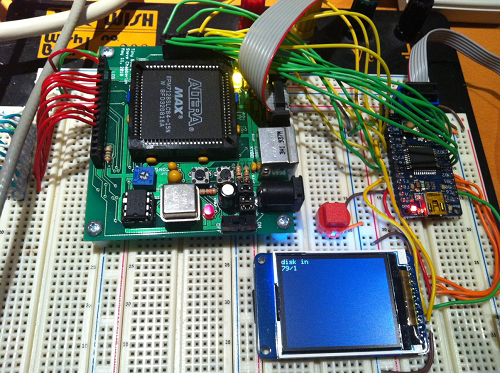
The Macintosh Floppy Emu works! No, not the flightless Australian bird, but the SD card 800K floppy drive emulator for classic Macintosh computers. I’ve been tinkering with this project for a while now, and wrote about it here several times before. Today I finally got read-only floppy emulation working from an SD card, in a rough approximation of the originally intended design. That makes it possible to download disk images of classic Mac software from the web, copy them to an SD card, and load them onto a Mac Plus or other Macintosh using the Floppy Emu.
Pictured above is the Floppy Emu hardware. Clockwise from the top-left are a custom CPLD board, an Adafruit ATmega32u4 board, and an Adafruit 1.8-inch TFT display with micro-SD card holder underneath. You can just barely see the SD card peeking out under the left edge of the display. In the middle of it all is the big red disk insert button.
The CPLD implements all the timing-sensitive functions and communication with the Mac, but its behavior is simple. The ATmega AVR microcontroller is the brains of the operation. It uses SdFatLib to read 512-byte sectors from a disk image file on the SD card, then passes the bytes one at a time to the CPLD at a speed that mimics a normal external floppy drive. Due to the design of the Macintosh IWM floppy controller, it’s not possible to pass data at a faster bit rate than a real floppy would, although the emulated drive could theoretically be faster overall if its track-to-track step times were faster. In practice I’ve found it difficult to match the performance of a real floppy drive. In its current state the Floppy Emu is actually somewhat slower than the real thing, but still fast enough to keep the floppy controller happy.
Signal Synchronization
Everything was nearly working two days ago, and I had a floppy emulator that worked much of the time, but not 100%. It worked enough so that I could often mount an emulated floppy disk in the Finder, but if I tried to open any of the files on the floppy it would fail with I/O errors. It took an agonizingly long time to isolate the last few bugs, the worst of which proved to be a sort of clock domain synchronization problem when writing to drive registers. The Mac performs a write to the floppy drive’s internal registers by putting the register address and data on the bus, and then asserting the LSTRB signal for a short time. These registers are emulated in the CPLD, but there’s no particular relationship between the timing of the LSTRB signal and the CPLD clock. One of the registers is STEP, and when a zero is written to the register, it moves the drive forward or back one track. My original code looked something like this:
always @(posedge clk) begin
  // was there a positive edge on lstrb?
  if (enable == 1 && reg == REG_STEP && lstrb == 1 && lstrbPrev == 0) begin
    track <= track + 1;
  end
end
The trouble was that the CPLD didn’t always see LSTRB cleanly transition between 0 and 1. Occasionally the CPLD clock would sample LSTRB just as its value was changing, and then funny things would happen. The signal would appear to change from 0 to 1 to 0 to 1 very quickly, causing a double-trigger of the code above, and stepping two tracks when it should only have stepped one. My fix was this:
always @(posedge clk) begin
  // left shift the current lstrb value into a history buffer
  lstrbHistory <= { lstrbHistory[4:0], lstrb };
end

always @(posedge clk) begin
  // was there a positive edge on lstrb?
  if (enable == 1 && reg == REG_STEP && lstrbHistory == 6'b011111) begin
    track <= track + 1;
  end
end
Looking back on it now, the problem seems fairly clear, but it took me ages to discover what was going wrong.
On-the-Fly Sector Retrieval
I’ve examined the designs of a few other floppy disk emulators, and they all use a sensible technique in which an entire track of data is read into a RAM buffer, and then the sectors in that track are continuously “played” from the RAM buffer, over and over until the computer selects a new track. Since everything is in RAM, there are no sector-to-sector delays needed to fetch new data from from the memory card. The only downside to the technique is that it requires a RAM buffer large enough to hold an entire track’s worth of sectors at once. For the Macintosh that’s 6K, plus about 1.5K more for other buffers and SdFatLib. I wanted to use an 8-bit AVR microcontroller, but few of them have 8K+ of RAM, and nothing that I had handy has more than 2K.
To fit the limited memory available, I used an on-the-fly sector retrieval technique instead of the track-at-a-time technique. This technique only requires a single 512 byte buffer, enough for one sector. After the data bytes from a sector have been sent to the Mac, the AVR loads the next sector from the SD card, which takes about 2 milliseconds. On a real floppy the sector-to-sector padding is only about 0.25 milliseconds, but it turns out that the Mac is tolerant of much longer inter-sector delays as long as you keep sending it $FF sync bytes between sectors.
How much slower does this make Floppy Emu data transfers versus a real floppy? The numbers say about 16%. Assuming 10 sectors per track, 752 bytes per sector after GCR encoding, 2 microseconds per bit, then it takes about 122 milliseconds to transfer all the data in a track from a real floppy. Add an extra 2 ms delay between each sector for SD card access, and the total time increases to 142 ms.
In actual use, however, Floppy Emu appears closer to 3x slower than a real floppy disk. Using Disk Copy 4.2, I was able to read an entire 800K floppy in 41 seconds, and an emulated version of that same floppy in 2 minutes 10 seconds. As best as I can tell, the difference is due to some kind of bug that’s triggering the Mac’s retry mechanism, rather than the 20% SD card access overhead. The TFT display shows the emulated active track and side in real-time, so I can see that after every few tracks read during disk copying, the drive seeks down to track 0, then all the way back up to the track where it left off. This looks like some kind of mechanism for coping with unexpected data: the Mac concludes the drive isn’t where it thought it was, so it resyncs by returning to a known location (track 0) and then continuing. It never reports any errors to the OS or the application, though, so I’m not sure how I can determine what’s causing this behavior.
Further Steps
Encode On-the-Fly: The disk image data that’s stored on the SD card is pre-encoded using the GCR tool that I previously wrote for Plus Too. Now that I’ve got a microcontroller that can run plain old C code, it should be easy to do the GCR encoding on-the-fly in the microcontroller instead. That way the disk images on the SD card would be the exact same disk image files used with popular Mac emulators like Mini vMac.
Disk Image Selection: In its current form, there’s no UI for selecting which disk image file to use from the SD card. It simply looks for “floppy.dsk” and that’s it. It would be nice to have a simple UI for navigating the directories on the card, determining which disk image files are in a supported format, and selecting a file to use.
USB: The ATmega32u4 microcontroller that I’m using is USB-capable. Instead of loading the disk image data from an SD card, maybe it could be loaded from an attached PC over USB? I’m not sure it would be fast enough, and maybe it would be more hassle than it’s worth, but it’s an interesting idea.
Writable Floppy Emulation: The current technique is unsuitable for writes. It’s OK to be slower than a real floppy during reads, because Floppy Emu decides when to send the next sector’s worth of data. But for writes there’s no flow control mechanism– the emulator needs to receive, decode, and write to the SD card fast enough to keep up with the Mac, or else it will fail. That’s not possible with the on-the-fly sector method. To support writing to the emulated floppy, it will require an AVR with a large capacity RAM using the track-at-a-time method. Incoming data will be buffered in RAM, and then a full track of data will be written to the SD card during the period while the emulated drive is stepping to the next track.
Read 13 comments and join the conversation13 Comments so far
Leave a reply. For customer support issues, please use the Customer Support link instead of writing comments.
Wow, this is seriously impressive! I’m glad you’re documenting this project, too; I’ve been planning to start work on a similar device for older Power Macs that would let an SD card function as a physical GCR floppy drive.
How are you planning to connect to the Power Mac– internally? I don’t think any of them have an external floppy port. I think it should be possibly to adapt this to behave like a 1.4 MB floppy drive with some extra work, but I’m not certain exactly what would change. Let me know if you decide to try it!
Very impressing, and thank you for sharing fragments of CPLD code. After looking at them, I think CPLD/FPGA programming is not as hard and it seems to be!
About inter-sector delays – how about running two task? One for SD access, and one for CPLD communications? For example, CPLD comms in foreground and reading SD in background via build-in SPI controller and using RX complete / TX complete interrupts. Or even try FreeRTOS to do task juggling?
Steve,
Great work! I’m enjoying following your progress on this! Are you planning to make the final version of the floppy emulator for sale?
Thanks! Yes, once it’s ready I’ll publish the design so people can build their own if they’d like to, and I’ll probably also offer some pre-built ones for sale if there’s interest.
I too am very interested in building one of these — I eagerly await the final published design. More youtube videos explaining/showing the device!
What about the plus too? I want to build ones of those, I would donate to ‘the cause’ if that helps.
OK, I think I’ve fixed the bug that was causing all the retries and reseeks to track 0, bloating the read times. Now it reads through an entire floppy image without any retries– hooray! But it’s still slower than a real floppy: 57 seconds to read an 800K disk, vs 41 for a real floppy in my most recent test.
I’m wondering if this has something to do with how the sectors are interleaved and organized on a real floppy. On my emulated floppy, the sectors in each track appear in consecutive ascending order, and every time the drive steps or switches sides, it jumps to the first sector on that track. I’m wondering if real floppies are formatted with a 2:1 interleave, so sectors appear in order like 0 4 1 5 2 6 3 7 instead of 0 1 2 3 4 5 6 7. I also seem to remember reading somewhere that a real floppy offsets the location of the first sector in each track from the location of the first sector in the previous track.
There are a bunch of tricks like that which can help reduce the number of times the disk must make a complete rotation before the Mac reads all the sectors from a track, basically trying to match the access pattern of the Mac with the organization of the sectors on the disk. In a perfect world, the Mac would always read all the sectors from a track in one pass, with the disk only making a single rotation. My debug info shows this does happen with my emulated floppy, but only rarely. With a real floppy this should be rare too, because it would require the lucky chance of a read operation beginning just as the first sector of the track approached the read head. With a random starting position, two rotations of the disk should always be enough to read the whole track, assuming the Mac is fast enough to keep up. But my debug info shows that most of the time, it takes about three “rotations” of the emulated disk to read a whole track. My measured disk read times of 57 vs 41 seconds make roughly a 3:2 ratio, so maybe there’s something to that.
You might find some helpful information here http://hxc2001.free.fr/floppy_drive_emulator/index.html
Yes, the HxC emulator is a nice program, I’ve mentioned it here before.
I’m getting a little worried about supporting writes now. I did some tests and found that track-to-track step times must be no more than 12ms for the floppy driver to work. If I need to write a full track’s worth of sectors to the SD card during the step time, I’m not sure 12ms will be long enough. I may need to do writes in the background instead, using interrupts or some other method.
This is so cool! I’m only 17 and it kinda seems like a lot to do. Do you happen to know where I could get a pre built one? And how much would it cost? Thanks. I wanted to do more with my Mac Plus
Jordan, it’s available for sale here (but temporarily sold out): https://www.bigmessowires.com/floppy-emu/
Hi there,
I am helping an old man from my town to upgrade his old Macintosh Performa 580CD running on system software 7.6.1 currently. All his data is currently being stored in his system or floppy drives. I really want to help him by moving his data from the old mac to some newer Mac or other system. I want to know your Floppy EMU will be able to act like a floppy drive so that we can move data onto it? and also, is it possible to connect it via DB25 port at the back of the Mac and perform the job to avoid dismantling the system?
The person I am trying to help is a paralegal in our small town and the data on his system is worth saving as those are legal files and records of his customers.
I hope to find a solution and believe you could help me. Please drop me an email of your response.
Thanks.