

Wombat Adds Support for ADB Gamepads and Joysticks

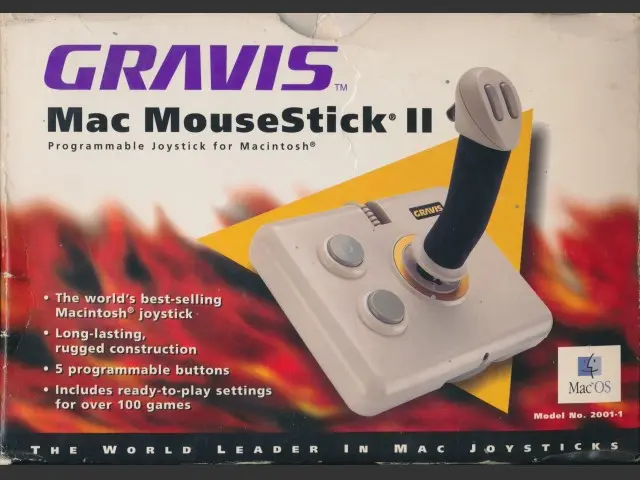
It’s time for gaming! Firmware version 3.25 for the BMOW Wombat adds support for ADB game controllers, joysticks, and gamepads, making them available to modern computers. Support includes the popular Gravis Mac GamePad and Gravis MouseStick II, as well as others such as the Gravis Firebird and Blackhawk, Microsoft SideWinder 3D Pro, MacAlly JoyStick, and Atmark Pippin controller. Currently the Mac GamePad and the MouseStick II are the only ones confirmed through hands-on testing; the others have support based on their documented interfaces but still need real-world confirmation. Your help with this would be greatly appreciated.
Firmware 3.24 previously added USB-to-ADB gamepad support, so today’s release rounds out the Wombat’s capabilities with full game controller support in both directions of translation.
With this release, we’ve reached the end of a chapter, and I’ll be closing the book on further Wombat firmware changes for the time being. The last six weeks have been a frantic period of development that saw 15 separate firmware releases covering a huge range of compatibility and feature work. The capabilities of the Wombat have advanced substantially. But now I’m tired boss… it’s time for a break.
Please send me your game controller stories! I’m looking forward to hearing from you.
Hello,
I was having some issues trying to get my Gravis Gamepad to work with my laptop. I did the firmware update, and it seemed to go as planned. I didn’t see anything outside of what was supposed to happen.
I think my PC thinks my Gamepad is a keyboard. The D-pad works as arrow keys, but that’s about it. (Most likely unrelated, but pushing up and down on the gamepad at the same time just kills the controller, and I have to re-plug it in.) Can anyone help?
Thanks!
By default, the ADB Gravis GamePad behaves like a keyboard typing arrow keys. The Wombat switches it to game controller mode, but it sounds like that failed in your case. I am currently tracking a mysterious bug where some Gravis ADB game controllers don’t work correctly when connected by themselves, but only work when an ADB keyboard is also plugged in. Try that and see if it helps. As for pushing up and down simultaneously, I don’t think that’s physically possible with a mechanical rocker switch like the D-pad.
Awesome!
Thanks Steve, I really appreciate it!
I’m back,
I tried what you recommended and have had no luck.
Is there anything else I could be missing?
What type of keyboard did you use, and how is it connected? Keyboard to GamePad, or GamePad to Keyboard? It may be worth trying both. I am using the Apple Extended Keyboard II. It seems to be something about the electrical presence of the keyboard on the ADB, and not the keyboard function itself. Try Control-Shift-CapsLock-I to see a dump of what devices the Wombat sees on the ADB bus.
I’m using the Apple Keyboard II. I did try both connections and both yield the same result. When I do Ctrl-shift-CpsLk-I, it says “Mouse id FF, keyboard 02”. (I do only have the gamepad and keyboard plugged in.) I did also try re-installing the update, which seemed to work properly as the did the first.
I can’t find a specific model number on the back of my Gamepad, all it know is that it’s patent was set for 1992, though I do believe it is the original Mac model.
Control-Shift-CapsLock-V shows the firmware version number, if you are not sure it’s updated. See the instruction manual for the full list of these help commands. Given your result, the GamePad was not recognized at all. It should either be listed as a second keyboard, or if all goes correctly, as a GamePad.
I have reports from at least two other testers of ADB GamePads working, one who said it only works when his keyboard is present, which is also my experience. Yours is the only report that I’ve seen of an ADB Gravis controller not working when in the presence of an AEK II, so I would check all the silly things like cables plugged in securely, etc. Also try disconnecting everything for about 60s between each test that you do, to give capacitors an opportunity to completely discharge. In some of my tests, devices didn’t work after a 5 second power-off-on cycle, but did after a 60 second cycle.
It’s looking like the ADB controller hardware in Gravis controllers may be more sensitive than Apple devices to signal edge rates or bus voltage or other similar factors. I’ve not found a clear explanation or solution. Adding capacitance between the ADB-Data line and GND seems to help, something in the 375pF to 2000pF range. This also seems to be what the keyboard accomplishes. I haven’t determined the exact value needed, but in my tests some extra capacitance in that range will get the Gravis controllers working even with no keyboard present.
Firmware 3.26 fixes device recognition problems with ADB Gravis game controllers. No extra keyboard or capacitors are needed. Download it from https://www.bigmessowires.com/usb-wombat/#firmware