

Modern keyboards and mice for your vintage Mac!
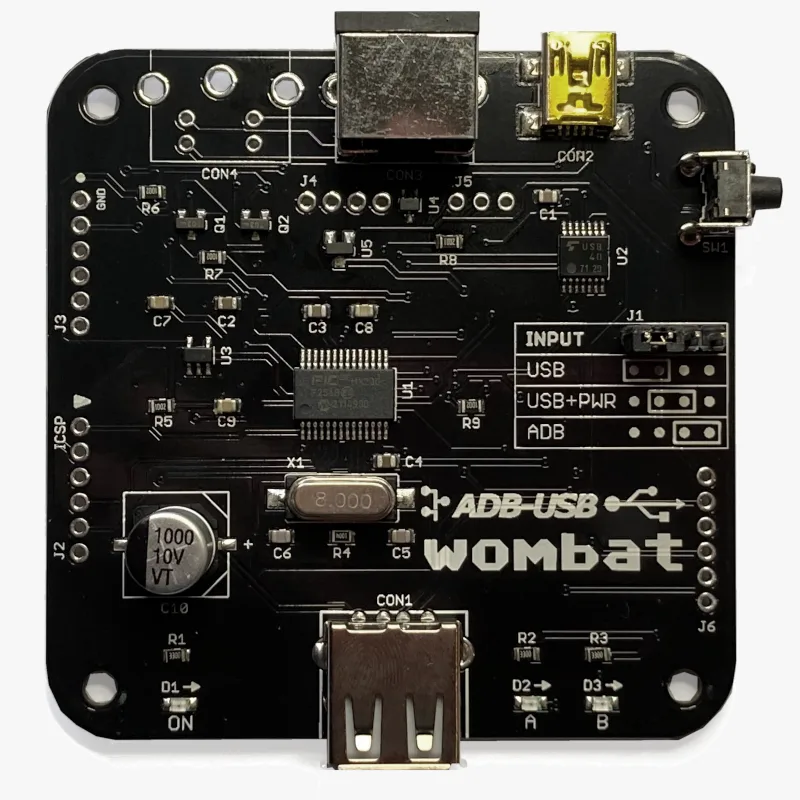
Modern keyboards and mice for your vintage Mac! The Wombat is a bidirectional ADB-to-USB and USB-to-ADB converter for keyboards and mice.
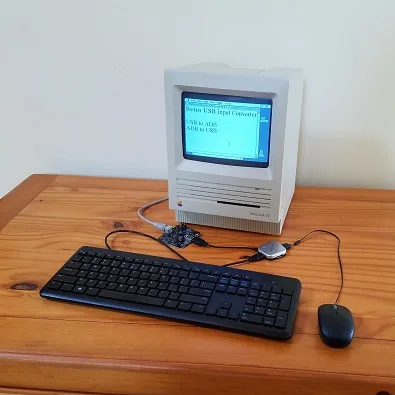
- Connect modern USB keyboards and mice to a classic ADB-based Macintosh, Apple IIgs, or NeXT
- Connect legacy ADB input hardware to a USB-based computer running Windows, macOS, or Linux
No special software or drivers are needed – just plug it in and go.
Now you can finally use a modern optical mouse with your vintage Macintosh, or amuse your coworkers with a retro ADB keyboard on your work machine. ADB-USB Wombat is an indispensable tool for Apple collectors and enthusiasts.
Optional accessories for your Wombat:
Features
BMOW’s ADB-USB Wombat is great for breathing new life into your vintage Apple hardware collection. If you love old Macs, you know ADB keyboards are expensive and hard to find, and ADB mice are sticky and trouble-prone. With the Wombat, you can substitute modern USB input peripherals instead. Or if you swear by your old Apple Extended Keyboard, you can use it with your modern computer. Visitors are sure to smile when they see you running 1980s Apple input peripherals on your current-year machine.
- Bidirectional: converts USB to ADB, or ADB to USB
- Works with your favorite mice and keyboards, including wireless, gaming, and mechanical keyboards
- Use several keyboards and mice at the same time
- On-board power key for remote turn-on
- Custom key mappings
- Supports international keyboards, including ISO, AZERTY, and QWERTZ layouts
- Works with USB switches and KVMs, including IP KVMs like PiKVM
- Startup key combinations work, like Command-Option-P-R to reset PRAM, or Control-Apple-Reset on a IIgs
- Adjustable mouse speed, right-click, and scroll wheel behavior, saved in the Wombat’s memory
- No external power source needed
- Upgradable firmware
The Wombat was developed by Steve Chamberlin, here at Big Mess o’ Wires. See the blog archive for technical details on its software and hardware.

Compatibility
The Wombat works with all Apple computers, keyboards, and mice that have an ADB connector (a 4-pin mini DIN): most early Macintosh models, the Apple IIgs, and some NeXT models. It also works with standard USB keyboards and mice. In ADB-to-USB mode, it works with Windows, macOS, Linux, ChromeOS, or any other operating system that supports standard USB keyboards and mice.
The Wombat has been tested with a very wide range of USB devices, including wireless keyboard and mouse combos, Logitech Bolt receivers, gaming keyboards and mice, mechanical keyboards with QMK or VIA firmware, Apple Magic Keyboards, USB switches, and KVMs. If a USB device doesn’t work as expected, first update to the latest firmware.
Security dongles, graphics tablets, joysticks, and other less common devices aren’t currently supported. The Mac Plus, 512K, and 128K use an older non-ADB connector for keyboards and mice, and aren’t supported.
What are ADB and USB?
 ADB connector
ADB (Apple Desktop Bus) was Apple’s standard for connecting keyboards and mice from 1986 through 1998. It was used by the Apple IIgs and all early Macintosh models except the Mac Plus, 512K, and 128K. The ADB connector is a round 4-pin mini DIN, physically identical to the S-Video connector.
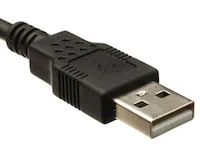 USB-A connector
USB (Universal Serial Bus) replaced ADB, Firewire, PS/2, and other earlier standards, and is used by nearly every computer today. Every Apple computer since 1998 has used USB for its keyboard and mouse.
Converting between the two takes more than a plug adapter. ADB and USB use very different protocols, signal speeds, signal formats, and voltages.
Usage
The Wombat converts keyboard and mouse data in one direction at a time, selected by the INPUT jumper on the board. Set the jumper before connecting anything. A wrong jumper setting is the most common cause of problems.
The Wombat board has three connectors:
- CON1: USB-A port, for USB keyboards, mice, and hubs
- CON2: USB Mini-B port, to a USB computer, or to a USB charger for standby power
- CON3: ADB port, to ADB keyboards and mice, or to an ADB computer
USB to ADB: USB keyboards and mice on a vintage computer
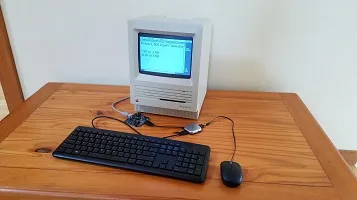
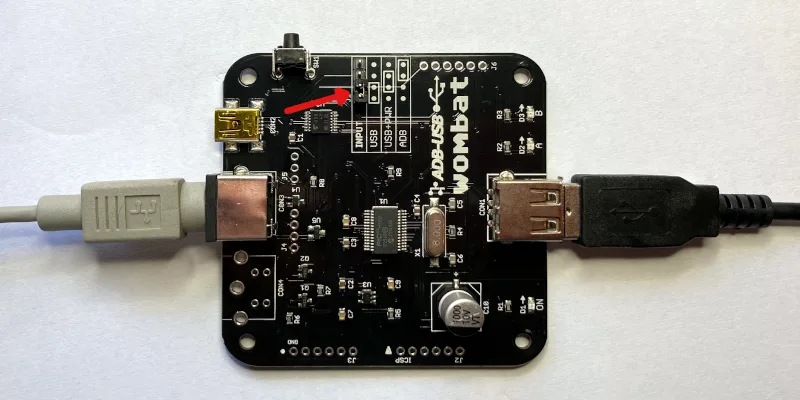
Setup
- Set the jumper to USB, as shown in the diagram.
- Connect CON3 to the computer’s ADB port with an ADB cable. The computer powers the Wombat.
- Connect a USB keyboard or mouse to CON1, or connect a USB hub for several devices.
- Turn on the computer.
Connect the Wombat before turning on the computer, because the computer only looks for ADB devices when it starts up. USB devices can be plugged in and unplugged at any time.
Multiple Devices and Hubs
To connect a keyboard and a mouse at the same time, a simple bus-powered 2-port or 4-port USB hub is recommended. Some hubs with their own external power supply can backfeed power into the Wombat when it’s off, causing problems.
Multiple USB keyboards and mice can be used together, with firmware 3.20 or later. All your devices work at once, combining their input, along with any ADB keyboards and mice connected to the computer.
The Wombat can manage up to 8 total hub ports. Note this is a limit of ports, not connected devices, so using a complex many-port hub is not recommended. Some USB equipment may have invisible ports due to its internal design. A keyboard with two built-in USB ports counts as 3 or 4 ports total, and a 7-port hub counts as 8. Any devices connected to ports beyond the max of 8 are ignored.
Right Button
The Wombat’s preferences determine what the right (secondary) button does on a USB mouse. CTRL LEFT CLICK sends Control + click, which opens contextual menus in Mac OS 8 and later. LEFT CLICK makes it a second left button. RIGHT CLICK sends a true right click, for NeXT computers. Most Macs ignore it.
Scroll Wheel
Scroll wheel movements are turned into virtual presses of the up and down arrow keys. This works well for scrolling documents and file dialogs. This behavior can be turned off in the preferences.
Mouse Speed
If a USB mouse is too slow or too fast, even after adjusting the computer’s mouse control panel, change the Wombat’s mouse speed in the preferences. This applies a scaling factor to the raw motion data.
 Power Key
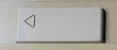
Real ADB keyboards have a power key with a triangle logo, which serves to turn on many Mac models and also acts as a Reset key for the Apple IIgs. The Wombat has a push button that serves the same purpose. For Macs that support keyboard startup, pushing this button will turn on the computer even when the Wombat is off. The PRINT SCREEN and F13 keys on a USB keyboard also function as a power key, but only while the Wombat is already on. They’re handy for restarting with Control-Command-Power, or Control-Power on some models.
ADB Standby Power
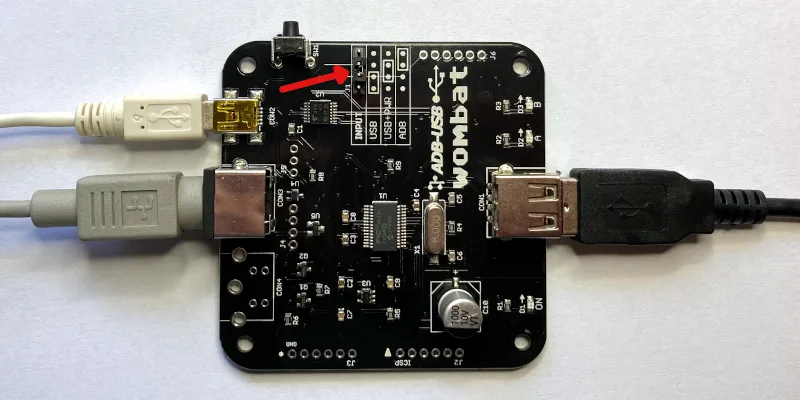
Connections for ADB Standby Power
To turn on a computer from the keyboard’s PRINT SCREEN or F13 key instead of the Wombat button, the Wombat needs power while the computer is off. Set the jumper to USB+PWR, as shown in the diagram, and connect a USB charger to CON2 with a USB Mini-B cable. In USB+PWR mode, the charger must always be connected, regardless of whether the computer is on or off.
ADB to USB: ADB keyboards and mice on a modern computer
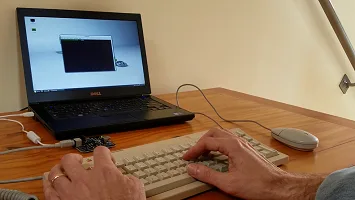
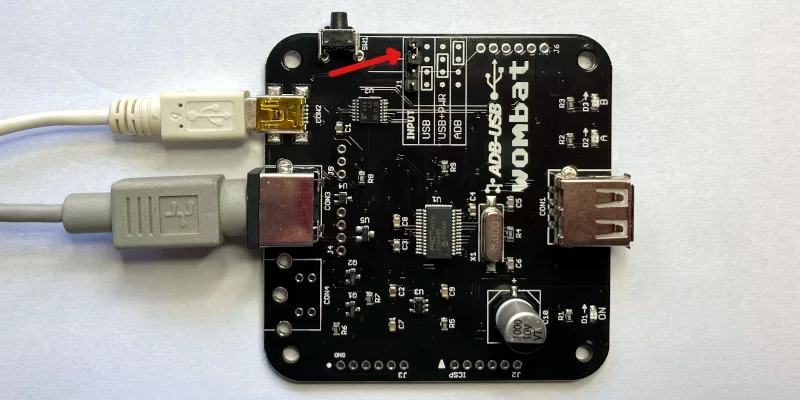
Setup
- Set the jumper to ADB, as shown in the diagram.
- Connect CON2 to the computer’s USB port with a USB-A to Mini-B cable. The computer powers the Wombat.
- Connect an ADB keyboard or mouse to CON3. Daisy-chain more devices through the keyboard’s second port.
- Leave CON1 empty.
The ADB devices appear to the computer as standard USB keyboards and mice, so no drivers are needed. The Wombat supports up to two ADB keyboards and two ADB mice at once, and extra buttons on multi-button mice and trackballs like the Kensington Turbo Mouse. With firmware 3.19 or later, ADB devices can be plugged in and unplugged while the Wombat is running, and are ready to use within a few seconds.
Power Key
The ADB keyboard’s power key is sent to the computer as the USB Power key. You can remap it to another key with the custom key mapping tool.
Status LEDs
During a firmware update or installation of a custom key mapping file, the LEDs show the update status.
During normal operation of the Wombat, the LEDs show the host connection status and input activity.
LED A – On when the Wombat has a working connection to the computer
LED B – Blinks when there’s keyboard or mouse activity
Settings
Preferences
With firmware 3.21 or later, open an empty text document or go to the BASIC prompt and press Control-Shift-Capslock-P. The Wombat types a menu of its current settings:
BMOW Wombat ver 3.21 preferences
1 Keyboard layout is US
2 Mouse speed is 3 of 6
3 Right button is CTRL LEFT CLICK
4 Scroll wheel arrow keys are ON
0 Restore defaults
1234 change, RETURN save, ESC cancel
Press 1 to 4 to change the corresponding setting. Changes take effect immediately, so you can try them out. Press 0 to restore the defaults, RETURN to save, or ESC to cancel and exit the menu without saving. Preferences mode will also auto-cancel after 30 seconds without any key press.
Keyboard layout – US, ISO GENERIC, ISO FR BE, or ISO DE CH. See International Keyboards below.
Mouse speed – 1 (slowest) to 6 (fastest).
Right button – CTRL LEFT CLICK, LEFT CLICK, or RIGHT CLICK. See USB to ADB above.
Scroll wheel arrow keys – ON or OFF, to enable conversion of wheel movements to up/down arrow key presses.
Settings are kept through power-off and firmware updates. Installing a custom key mapping file resets them to the defaults.
Custom Key Mappings
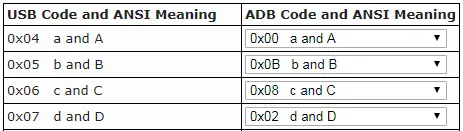
With firmware 0.3.0 or later, you can create customized mapping tables to control the USB/ADB conversion behavior. It’s possible to change which keys act as Command and Option, reassign the function keys, and more. See the Wombat Keymap Tool for details.
Help Commands
Issue help commands to the Wombat using any attached keyboard. Open an empty text document or command prompt first. The Wombat “types” its output there.
Control-Shift-Capslock-P – Enters the preferences menu, to configure the Wombat’s settings. See Preferences above.
Control-Shift-Capslock-V – Shows the firmware version number
Control-Shift-Capslock-I – Shows the USB vendor and product ID or ADB handler ID of each keyboard and mouse
Control-Shift-Capslock-C – Enters keydump mode, which shows the USB key code of each key you press and the ADB key code it’s mapped to (or vice versa). Useful for troubleshooting key mapping problems. Press Control-D to exit.
International Keyboards
The Wombat supports non-US keyboards, including British, Canadian French, Danish, Greek, AZERTY, QWERTZ, and other layouts. Select the matching keyboard layout in your computer’s keyboard control panel, so each key types the correct character.
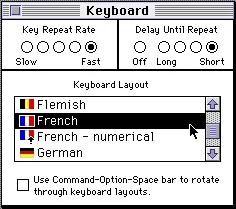
Macintosh System 7 Keyboard Control Panel
Keyboard Layout Setting
The keyboard layout option in the Wombat’s preferences tells it whether your keyboard is US (ANSI) or ISO style, and which keys to use when it generates output for help commands. If the key above TAB acts like the key to the right of LEFT SHIFT, switch the keyboard layout between US and an ISO layout to fix it.
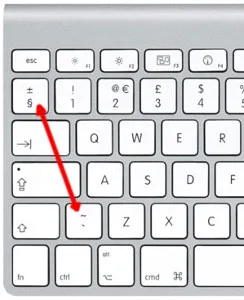
ISO Keyboard Key Swap
Except for the US/ISO selection, the Wombat’s keyboard layout setting doesn’t otherwise affect the characters you type yourself during normal typing – those are determined by your computer’s keyboard settings, not the Wombat settings. Because the Wombat types its menus and messages by pressing keys, however, some letters or symbols in its help command text will come out wrong if its keyboard layout doesn’t match yours. If that happens, use the preferences help command and press 1 to change the layout. The options are:
- US: US, Canadian English, and other ANSI keyboards
- ISO GENERIC: UK, Spanish, Nordic, Dutch, and other ISO QWERTY keyboards
- ISO FR BE: French and Belgian AZERTY keyboards
- ISO DE CH: German, Swiss, Austrian, and other QWERTZ keyboards
USB to ADB with Non-US Keyboards
For best results, use an Apple-brand country-specific USB keyboard. In many countries, PC-style USB keyboards have a different symbol layout than Apple keyboards. They’ll work, but some symbol keys won’t type what’s printed on them.
ADB to USB with Non-US Keyboards
macOS
The first time you connect the Wombat to a modern Mac, the Keyboard Setup Assistant asks you to identify the keyboard. For non-US keyboards, choose an ISO type. If the key above TAB acts like the key to the right of LEFT SHIFT, even with an ISO layout set in the Wombat, make the assistant run again: delete /Library/Preferences/com.apple.keyboardtype.plist, restart the computer, and follow its steps.
Windows
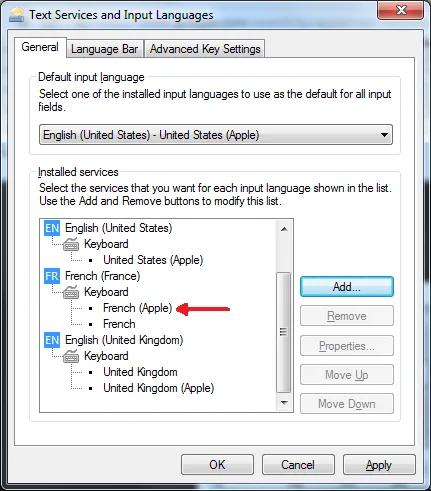
Windows 7 Text Services and Input Languages Control Panel
For country-specific ADB keyboards, choose the Apple version of your keyboard type in Windows’ Text Services and Input Languages control panel, such as United Kingdom (Apple), French (Apple), or German (Apple). If the Apple versions aren’t listed, install the Apple keyboard driver applekeyboardinstaller64.exe.
Firmware
Installing Updates
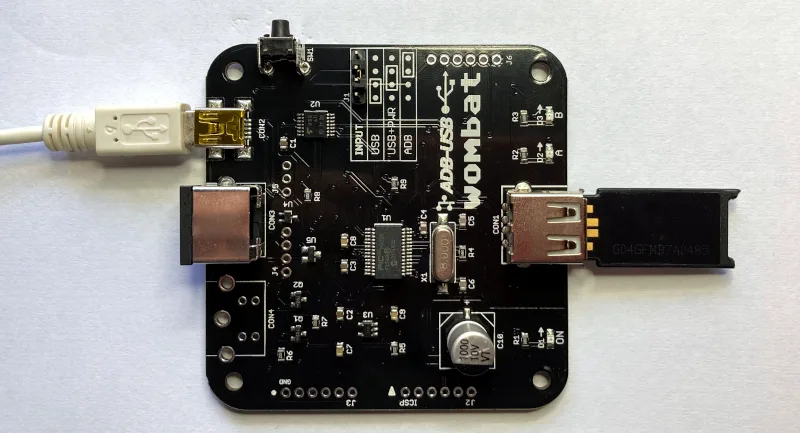
Firmware updates fix bugs and add new features. They don’t change your saved preferences. To update:
- Download the latest firmware from Downloads below, and unzip it.
- Copy firmware.hex to the top level of a FAT32-formatted USB flash drive.
- Disconnect all power from the Wombat, and plug the flash drive into CON1. Don’t use a hub.
- Choose a power source:
- an ADB cable from a running ADB computer to CON3, with the jumper set to USB, or
- a USB Mini-B cable from a USB charger to CON2, with the jumper set to USB+PWR
- Hold down the Wombat’s power key button, and connect the power source.
- Keep holding the button until the A and B LEDs start blinking rapidly, then let go.
- Wait about 10 seconds. When A and B blink slowly together, the update is done.
- Disconnect power, remove the flash drive, and set the jumper back to its normal position.
LED Activity During Updates
During a firmware update or installation of a key mapping file, the A and B LEDs show the progress:
A and B alternate slowly – searching for a firmware or key mapping file
A and B alternate rapidly – installing the firmware or key mapping
A and B blink slowly together – update finished successfully
If B blinks several times while A stays off, there’s an error:
2 blinks – no valid firmware on the chip, Wombat can’t start
3 blinks – no Wombat file found on the USB drive (see the FAQ)
4 blinks – error in the file
5 blinks – error while writing data to the chip
Downloads
ADB-USB Wombat latest firmware version: adb-usb-wombat-3.21 (October 7 2026)
3D-printable enclosure (contributed by James Kelly, Creative Commons license with attribution)
3D-printable enclosure (contributed by James Kelly, Creative Commons license with attribution)
Older firmware versions (try these if the latest version gives you problems)
adb-usb-wombat-3.20 (October 6 2026)
adb-usb-wombat-3.19 (October 5 2026)
adb-usb-wombat-3.18 (October 4 2026)
adb-usb-wombat-3.17 (October 3 2026)
adb-usb-wombat-0.3.16 (October 2 2026)
adb-usb-wombat-0.3.15 (October 2 2026)
adb-usb-wombat-0.3.14 (October 2 2026)
adb-usb-wombat-0.3.13 (October 2 2026)
adb-usb-wombat-0.3.12 (October 2 2026)
adb-usb-wombat-0.3.11 (September 28 2026)
adb-usb-wombat-0.3.10 (September 25 2026)
adb-usb-wombat-0.3.9 (August 9 2023)
adb-usb-wombat-3.19 (October 5 2026)
adb-usb-wombat-3.18 (October 4 2026)
adb-usb-wombat-3.17 (October 3 2026)
adb-usb-wombat-0.3.16 (October 2 2026)
adb-usb-wombat-0.3.15 (October 2 2026)
adb-usb-wombat-0.3.14 (October 2 2026)
adb-usb-wombat-0.3.13 (October 2 2026)
adb-usb-wombat-0.3.12 (October 2 2026)
adb-usb-wombat-0.3.11 (September 28 2026)
adb-usb-wombat-0.3.10 (September 25 2026)
adb-usb-wombat-0.3.9 (August 9 2023)
FAQ
Setup
The Wombat doesn’t work at all. What should I check first?
Check the INPUT jumper. It’s the most common cause of problems. Set it to USB to use USB keyboards and mice with an ADB computer, or ADB to use ADB keyboards and mice with a USB computer. See the diagrams under Usage. When the Wombat has a working connection to the computer, the A LED is on.
In USB-to-ADB mode, my keyboard or mouse works when plugged in directly to the Wombat, but not through a hub.
Try setting the INPUT jumper to USB+PWR and connect a dedicated 5V USB power adapter (like a phone charger) to CON2 with a USB Mini-B cable. The Wombat normally gets its power from the computer’s ADB port, which can only supply a limited amount. USB hubs and USB switches, keyboards with backlights or rechargeable batteries, and some wireless receivers can need more power. Signs of a power problem include devices that work only some of the time, and LEDs and keyboard lights that flicker or dim.
Also try a simple 2-port or 4-port hub. The Wombat can manage up to 8 total hub ports (a limit of ports, not connected devices). Some USB equipment may have invisible ports due to its internal design. A keyboard with two built-in USB ports counts as 3 or 4 ports total, and a 7-port hub counts as 8. Any devices connected to ports beyond the max of 8 are ignored.
In ADB-to-USB mode, my computer doesn’t detect the Wombat.
Some USB cables are charge-only, with no data wires. They power the Wombat, but the computer can’t see it. Try a different USB-A to Mini-B cable, ideally one you’ve used to transfer data with another device.
The A and B LEDs blink back and forth, and the Wombat never starts.
The Wombat is in firmware update mode, which it enters if its power key is held down at power-up. Some S-video cables have pins connected together inside, which looks like a held power key and can also make the Mac turn itself on. Use a real ADB cable or a different S-video cable. The Macintosh Portable causes this too (see Compatibility).
Do I need to connect everything before turning on the computer?
In USB-to-ADB mode, connect the Wombat to the ADB computer before turning it on, because the computer only looks for ADB devices at startup. USB devices can be plugged into the Wombat at any time. In ADB-to-USB mode, ADB devices can be plugged in at any time (firmware 3.19 or later).
Can I use more than one keyboard or mouse?
Yes. In USB-to-ADB mode, connect several USB keyboards and mice through a hub (firmware 3.20 or later), up to the limit of 8 hub ports. In ADB-to-USB mode, daisy-chain up to two ADB keyboards and two ADB mice, such as a keyboard and an Apple Adjustable Keyboard keypad, or a keyboard, trackball, and mouse.
Can I add a second ADB port to the Wombat?
For advanced users only: the board has an empty footprint at CON4 where a second ADB connector (a 4-pin mini DIN) could be soldered, wired in parallel with the main ADB port.
Mouse
My USB mouse moves too slowly (or too fast).
Change the mouse speed in the Wombat’s preferences: press Control-Shift-Capslock-P, then 2. Gaming mice with high polling rates (500 or 1000 Hz) can feel slow and miss some scroll wheel steps. If the mouse’s software can store a polling rate in the mouse, like Razer Synapse or Logitech G Hub, setting it to 125 Hz also helps.
How do I right-click?
By default, the right button of a USB mouse sends Control + click, which opens contextual menus in Mac OS 8 and later. For NeXT computers, set the right button to RIGHT CLICK in the Wombat’s preferences.
Keyboard
Do startup key combinations work, like resetting PRAM or the Apple IIgs Control-Apple-Reset?
Yes, with firmware 0.3.16 or later. On a USB keyboard, the Windows key acts as Command (Apple), Alt acts as Option, and Print Screen, F13, or the power key button on the Wombat board acts as the power key, which is also the Apple IIgs Reset key.
How can I use the help commands?
Make sure an empty text document or BASIC prompt is open, so you can see the Wombat’s text output. Help commands need Control, Shift, Capslock, and a letter key all held down at once, and some inexpensive keyboards can’t recognize that many keys together. Try a different keyboard.
In ADB-to-USB mode, the ADB keyboard doesn’t work after a cold boot, and all its LEDs are lit.
Some Macs, like the iBook G3, switch USB power off and on during startup, which can hang ADB keyboards and mice. Unplug the Wombat and plug it back in.
With an Apple Extended Keyboard, my second ADB device doesn’t respond after a cold boot.
Unplug the second device from the keyboard, and plug it back in.
Compatibility
Can I use the Wombat with a Macintosh Portable?
Yes, with external power. Set the jumper to USB+PWR and connect a USB charger to CON2 with a USB Mini-B cable, confirming that the Wombat is powered before turning on the Portable.
Does the Wombat work with USB switches and KVMs?
Yes. For IP KVMs like PiKVM, NanoKVM, or JetKVM, set the KVM to relative mouse mode. Absolute (tablet-style) pointers aren’t supported.
Does the Wombat work with Logitech Bolt or MX keyboards and mice?
Yes, with firmware 0.3.12 or later. Some older comments on this page say they’re incompatible, but that’s been resolved.
Does the Wombat work with joysticks, gamepads, and graphics tablets?
No, these aren’t currently supported. Coming soon, maybe?
Does the Wombat work with the Mac Plus, Mac 512K, or Mac 128K?
No. These computers use an older non-ADB connector for keyboards and mice, and aren’t compatible with the Wombat.
Firmware
The firmware update can’t find the firmware file (B blinks 3 times).
Make sure firmware.hex is at the top level of the USB drive, not in a folder, and that the drive is formatted as FAT32 with an MBR (Master Boot Record) partition scheme. Most USB drives come formatted this way, but drives formatted on a Mac often use a GUID partition scheme, which won’t work. To reformat a drive on a Mac, use the Disk Utility application. Select the USB drive, choose the option to format the drive as FAT32, and change the partition scheme to MBR before formatting. This erases everything on the drive. If the problem continues, try a different drive. Some large drives don’t work.
How do I check which firmware version I have?
Open an empty text document or go to the BASIC prompt and press Control-Shift-Capslock-V. The Wombat types its firmware version.
I have owned a few of the Wombat devices. I really enjoy them. Sadly many of the new mice out there present themselves either as a keyboard or as a combination of both keyboard and mice (likely to handle the multiple buttons they provide). How can I get the wombat to use these mice?
Additionally, 2.4Ghz wireless USB does not seem to be supported either (Microsoft Sculpt Keyboard) or mice with a USB dongle that connects to the mouse wirelessly. Is there something I can do to help enable these devices?
Is the firmware open sourced?
Chris Peak, if your mac is like my Mac mini (late 2014) then you’ll find that early boot option key combinations only work with the USB port nearest the power supply (in my case). This was a semi-obscure piece of knowledge. I was pulling my hair out trying to figure it out. Maybe the option key or other issues is due to the keyboard (and wombat) being connected to the “wrong” USB port.
Brielle, no .. my machine is an old 1997 Beige G3 PowerMac. No built-in USB back then, just ADB. The Wombat sits between a USB keyboard/mouse and the venerable ADB bus.
Hi Steve, I see that there is room for another connector “CON4” on the PCB but I didn’t see it mentioned in the instructions or here in the comments. Can you explain what it is for?. Can I solder on a 4-pin mini DIN and gain another ADB connection? I would like to connect a USB keyboard and a regular ADB mouse to my IIGS.
The empty ADB footprint is wired in parallel with the other ADB port. You could add an extra ADB mouse or keyboard there if you wish.
I love my Wombat so much. Great work.
I’d suggest a correction to the firmware update section of the help document here, though. I was updating firmware today and my wombat would not see the firmware file unless i formatted the USB drive as MBR rather than GUID. As GUID is the default for mac Disk Utility, people will likely have to select this manually when making a firmware update USB.
Keep up the great work!
I’ve recently started using the Wombat a bit more regularly, and I’ve noticed a peculiar thing when using it in ADB to USB mode on Windows. The computer never goes to sleep while the Wombat is plugged in. This happens on both a work laptop running Win10 and my home PC running Win11. It is the only USB device when plugged into the work laptop.
The OS can be placed into sleep manually no problem, it only affects the automatic sleep after inactivity setting. I can’t see any other issues in behaviour. I’m on the latest firmware and the device is working great. LEDs ON and A are always lit and LED B only flashes when keys are pressed.
Is this a known behaviour?
Hi all, just came across this page. The Wombat looks like such a great idea! Does anyone know if the Wombat would allow an ADB graphics tablet to work on a USB era Mac, pls? I have 2 Wacom 12″ tablets and would like to hook them up to G4 era computers.
I expect it may not support all of the functionality.
TIA.
Sorry, tablets and other peripherals besides keyboards and mice can’t be translated by the Wombat firmware.
I wanted to bump my previous comment that didn’t seem to rate a response. Most newer mice seem to register themselves as both keyboards and mice due to additional buttons and functionality. Is there a way to modify the firmware to detect these types of mice and at the very least just enable them as mice and ignore their keyboard functionality?
I’d be happy to contribute if the firmware is open source. Let me know.
The Wombat firmware is not open source, but you may want to check out the open-source TMK adapter if you’re looking for something you can tinker with. See the comments above for some of the wireless mice and keyboards that other people have used successfully. I personally have the Logitech KM117. The firmware uses the first connected USB keyboard and mouse that it finds, so if your mouse also id’s itself as a keyboard, you could try starting with only a USB keyboard and then connecting your mouse after the keyboard is recognized. Swapping the mouse and keyboard to different ports on your USB hub might also change the device enumeration order in a way that helps your use case.
Please consider an alternative to USB mini B for the secondary USB port on the Wombat. It’s by far the hardest connector type to find in brick-an-mortar stores.
Would you ever made a smaller version of this? I never bought this because how big it is and always waited to make a much smaller version for my projects. I could see you shrinking this and using switches for the jumpers instead to make it much smaller. I will buy a couple once you do.
Any timeline on when more wombat cases will be available for purchase?
The Wombat case is in stock now.
love my wombat! thank you for creating it.
trying to use it on OS9, but no dice thus far. any tips?
the particulars are a 9.2.2 on a Mini G4 (yes, there’s a bit of voodoo involved, but this Mini is happy to work with all my other USB input devices).
Hello, i wanted to ask when the Wombat Board get back in Stock? Kind regards
More Wombats are expected to be available next week.
The Wombat is back in stock now (June 21) in the BMOW Store.
I receive the Wombat and it works fine with my Apple Design Keyboard. But isn’t it about time for an upgrade from mini USB to USB-C? Luckily I still had a cable for it.
will this work for a apple keyboard to PC?
I Meant Keyboard 2
I already have a couple of your ADB>USB active converters and am extremely pleased! Now, do you have passive adaptor for female ADB > USB C (m or F)? Is there any such thing as an ADB gender changer?
I don’t think you will find a *passive* adapter for USB-to-ADB anywhere because those two standards are completely different. But you could add a passive USB-A/B to USB-C adapter to the Wombat, if needed for your computer.
I’ve noticed that my Wombat when connected to a Windows device fails to activate the screen saver after x period of time. Its acting like there’s always activity on the Keyboard (AEKII) even when idle. Is tis a Windows issue or a issue with the Wombat?
This issue of preventing a screensaver from running has been resolved in the latest firmware.
I reported the same bug a while ago, across multiple PCs. It’s a Wombat issue for sure. Occurs even if no ADB device is plugged in.
It’s almost a feature, it acts like an undetectable mouse jiggler for work procrastinators 😛
Hi Steve, received my wombat early this week. No joy however. Apple iigs. Standard ADB keyboard works just fine on the machine. I have yet to get the wombat with an any of my keyboards (tried both wireless and wired..and not gaming keyboards, just standard logi and/or MS). After the first initial attempts, I decided to upgrade firmware to the latest from this site. Then, not having luck, tried several other versions. F/W upgrade seems to go normally. fast toggling leds, 10 seconds, slow toggling A/B leds.
ADB port on computer works, as ADB keyboard works. When the wombat powers on, I get the slow A->B->A (1/sec) toggle on the wombat leds. It looks to me like ADB comm is not working. Only thing I can think of is I bought an S-Video cable from amazon (6ft) and that is not allowing the thing to work…although I don’t see any reason why it would not. What does the power on A->B->A->B blink mean? I am not holding down the ‘power’ button when booting. Anything I can do to debug? serial port console or anything? Thanks.
For 1-on-1 troubleshooting help with your personal equipment, please use the Contact link at upper-right of the page and we will do our best to help. It’s likely that the cable is the cause of the problem.
Hi,
I just received the unit and it seems like it works well.
I have Apple ADB keyboard and mouse connected to a PC. This setup works fine when I have ADB connected with the mini USB Connect side by side. However, I have a use case where I need to use the full size USB port on the other side. Otheriwse, I cannot use this how I intended it. How do I reroute the “ADB to side by side mini USB port” to “ADB to Opposite side of USB port”?
Thanks
How are you planning to use the Wombat? If you want to connect an ADB keyboard to a modern PC, then the large USB connector (USB-A) is not needed. That USB-A connector is only used when performing the opposite conversion: connecting a USB keyboard to an old Apple computer like a Macintosh SE or similar. If you have other questions that are specific to your installation, you can contact BMOW directly using the “Customer Support” link at the top-right of this page.
> trying to use it on OS9, but no dice thus far. any tips?
>
> the particulars are a 9.2.2 on a Mini G4 (yes, there’s a bit of voodoo involved, but this Mini is happy to work with all my other USB input devices).
Really late reply, but I can confirm at my Mac Mini G4 @ 9.2.2 works with the wombat when used with a USB A to mini B cable — but it’s important to use a cable with power AND data lines.
Hi, love this project. Is there a new eta on when more stock might be available?
The next batch is in production right now, but taking a bit longer than expected. I hope to have them ready in about a week or so.
hi, can i order now even though it says sold out on the website? i can still add to cart via this page
then i just wait for production to complete
Sorry, we’re not accepting more orders until we have the product in hand, just to be conservative in case there are any unexpected problems with manufacturing or crazy surprises with tariffs.
Glad to see this is back in stock! The timing is hilarious because had given up on waiting and *just* spent the weekend bit banging ADB on an old Arduino and Raspberry Pi. Got it working great with both keyboard and mouse. It was a lot of fun, but your solution is obviously a lot more elegant and doesn’t require individual jump wires plugged directly into my SE’s ADP port!
I just received my Wombat and case. I have the Original AppleDesign Keyboard from when I added it on my Mac SE back in 1995. (Got it from a Quadra I think…) It’s ADB of course, and I plugged it in via the Mini-USB with a USB-C adaptor, and it’s connected to my Mac Mini M4. That’s what I am typing on now!! The CAPS lock light works too!
Man… the nostalgia. I need to find my original SE keyboard and try that too. SO DANG COOL!
I kept watching the website every day for a month and then got one. I am so happy!
Thanks you BMOW!!
I have a Wombat with a cheap USB Hub and a wireless keyboard and wireless mouse connected. The keyboard works great, and the mouse works great separately, but I can’t get them to work together. The keyboard always works. I have tried plugging them into different ports on the hub. Also confirmed they both work together on my Windows machine plugged in directly or into the cheap USB Hub.
Should I look at adding power from the USB-micro port on the Wombat? I am thinking maybe the power draw is too much for bus power from the ADB?
An auxiliary power supply at CON2 is certainly worth trying – don’t forget to move the jumper to the USB+PWR position. Or it might a keyboard that has an integrated pointing device that gets detected instead of the mouse. If you continue to have trouble, please use the Customer Support link at upper-right of the page to get in touch directly.
Hi Steve,
I just got my Wombat, and love it. So here’s my issue I can’t seem to find an answer for. It has to do with the right-click context menu. I recently got a Macintosh SE FDHD, with the original extended keyboard and mouse.Basically, I decided to rip out all the guts of the SE due to hardware issues I didn’t want to deal with, but wanted to do something with the case, keyboard (ADB connectors) and mouse. I got a Mini PC and 8″ monitor, hooked up the Wombat so I could utilize the keyboard with the USB of the Mini PC. It works great, but since it’s a one button mouse, I can’t do a right click to bring up a context menu. Is there any way to do this? I know it would be easy with a modern keyboard and mouse, but I’m trying to maintain the “cool” factor of the package. Also, I know there are keyboard shortcuts using the F10 key, but there are no “F” keys on this one. Any thoughts to get the right-click context menu working with this setup? Thanks
I think this may be more of a Windows question than a Wombat question. Google says you can use PowerToys to map a key to open the right-click context menu in Windows 10/11. Shift+F10 is another option as you mentioned. If your keyboard doesn’t have an F10 key, you could swap it for an Apple Extended Keyboard or use the key mapping feature to assign another unneeded key to behave as F10. https://www.reddit.com/r/Windows10/comments/10k28fk/right_click_shortcut/
Thanks for the super-fast response. I will check out your suggestions.
Ed
I got the wombat so I could use a modern keyboard and mouse with my old Apple IIgs.
I have tried two different keyboards, and neither one works at all. I have tried both USB and USB+PWR modes. Of course I added external power when using the USB+PWR mode. It didn’t make any difference.
I think maybe part of the problem is that both USB keyboards I tried are too fancy. They both have LED lighting. One of them is a Keychron that can switch from wired to wireless, and when it is wired it attempts to charge its internal battery.
Is the solution to go out and get a boring old USB 2.0 keyboard, or is there some other troubleshooting step I can try first?
The wombat works great with my USB mouse. It also works great for using an ADB keyboard with my modern computer. So I don’t think the wombat itself is broken. I also confirmed the firmware is the latest version.
Yes, it would be worth trying a more plain vanilla keyboard since combo devices with integrated pointing devices or game functions may not be identified correctly by the Wombat. I’d also suggest trying a keyboard by itself, without the mouse, since some gamer mice with macro capability may ID as both a mouse and a keyboard. Please use the “customer support” link to get in touch directly if you need further individual help.
That shouldn’t be a problem, I’ve used Keychron boards (K2, K8, C1, Q60 Max) with the Wombat and a IIgs, all worked fine. The LED stuff is (AFAIK) invisible to the Wombat. I use it now with Tokyo60 boards that have backlighting as well, works great.
@Steve @Chris thanks. I have a Keychron K10 Pro an also a Corsair STRAFE. Neither are working with the Wombat. I am trying to change various things. USB/USB+PWR mode. Different USB cables. It doesn’t seem to matter. The B LED on the wombat does not blink when I press keys on the keyboard. Every other mode works, including the USB mouse. I have re-read the instructions, and do not believe I am doing anything incorrectly. Any ideas?
Please try those Keychron and Corsair keyboards again with the latest firmware. Your issues should hopefully be resolved.
I borrowed a Logitech K120 from a friend. The most boring standard keyboard imaginable. It works.
Hi, I scanned through the comments but I’m not sure my exact use case was discussed.
I have multiple 68k Macs that I would like to use a single ADB keyboard and Mouse with. Unfortunately ADB keyboard mouse switches seem to be very difficult to source.
My crazy idea is to use a USB KVM along with BMOW Wombat adapters (ADB ↔ USB) on each Mac. In theory, that should let me use one ADB keyboard and mouse across multiple vintage Macs by converting them through the Wombat into USB, switching with the KVM (while machines are powered off), and then back to ADB where needed.
Would this work?
Check out this person’s setup, it sounds like what you need: https://68kmla.org/bb/index.php?threads/keyboard-setup-with-bmow-wombat.46031/
Hi there.
I have bought recently a wombat and printed a nice case thanks to the stl file.
Works great with my Apple IIGS with my Logi Ergo M575 trackball, but i can’t have a Microsoft wired keyboard 600, not a similar wireless Microsoft keyboard to work. I guess those one are pretty standard and used in vast numbers. Only an unknow brand with illuminated keys is working. Is there a way to have those Microsoft keyboards to work or a whitelist of working keyboards?
About the illuminated one, i guess it is not a good idead to drain current from the AppleIIGS ADB port for lights?
Regards.
Hello, I wanted to get another Wombat. Any idea on a restock date?
Is there any known incompatibility with the Mac Portable (5120, 5126)? I have tried two separate Wobats, with latest firmware updates and even used the powered USB option. The Portable works find with ADB mouse and keyboards but the Wombat will not let me use an Apple USB keyboards and mouse.
Thanks for the report, there does seem to be a compatibility issue with the Mac Portable – I’m surprised this hasn’t come up before, but I confirmed it with the help of a friend’s Portable. With the Wombat powered by the Portable, the Portable’s unique startup circuitry forces the Wombat into bootloader mode when the computer is turned on (alternating blinking of LEDs A and B ). This prevents normal keyboard/mouse function. The solution is to move the input jumper to the USB+PWR position and attach a USB power supply to CON2. With the Portable still off, confirm that the Wombat’s ON light is illuminated due to the external power supply. Then turn on the Portable and the Wombat should work normally. Please use the customer support link to get in touch directly if you have any further trouble.
I also have a keychron V6 MAX keyboard which is tri-mode (wired/2.4g/bluetooth). When I connect the keyboard through the wombat via a cable (through my USB hub) or using the 2.4ghz dongle, the keyboard connected, however none of the keys worked, including the caps lock key. I tried restarting a few times and verified that the Wombat registers an ADB keyboard via Tattle Tech. This is on a Macintosh II with 7.1.2 installed.
I’m a little disappointed this isn’t working. I do have a USB sniffer I could use if that can help you at all, but there definitely seems like an incompatibility with super modern keyboards. When I plugged in my Macintosh G4 Keyboard (A1048) it worked fine, even without needing to restart the computer.
My Keychron M3 8K mouse works fine, I even have it routing through my G4 keyboard. I do want to discontinue using the older keyboard since I have newer ones available. Please let me know if we can sync to do some usb debugging together!
Please give your Keychron keyboard another try with the latest firmware. I believe this issue is now resolved, but don’t have any Keychron equipment to confirm.
I was doing a little more troubleshooting. Seems like when I set the adb wombat to USB+pwr mode with a walmart Onn branded usb2 hub, I was able to get my keyboard to work, however the mouse wasn’t working. I am wondering if there is some kind of power thing going on with the wombat and some modern devices.
Hi, you can use the Customer Support link at upper right if you need to get in touch about individual hardware issues, returns, etc. Yes the USB stack on the Wombat’s microcontroller is simpler and more limited than what exists in a full-fledged OS, and also has a limit of one mouse and one keyboard. Some fancier USB devices are designed as compound devices, like a keyboard with an integrated pointer or a mouse with a macro key feature, or other tech issues that cause compatibility problems with the Wombat. For this reason I recommend using more “plain vanilla” USB devices as ADB replacements if possible.
Power in USB-to-ADB mode is supplied by the NeXT, Apple IIgs, or vintage Macintosh the Wombat is plugged into. Tools like TattleTech will always show that an ADB mouse and keyboard are present when the Wombat is plugged in, regardless of whether any USB devices are present or working, since it’s the Wombat that implements the ADB communication with the host.
If the Keychron is a must-have for you and you’re not able to get it working as you’d hoped, please reach out to Customer Support to arrange a product return. Thanks!
The Wombat is worth every penny of its very reasonable price.
I got a working Macintosh LC520 left out next to an apartment building without a keyboard and mouse. I used the paperclip trick to boot it but couldn’t do anything with it without its ADB keyboard and mouse. Vintage Apple ADB keyboards and mice are very expensive now, fortunately, I discovered the USB-ADB Wombat that enabled me to use a wired keyboard and mouse through a powered USB hub to use the LC520. To boot the LC520, pressing F13 on an Apple keyboard is required, pressing F13 on a usb keyboard connected to the LC520 ADB connector through the Wombat doesn’t work, but that isn’t a problem because the Wombat has a pushbutton that, when pressed, boots the LC520.
Thanks for the review! If using a powered USB hub and with the input jumper on the USB+PWR position, you should see the same behavior from pressing F13, PrintScreen, or the side power button. All three activate the same transistor which pulls one of the ADB pins low, to signal a power button press.
While running Win11, has anyone else experienced “2026-08 .NET Framework Security Update (KB5120708)” making their ADB mouse go away? I am using a Kensington Turbo Mouse (The reason why I got two wombats was to use these great trackballs) and after installing KB5120708, the curser disappears. Uninstall KB5120708 and it reappears.
Wombat firmware 0.3.11 was just released to fix a serious bug in the handling of USB keyboards and mice. The bug prevented USB devices from being recognized by the Wombat if their HID report descriptor was larger than 255 bytes. In simple terms, fancy keyboards and mice with lots of buttons and other features often did not work, due to the larger size of the data they needed to report. https://www.bigmessowires.com/2026/09/29/adb-usb-wombat-firmware-fix-for-unrecognized-usb-keyboards-and-mice/
Steve, you are a peach…at least as amazing as your products! All back to good. Please keep up the great work.
I should add that I can’t verify whether the update helped or not. I disconnected the trackball once it stopped working (hard not to add updates these days with all of the zero days flying around). I plugged it in and it started working. That is hardly a proper testing design.
So, either the update solved my issue or this Wombat is so bulletproof it fixed itself *despite* the update. Steve, you restore a good chunk of my questionably misguided faith in humanity, lol!
BTW, I use a Wombat w my work PC and it confuses work’s Microsquishy Teams. Somehow the chip keeps Teams from sensing when I’m there or away so it is now 100% at my command, lol.
Many people have asked about gamepad support. What are you looking for, specifically? Are you hoping to use a USB gamepad to play games on your Mac IIfx? If that’s what you want, do you care if the USB gamepad appears to the IIfx like a generic keyboard pressing arrow keys and other keys, or if it specifically appears as a Gravis gamepad? Or are you hoping to use a real ADB Gravis gamepad on a modern PC or Mac, appearing to the computer like a USB gamepad? Same question for those of you who asked about joysticks.
More Wombat firmware fixes and improvements are coming very soon.
“Some externally powered USB hubs (with their own independent power supply) can backfeed power into the Wombat even when it’s off, causing problems.”
I assume this would still be a risk when using a VGA+USB KVM? I see several comments of successful KVM use but all of them appear to use the Wombat in ADB to USB mode as the input keyboard for the KVM, or using a bus powered USB switcher.
My situation is that I have several older PCs and a G4 that I use with a VGA+USB KVM switch with USB keyboard and mouse. I’d like to add my Quadra to this setup using my Wombat to accept the USB connection from the KVM for its channel. I just want to be sure that won’t cause any damage.
I think you’ll be fine. Many people have used the Wombat in USB-to-ADB mode successfully with a KVM, for example see here: https://68kmla.org/bb/threads/keyboard-setup-with-bmow-wombat.46031/ KVM compatibility has been hit-or-miss, but I’m working on some fixes right now that will hopefully improve the situation significantly.
I should soften my warning about powered hubs and KVMs somewhat. A *correctly-designed* hub or KVM with its own power source (wall adapter, or power drawn from another computer) will never feed power backwards into its upstream host side. Doing so violates the USB spec. For a good-quality hub/KVM from a reliable brand, it’s unlikely to be an issue.
Unfortunately crappy non-compliant hubs and KVMs are common.
You can test this easily. Power-up your KVM normally with its power adapter, and with your other normal equipment connected. Set the Wombat’s jumper to USB input mode, but for this test don’t connect your Quadra or any ADB cables. Plug the Wombat into the KVM and check if the Wombat’s power LED illuminates. Check it with the KVM switched to that channel, and also away from it. On a correctly designed KVM/hub, the LED will never illuminate.
You can also test this with a multimeter. Again with the KVM powered externally and your other equipment connected, measure the voltage on the empty USB port that’s intended for the Wombat. The voltage between VBUS (pin 1) and GND (pin 4) should be about 0V. If it’s anything over a volt or two, the KVM backfeeds. Check it again with the KVM switched to that channel and away from it.
These Wombats are great! I have two questions semi-related questions:
1) I use the Wombat in USB-ADB mode with an Apple Magic Keyboard with Numeric Keypad (A1843). It is connected, along with a Logitech M100 mouse, to the Wombat via a Sabrent HB-UM43 4-port hub. The mouse works fine; the keyboard *mostly* works, unless I hit the caps lock key, at which point things get weird and the Mac repeats the same character until I disconnect/reconnect the keyboard. Curious if anyone else is foolish enough to be using this keyboard and/or has seen similar behaviour?
2) I haven’t been able to trigger key commands at startup on a Quadra 650 (PRAM reset & SCSI ID select). I have tried both the Apple keyboard mentioned above as well as a Redragon K565-RGB keyboard. Likewise, I have tried both keyboards in USB and USB+PWR modes. (Sadly, I don’t have a more generic USB keyboard to try.) Curious to know if anyone has success with keyboard commands at boot with the Wombat? If so, what is your setup?
Thanks!
Handling of special key commands at startup was fixed in a very recent firmware, still in testing and not yet officially released. That behavior with the Caps Lock key might also be fixed, but it sure sounds weird. When you press Caps Lock, what character gets repeated? The next character that you type after Caps Lock?
If you want to try the bleeding edge firmware, it’s https://www.bigmessowires.com/rusb/usb-wombat-firmware-3.20.zip It also includes many other fixes beyond just the startup keys.
I found the cause of your Caps Lock bug. A fix is coming in 3.21.
Dang that was quick! Thanks, Steve. Yes as I think you probably discovered it was always the key I pressed after hitting caps lock that would repeat.
I have family coming so am putting away the hobby gear for a few days—will be excited to try out the firmware updates at the next chance.
Wombat firmware 3.21 has been released. It fixes practically every bug that has ever been reported. Haha, I’m only half-kidding. Read more about it here: https://www.bigmessowires.com/2026/10/10/the-mother-of-all-usb-wombat-firmware-updates/