

Applying 10 Years of Server Updates in One Shot

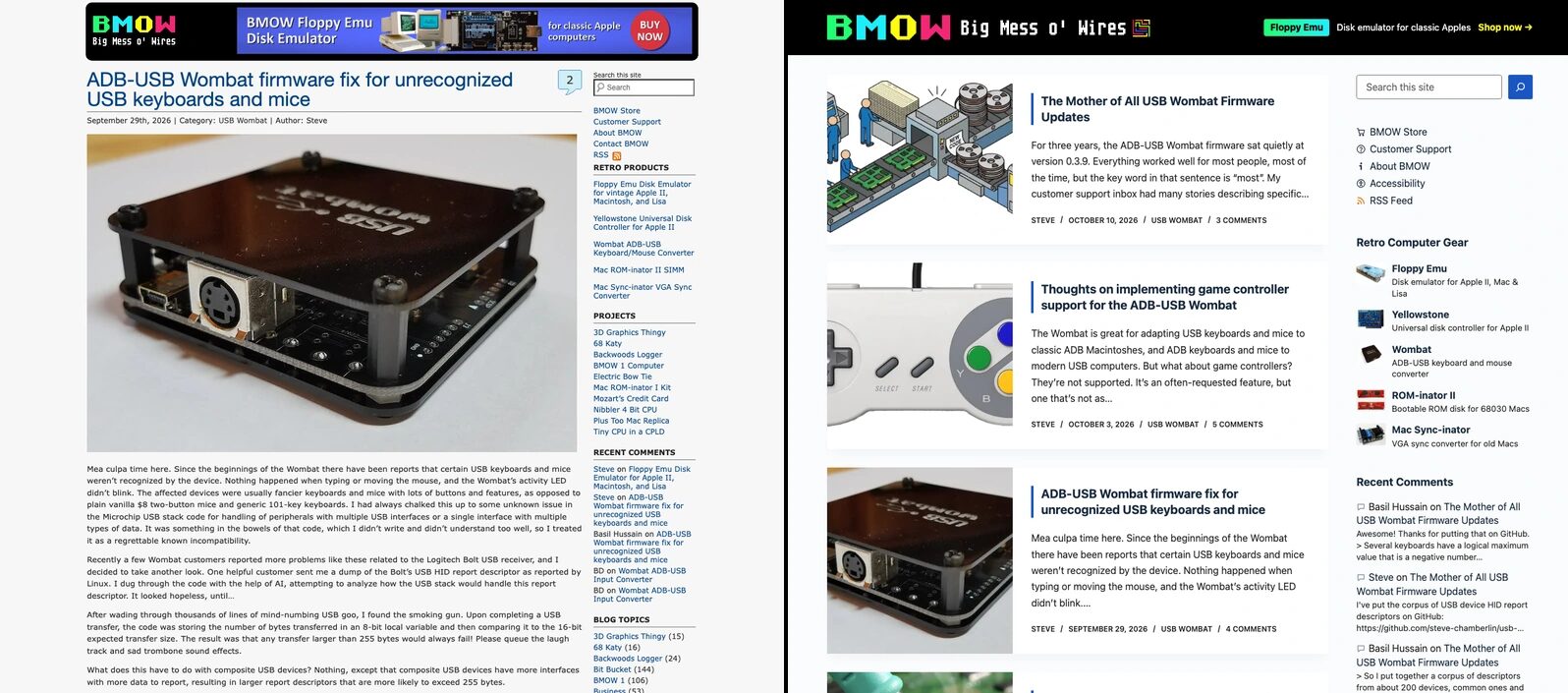
The Big Mess o’ Wires website has a new foundation and updated look for 2026, cleaning out the cruft and junk. It’s a familiar story. Over the years, the site accumulated loads of customizations that tended to complicate updates. One day in 2016 an update broke the site. Lacking the energy to troubleshoot the problem, I simply turned off updates and never turned them back on. Eventually the version of PHP that I was using reached end of life, but it couldn’t be updated without causing breakages either. For the past four years, I’ve paid a monthly fee for extended maintenance of my obsolete configuration.
Being frozen in time with a 10-year-old technology stack would be bad enough, but it was actually worse than that. The theme I was using, which determines the visual appearance of the site, was 21 years old! I could never update it, because I’d directly edited many of its files for reasons I’m sure were excellent but which I could never remember later. It was a similar story with several other key plugins. So there I was, stuck with a 2005-2007 infrastructure that wasn’t surviving very well in 2026.
I finally decided it was time to take action, backing up the whole site to my laptop and getting it running locally in a 5 GB container. This afforded me the time and space I needed to upgrade pieces of the infrastructure and break things temporarily while I worked. The trickiest part was getting it all back onto the server again, and cutting over quickly and cleanly from the old version to the new one. The whole process took me about 10 days of on-and-off work.
Core Platform
- Updated from WordPress 4.7.22 to 7.1.3, and PHP 7.4 to 8.4. Paid legacy-PHP support is no longer needed!
- Lots of code that would crash under WordPress 7 or PHP 8 was removed or replaced.
- The database also moved to InnoDB, MySQL’s newer table format.
- Everything is https across the board now. Http redirects to https.
Database Character Set
- Somehow the old database contained latin1 tables that actually held UTF-8 text, which caused a number of odd problems I’ve written about before. Depending on the age of the data, some text was doubly-encoded.
- I used a script to examine and fix all of the database text as individually needed, instead of a blanket conversion.
- Characters outside latin1 now work consistently. Posts and comments can contain äcçéntêd letters, Japanese 日本語のテキスト text, even 😆💩🦋emojis.
- I also fixed over 1000 instances where the HTML non-breaking space entity had been converted into Unicode character C2A0 (non-breaking space) and stored that way in the database, causing confusion and layout problems.
Plugins
- Removed a cacheing plugin that was disabled anyway, a backup plugin that had silently stopped working five years prior, a security plugin of questionable value, a plugin that was supposed to magically turn my desktop theme into a mobile theme, and many others.
- Found and configured new plugins for anti-spam, comment subscriptions, image format conversion, and link redirection.
- Created a few small plugins to modify my new theme’s behavior, instead of modifying any theme files directly. These were mostly related to the appearance and behavior of the comment sections, but also the “Most Discussed” sidebar widget you see here.
Cleanup
- Large amounts of spam and trash comments and leftover junk was deleted from the database, shrinking it by a third.
- Deleted more than 50 installed but unused themes.
- Removed old backups and other files accidentally left on the server years ago.
- Removed all remaining traces of the old WooCommerce store at bigmessowires.com/shop. Since 2021, the store has been powered by Shopify and lives at shop.bigmessowires.com.
- Removed some unused jQuery and Google Analytics code that was appearing on many pages.
Things That Were Broken On The Old Site
- Fixed several dozen photos in old posts that were appearing sideways or upside down, due to changes over the years in the way browsers handle rotation metadata in images.
- Repaired large numbers of embedded YouTube videos that weren’t working because of http vs https issues in the YouTube link.
- Fixed many links that were typos or that didn’t work due to capitalization differences.
- Reviewed about 100 dead links, replacing many of them with links to the Internet Archive.
Content, Look, and Speed
- All images in posts and pages now have width and height attributes, so pages no longer jump around while loading.
- Set featured images for most posts going back to 2007, used for the cards on the home page.
- Changed the Archives widget to only show links for each year, instead of a separate link for each of the ~240 months in the blog’s history.
- Addressed issues with past comments, like commenter names that were a space character rather than an empty string, and replies to comments that no longer existed.
- Adopted a new modern and responsive theme, but with fSpring’s colors and feel. New home page card design, a new top banner, reworked sidebar, new numbered page UI for post listings and pages with over 50 comments.
- The mobile version of the site now looks completely different than before, and more like the desktop version.
- Implemented many page loading speedups: WebP images, lazy loading of images, delayed loading of the YouTube player until it’s actually clicked, fewer scripts. To view a typical page, it now requires only about a third of the data download that it used to.
Accessibility
- This was an important one! For the last several years, a few unscrupulous law firms have been filing thousands of nuisance lawsuits related to ADA accessibility issues against small web site operators.
- Rather than a genuine problem report from a site visitor looking for help, these are straight-up cash grabs where the law firms hope the site operators will agree to pay a 5 or 6-figure settlement rather than take a risk in court, since fixing issues after the fact doesn’t necessarily absolve liability.
- Prior to the server update, a popular accessibility checker tool crawled the BMOW site and flagged thousands of issues. With the updated site, it finds zero.
- Meaningful “alt” tag text was added to over 1500 images, for use by screen-reader software.
- All tables now have properly-tagged headers.
- All content headings such as “Accessibility” above now use structural tags like <h2> and <h3> rather than relying solely on font size and weight to convey their purpose.
- Closely-spaced links and buttons are now spaced further apart, as WCAG rules require.
- UI colors were adjusted to maintain a minimum contrast level between text and background.
- The site can be navigated with the keyboard and tab items.
- Hidden labels and names that are only used by screen readers were added to many UI items.
- Added an Accessibility statement page.
Preventing Mistakes
- To avoid the risk of breaking something subtle that wouldn’t be noticed until later, the entire site was crawled and logged before beginning work. After making changes, the work-in-progress site was then crawled again to confirm that the only changes were the intended ones.
- Rather than making ad-hoc edits to the server data and files, the update was constructed as a series of about 50 scripts that operated on a local copy of files, each script responsible for applying one specific update or change. The scripts could be re-run from the original server dump at any time.
- Because my web host lacks any real sandboxing or versioning capability, the finished site was deployed to a subdomain for live testing. The cut-over was achieved by renaming and swapping the server root directories of the subdomain and main domain.
Hello from the (still working) RSS feed! 👋