

HD20 Firmware 0.4: Write Support!

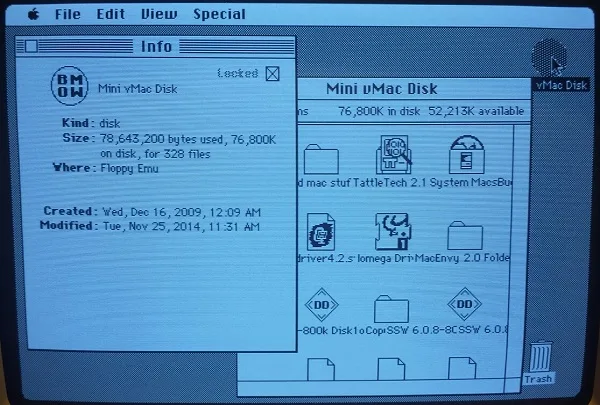
Firmware 0.4 adds support for writing to the emulated HD20 disk drive. No more read-only disks! I’ve tested it with a Mac Plus and a Mac IIsi, copying lots of files about and moving the mouse in crazy circles to exercise the holdoff logic, and it all seems solid.
- Implemented writing to the emulated HD20 disk
HD20 Firmware 0.4A-F66
This marks the completion of the HD20 emulation work, and the latest firmware version is fully usable as a general purpose boot disk or secondary disk. I still need to do some code cleanup and performance optimization, and see how much of the floppy and HD20 emulation code can be merged, but that’s all bonus stuff. Assuming no major problems surface with this HD20 firmware 0.4 in the next couple of days, I’ll promote it to 1.0 status and call it done. Woohoo!
Thank you, Apple, for creating such an oddball hard drive that hijacked the floppy port. HD20 lives!
Awesome!!!
Amazing work! Truly a gift the the classic Mac community.
Yes, and today is my birthday as well 🙂
Great work!! I’ll try it on my floppy emu board tonight 🙂
On a real mac there is a daisy chain port to add a floppy drive behind a HD20. Have you tried to chain two floppy emu boards, one acting as HD20 an the other as floppy drive? If it works, i would really be awesome 😀
A last thing, someone already ask about the possibility to merge both functions in a unique firmware, you said it might be tricky. Instead I thought about a simple menu which enable the possibility to flash the desired firmware whithout having to move/delete firmware files on the SD.
The hardware doesn’t have a daisy chain output port, so there’s nowhere to connect a second drive, sorry. 🙁 Might be possible if I ever do a new hardware revision. Until then, if you want two boards at once you can connect one to the internal floppy port, replacing the built-in floppy drive.
A menu to select between two CPLD firmwares should be possible. I think creating a single AVR application that handles floppy and HD20 functions is doable, it’s the CPLD firmware that would be very challenging to support both in one. It wouldn’t be an ideal user experience, since it takes about 20 seconds to update the CPLD firmware, but it would still be better than renaming files on the SD card and doing the updates manually.
regardless, thanks for doing this!
For daisy chaining, I just thought about a ribbon with two floppy connectors (plus the one for the computer) and one floppy emu on each, without any other piece of hardware… I may be wrong lol!!
I made a little video of the HD20 emulation working 🙂
http://www.youtube.com/watch?v=vg60NwoF5J8
One more thing, sorry… for more accurate emulation can you give us an update with normal HD icon?
Nice video – so when you boot from a floppy with the HD20 Init, it ejects the floppy and boots the OS from the HD20? That’s pretty neat, I didn’t know that.
Yes, a daisy chain needs in and out connectors on each device. Just connecting them all together in a bus with a shared cable won’t work. Each device has to know when to process commands from the Mac, and when to pass them on to the next device in the chain.
I should do something about the icon. Maybe an SD card icon, or a computer chip. Or find a way for people to provide their own icons.
An activity light might be nice.
This thing’s performance in the LC1 and SE/30 is quite fast.
hey can you toss a 100+ etc. image up, the 33meg one is nice.
Im to lazy to go and figure out how to increase the side of the image.
Seems like this new firmware is working very nice!
On the real floppy seen on my video, I have the HD20 init present in the system folder, I already used it before cause it allows 800k HFS disks mounting on either my external apple 3.5″ drive or floppy emu 🙂 Another interessing tip is that the boot disk MUST be MFS, but 800k MFS (real or emulated) disk also boot the 512k from scratch 😉 There is a description on this website: http://68kmac.com/Mac128/Mac_128_Update/Entries/2007/9/1_Formatting_800K_MFS_Disks_With_64K_ROMs.html
For the disk icon, a simple file on the SD root directory that user may change or modify would be great 😉
I tested the HD20 emulation with my macintosh portable too and transfers go quite fast on it, with system 6.0.7 on it, it boots directly, priority for HD20 is lower than floppy but higher than SCSI. On my 512k (512k motherboard in a dirty Plus case lol), it is far slower… I was sometimes worrying about an eventual crash but no it is just slow!! So +1 for blinking the LED when activity 🙂
Jus did a benchmark, with System Info, and the SE/30
The HD20Emu Score was 5.06 / 100
The 100mb Scsi zip drive is 28.8 /100
100 says that its the Quadra 700, so what ever that means.
The IIci got 5.10 / 100 Score with the HD20Emu
The IIci gets 127 / 100 Score with the 73gig, 10K RPM 8m Cache SCA SCSI hd i have in there.
Real HD20 connected to the SE/30 only gets 3.56 / 100
Here i have a couple videos:
128Ke Booting from HD20 Emu
https://plus.google.com/+NotgoingTotellyou/posts?pid=6088598152449807442&oid=100890837144428718359
512ke Booting from HD20 Emu
https://plus.google.com/+NotgoingTotellyou/posts/8HPQYqPWQjH?pid=6088605956494915138&oid=100890837144428718359
There must be some kind of MASSIVE performance degradation using the Floppy INIT.
Because the Floppy EMU plugged into the back of this 512ke here, boots up and clicks through windows
instantaneously. I am not bull crapping here either.
Interesting. I think the speed difference vs Thomas’ video may be due to Charles using an older System version. Using System 6.0.7, it looks like Thomas’ 512Ke booted to the desktop in about 25 seconds from the point it switches over from the floppy to the HD20. That’s about the same speed as I see with my Mac Plus. In Charles’ video it looks like it booted to the desktop in about 5 seconds, using an older (and smaller) System file. I couldn’t see exactly what System version it was.
Also, launching Choplifter may be faster than Mac Paint just because it’s a smaller application file. And it looked like Thomas has a system clock extension, which may slow down load times a bit further. Charles, have you tried the example disk image I posted a while ago? https://www.bigmessowires.com/hd20-disk-image.zip That has System 6.0.7, see how it affects speed on your 128Ke and 512Ke. The raw transfer rate from the drive is around 55 KB/sec max, so it’s not going to beat a real SCSI disk. But for most vintage Mac stuff where file sizes are quite small, it’s still plenty quick.
Activity LED: this was an oversight. Will fix.
The system I launched in my video is nearly the maximum os a 512k (not 512ke) can run on. It’s system file 3.3 and finder 5.5. The slow startup might be caused by the ram loaded HD20 code, i’ll look at Charles’s videos after work to see the speed difference.
Thanks for the future activity light, if you don’t actually have time to make the icon customization possible, can you tell me where it is coded in the firmware file?
I’m not sure why having HD20 code in RAM instead of ROM would make it slower, but I suppose it’s possible. I have a 512K kicking around somewhere… I’ll try booting the same system on the 512K with HD20 Init and on a Mac Plus with ROM-based HD20 code, and see if there’s a noticeable difference.
I can make the icon customizable, but it will probably take some time. If you want to try patching the current firmware image, in 0.4A-F66 the icon data is at offset $21A (hex) in the femu.bin file. It’s 128 bytes of icon followed by 128 bytes of icon mask. I don’t remember if there’s also a file checksum that would need to be modified if you patch the data, but I think there isn’t.
Tested with a 200MB HD20.dsk file, which contained a vanilla System 3.2 install and nothing else. Using HD20 firmware 0.4 on the Floppy Emu board, with a 2GB Transcend class 4 SD card. For the Mac Plus, I booted directly from the Floppy Emu (in HD20 mode). For the Mac 512K, I booted from a 400K floppy in the internal drive, which contained System 3.3 and the HD20 Init.
Mac Plus: appearance of the Happy Mac icon to appearance of the disk icon on the desktop: 5 seconds
Mac 512K: ejection of the floppy to appearance of the disk icon on the desktop: 4 seconds
Bottom line, I don’t see any difference in HD20 emulation speed between machines using the HD20 Init vs machines with HD20 support in ROM. Mac 512K takes slightly longer to boot, since it has to load the original system and the HD20 Init from floppy, but once the HD20 Emu takes over the speed appears to be the same.
Ok, here’s a new video I made with blank HD20 image on fresh formatted SD. I used known good version of the HD20 startup disk and everithing is fine and fast 🙂
http://www.youtube.com/watch?v=OoLc8KS-5ms
I’ll have to investigate further why it was so slow before… maybe cause my HD20 image was filled with a lot of files (nearly 16Mb of data)…
How do i put files inside of the hd20 from the ad card ?
*SD
either from Hard disk or floppies on a real mac with floppy emu board attached or by mounting HD20.dsk with vmac or basiliskII 😉
It works fine now, don’t know what I made wrong the first time to obtain a so slow HD20 emulation…
http://www.youtube.com/watch?v=bTrJBAw_FL0
PS: thank you Steve for the icon hint 😉
looking good Thomas !
Thanks! Nest step (If I find time & money): Buying a used HD20 (even out of use) and reverse engineering the way it dispatch output and input data between itself and the daisy chained floppy port 🙂
The best significant photo I could find on the Internet is:
http://tjjq.free.fr/mac/hd20_inside_allconnected-19971.jpg
No reverse engineering necessary, the daisy chaining is explained in this doc: http://bitsavers.trailing-edge.com/pdf/apple/disk/hd20/Directly_Connected_Disks_Specification_1.2a_May85.pdf
Thanks a lot 😀
Ok so pretty much to give anyone an idea of the speed of this new HD20emu, IF you have ever done a local talk between 2 vintage mac’s about the best speed i have seen is about 3-5kb/sec Yup about as fast as a 33.6/56k modem.
So the HD20emu run at around 55kb/sec that is pretty darn fast…
I mean even by todays standard.
Most satellite internet these days sits at right around those speeds.
So the HD20 emu is not slow, at least not by my standards.
Thomas, could you send me a binary dump of the icon you made? I’ll use that as the default in the next firmware, instead of my BMOW in a circle.
Here it is 🙂
http://tjjq.free.fr/mac/apple_hd_icon
Take a look at 68kmla topic, I posted something rather interesting 😉