

68 Katy
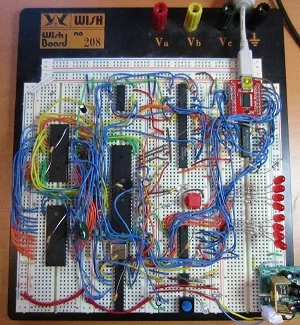
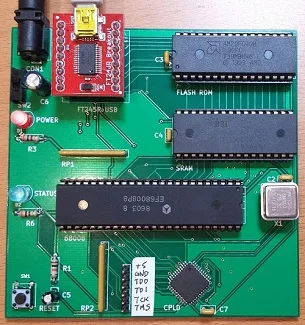
68 Katy is a hand-built computer based upon a Motorola 68K series CPU, and designed to run the Linux OS. The initial 2 MHz prototype was constructed on a solderless breadboard, and a later PCB version runs at 12 MHz. The operating system is a customized version of uClinux with the 2.0.39 kernel from 2004, squeezed into just 467K. It’s a full-fledged multitasking OS, and even runs vi and the classic Colossal Cave Adventure! A small monitor/bootloader program acts as a companion to uClinux, and can be used to load bare-metal programs or to update the contents of the flash ROM.
Both the breadboard and PCB versions feature 512K flash ROM, 512K SRAM, and a USB serial port. The heart of the design is a 68008 CPU, a low-cost version of the more familiar 68000 CPU that has an 8-bit data bus instead of 16-bit. Curious readers may wonder how Linux can run on a 68008 CPU, which lacks a memory management unit and can’t support virtual memory. Fortunately uClinux is specifically designed for such “no MMU” architectures. Of course with no MMU there’s no memory protection, so a buggy program can wreak havoc in other running programs, or even crash the whole OS – just like in the good old days.
Much more background about the original “Linux on a breadboard” prototype and the process of building it can be found in 68 Katy – 68000 Linux on a Solderless Breadboard. For full details, see the postings in the 68 Katy build log.
Here’s a video of the prototype machine booting uClinux and running through its paces:

The breadboard prototype (2 MHz) versus the PCB version (12 MHz):

Memory Map
BREADBOARD 68 KATY               PCB 68 KATY
00000 - 77FFF : ROM              00000 - 77FFF : ROM
78000 - 79FFF : serial in        78000 - 79FFF : serial in
7A000 - 7BFFF : serial out       7A000 - 7BFFF : serial out
7C000 - 7DFFF : serial status    7C000 - 7CFFF : serial status RDF
                                 7D000 - 7DFFF : serial status TXE
7E000 - 7FFFF : LED register     7E000 - 7FFFF : LED register
80000 - FFFFF : RAM              80000 - FFFFF : RAM
PCB Version
The PCB version is the easiest way to build your own 68 Katy. It replaces all of the glue logic, timers, and other miscellaneous components with a single CPLD. Compared with the breadboard version, the number of status LEDs is reduced from eight to one, and there’s a small change to the serial status address mapping. Get a PCB, solder the components, burn the ROM, and you’ll be in business.
Assembling the PCB requires soldering one surface mount component, the 44 pin CPLD in TQFP package. It can be soldered with a standard iron using the drag soldering method (my preference), with hot air, or with a toaster oven reflow. The rest of the components are easy through-hole parts.
You’ll need an EPROM burner to program the initial flash ROM data, as well as a JTAG programmer for the CPLD. I used a Bus Pirate with the XSVF player firmware to program the CPLD.
Note that the PCB and Breadboard versions of 68 Katy are not binary compatible, due to a small difference in their memory maps. If you’re building the PCB version, be sure to use the files in this section, and not the breadboard version files.
PCB Version: Files
- schematic and board layout – Board definition in KiCad format
- Gerber files – For getting a copy of the PCB made at a fab like Seeed Studio
- CPLD source – Xilinx ISE project and Verilog source code for the CPLD
- 68katy.xsvf – JTAG configuration file for the CPLD
- monitor.asm – My ROM-based monitor/bootloader program. I used Easy 68K to assemble it.
- monitor-plus-linux-pcb.bin – This is the final binary image I programmed into the ROM, containing the monitor/bootloader program with the uClinux kernel concatenated to it beginning at address $003000
- virtualboxes.org Ubuntu machine – For Linux cross-development, I used Ubuntu 12.04 32-bit running as a virtual machine under Virtual Box. Don’t use the 64-bit version, or the 68K toolchain won’t work. You can use this pre-configured Ubuntu Virtual Box machine image. Username “ubuntu”, password “reverse”
- uClinux-dist-20040218 – I started from the February 18, 2004 release of uClinux. This is the unmodified version.
uClinux-20040218-pcb.tar.gz – This is my modified version of uClinux. It includes code for kernels 2.0, 2.4, and 2.6, but I only ported kernel 2.0 for 68 Katy. Search the code for “68KATY” to find my changes. - m68k-elf-tools-20030314 – You’ll need a 68K cross compiler and other tools in order to build the uClinux source code. I used m68k toolchain 20030314. It’s supposed to be a self-extracting shell script, but that didn’t work for me. I had to extract it manually, like this:
user@ubuntu$ tail -n +43 m68k-elf-tools-20030314.sh | gunzip > tools.tar

user@ubuntu$ tar xvf tools.tar
PCB Version: Parts List
- Motorola 68008 CPU, 8 MHz, 48-pin DIP package
- AM29F040B or SST39SF040 4 megabit Flash ROM
- BS62LV4006PIP55 4 megabit SRAM, or compatible substitute
- Xilinx XC9536 CPLD – not XC9536XL
- Sparkfun FT245RL USB to FIFO breakout board
- 12 MHz metal can oscillator
- bypass capacitors, resistors, LEDs, buttons, switches, sockets, etc. – complete parts list
Breadboard Version
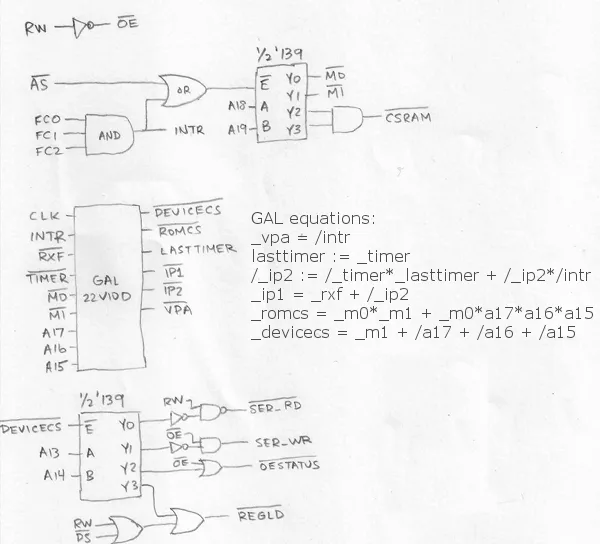
Want to build a 68 Katy on a breadboard, for the ultimate in geeky fun? This version uses discrete 7400-series chips for most of the address decoding and other glue logic, with the exception of one PAL. The PAL replaces some logic that would otherwise have required more NAND’s, OR’s, flip-flops, etc. If you’re building your own version of 68 Katy, you don’t necessarily need the PAL – just replace it with the equivalent 7400-series basic logic gates.
You’ll need an EPROM burner to program the initial flash ROM data, as well as to program the PAL if you’re using one. Beyond that, no special hardware or skills are required.
Note that the PCB and Breadboard versions of 68 Katy are not binary compatible, due to a small difference in their memory maps. If you’re building the breadboard version, be sure to use the files in this section, and not the PCB version files.
Breadboard Version: Files
- monitor.asm – My ROM-based monitor/bootloader program. I used Easy 68K to assemble it.
- ehBASIC.zip – A slightly modified version of Lee Davison’s ehBASIC for 68000.
- monitor-plus-linux.bin – This is the final binary image I programmed into the ROM, containing the monitor/bootloader program with the uClinux kernel concatenated to it beginning at address $003000
- virtualboxes.org Ubuntu machine – For Linux cross-development, I used Ubuntu 12.04 32-bit running as a virtual machine under Virtual Box. Don’t use the 64-bit version, or the 68K toolchain won’t work. You can use this pre-configured Ubuntu Virtual Box machine image. Username “ubuntu”, password “reverse”
- uClinux-dist-20040218 – I started from the February 18, 2004 release of uClinux. This is the unmodified version.
uClinux-20040218.tar.gz – This is my modified version of uClinux. It includes code for kernels 2.0, 2.4, and 2.6, but I only ported kernel 2.0 for 68 Katy. Search the code for “68KATY” to find my changes. - m68k-elf-tools-20030314 – You’ll need a 68K cross compiler and other tools in order to build the uClinux source code. I used m68k toolchain 20030314. It’s supposed to be a self-extracting shell script, but that didn’t work for me. I had to extract it manually, like this:
user@ubuntu$ tail -n +43 m68k-elf-tools-20030314.sh | gunzip > tools.tar

user@ubuntu$ tar xvf tools.tar
Breadboard Version: Parts List
- Motorola 68008 CPU, 8 MHz, 48-pin DIP package
- AM29F040B or SST39SF040 4 megabit Flash ROM
- BS62LV4006PIP55 4 megabit SRAM, or compatible substitute
- Sparkfun FT245RL USB to FIFO breakout board
- 2 MHz metal can oscillator
- NE555P timer, 8-pin DIP package
- 74LS139 decoder
- 74LS377 8-bit register
- 74LS244 8-bit tri-state driver
- 74LS00 quad NAND
- 74LS08 quad AND
- 74LS32 quad OR
- Lattice GAL22V10D logic array
- bypass capacitors, resistors, LEDs, buttons, etc.
CPU

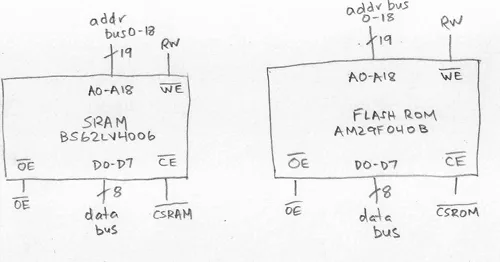
RAM and ROM
Control Logic
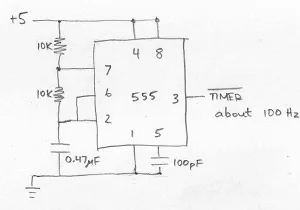
555 Timer for Scheduler
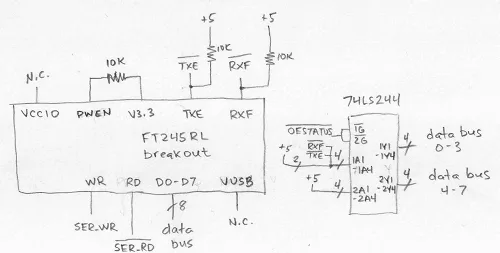
USB Serial FIFO
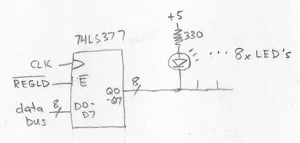
LED Display
Temporary email to put the uClinux-dist-20040218.tar.gz is uclinux@outlook.es, a good advice would be to .zip the uClinux-dist-20040218.tar.gz file with password, in this manner can be added as attachment. Other advice would be to chunk the file in 40mb chunks.
thanks
Temporary email to put the uClinux-dist-20040218.tar.gz is uclinux@outlook.es, a good advice would be to .zip the uClinux-dist-20040218.tar.gz file with password, in this manner can be added as attachment. Other advice would be to chunk the file in 40mb chunks.
thanks
Hello:
Yesterday download from Wayback Machine ends at 48Mb, today I have been able to download succesfully the archive, no need to send by email.
thanks
Sorry, I had to free some space on the server and removed those files. Glad you found it on the Wayback Machine.
Your video quality is very poor.
Are the files still downloadable from somewhere? I also have some questions for you regarding the uclinux and the hardware side of things. Can we get in touch on some chatting platform to quickly sort out the things I wanted to ask for my build?
For anyone looking for uClinux-dist-20040218.tar.gz, I put a copy on archive.org
https://archive.org/details/uClinux-dist-20040218.tar
or on github https://github.com/neozeed/uClinux-dist-20040218 if you prefer that kind of thing.
HEllo,
Your monitor and uclinux port is working on the Jaty68k emulator base on m68k emulator project.
I also add a target for your board on the py68k emulator project. zbug is working except the “S” command who try to read outside of RAM.
084000>stack display, shows 16-word deep
1FFC7C [0000]
1FFC7E [0000]
1FFC80 [0000]
1FFC82 [0000]
1FFC84 [0000]
1FFC86 [0000]
1FFC88 [0000]
1FFC8A [0000]
1FFC8C [0000]
1FFC8E [0000]
1FFC90 [0000]
1FFC92 [0000]
1FFC94 [0000]
1FFC96 [0000]
1FFC98 [0000]
1FFC9A [0000]
1FFC9C [0000]
084000>
Waiting for emulator, hit ^C three times quickly to
** I tracked the bus error when executing
MOVEA.L #SUPER_STACK+USER_STACK,A1 ; TOP OF USER STACK
LEA.L -32(A1),A0 ; EACH COMPOSED OF TWO BYTE
** At this point A0=0x1ffc7c
** For some reason #SUPER_STACK+USER_STACK is outside memory range.
EXECUTE : 0x00000ed0 : movea.l #$1ffc9c, A1 A1=0x100000
READ : 0x00000ed6 : 0x41e9
READ : 0x00000ed8 : 0xffe0
EXECUTE : 0x00000ed6 : lea (-$20,A1), A0 A0=0x0 A1=0x1ffc9c
READ : 0x00000eda : 0x3e3c
READ : 0x00000edc : 0x0010
EXECUTE : 0x00000eda : move.w #$10, D7 D7=0xffff
READ : 0x00000ede : 0x2c7c
READ : 0x00000ee0 : 0x000ffe7a
EXECUTE : 0x00000ede : movea.l #$ffe7a, A6 A6=0xffe7a
READ : 0x00000ee4 : 0x2008
EXECUTE : 0x00000ee4 : move.l A0, D0 D0=0x84000 A0=0x1ffc7c
READ : 0x00000ee6 : 0x2f00
EXECUTE : 0x00000ee6 : move.l D0, -(A7) D0=0x1ffc7c A7=0xffe72
WRITE : 0x000ffe70 : 0xfc7c
WRITE : 0x000ffe6e : 0x001f
READ : 0x00000ee8 : 0xb1ee
READ : 0x00000eea : 0x00b2
EXECUTE : 0x00000ee8 : cmpa.l ($b2,A6), A0 A0=0x1ffc7c A6=0xffe7a
** Then later in SKIP_PRINT_BLANK this instruction MOVE.W (A0)+,D0 will generate a bus error, because A0=0x1ffc9c
READ : 0x000ffe6e : 0x00000f16
READ : 0x00000f16 : 0x3018
EXECUTE : 0x00000f16 : move.w (A0)+, D0 D0=0x1ffc5b A0=0x1ffc7c
BAD_READ : 0x001ffc7c : 0xffffffff
Trying to start uclinux
084000>jump to address 084000>003000
uClinux/MC68000
Flat model support (C) 1998,1999 Kenneth Albanowski, D. Jeff Dionne
MC68000 68 Katy support by Big Mess o’ Wires, Steve Chamberlin
Line F emulator!FTDI FT245 driver version 1.01 by Steve Chamberlin
ttyS0 at 0x00078000 (irq = 2) is a FTDI FT245
Ramdisk driver initialized : 16 ramdisks of 4096K size
Blkmem copyright 1998,1999 D. Jeff Dionne
Blkmem copyright 1998 Kenneth Albanowski
Blkmem 1 disk images:
0: 48530-7792F (RO)
Line F emulator!
Exception has no handler!Jump to 0
zBug(ROM) for 68Katy (press ? for help)
I keep trying to get it run 😉
Latest commits for both project are on my github @see https://github.com/demoze
Hi folks – I thought you might be interested in a project I’m working on that runs the PCB version of the 68Katy images using Musashi: https://github.com/eparadis/68katy-musashi
It is heavily based on the example machine provided by Musashi.
It runs the monitor and boots uClinux. There are still some terminal emulation bugs, but it works well enough to play Colossal Cave Adventure.
I hope to grow it to an emulated 68030-based system, but getting Steve’s stuff to work was a big milestone in understanding how these things go together. Thanks for putting you work up where folks can benefit from it, Steve!
If anyone has questions or ideas, feel free to start a discussion/issue on the Github page.
I’m glad to see that 68 Katy is inspiring some interesting new variations and emulators! I haven’t thought about this project very much since 2014, and need to reread my own blog posts to remember how the design works. My original breadboard prototype was long since dismantled, but the PCB version is still here.
@ed Paradis,
that’s great, I need to check your code to find out why, the py68k which is base on musashi failed to completly boot, uclinux.
😉
@steve , this is still a great project, I even made a board target for MicroMonitor http://www.umonfw.com/ able to run zbug. And I plan to add virtual ethernet interface emulation with tun/tap to get networking 😉
@Ed wow that looks fantastic! I tried and failed so long ago, glad it’s up and running!
Here’s a tip for anyone setting up the development environment. You can join the monitor.bin and uclinux rom output (images/68Katy.rom) using the following:
dd conv=notrunc bs=1 if=monitor.bin of=newrom.bin seek=0
dd conv=notrunc bs=1 if=images/68Katy.rom of=newrom.bin seek=$((0x3000))
For me this resulted in a newrom.bin that is 489,764 bytes. The original monitor-plus-linux-pcb.bin available here is 489,776 bytes. I am using the `m68k-elf-tools-20030314.sh` toolchain. You can find it on the Wayback Machine.
I found running ‘make config’ before running ‘make dep’ and ‘make’ inside the modified uClinux-20040218-dist available above would make some subtle change that would prevent the machine from booting. If you want to change the uClinux config, make sure to use git or something to track any file that might be changed.
I used qemu-system-i386 v8.0.2 and set up a development VM with debian-12.0.0-i386-netinst.iso. Note that an Apple compiler bug prevents Qemu from building correctly for their M1/M2 architectures out of the box.
Hi guys,
as I see is that blog still alive after 9 years when Steve started his project.
I would like to report on my experiences on porting uClinux – encouraged by Steve – to my single board computer (a not Katy).
Maybe someone is interested and we can exchange ideas….
After a long and hard road my single board computer (m68010@10 MHz, MFP68901, silabs cp2200 ethernet, 1 MB SRAM, 1 MB FLASH) runs with uClinux including ethernet with nfs 😉.
My initial approach was different because I first tried to write my own small OS. But someday after I had struggled with the lwIP and the driver for the cp2200 again and again I decided to try to switch to the uClinux.
So, I had a monitor written by my own (adapted e.g. the diassembler to my monitor or even the isp ability for the FLASH) and the gcc-4.9.4 toolchain. First I tried to compile and run uClinux with modified sources and the more “modern” gcc4 (the higher the pikier), but that’s another story …. and I switched to gcc-2.95.
My system works with vector-irq, so I had to reknit the irq management and had to look trough confusing traps.c / ints.c / config.c files.
I had to marrying my Motorola-style-assembler written monitor “smon68k” with uClinux in the entry.S file with all the execption vectors. It is knitted together a little dirty but it works fine. My total file to burn into FLASH (smon, kernel with tcp/ip, uC-libc and excessive use of busybox) is around 900K.
This was the easier part.
The frustrations began – or to citate Steve:
“inching forward …. and banging my head against the wall… this is the Linux kernel, it’s supposed to work…..”
1st crash was:
in tty_io.c with CHECK_TTY_COUNT enabled (did not occur with gcc-2.95 only with gcc-4.9.4, curious, cause when you check the c-code in that function and the diassembly: yes, I guess, it would have to crash).
2nd crash was:
in binfmt_flat.c (when tried to perform (/bin/init etc.)) my absolutely favorite hate function “do_load_flat_binary”.
I wonder why this function works for Steve (and everyone else) but not for me. Actually the c-code must lead to a crash of the system – and did.
(if interested: the expression “bss_len+(current->mm->end_brk-current->mm->start_brk)+stack_len” is always negative and due to that the following memset function runs to clear a negative number of bytes, e.g. $FFFF3d00 bytes, that leads to BERR in my system but before that it had overwritten the whole ram).
3rd crash was my mistake (lasted for weeks .. months)
Be careful with your linker script: uClinux expects the RAM memory to start at a point divisible by 4096 (4K page). Otherwise the whole kmalloc system will not work and all instructions (ls, cd, cat ….) crash.
So, the thing with the BogoMips is that you have to increase in the “main.c” LPS_PREC for example up to 10 and to decrease loops_per_sec = (1<<12) to loops_per_sec = (1<<8).
The 0.81 bogomips Steve has reached is the lowest value you can ever reach with LPS_PREC 8 and LPS=$1000.
I guess the programmer could not imagine that somebody clocks a cpu with so few MHZ.
My MC68010 initialy reached 0.51 BogoMips at 10-11 MHz and 0.051 in trace mode, but when i realized that my system runs with 200 Hz ticks (instead of 100 Hz), yeah it is 1.08 BogoMips for the 68010!!!
I hope this was somewhat interesting and helpful.
Olav
Hello Olav
Do you have any pictures of your board and uClinux running on it, also could you share your version source code and any thing that would be of help
Thanks Tony
Hello Olav,
I’m interested in your work. I have several 68010 and 68302 boards with 1 meg or more of memory. CPM68K are successfully ported to them, but I like to port uCLinux to them. Where can I find more info on your project?
Bill
Hi everbody,
I don’t have a homepage or github or anything else to publish my project, unfortunately.
It was intended as a private project
Maybe Steve can pass on our eMail and you can exchange information that way.
I did the same thing Steve did, but inspired and encouraged by his example:
I transferred the uClinux distribution he used (kernel, libc, user programs) to my SBC system just as he did to the 68k Katy.
I followed him and where it no longer fit, I went my own way. Okay, was very early, but I learned so much from him, without his example I would never have had the idea to try this way at all.
So I would like to give that back.
And encouraging others to do the same is great fun (before that a lot of sweat and frustration 🙂
In two portion because space per contribution seems to be limited
As you can see please:
* OldCat m68k-Computer **
(p) 2018-23 olav.k
CPU is a m68010 approximatley @ 11 MHz
SMON68k Version 0.3 build on Andromeda 2023-07-16@16:46
** trap #14 breakpoint @ $0000027a
* —————————68010-CPU——————————————————— *
T S IRQ XNZVC USP=$0010004c SSP=$001ffd16
SR=2704 0010011100000100 DFC=00 SFC=01 VBR=$00000000
PC=$0000027a next ins: 41F900109680 LEA.L $00109680,A0
* ——————————————————————————————— *
D0=0000000b D1=0000ffff D2=000003d4 D3=00000000 D4=0000000b D5=000000fa D6=20535350 D7=00000010
A0=00066518 A1=00109680 A2=00109680 A3=00100218 A4=00100010 A5=00100010 A6=00100200 A7= SSP
smon68k: ru
uClinux/MC68010
Flat model support (C) 1998,1999 Kenneth Albanowski, D. Jeff Dionne
M68oooer – the Old Cat lives MMXXI Olav Krömeke
Calibrating delay loop.. with HZ=200 ok – 1.08 BogoMIPS
Memory available: 872k/1018k RAM, 678k/1024k ROM (346k kernel code, 144k data)
uClinux version 2.0.39.uc2 (olav_k@Andromeda) (gcc version 2.95.3 20010315 (release)(ColdFire patches – 20010318 from http://fiddes.net/coldfire/)(uClinux XIP and shared lib patches from http://www.snapgear.com/)) 468 dom 16 lug 2023, 16.48.34, CEST
mfp68901 driver version 1.0 by olav.k
ttyS0 at 0x00fc002f (irq no= 21) is a mfp68901
Ramdisk driver initialized : 16 ramdisks of 4096K size
Blkmem copyright 1998,1999 D. Jeff Dionne
Blkmem copyright 1998 Kenneth Albanowski
Blkmem 1 disk images:
0: 66518-EFD17 (RO)
eth0 is a silicon labs cp2200 at 0x00fe0001 (irq no= 24); MAC = 00:0b:3c:89:f6:86
VFS: Mounted root (romfs filesystem) readonly.
Swansea University Computer Society NET3.035 for Linux 2.0
NET3: Unix domain sockets 0.13 for Linux NET3.035.
Swansea University Computer Society TCP/IP for NET3.034
IP Protocols: ICMP, UDP, TCP
please wait, system is booting up:
expand ramfs.img
———————————————————————–
Welcome to
____ _ _
/ __| ||_|
_ _| | | | _ ____ _ _ _ _
| | | | | | || | _ \| | | |\ \/ /
| |_| | |__| || | | | | |_| |/ \
| ___\____|_||_|_| |_|\____|\_/\_/
| |
|_|
————————————————————————
BusyBox v0.60.5 (2023.07.16-14:46+0000) Built-in shell (msh)
Enter ‘help’ for a list of built-in commands.
Olav
Olav, you can create a simple web site to document your project with GitHub Pages: https://pages.github.com/ There’s also reddit.com/r/vintagecomputing/ if you want comments and feedback from others.
part two:
# cat /proc/cpuinfo <= Informations taken from the smon but actually
CPU: 68010 calculated and found out
MMU: none
FPU: none
Clocking: 11.0MHz
BogoMips: 1.08
Calibration: 543200 loops
# ping 192.168.2.103
PING 192.168.2.103 (192.168.2.103): 56 data bytes
64 bytes from 192.168.2.103: icmp_seq=1 ttl=64 time=5.0 ms
64 bytes from 192.168.2.103: icmp_seq=3 ttl=64 time=10.0 ms
…
64 bytes from 192.168.2.103: icmp_seq=9 ttl=64 time=5.0 ms
64 bytes from 192.168.2.103: icmp_seq=10 ttl=64 time=5.0 ms
— 192.168.2.103 ping statistics —
11 packets transmitted, 8 packets received, 27% packet loss
round-trip min/avg/max = 5.0/6.8/10.0 ms
# mount -t nfs 192.168.2.103:/home/olav_k /mnt <= the network connection is a bit bumpy and
sometimes a bit day-to-day dependent ….
# df
Filesystem 1k-blocks Used Available Use% Mounted on
/dev/rom0 550 550 0 100% /
/dev/ram0 55 5 50 9% /var
192.168.2.103:/home/olav_k 417982424 258036076 138640544 65% /mnt
# cat /proc/interrupts
irq no 14: cpu_vec 69,calls: 39354 L systimer
irq no 21: cpu_vec 76,calls: 99 L MFP68901 console
irq no 24: cpu_vec 79,calls: 63 eth0
# cat /proc/meminfo
total: used: free: shared: buffers: cached:
Mem: 892928 630784 262144 0 86016 0
Swap: 0 0 0
Free pages: 64 (256kB), %6 frag, %4 slack
Free blks: 4 min=1 max=57 avg=16
Used blks: 4 min=1 max=113 avg=47
MemTotal: 872 kB
MemFree: 256 kB
MemShared: 0 kB
Buffers: 84 kB
Cached: 0 kB
SwapTotal: 0 kB
SwapFree: 0 kB
glad to hear from you.
olav
I have Simons board but still have not got it 100%
As you can see belowinit keeps respanwing to fast any ideas on how to fix this would be great
Alcetronics M68K v0.3 (2012)
Booting in 3…
Al
Alcetronics M68K v0.3 (2012)
Booting in 3…
FPGA bitstream sent.
Booting…
Linux version 3.11.0-rc1 (root@localhost.localdomain) (gcc version 4.5.1 (GCC) ) #40 Sat Dec 5 23:26:00 PST 2020
Alcetronics M68K support by Luis Alves
[plat-alce68k]: registering early dev resources
bootconsole [early_FT245uart0] enabled
uClinux/MC68000
Flat model support (C) 1998,1999 Kenneth Albanowski, D. Jeff Dionne
Built 1 zonelists in Zone order, mobility grouping off. Total pages: 2031
Kernel command line: uclinux.physaddr=0xb00000
PID hash table entries: 32 (order: -5, 128 bytes)
Dentry cache hash table entries: 1024 (order: 0, 4096 bytes)
Inode-cache hash table entries: 1024 (order: 0, 4096 bytes)
Sorting __ex_table…
Memory: 7696K/8188K available (1497K kernel code, 68K rwdata, 168K rodata, 56K init, 74K bss, 492K reserved)
Virtual kernel memory layout:
vector : 0x00000000 – 0x00000400 ( 1 KiB)
kmap : 0x00000000 – 0xffffffff (4095 MiB)
vmalloc : 0x00000000 – 0xffffffff (4095 MiB)
lowmem : 0x00001000 – 0x00800000 ( 7 MiB)
.init : 0x0003d000 – 0x0004b000 ( 56 KiB)
.text : 0x00810000 – 0x00986640 (1498 KiB)
.data : 0x00001000 – 0x0003c080 ( 237 KiB)
.bss : 0x0004b000 – 0x0005da14 ( 75 KiB)
NR_IRQS:32
Calibrating delay loop… 1.88 BogoMIPS (lpj=9408)
pid_max: default: 32768 minimum: 301
Mount-cache hash table entries: 512
NET: Registered protocol family 16
bio: create slab at 0
Switched to clocksource tmr
alce-eth Ethernet Driver, V0.01
ENC28J60: Probe
net eth0: alce-eth driver registered
mmc_spi: clk = 0
mmc_spi: mmc_ios_pm
mmc_spi: clock to 400000 Hz
mmc_spi: mmc_ios_pm
FTDI 245 USB module serial driver
ttyS0 at MMIO 0xe00000 (irq = 5) is a FTDI 245 serial usb module
console [ttyS0] enabled, bootconsole disabled
console [ttyS0] enabled, bootconsole disabled
FPGAUART serial driver
ttyU0 at MMIO 0xf00020 (irq = 19) is a Simple FPGA UART
jffs2: version 2.2. (NAND) © 2001-2006 Red Hat, Inc.
ROMFS MTD (C) 2007 Red Hat, Inc.
JFS: nTxBlock = 60, nTxLock = 481
msgmni has been set to 16
io scheduler noop registered (default)
uclinux[mtd]: probe address=0xb00000 size=0x2e000
Creating 1 MTD partitions on “rom”:
0x000000000000-0x00000002e000 : “ROMfs”
ftl_cs: FTL header not found.
mmc_cd = 64
mmc_spi: clk = 0
mmc_spi: mmc_ios_pm
VFS: Mounted root (romfs filesystem) readonly on device 31:0.
Freeing unused kernel memory: 56K (0003d000 – 0004b000)
Shell invoked to run file: /etc/rc
Command:
Command: echo – Alcetronics M68K –
– Alcetronics M68K –
Command:
Command: mount -t ramfs none /var
Command: mkdir /var/tmp
Command: mkdir /var/usr
Command: mkdir /var/run
Command: mkdir /var/conf
Command: mkdir /var/dhcpc
Command:
Command:
Command:
Command: echo Setting up loopback device…
Setting up loopback device…
Command: ifconfig lo inet 127.0.0.1 netmask 255.0.0.0
ifconfig: Bad command or file name
Command:
Command:
Command: echo Setting up eth0: IP address 192.168.222.200
Setting up eth0: IP address 192.168.222.200
Command: ifconfig eth0 inet 192.168.222.200 netmask 255.255.255.0 up
ifconfig: Bad command or file name
Command: route add -net default gw 192.168.222.254
route: Bad command or file name
Command:
Command: echo “nameserver 192.168.222.254” > /etc/resolv.conf
nameserver 192.168.222.254 > /etc/resolv.conf
Command: echo “127.0.0.1 Alce68K” > /etc/hosts
127.0.0.1 Alce68K > /etc/hosts
Command: echo “127.0.0.1 localhost” >> /etc/hosts
127.0.0.1 localhost >> /etc/hosts
Command:
Command: portmap &
portmap: Bad command or file name
[24]
Command:
sh 20: Child 24 died
Command: mount -t proc proc /proc
Command:
Command: mount -t sysfs sysfs /sys
Command:
Command: hostname Alce68K
Command:
Command: echo “Mounting SD/MMC card…”
Mounting SD/MMC card…
Command: mount /dev/mmcblk0p1 /mnt/mmc
mount failed: No such device
Command:
Command:
Command: exit 0
usage: exit
Execution Finished, Exiting
Sash command shell (version 1.1.1)
/>
Sash command shell (version 1.1.1)
/> init: /bin/inetd respawning too fast
init: /bin/inetd respawning too fast
init: /bin/inetd respawning too fast
I meant Luis Alves board
Hi Tony,
as you can see (or not, cause it’s missing) in the booting lines:
Swansea University Computer Society NET3.035 …..
You did not initialize your tcp/ip system and your network will not work.
In the kernel 2.0 e.g. you find it (or must add(!) these lines) in main.c:
in the function
static int init(void * unused)
{
+#ifdef CONFIG_NET
+# sock_init(); <=== init your socket, you have to call it.
+#endif
(and you must have CONFIG_NET=y of course)
the routine creates (among other things) in the /proc filesystem the net/subdiretories which probably do not exist with you:
ifconfig and route grumble, they can not find them, they stop, die ….
the init process rakes and gets no further, breaks off ….
If you can see someone in your boot process like:
Swansea University Computer Society NET3.035 for Linux 2.0
NET3: Unix domain sockets 0.13 for Linux NET3.035.
Swansea University Computer Society TCP/IP for NET3.034
IP Protocols: ICMP, UDP, TCP
it should work.
hope that helps
olav.
@Steve:Yes, thanks for the suggestion. I'm thinking about it, I'm not so familiar with it, or to be honest…. have no idea about it.
thinks for the info, I will check it out
The kernel I am using is 3.9
I don`t think I would be able to rebuild it 🙁
I had port the micro monitor (http://www.umonfw.com/) to run on 68Katy . has been test on the py68k emulator. I will publish it on my github soon.
I have a 68008 kit computer with 1Mbyte RAM, no ROM called “68k-MBC” with a SD-card as file system. CP/M 68k with C compiler is running, but uCLinux 2.0 kernel is interesting. Is there a uCLinux port for 68k-MBC? See my page http://andreadrian.de/68K-MBC_CPM68K/index.html