

Mac ROM-inator II
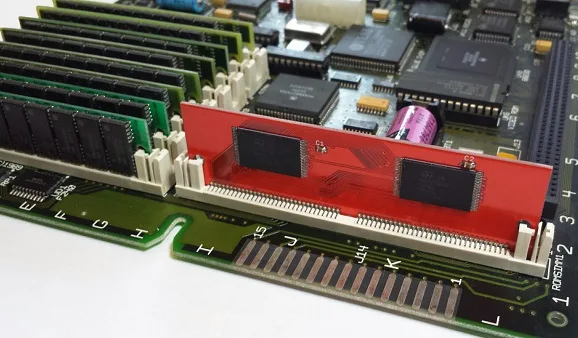
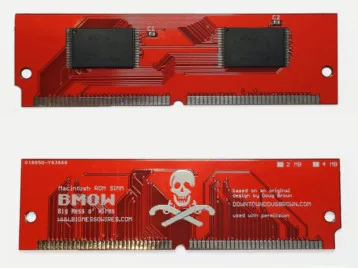
Want to add new features to your old Mac? The Mac ROM-inator II replaces the stock Macintosh ROM SIMM with a 4 MB custom flash memory module. Add a bootable ROM disk, make your system 32-bit clean, gain HD20 hard disk support, and more. The Mac ROM-inator II supports the Macintosh SE/30, IIx, IIcx, IIci, IIfx, and IIsi.
The Mac ROM-inator II is great for breathing new life into your old SE/30 or II-series Macintosh. The ROM disk provides fast and convenient boot-ups and a collection of utility programs, games, and customized startup sounds and icons add a touch of fun. The ROM SIMM comes pre-programmed with a BMOW-made custom ROM containing the following changes:
- ROM disk provides a diskless booting option
- HD20 hard disk support built-in
- 32-bit clean – allows use of System 7.6+ and more than 8MB RAM
- Memory test is disabled for faster booting on 16MB+ systems
- Customized startup chime – major 9th arpeggio
- Happy Mac icon is replaced by a color smiling “pirate” Mac
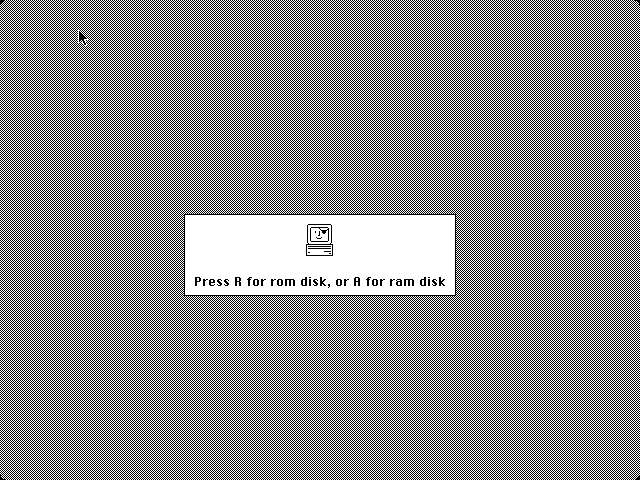
- New startup menu screen displays installed RAM, addressing mode, and ROM disk details
The ROM-inator II is based on Doug Brown’s earlier Mac ROM SIMM design, used with permission.
Downloads
ROM-inator II instruction manual: PDF
BMOW ROM SIMM Programmer 3D-printable case: simm programmer case
BMOW ROM SIMM Programmer 3D-printable case: simm programmer case
The ROM SIMM and pre-programmed ROM contents are compatible with the Macintosh SE/30, IIx, IIcx, IIci, IIfx, and IIsi. The SIMM simply snaps into the ROM socket on the computer’s logic board. Note the Macintosh SE differs from the SE/30 internally, and is not compatible with the ROM-inator II.
CPU accelerators such as the Daystar PowerCache and Turbo series are not compatible with the ROM-inator II.
Some SE/30 hardware may require a shim to ensure ideal fit of the SIMM – see instructions for details.
If running Mac OS System 7.5 or later, some Mac models require a software patch to the System file.
Benefits
HD20 Hard Disk Support – The pre-programmed ROM includes support for HD20-type hard disks, such as the hard disk emulation mode of the BMOW Floppy Emu disk emulator. The stock ROMs in the Macintosh SE/30, IIx, IIcx, and IIfx lack HD20 support, so these computers are normally unable to use HD20 disks. With the ROM-inator II, HD20 support is built-in.
32-Bit Clean – The pre-programmed ROM also makes the Mac 32-bit clean, enabling it to use more than 8 MB of RAM natively without the need for special system enablers or extensions, and to run newer versions of System software that require 32-bit clean ROMs. Some older Macintosh models like the SE/30, IIx, and IIcx have stock ROMs that are “dirty”, meaning they can’t support 32-bit addressing without ROM patches. Using the Mac ROM-inator II and the pre-programmed ROM, the Mac SE/30 can support up to 128MB of RAM!
Faster Startup – The power-on RAM test is disabled in the pre-programmed ROM. This speeds up boot times on Macs with 16 MB or more of RAM, skipping a time-consuming check that can take up to 1 minute otherwise.
ROM Disk
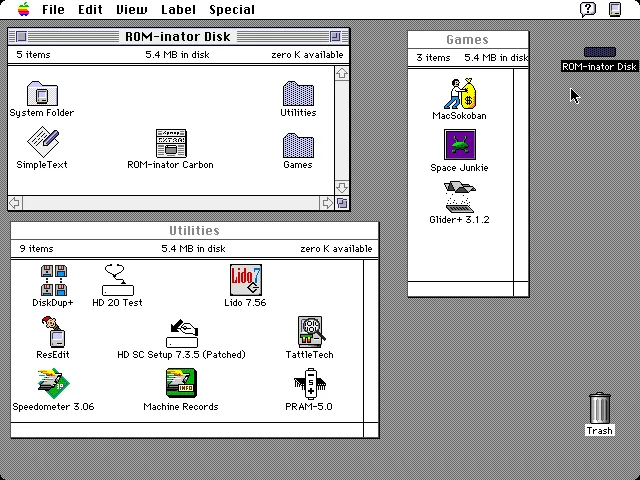
With the ROM-inator II, you have the option to boot normally from a standard startup disk, or to boot from the built-in ROM disk. The included ROM disk is like a recovery partition for your Macintosh, containing System 7.1 and a collection of utility programs and games. With the ROM disk it’s possible to boot a computer with an unformatted or damaged hard disk, and then format or repair it using the utility programs. Or boot a computer with no physical disks at all, to perform troubleshooting and diagnostics.
The ROM disk contents are stored compressed, and are decompressed on the fly as needed, in order to squeeze the largest possible disk image into the available space. This requires 1MB of RAM for caching of decompressed disk sectors, so a minimum of 2MB total system RAM is required. The ROM disk can be mounted as read-only, or as a read-write RAM disk.
The 5.4 MB compressed ROM disk contains:
- System 7.1 with System Update 3.0, Apple CD-ROM Extension 5.3.1, AppleShare and File Sharing Extensions, Networking and Printer Extensions
- After Dark 2.0 screensaver
- HD SC Setup 7.3.5 (patched to support formatting non-Apple hard disks)
- Lido 7.56 (for troubleshooting and formatting SCSI disks)
- SCSI Probe 3.3 (for troubleshooting the SCSI bus)
- TattleTech 2.17 (system diagnostics)
- DiskDup+ (floppy disk duplication tool)
- HD 20 Test (troubleshooting an external HD20 drive)
- PRAM-5.0 (modify or reset Parameter RAM settings)
- Speedometer 3.6 (performance benchmarking tool)
- ResEdit 2.1.3 (programmer’s editor)
- MacsBug 6.2.2 (low-level debug tool)
- MacSokoban
- Space Junkie
- Glider+
Usage
Most of the ROM-inator II’s benefits are automatic: just install the SIMM, and you’ll gain HD20 support, 32-bit cleanliness, and custom sounds and icons. Only the ROM disk requires any user interaction.
When first powered on, a Macintosh with the ROM-inator II will play a customized startup sound, and display diagnostic info about the amount of installed RAM, the current addressing mode, and the detected ROM disk type. After a moment, an interactive startup menu will be displayed.
To boot from the ROM disk as a read-only disk, press the R key on the keyboard. Or to convert the ROM disk into a writable RAM disk, press the A key. Or to bypass the ROM disk, do nothing and wait five seconds. If no keys are pressed, the Macintosh will boot normally from an attached SCSI or HD20 disk, or wait for a floppy disk to be inserted.
Note: If booting from a SCSI disk when the ROM-inator II is installed, any 32-bit enablers or extensions such as MODE32 or 32-Bit System Enabler must be removed from the disk’s System folder.

Programming
For advanced users with external SIMM programming hardware, the Mac ROM-inator II’s contents can be reprogrammed, providing the ultimate in customization. There’s 4 MB of total flash memory available, of which 3.5 MB is available for any purpose like a new ROM disk image, alternate ROM code, or other crazy experiments. Using compression, this is enough for the base 512K ROM image plus a roughly 5.4 MB disk image. Edit the ROM disk image, change the ROM code, or try other crazy experiments. Go nuts! More information is available on the ROM-inator II Programming Page.
Get One Now
Check out the Mac ROM-inator II at the BMOW Store.
Awesome stuff. If Apple did this back in the day, it would really blow away the competition.
Now I want a Mac II! If I where to invest in II or IIx (IIci is so damn hard to find) what graphics card should I use?
/K
Hey Steve, i love your tireless work and have bought several of your products. Have you improved or streamlined Doug’s design? or are you simply the caretaker in this case, keeping the work alive? (to be clear: i have one of Doug’s ROM Simm cards and the programmer… but, you know, just give me an excuse to buy another…!!)
Both the SIMM and the programmer have changed from Doug Brown’s earlier designs, and the SIMM also now comes pre-programmed, with the on-the-fly compression disk driver that I designed. The new programmer is about 4x faster and also has an on/off switch and power LED. And it’s hexagonal. 🙂 The new programmer also works with Doug’s old SIMMs, and the old programmer will work with the new SIMMs if you update the software.
Hi Steve. Based on your comments above, the new SIMMProgrammer.app is backwards compatible with the original dbrown SIMM and Programmer, right?
This is great news. I was running into the limit with the 8MB ROM in my IIsi and want to try out the new compression driver to see what more I can fit in there 🙂
Once I get the SE/30, I’ll add another one for that machine, because the boot speed, silent operations, and convenience are awesome.
Best.
Hi Steve, Mac ROM-inator II is out of stock. It will available soon ? :'(
I’m awaiting delivery of more parts, and hope to have new stock ready in a few weeks.
Oh It’s a good news. Thx. 😉
The ROM-inator II SIMM is back in stock.
Would the base ROM the SIMM comes with be compatible in a IIci with a Daystar Turbo 040 PDS accelerator?
Probably not. I believe the Daystar accelerator has its own ROM and does some kind of run-time ROM patching. If you try it, let me know what you find!
I just got my Mac Rom-inator II in the mail and installed it in my SE/30!
Having HD20 support plus native 32-bit clean is great! It as well boots much quicker.
I am likely going to be purchasing the programmer in the near future as it would be awesome to have my OS boot directly from RAM, freeing up some space on my (miniscule) 40mb HDD.
Thanks Steve!
I’ve finally gotten my SE/30 recapped, and put everything back together. Good news: It all works first time…. Bad news: When I replace my original ROM with the Rom-inator II, it only works when I disconnect the floppy drive. I read the manual PDF, but I didn’t see anything specific to this issue. I’ve got a new fully matched set of RAM from OWC, so I don’t think that’s the trouble. As an SE/30, there shouldn’t be a jumper to change. I’m at a loss here…. any suggestions?
Thanks for any insight you can give!
Hmm, that’s strange. Have you tried pushing on the ROM SIMM while it’s booting, or using a shim, as described in the manual? Some SE/30’s seem especially picky about the ROM SIMM. If you’re unable to get it to work in your machine, you can return it for a refund, but hopefully it doesn’t come to that.
Dear Steve,
today I received 2 Rominator II sets. I installed them in a IIfx and a SE/30 – everything worked fine immediately ! A wonderful piece of soft- and hardware !!!
I had minor problems programming them: Mac OS Sierra was not able to communicate with the programmer (the window with progress bar saying “starting communication ,,,” stayed forever). But maybe that is an issue due to my patched Sierra on an unsupported Mac. Using Mac OS ElCapitan everything went well.
In Windows 10 your software complains about a missing plug-in “QT windows” and refuses to work.
Roland
Roland: I too have the “Staring Communication…” message in macOS 10.12.1 Sierra, but found quitting the app, then reading the ROM to a file is successful, THEN you can write to the ROMinator successfully. Annoying, but does end up working!
Steve: Not sure if anyone has customized the iisi+romdrv1.2.rom file for a Daystar Turbo 040, but I’d be interested – currently no boot chime if used with Turbo 040 installed.
Thanks for the macOS Sierra software work-around. I’m interested to hear if others have the same experience. As for the Daystar 040 accelerator, I believe it has its own on-board ROM, which tries to patch sections of the main ROM. Those patching attempts probably go horribly wrong when using a non-stock main ROM like ROM-inator II.
This is a super useful tool for some hardware development I’m doing with the SE/30. Two quick things:
1. The programmer doesn’t run out-of-the-box on Windows 10. I just rebuilt it in Linux (where I normally work), but others may have the same issue.
2. Do you have a listing of the offsets where the startup sound, boot icon, etc. live like the ROM-inator v1?
Well, that’s what I get for not reading everything. With the IIsi specific formatting information and FDisasm (https://www.bigmessowires.com/2016/06/10/rom-hacking-tutorial-with-rom-inator-ii/), it looks like the icon starts at 0x17F2 and the chimes are all synthesized with the data tables at 0x7158.
Thanks for the note on Windows 10. I don’t have a Win 10 system for development at the moment – looks like I’ll need to get one. I suspect the issue is with the 3rd-party library used to enumerate and talk to the USB.
So I just received my shiny new “Mac ROM-inator II” ROM stick and I’ve popped it into my SE/30. I’m able to boot from the Mac ROM-inator II’s bootable ROM/RAM disk without issue and everything seems totally normal, but when I attempt to boot to MacOS 7.5.5 from my internal SCSI drive, the system hangs at the “Welcome to Macintosh” screen. I double-checked that I don’t have Mode32 (or any other 32-bits-related control panels or extensions) enabled, and I get the same result if I hold shift down – it shows that it’s booting with extensions disabled, but still hangs at the Welcome to Macintosh screen.
Any clues here? I’ll try the obvious / easy stuff (reseat my RAM, etc.), but it just seems pretty odd to me. I’ll also try reseating / shimming the ROM stick, but given that it’s able to boot from the ROM / RAM disk, I have to assume that’s not the main issue. Thanks for any suggestions!
PS I have 64 megs of brand-new RAM arriving from OtherWorldComputing in a few days, so if this indicates a RAM issue, that will probably sort itself out shortly…
Nevermind – I’m a dummy and I neglected to RTFM. I’ve followed the guide and made the appropriate ResEdit tweak to my MacOS 7.5.5 System file, and the SE/30 is humming along as expected now. Whew!
What tweak? I have the same issue! With my MacIIcx (7.5.3)
Kristian – I was referring to the ResEdit guide posted here: https://www.bigmessowires.com/mac-se30-with-upgraded-rom/
Since I have MacOS 7.5.5 on the internal drive of my SE/30, I followed that guide, changed a “0003” to a “0005” in one particular value of the system file, and the whole issue was fixed immediately. Given that this is necessary, I wish ResEdit could be included in the bootable OS found on the ROM stick – would’ve saved me some time having to shuttle ResEdit via floppy from another Mac!
Thank you for the link Huxley.
I have 2 Rominator II, one for a SE/30, the other for a IIfx. Additionally I use the floppy emu, which is working fine with the SE/30 on the external port.
On the fx (without external Floppy-port) I plugged the floppy disk emu directly to the floppy-ports on the mainboard. Unfortunately the IIfx does not recognize the emulated HD20 (as the SE/30 did). Independent, which floppy-port I use on the IIfx.
Any ideas how to solve the problem ??
Sorry, I wasn’t aware the IIfx lacks an external floppy port. The Apple HD20 ROM routines are designed to expect the hard drive on the second (external) floppy port only. Since the IIfx has two internal floppy ports on its internal logic board, you may have success if you try connecting the cable to the other port.
unfortunately the floppy-emu is not recognized independent which port I use 🙁
.. both ports are working well with the original floppy
the IIfx has a 6502 CPU subsystem to handle the floppy ports – may this cause the problem ?
That sounds plausible. If the IIfx’s connection to the floppy ports works substantially differently than in other supported Mac models, then it’s likely Apple’s HD20 routines in the ROM-inator II ROM code won’t know how to handle it.
For those having problems under Windows 10 with the ROM SIMM programmer utility software, try downloading the newest version of the software from the link above. The older version was missing some required DLLs. I’ve also left the link to the old version in place for the time being, just in case the new one has any unexpected problems.
Great ROM!!!
As others had stated before, my SE/30 would freeze at “Welcome to Macintosh” with OS 7.5.5…
To fix this, simply go over to the guide with the resedit tweaks, and follow the instructions for OS 7.5.5, and change that value of 0003 or something like that (It says in the guide) to the 0005. Worked great for me!
One problem I had was that when I booted to a ram disk, I keep getting disk unreadable. However, that was before I edited the file…
I have just bought ROM-inator II to my SE30 but can not get it to work.
With the standard ROM the se30 works but with the ROM-inator II it get zebra stripes.
I have try different RAM configurations but no differance, only zebra lines.
Any help appreciated 🙂
Try one of the methods described in the manual for bracing or shimming the SIMM in the SE/30 ROM socket. You can email me directly if you need additional help – the address is on the Contact page.
Steve,
Maybe I’m missing a step. I just installed ROM-inator II on my 32 meg SE-30 (8, 4 meg simms). It boots into 7.1 from the ROM disc, but when I get info About This Macintosh, it shows Total Memory of 32,768K, Largest Unused Block of 6,934K, and the System Software using 25,808K. If I remember correctly (thinking back 25 years or so), that’s what happens without Mode 32 installed. Isn’t the ROM-inator supposed to be addressing that or am I just misunderstanding something?
I’ve got a Floppy-Emu here and a plan to make a bootable HD20ish setup, but I want to make sure I’m not going to be running into any ROM compatibility issues.
I’d appreciate any suggestions you can offer.
Never mind.
I forgot that I had to turn on 32 bit addressing in the the memory control panel. It\’s been a long time…cut me some slack. Thanks!
I would like to have one but unfortunately there is no more. It should be back to buy please infomer
Please check back in a few days; I should have more ready for sale.
Is it possible to do a similar upgrade for power mac systems?
For certain values of “possible”, yes. 🙂 Some PowerMacs have their ROM on a removable module, so in theory you could replace it with something custom. But the hardware and software would be entirely different from the ROM-inator II.
When will the MEGA be back in stock?
Should be a few more days.
More MEGAs are now available.
So, I have now done some tests with the ROM-inator II and two Daystar PDS accelerators, one 33MHz 030 and one 33MHz 040 Turbo in an IIcx with an original Daystar adapter. The 030 works like a charm, but the 040 only gives death tones. Whats the difference? Since the 040 is suppose to work in an IIsi?
Thanks!
Kristian
See some of the comments above about the DayStar accelerator. I believe it has its own on-board ROM, which tries to patch sections of the main ROM.
Hi! Any chance the 32 bit clean ROMs here will allow an otherwise unmodified SE/30 run A/UX 3.11 reliably?
-Sam
I don’t have any experience with A/UX, so I’m not sure.
Is there a listing available of what comes pre-installed on the ROM-inator-II / Mega?
The pre-programmed MEGA disk image is in the downloads section (the blue box above): romdisk-mega.dsk. You can open it with you favorite Mac emulator or Floppy Emu if you want to check it out.
Hey, just wanted to provide some info on the ROMinator II MEGA with a Daystar PowerCache 33Mhz in an SE/30.
Mine works fine IF the RAM is a matched set.
Some things to mention that may indicate the accelerator is not the cause here:
1. I don\’t have a stock 68K for the SE/30 to test without the accelerator.
2. I don\’t have a stock IIsi ROM to test against the Rominator.
So, grain of salt I guess, but matching RAM seems to be a must.
I think it’s only the 040-based TurboCache accelerators that don’t work, but I’m not certain.
It may just be that the IIsi ROM is picky about the RAM.
As info, (and as pointed out by Steve and others in previous comments), the Daystar Turbo040 patches sections of ROM in memory and it won’t boot using a stock 32-bit clean image.
However, I got a custom ROM with the 040 driver built in and do have my SE/30 running Mac OS 8.1 smoothly with a 33 MHz Turbo040. I tested the image out on both 4 MB and 8 MB MEGA SIMMs and works great.
I lack any assembly skills whatsoever so I did give up the ROM disk and I’ve not had success with getting that grafted on. But have hope! You can search the 68kMLA forums for my thread (and give credit to another user that shared it with me)
Paul, I can’t find the 68kMLA thread you spoke of. Please use Bitly to create a short URL to it and post that. If URLs are filtered here, then please type the BItly URL out in a way it won’t be filtered. Thanks.