

Mac ROM-inator II
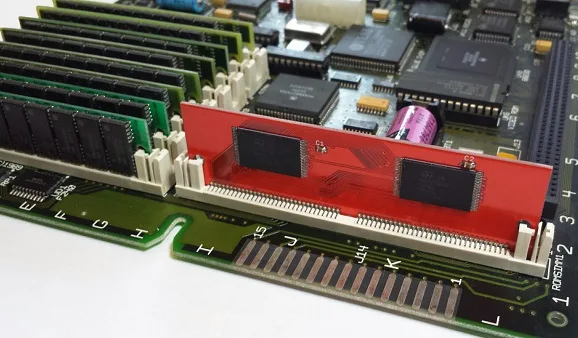
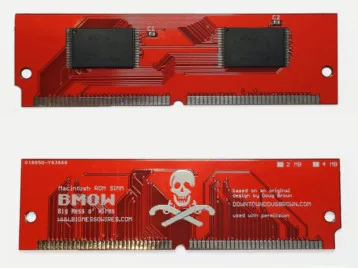
Want to add new features to your old Mac? The Mac ROM-inator II replaces the stock Macintosh ROM SIMM with a 4 MB custom flash memory module. Add a bootable ROM disk, make your system 32-bit clean, gain HD20 hard disk support, and more. The Mac ROM-inator II supports the Macintosh SE/30, IIx, IIcx, IIci, IIfx, and IIsi.
The Mac ROM-inator II is great for breathing new life into your old SE/30 or II-series Macintosh. The ROM disk provides fast and convenient boot-ups and a collection of utility programs, games, and customized startup sounds and icons add a touch of fun. The ROM SIMM comes pre-programmed with a BMOW-made custom ROM containing the following changes:
- ROM disk provides a diskless booting option
- HD20 hard disk support built-in
- 32-bit clean – allows use of System 7.6+ and more than 8MB RAM
- Memory test is disabled for faster booting on 16MB+ systems
- Customized startup chime – major 9th arpeggio
- Happy Mac icon is replaced by a color smiling “pirate” Mac
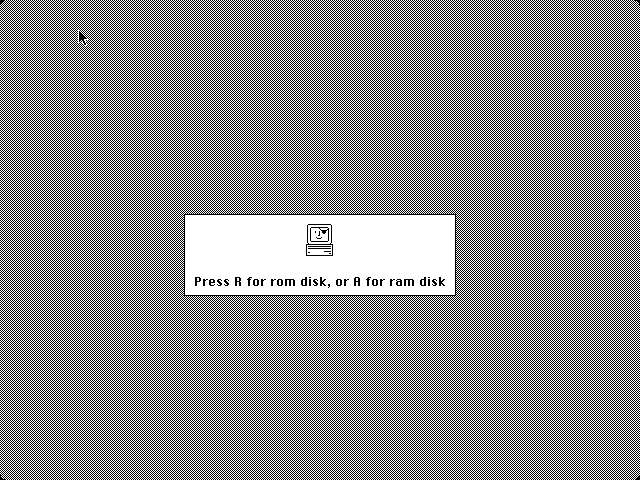
- New startup menu screen displays installed RAM, addressing mode, and ROM disk details
The ROM-inator II is based on Doug Brown’s earlier Mac ROM SIMM design, used with permission.
Downloads
ROM-inator II instruction manual: PDF
BMOW ROM SIMM Programmer 3D-printable case: simm programmer case
BMOW ROM SIMM Programmer 3D-printable case: simm programmer case
The ROM SIMM and pre-programmed ROM contents are compatible with the Macintosh SE/30, IIx, IIcx, IIci, IIfx, and IIsi. The SIMM simply snaps into the ROM socket on the computer’s logic board. Note the Macintosh SE differs from the SE/30 internally, and is not compatible with the ROM-inator II.
CPU accelerators such as the Daystar PowerCache and Turbo series are not compatible with the ROM-inator II.
Some SE/30 hardware may require a shim to ensure ideal fit of the SIMM – see instructions for details.
If running Mac OS System 7.5 or later, some Mac models require a software patch to the System file.
Benefits
HD20 Hard Disk Support – The pre-programmed ROM includes support for HD20-type hard disks, such as the hard disk emulation mode of the BMOW Floppy Emu disk emulator. The stock ROMs in the Macintosh SE/30, IIx, IIcx, and IIfx lack HD20 support, so these computers are normally unable to use HD20 disks. With the ROM-inator II, HD20 support is built-in.
32-Bit Clean – The pre-programmed ROM also makes the Mac 32-bit clean, enabling it to use more than 8 MB of RAM natively without the need for special system enablers or extensions, and to run newer versions of System software that require 32-bit clean ROMs. Some older Macintosh models like the SE/30, IIx, and IIcx have stock ROMs that are “dirty”, meaning they can’t support 32-bit addressing without ROM patches. Using the Mac ROM-inator II and the pre-programmed ROM, the Mac SE/30 can support up to 128MB of RAM!
Faster Startup – The power-on RAM test is disabled in the pre-programmed ROM. This speeds up boot times on Macs with 16 MB or more of RAM, skipping a time-consuming check that can take up to 1 minute otherwise.
ROM Disk
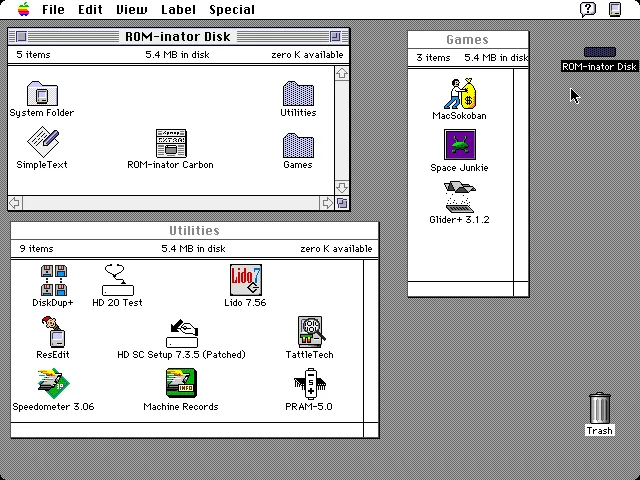
With the ROM-inator II, you have the option to boot normally from a standard startup disk, or to boot from the built-in ROM disk. The included ROM disk is like a recovery partition for your Macintosh, containing System 7.1 and a collection of utility programs and games. With the ROM disk it’s possible to boot a computer with an unformatted or damaged hard disk, and then format or repair it using the utility programs. Or boot a computer with no physical disks at all, to perform troubleshooting and diagnostics.
The ROM disk contents are stored compressed, and are decompressed on the fly as needed, in order to squeeze the largest possible disk image into the available space. This requires 1MB of RAM for caching of decompressed disk sectors, so a minimum of 2MB total system RAM is required. The ROM disk can be mounted as read-only, or as a read-write RAM disk.
The 5.4 MB compressed ROM disk contains:
- System 7.1 with System Update 3.0, Apple CD-ROM Extension 5.3.1, AppleShare and File Sharing Extensions, Networking and Printer Extensions
- After Dark 2.0 screensaver
- HD SC Setup 7.3.5 (patched to support formatting non-Apple hard disks)
- Lido 7.56 (for troubleshooting and formatting SCSI disks)
- SCSI Probe 3.3 (for troubleshooting the SCSI bus)
- TattleTech 2.17 (system diagnostics)
- DiskDup+ (floppy disk duplication tool)
- HD 20 Test (troubleshooting an external HD20 drive)
- PRAM-5.0 (modify or reset Parameter RAM settings)
- Speedometer 3.6 (performance benchmarking tool)
- ResEdit 2.1.3 (programmer’s editor)
- MacsBug 6.2.2 (low-level debug tool)
- MacSokoban
- Space Junkie
- Glider+
Usage
Most of the ROM-inator II’s benefits are automatic: just install the SIMM, and you’ll gain HD20 support, 32-bit cleanliness, and custom sounds and icons. Only the ROM disk requires any user interaction.
When first powered on, a Macintosh with the ROM-inator II will play a customized startup sound, and display diagnostic info about the amount of installed RAM, the current addressing mode, and the detected ROM disk type. After a moment, an interactive startup menu will be displayed.
To boot from the ROM disk as a read-only disk, press the R key on the keyboard. Or to convert the ROM disk into a writable RAM disk, press the A key. Or to bypass the ROM disk, do nothing and wait five seconds. If no keys are pressed, the Macintosh will boot normally from an attached SCSI or HD20 disk, or wait for a floppy disk to be inserted.
Note: If booting from a SCSI disk when the ROM-inator II is installed, any 32-bit enablers or extensions such as MODE32 or 32-Bit System Enabler must be removed from the disk’s System folder.

Programming
For advanced users with external SIMM programming hardware, the Mac ROM-inator II’s contents can be reprogrammed, providing the ultimate in customization. There’s 4 MB of total flash memory available, of which 3.5 MB is available for any purpose like a new ROM disk image, alternate ROM code, or other crazy experiments. Using compression, this is enough for the base 512K ROM image plus a roughly 5.4 MB disk image. Edit the ROM disk image, change the ROM code, or try other crazy experiments. Go nuts! More information is available on the ROM-inator II Programming Page.
Get One Now
Check out the Mac ROM-inator II at the BMOW Store.
James – no problem, here it is:
https://68kmla.org/forums/index.php?/topic/54723-my-se30-w-turbo-040-rom-inator-ethernet-and-81/&do=findComment&comment=580548
Again, I can’t take credit for the actual ROM (as I believe another user got it custom from Doug) but sharing in the hopes someone can either a) adapt for the Turbo 601 (of which I have two) or b) add the ROM disk, which isn’t as simple as concatenating the two ROM sections.
Paul, thank you for the link. I just posted a reply in that thread. I am JDW.
Awesome, thanks for sharing!
Hi, Steve. I’m currently mulling a purchase of a ROMinator II MEGA and programmer, and a FloppyEMU Bundle. Any forthcoming “Spring 2018 Discount Codes”? 🙂
I just had a sale on the ROM-inator MEGA that ended a couple of days ago, and the ROM-inator programmer is on sale now. That’s all for discounts at present.
Hi James,
I shared the link to the ROM in that post/comment. I’ll PM you over there.
Steve – thanks for letting me share that link and for two awesome products. If you have any advice to share in getting the bootable disk .img appended to that 040+ROM file, I’m all ears.
Thank you for your kind reply, Steve!
By the way, if you’re thinking of new products that would benefit the vintage Mac community, especially those of us who own and love the SE/30, I would love to see a replacement PSU product become available at a price point lower than what ARTMIX Japan charges. They want US$200 plus shipping for their model that was last revised in 2009. And it’s not clear if their inventory is old stock from 2009 or something made in the last year either. I say this because I recently had a power supply die, just last night in fact, in one of my SE/30s.
Anyway, thank you for the great gadgets and for your enthusiasm in putting them out there for us to buy. I really appreciate it.
Steve, please forgive me but there\’s \”one more thing.\” 🙂
I\’ve read through the ROM-inator II PDF User Manual and Tutorial, but there is no mention of \”*.bin\” files. The issue that Paul and I are trying to make sense of centers on *.bin files. For detailed information about this, please see my latest post (JDW) on the 68kMLA by clicking on the thread Paul kindly linked for us above. In that post, I (JDW) explain everything very clearly. Any answers you could kindly provide would be greatly appreciated.
Lastly, please be gentle as I\’ve not even pulled the trigger yet on my first ROM-inator II purchase. I have them sitting in my Cart though and am now just trying to gain clarity on what\’s feasible with the technology so as to make good use of my forthcoming purchase.
Many thanks.
*.bin just means a binary file, but isn’t very descriptive, and I don’t use that suffix for any of the ROM-inator data files. From the context, it sounds like this *.bin file is a new base ROM image specific to the Turbo040 accelerator. I’m not sure how that was created, or whether it supports a ROM disk, or whose ROM disk driver and format it supports. You could try concatenating romdisk-standard.dsk from the Downloads section above, program it to your ROM SIMM, and see if it works. If not, then your custom Turbo040 base ROM probably does not include ROM disk support.
This will work with a plain Macintosh II correct? I’m getting back to the Mac scene and I want to make sure it’s compatible with it. I assume it is since it’s in the same series but I’m not sure
Sorry, the original Macintosh II is not compatible. The list of compatible computers is shown in the hardware description at the top of the ROM-inator II page.
I’ve been interested in a ROM-inator II for my SE/30 since I fixed it, however, I wondered if I could custom order one preprogrammed with the original SE/30 boot sound and original Happy Mac icon instead of the Pirate Mac. I’m perfectly fine with the rest of the stock ROM-inator contents, so paying an additional $59 + all of the import duties to go with it for a programmer I’d likely use once, makes little sense. I’d be prepared to pay a bit extra for the customization, of course. I’d just like to keep those two small things stock.
Sorry, but the ROM-inator SIMMs are manufactured with the BMOW image and I can’t do customized one-offs. You may be able to find another ROM-inator owner who can assist you if you don’t want the programmer.
Dan, I was faced with the same issue. And while other ROM-inator owner’s are willing to help, it doesn’t financially make sense. I live in Japan, and most of the willing ROM-inator owners don’t. Am I really going to ship to them and pay for them to ship back to me? Of course not. So I ended up buying a ROM-inator so I could do that one-time programming. In fact, I’ve not even done that yet. But it’s nice that I have the ROM-inator just in case.
Any idea when the MEGA+programmer will be back in stock for purchase?
They won’t be, sorry. The 5 volt flash memory that the ROM-inator SIMM needs was discontinued by Toshiba.
The 64-pin sockets for the SIMM programmer are no longer commonly available, nor are the 5V flash chips for the SIMM. But even before obsolete parts forced a halt to ROM-inator II sales, the business case for it was weak. I was never really able to sell enough of them to make all the time and hassle worthwhile. It was a very high-touch product, with many of the sales leading to marathon-length tech support discussions. Not every electronic gizmo makes a good business. So I couldn’t justify the R&D needed to make a new SIMM design now with a new set of hardware. If a low-capacity Macronix part could just drop-in to the existing SIMM PCB, perhaps a non-programmable 512KB SIMM would be feasible and low effort for me. That would at least give SE/30 owners a path to a 32-bit clean ROM with HD20 support, which was the most common use for the ROM SIMM.
Dang it! I have a ROMinator II (great product, by the way!) but I kept meaning to get a programmer so I could change the ROM Disk image, and never got around to it. Any chance of any sitting around left to sell?
I have a ROM-inator II and I have made myself a System 6 image with Civ, Tetris and Prince of Persia on it.
Can you help me with networking by default?
I assembled the image in mini vMac 26 (the MacII flavour) and I can’t get AppleTalk active by default, MacTCP 2.0.6 doesn’t see the EtherTalk extension and the Network CDEV won’t start because AppleTalk is inactive.
When my IIfx boots up, the EtherTalk extension is visible, but I can’t change anything because it is read-only. As a workaround, I’m having the System Folder transferred to a RAM disk on start-up and that will allow me to configure it manually. However, I’d rather not have to do it on each cold start. Do you have any ideas to make my image network ready on startup?
Thanks very much,
Sean.
Sean,
I did something similar on my IIsi. The EtherTalk extension and AppleTalk are active at boot up because:
1. I set it up to run from RAM, not the ROM. Plenty of RAM on my IIsi.
2. My PRAM seems to correctly recall my AppleTalk settings on boot. Do you have a good battery in your IIfx?
However, I’m not using MacTCP and I am using System 7.
Hi Brian
It’s funny that you should mention batteries (the IIfx needs 2), I had been thinking about them as a source for my woes. I shall check them. I may yet have to boot from System 7 and sacrifice a game.
Ta,
Sean.
Has anyone tried soldering a SIMM socket onto a Macintosh IIvx logic board? The header is there, but no socket. I’d love to test this ROM in my machine!
If anyone has an 8MB and programmer, I would very much appreciate purchasing them. I would like to experiment with the boot code and creating a better ROM image.
Hi, I got an IIcx, which i know the ROM-inator works on (so I would like to order one) and also a IIc, but that one is not supported, is it? is there any way to connect the Rominator to it externaly, or something?
Hi Bernardo.
There is a Mac Iix, a Mac Iicx, and a Mac IIci. There was ever a “Mac Iic”.
If you are actually talking about an Apple Iic, that’s incompatible with the Macintosh line. It’s part of the Apple II family.
Yes Brian, you are right, sorry messed things up. I meant that I have an apple IIc and a Macintosh IIcx.
Cheers
Bernardo,
No worries but you should also check out the Floppy Emu for sale on this site (though currently out-of-stock). It will work as a disk drive replacement for both your computers to allow loading software from an SD card.
Best.
Yes Brian, it´s my intention to get both the Floppy EMu and the ROM inator. Hope I´ll be able to do it soon (our weak currency, here in Colombia, makes everything more difficult, but I´ll make it for sure)
Excellent.
Congrats on your nation’s Tour de France success!
Thank You! Everyone here is going nuts with that…It was very emotional for everyone here…
🙂
Hi Steve, since I don\’t have access to a programmer, if I purchase one of the Atom SIMMs from you, could you pre-program it with my second System 8 ROM image from this MacRumors post?
https://68kmla.org/forums/index.php?/topic/56932-best-rom-disk-for-rominator-gglabs/&do=findComment&comment=619912
Of if you have one last 4MB or 8MB version left for me… 😀
I made an intentional choice with the ROM-inator II Atom to offer one specific and thoroughly-tested BMOW ROM image, which is described here. If you wanted to make a custom ROM, you would need to do the modifications/reprogramming on your own.
Miles, the Atom is only 2MB so Steve’s decision to use System 7.1 on the included ROM disk is sound. That System is the fastest version of System 7 and maximizes software compatibility. But the ROMinator II Atom is still useful even if you don’t use the ROM disk because it’s 32-bit clean, eliminates cold boot RAM checks, and offers HD20 compatibility which I love when using my FloppyEMU because I can create a big disk on my FloppyEMU and boot my SE/30 from it because I have the ROMinator II. Without the ROMinator II, I could only use my FloppyEMU for floppy disk sized disks. But with HD20 compatibility in ROM, I can make a 200MB or larger “floppy” that is bootable and contains a lot of software. The only down side is the FloppyEMU runs at the speed of the floppy serial interface. If you really want fast though, you would need a SCSI2SD solution.
As already stated, I don’t have access to a SIMM programmer, so I can’t reprogram my own, and I haven’t found anywhere else to purchase one. I already own a 2M version so I already enjoy the other benefits – 32bit native, no RAM check, HD20 support. I also bought the full FloppyEmu package to make use of that HD20 support!
My specific use case is a ‘recovery’ environment in the ROM that fits my use case. Ideally I’d like an 8.1 recovery for accessing HFS+, but I haven’t gotten it able to fit in ~2M image yet, which is all that is available, and all that I have to work with right now.
For the record, I took an SE/30 that was running A/UX and had 128M of RAM (but could only address 24 bits worth) and installed a ROM. I was then able to boot A/UX cleanly and address all 128M after modifying the available memory in the Memory Control Panel! I’m still having issues installing with the ROM installed, but it seems to install okay with the stock ROM, then swapping after the install completes cleanly. This is a fantastic product, thank you!!
-Sam
Hi
I have a little problem : i have erased the Mega SIMM for a test, and i have not made a backup from the original pre-programmed ROM (yes, i am dumb)
Is there a way to download it ?
Pierre
Email me and I can help you out.
Thank you !
Which model originally used the major 9th arpeggio chime?
None. It is a custom chime.
Steve – is there any prospect of being able to persuade the Mac to do the programming in system, like with the older ROMinator?
That’s if and when this project gets rebooted as a new version, of course.
https://www.bigmessowires.com/mac-rom-inator/
I don’t think so, because for the Mac II series the write-enable signal isn’t physically connected to the ROM socket on the logic board.
I thought that was what the jumper wire in the earlier version was for
Hi ! is it impossible to use the Rom-Inator with a simple Macintosh SE ?
Thanks for your help !
The regular Mac SE doesn’t use a ROM SIMM, so it’s not compatible. The Mac SE/30 *is* compatible because it’s an entirely different machine – it’s basically a Mac IIx with fewer NuBus slots.
Hi, I’m having a few problems with mine on a IIx.
The first is that the SIMM seemed to be a bit too thin to fit properly in the slot (so I had to pull it forward before the machine would chime), so I had to add some tape on the back to make it fit.
The second is that it seems to refuse to boot my System 7.5 Disk Tools disk — it gets to the Welcome to Macintosh screen and hangs. This doesn’t happen with the stock ROM.
The third is that the Mac only seems to be seeing 4 of my 8 MB of RAM with the ROMinator installed, using either the ROM disk or the copy of 7.1 on the hard drive. Putting back the stock ROM and booting from the hard drive or the 7.5 floppy makes it see the full 8MB of RAM.
Any ideas on solving these problems? Thanks!
Never mind — the missing RAM issue seems to have gone away on its own, and I found the page on patching the System 7.5 System file.
The ROMinator II initially gave horizontal lines until I went back to the manual and added rubber bands to give the ROMinator extra support. It works great now in my Mac SE/30!
Just so everyone is aware, Joel build some 3d Printable supports for the ROMinator II. Check it out at:
https://www.prusaprinters.org/prints/35592-macintosh-se30-rom-clips
I was Wondering if this would Work in my Outbound Notebook, it uses the ROMs from a Mac Plus or an SE/30?
No, it’s only for specific Macintosh II series machines and the SE/30. The list of supported machines is in the Compatibility section above.
The ROM SIMM arrived but did not boot – made a kind of simasimac pattern. Tape necessary to thicken the SIMM a little, it is thinner than the original. After that with the contacts pressed up against the SIMM slightly harder all is well. Great product!
So I’m having an odd problem. I’m trying to use the ROMinator II in a IIfx, which works fine. But I’m also trying to run A/UX on the IIfx, which doesn’t work fine — I’m met with a gray screen unless I swap the original ROM back in. The combination of the ROMinator and A/UX works fine on a IIcx or an SE/30. It was suggested over on 68kMLA that this could be because the A/UX startup is applying a different set of ROM patches to the IIcx and SE/30 vs the IIfx, and that some check the startup application is performing on the ROM is getting it confused. Any idea what check it could be performing?
Sorry, I don’t know. 🙁
I was unable to get A/UX to install on am SE/30 with the ROM installed. I was able to install on stock ROMs and then swap after the fact. Have you tried that?
I completely understand if you don’t want to start baking custom ROMs, but is it possible to order a ROM-inator with the stock SE/30 startup chime? It’s half the nostalgia for me 🙂