

Modern keyboards and mice for your vintage Mac!
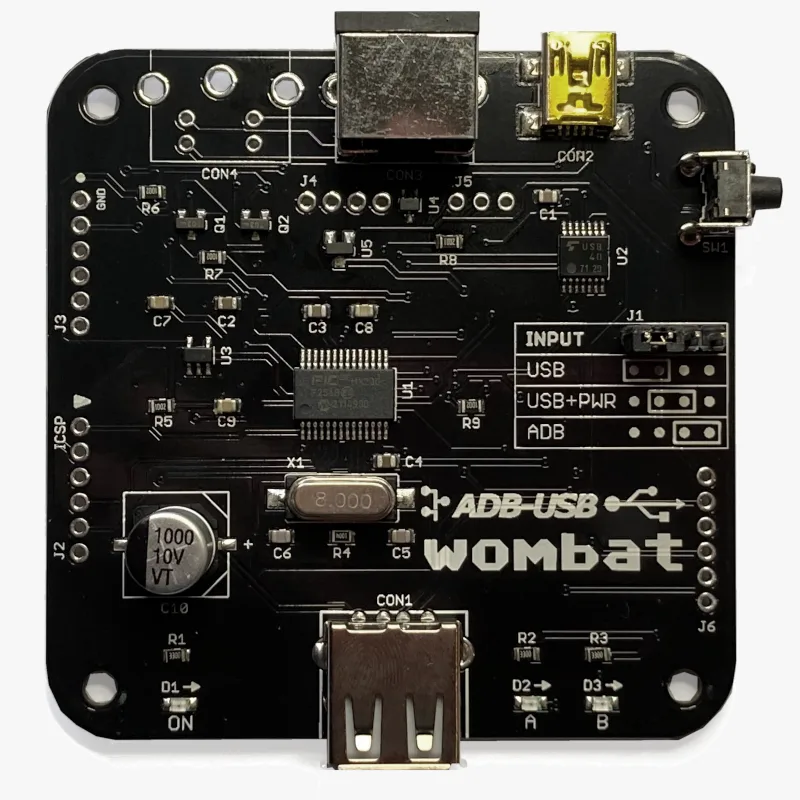
Modern keyboards and mice for your vintage Mac! The Wombat is a bidirectional ADB-to-USB and USB-to-ADB converter for keyboards and mice.
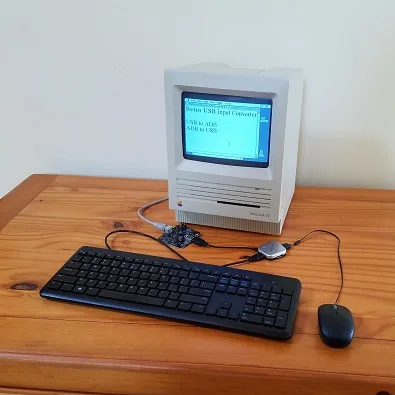
- Connect modern USB keyboards and mice to a classic ADB-based Macintosh, Apple IIgs, or NeXT
- Connect legacy ADB input hardware to a USB-based computer running Windows, macOS, or Linux
No special software or drivers are needed – just plug it in and go.
Now you can finally use a modern optical mouse with your vintage Macintosh, or amuse your coworkers with a retro ADB keyboard on your work machine. ADB-USB Wombat is an indispensable tool for Apple collectors and enthusiasts.
Optional accessories for your Wombat:
Features
BMOW’s ADB-USB Wombat is great for breathing new life into your vintage Apple hardware collection. If you love old Macs, you know ADB keyboards are expensive and hard to find, and ADB mice are sticky and trouble-prone. With the Wombat, you can substitute modern USB input peripherals instead. Or if you swear by your old Apple Extended Keyboard, you can use it with your modern computer. Visitors are sure to smile when they see you running 1980s Apple input peripherals on your current-year machine.
- Bidirectional: converts USB to ADB, or ADB to USB
- Works with your favorite mice and keyboards, including wireless, gaming, and mechanical keyboards
- Use several keyboards and mice at the same time
- On-board power key for remote turn-on
- Custom key mappings
- Supports international keyboards, including ISO, AZERTY, and QWERTZ layouts
- Works with USB switches and KVMs, including IP KVMs like PiKVM
- Startup key combinations work, like Command-Option-P-R to reset PRAM, or Control-Apple-Reset on a IIgs
- Adjustable mouse speed, right-click, and scroll wheel behavior, saved in the Wombat’s memory
- No external power source needed
- Upgradable firmware
The Wombat was developed by Steve Chamberlin, here at Big Mess o’ Wires. See the blog archive for technical details on its software and hardware.

Compatibility
The Wombat works with all Apple computers, keyboards, and mice that have an ADB connector (a 4-pin mini DIN): most early Macintosh models, the Apple IIgs, and some NeXT models. It also works with standard USB keyboards and mice. In ADB-to-USB mode, it works with Windows, macOS, Linux, ChromeOS, or any other operating system that supports standard USB keyboards and mice.
The Wombat has been tested with a very wide range of USB devices, including wireless keyboard and mouse combos, Logitech Bolt receivers, gaming keyboards and mice, mechanical keyboards with QMK or VIA firmware, Apple Magic Keyboards, USB switches, and KVMs. If a USB device doesn’t work as expected, first update to the latest firmware.
Security dongles, graphics tablets, joysticks, and other less common devices aren’t currently supported. The Mac Plus, 512K, and 128K use an older non-ADB connector for keyboards and mice, and aren’t supported.
What are ADB and USB?
 ADB connector
ADB (Apple Desktop Bus) was Apple’s standard for connecting keyboards and mice from 1986 through 1998. It was used by the Apple IIgs and all early Macintosh models except the Mac Plus, 512K, and 128K. The ADB connector is a round 4-pin mini DIN, physically identical to the S-Video connector.
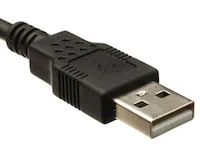 USB-A connector
USB (Universal Serial Bus) replaced ADB, Firewire, PS/2, and other earlier standards, and is used by nearly every computer today. Every Apple computer since 1998 has used USB for its keyboard and mouse.
Converting between the two takes more than a plug adapter. ADB and USB use very different protocols, signal speeds, signal formats, and voltages.
Usage
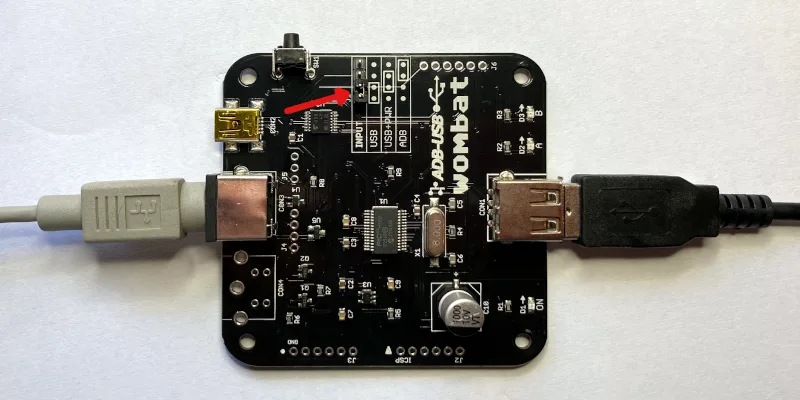
The Wombat converts keyboard and mouse data in one direction at a time, selected by the INPUT jumper on the board. Set the jumper before connecting anything. A wrong jumper setting is the most common cause of problems.
The Wombat board has three connectors:
- CON1: USB-A port, for USB keyboards, mice, and hubs
- CON2: USB Mini-B port, to a USB computer, or to a USB charger for standby power
- CON3: ADB port, to ADB keyboards and mice, or to an ADB computer
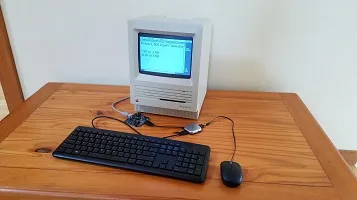
USB to ADB: USB keyboards and mice on a vintage computer
Setup
- Set the jumper to USB, as shown in the diagram.
- Connect CON3 to the computer’s ADB port with an ADB cable. The computer powers the Wombat.
- Connect a USB keyboard or mouse to CON1, or connect a USB hub for several devices.
- Turn on the computer.
Connect the Wombat before turning on the computer, because the computer only looks for ADB devices when it starts up. USB devices can be plugged in and unplugged at any time.
Multiple Devices and Hubs
To connect a keyboard and a mouse at the same time, a simple bus-powered 2-port or 4-port USB hub is recommended. Some hubs with their own external power supply can backfeed power into the Wombat when it’s off, causing problems.
Multiple USB keyboards and mice can be used together, with firmware 3.20 or later. All your devices work at once, combining their input, along with any ADB keyboards and mice connected to the computer.
The Wombat can manage up to 8 total hub ports. Note this is a limit of ports, not connected devices, so using a complex many-port hub is not recommended. Some USB equipment may have invisible ports due to its internal design. A keyboard with two built-in USB ports counts as 3 or 4 ports total, and a 7-port hub counts as 8. Any devices connected to ports beyond the max of 8 are ignored.
Right Button
The Wombat’s preferences determine what the right (secondary) button does on a USB mouse. CTRL LEFT CLICK sends Control + click, which opens contextual menus in Mac OS 8 and later. LEFT CLICK makes it a second left button. RIGHT CLICK sends a true right click, for NeXT computers. Most Macs ignore it.
Scroll Wheel
Scroll wheel movements are turned into virtual presses of the up and down arrow keys. This works well for scrolling documents and file dialogs. This behavior can be turned off in the preferences.
Mouse Speed
If a USB mouse is too slow or too fast, even after adjusting the computer’s mouse control panel, change the Wombat’s mouse speed in the preferences. This applies a scaling factor to the raw motion data.
 Power Key
Real ADB keyboards have a power key with a triangle logo, which serves to turn on many Mac models and also acts as a Reset key for the Apple IIgs. The Wombat has a push button that serves the same purpose. For Macs that support keyboard startup, pushing this button will turn on the computer even when the Wombat is off. The PRINT SCREEN and F13 keys on a USB keyboard also function as a power key, but only while the Wombat is already on. They’re handy for restarting with Control-Command-Power, or Control-Power on some models.
ADB Standby Power
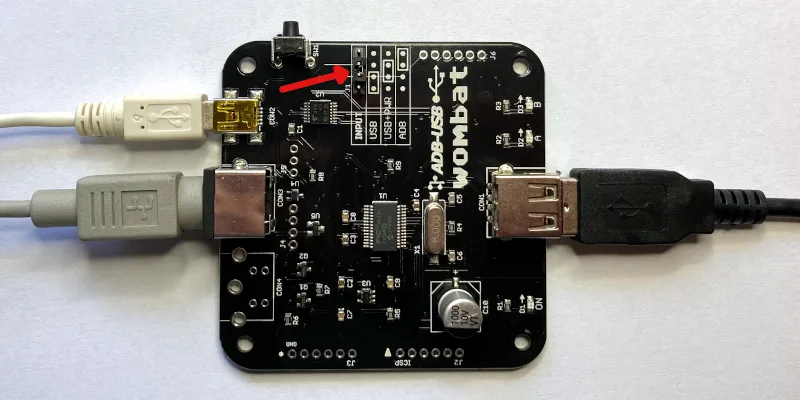
Connections for ADB Standby Power
To turn on a computer from the keyboard’s PRINT SCREEN or F13 key instead of the Wombat button, the Wombat needs power while the computer is off. Set the jumper to USB+PWR, as shown in the diagram, and connect a USB charger to CON2 with a USB Mini-B cable. In USB+PWR mode, the charger must always be connected, regardless of whether the computer is on or off.
ADB to USB: ADB keyboards and mice on a modern computer
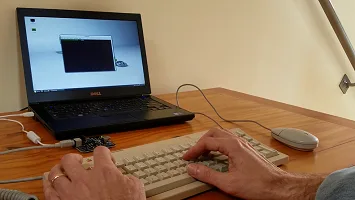
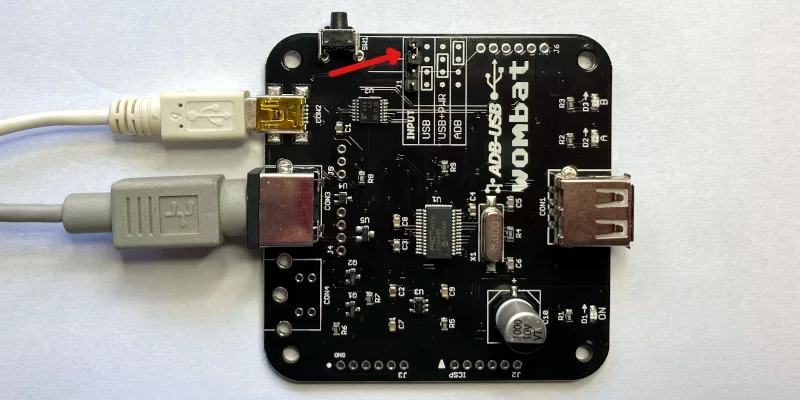
Setup
- Set the jumper to ADB, as shown in the diagram.
- Connect CON2 to the computer’s USB port with a USB-A to Mini-B cable. The computer powers the Wombat.
- Connect an ADB keyboard or mouse to CON3. Daisy-chain more devices through the keyboard’s second port.
- Leave CON1 empty.
The ADB devices appear to the computer as standard USB keyboards and mice, so no drivers are needed. The Wombat supports up to two ADB keyboards and two ADB mice at once, and extra buttons on multi-button mice and trackballs like the Kensington Turbo Mouse. With firmware 3.19 or later, ADB devices can be plugged in and unplugged while the Wombat is running, and are ready to use within a few seconds.
Power Key
The ADB keyboard’s power key is sent to the computer as the USB Power key. You can remap it to another key with the custom key mapping tool.
Status LEDs
During a firmware update or installation of a custom key mapping file, the LEDs show the update status.
During normal operation of the Wombat, the LEDs show the host connection status and input activity.
LED A – On when the Wombat has a working connection to the computer
LED B – Blinks when there’s keyboard or mouse activity
Settings
Preferences
With firmware 3.21 or later, open an empty text document or go to the BASIC prompt and press Control-Shift-Capslock-P. The Wombat types a menu of its current settings:
BMOW Wombat ver 3.21 preferences
1 Keyboard layout is US
2 Mouse speed is 3 of 6
3 Right button is CTRL LEFT CLICK
4 Scroll wheel arrow keys are ON
0 Restore defaults
1234 change, RETURN save, ESC cancel
Press 1 to 4 to change the corresponding setting. Changes take effect immediately, so you can try them out. Press 0 to restore the defaults, RETURN to save, or ESC to cancel and exit the menu without saving. Preferences mode will also auto-cancel after 30 seconds without any key press.
Keyboard layout – US, ISO GENERIC, ISO FR BE, or ISO DE CH. See International Keyboards below.
Mouse speed – 1 (slowest) to 6 (fastest).
Right button – CTRL LEFT CLICK, LEFT CLICK, or RIGHT CLICK. See USB to ADB above.
Scroll wheel arrow keys – ON or OFF, to enable conversion of wheel movements to up/down arrow key presses.
Settings are kept through power-off and firmware updates. Installing a custom key mapping file resets them to the defaults.
Custom Key Mappings
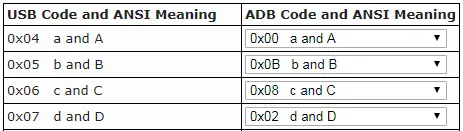
With firmware 0.3.0 or later, you can create customized mapping tables to control the USB/ADB conversion behavior. It’s possible to change which keys act as Command and Option, reassign the function keys, and more. See the Wombat Keymap Tool for details.
Help Commands
Issue help commands to the Wombat using any attached keyboard. Open an empty text document or command prompt first. The Wombat “types” its output there.
Control-Shift-Capslock-P – Enters the preferences menu, to configure the Wombat’s settings. See Preferences above.
Control-Shift-Capslock-V – Shows the firmware version number
Control-Shift-Capslock-I – Shows the USB vendor and product ID or ADB handler ID of each keyboard and mouse
Control-Shift-Capslock-C – Enters keydump mode, which shows the USB key code of each key you press and the ADB key code it’s mapped to (or vice versa). Useful for troubleshooting key mapping problems. Press Control-D to exit.
International Keyboards
The Wombat supports non-US keyboards, including British, Canadian French, Danish, Greek, AZERTY, QWERTZ, and other layouts. Select the matching keyboard layout in your computer’s keyboard control panel, so each key types the correct character.
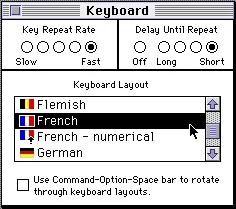
Macintosh System 7 Keyboard Control Panel
Keyboard Layout Setting
The keyboard layout option in the Wombat’s preferences tells it whether your keyboard is US (ANSI) or ISO style, and which keys to use when it generates output for help commands. If the key above TAB acts like the key to the right of LEFT SHIFT, switch the keyboard layout between US and an ISO layout to fix it.
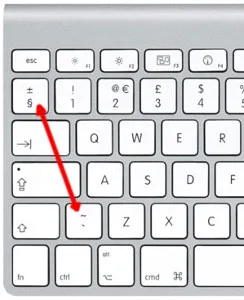
ISO Keyboard Key Swap
Except for the US/ISO selection, the Wombat’s keyboard layout setting doesn’t otherwise affect the characters you type yourself during normal typing – those are determined by your computer’s keyboard settings, not the Wombat settings. Because the Wombat types its menus and messages by pressing keys, however, some letters or symbols in its help command text will come out wrong if its keyboard layout doesn’t match yours. If that happens, use the preferences help command and press 1 to change the layout. The options are:
- US: US, Canadian English, and other ANSI keyboards
- ISO GENERIC: UK, Spanish, Nordic, Dutch, and other ISO QWERTY keyboards
- ISO FR BE: French and Belgian AZERTY keyboards
- ISO DE CH: German, Swiss, Austrian, and other QWERTZ keyboards
USB to ADB with Non-US Keyboards
For best results, use an Apple-brand country-specific USB keyboard. In many countries, PC-style USB keyboards have a different symbol layout than Apple keyboards. They’ll work, but some symbol keys won’t type what’s printed on them.
ADB to USB with Non-US Keyboards
macOS
The first time you connect the Wombat to a modern Mac, the Keyboard Setup Assistant asks you to identify the keyboard. For non-US keyboards, choose an ISO type. If the key above TAB acts like the key to the right of LEFT SHIFT, even with an ISO layout set in the Wombat, make the assistant run again: delete /Library/Preferences/com.apple.keyboardtype.plist, restart the computer, and follow its steps.
Windows
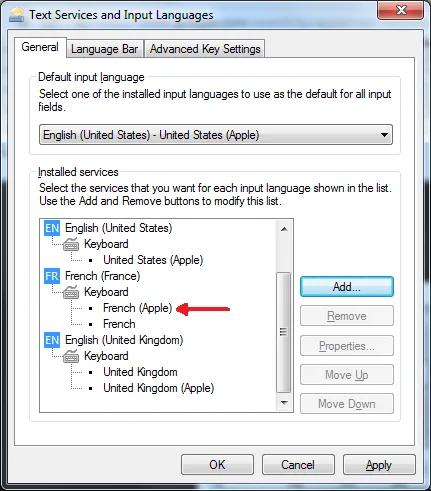
Windows 7 Text Services and Input Languages Control Panel
For country-specific ADB keyboards, choose the Apple version of your keyboard type in Windows’ Text Services and Input Languages control panel, such as United Kingdom (Apple), French (Apple), or German (Apple). If the Apple versions aren’t listed, install the Apple keyboard driver applekeyboardinstaller64.exe.
Firmware
Installing Updates
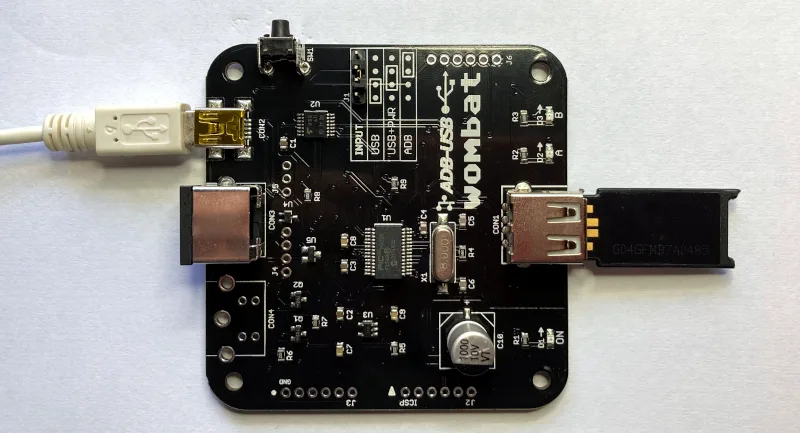
Firmware updates fix bugs and add new features. They don’t change your saved preferences. To update:
- Download the latest firmware from Downloads below, and unzip it.
- Copy firmware.hex to the top level of a FAT32-formatted USB flash drive.
- Disconnect all power from the Wombat, and plug the flash drive into CON1. Don’t use a hub.
- Choose a power source:
- an ADB cable from a running ADB computer to CON3, with the jumper set to USB, or
- a USB Mini-B cable from a USB charger to CON2, with the jumper set to USB+PWR
- Hold down the Wombat’s power key button, and connect the power source.
- Keep holding the button until the A and B LEDs start blinking rapidly, then let go.
- Wait about 10 seconds. When A and B blink slowly together, the update is done.
- Disconnect power, remove the flash drive, and set the jumper back to its normal position.
LED Activity During Updates
During a firmware update or installation of a key mapping file, the A and B LEDs show the progress:
A and B alternate slowly – searching for a firmware or key mapping file
A and B alternate rapidly – installing the firmware or key mapping
A and B blink slowly together – update finished successfully
If B blinks several times while A stays off, there’s an error:
2 blinks – no valid firmware on the chip, Wombat can’t start
3 blinks – no Wombat file found on the USB drive (see the FAQ)
4 blinks – error in the file
5 blinks – error while writing data to the chip
Downloads
ADB-USB Wombat latest firmware version: adb-usb-wombat-3.21 (October 7 2026)
3D-printable enclosure (contributed by James Kelly, Creative Commons license with attribution)
3D-printable enclosure (contributed by James Kelly, Creative Commons license with attribution)
Older firmware versions (try these if the latest version gives you problems)
adb-usb-wombat-3.20 (October 6 2026)
adb-usb-wombat-3.19 (October 5 2026)
adb-usb-wombat-3.18 (October 4 2026)
adb-usb-wombat-3.17 (October 3 2026)
adb-usb-wombat-0.3.16 (October 2 2026)
adb-usb-wombat-0.3.15 (October 2 2026)
adb-usb-wombat-0.3.14 (October 2 2026)
adb-usb-wombat-0.3.13 (October 2 2026)
adb-usb-wombat-0.3.12 (October 2 2026)
adb-usb-wombat-0.3.11 (September 28 2026)
adb-usb-wombat-0.3.10 (September 25 2026)
adb-usb-wombat-0.3.9 (August 9 2023)
adb-usb-wombat-3.19 (October 5 2026)
adb-usb-wombat-3.18 (October 4 2026)
adb-usb-wombat-3.17 (October 3 2026)
adb-usb-wombat-0.3.16 (October 2 2026)
adb-usb-wombat-0.3.15 (October 2 2026)
adb-usb-wombat-0.3.14 (October 2 2026)
adb-usb-wombat-0.3.13 (October 2 2026)
adb-usb-wombat-0.3.12 (October 2 2026)
adb-usb-wombat-0.3.11 (September 28 2026)
adb-usb-wombat-0.3.10 (September 25 2026)
adb-usb-wombat-0.3.9 (August 9 2023)
FAQ
Setup
The Wombat doesn’t work at all. What should I check first?
Check the INPUT jumper. It’s the most common cause of problems. Set it to USB to use USB keyboards and mice with an ADB computer, or ADB to use ADB keyboards and mice with a USB computer. See the diagrams under Usage. When the Wombat has a working connection to the computer, the A LED is on.
In USB-to-ADB mode, my keyboard or mouse works when plugged in directly to the Wombat, but not through a hub.
Try setting the INPUT jumper to USB+PWR and connect a dedicated 5V USB power adapter (like a phone charger) to CON2 with a USB Mini-B cable. The Wombat normally gets its power from the computer’s ADB port, which can only supply a limited amount. USB hubs and USB switches, keyboards with backlights or rechargeable batteries, and some wireless receivers can need more power. Signs of a power problem include devices that work only some of the time, and LEDs and keyboard lights that flicker or dim.
Also try a simple 2-port or 4-port hub. The Wombat can manage up to 8 total hub ports (a limit of ports, not connected devices). Some USB equipment may have invisible ports due to its internal design. A keyboard with two built-in USB ports counts as 3 or 4 ports total, and a 7-port hub counts as 8. Any devices connected to ports beyond the max of 8 are ignored.
In ADB-to-USB mode, my computer doesn’t detect the Wombat.
Some USB cables are charge-only, with no data wires. They power the Wombat, but the computer can’t see it. Try a different USB-A to Mini-B cable, ideally one you’ve used to transfer data with another device.
The A and B LEDs blink back and forth, and the Wombat never starts.
The Wombat is in firmware update mode, which it enters if its power key is held down at power-up. Some S-video cables have pins connected together inside, which looks like a held power key and can also make the Mac turn itself on. Use a real ADB cable or a different S-video cable. The Macintosh Portable causes this too (see Compatibility).
Do I need to connect everything before turning on the computer?
In USB-to-ADB mode, connect the Wombat to the ADB computer before turning it on, because the computer only looks for ADB devices at startup. USB devices can be plugged into the Wombat at any time. In ADB-to-USB mode, ADB devices can be plugged in at any time (firmware 3.19 or later).
Can I use more than one keyboard or mouse?
Yes. In USB-to-ADB mode, connect several USB keyboards and mice through a hub (firmware 3.20 or later), up to the limit of 8 hub ports. In ADB-to-USB mode, daisy-chain up to two ADB keyboards and two ADB mice, such as a keyboard and an Apple Adjustable Keyboard keypad, or a keyboard, trackball, and mouse.
Can I add a second ADB port to the Wombat?
For advanced users only: the board has an empty footprint at CON4 where a second ADB connector (a 4-pin mini DIN) could be soldered, wired in parallel with the main ADB port.
Mouse
My USB mouse moves too slowly (or too fast).
Change the mouse speed in the Wombat’s preferences: press Control-Shift-Capslock-P, then 2. Gaming mice with high polling rates (500 or 1000 Hz) can feel slow and miss some scroll wheel steps. If the mouse’s software can store a polling rate in the mouse, like Razer Synapse or Logitech G Hub, setting it to 125 Hz also helps.
How do I right-click?
By default, the right button of a USB mouse sends Control + click, which opens contextual menus in Mac OS 8 and later. For NeXT computers, set the right button to RIGHT CLICK in the Wombat’s preferences.
Keyboard
Do startup key combinations work, like resetting PRAM or the Apple IIgs Control-Apple-Reset?
Yes, with firmware 0.3.16 or later. On a USB keyboard, the Windows key acts as Command (Apple), Alt acts as Option, and Print Screen, F13, or the power key button on the Wombat board acts as the power key, which is also the Apple IIgs Reset key.
How can I use the help commands?
Make sure an empty text document or BASIC prompt is open, so you can see the Wombat’s text output. Help commands need Control, Shift, Capslock, and a letter key all held down at once, and some inexpensive keyboards can’t recognize that many keys together. Try a different keyboard.
In ADB-to-USB mode, the ADB keyboard doesn’t work after a cold boot, and all its LEDs are lit.
Some Macs, like the iBook G3, switch USB power off and on during startup, which can hang ADB keyboards and mice. Unplug the Wombat and plug it back in.
With an Apple Extended Keyboard, my second ADB device doesn’t respond after a cold boot.
Unplug the second device from the keyboard, and plug it back in.
Compatibility
Can I use the Wombat with a Macintosh Portable?
Yes, with external power. Set the jumper to USB+PWR and connect a USB charger to CON2 with a USB Mini-B cable, confirming that the Wombat is powered before turning on the Portable.
Does the Wombat work with USB switches and KVMs?
Yes. For IP KVMs like PiKVM, NanoKVM, or JetKVM, set the KVM to relative mouse mode. Absolute (tablet-style) pointers aren’t supported.
Does the Wombat work with Logitech Bolt or MX keyboards and mice?
Yes, with firmware 0.3.12 or later. Some older comments on this page say they’re incompatible, but that’s been resolved.
Does the Wombat work with joysticks, gamepads, and graphics tablets?
No, these aren’t currently supported. Coming soon, maybe?
Does the Wombat work with the Mac Plus, Mac 512K, or Mac 128K?
No. These computers use an older non-ADB connector for keyboards and mice, and aren’t compatible with the Wombat.
Firmware
The firmware update can’t find the firmware file (B blinks 3 times).
Make sure firmware.hex is at the top level of the USB drive, not in a folder, and that the drive is formatted as FAT32 with an MBR (Master Boot Record) partition scheme. Most USB drives come formatted this way, but drives formatted on a Mac often use a GUID partition scheme, which won’t work. To reformat a drive on a Mac, use the Disk Utility application. Select the USB drive, choose the option to format the drive as FAT32, and change the partition scheme to MBR before formatting. This erases everything on the drive. If the problem continues, try a different drive. Some large drives don’t work.
How do I check which firmware version I have?
Open an empty text document or go to the BASIC prompt and press Control-Shift-Capslock-V. The Wombat types its firmware version.
Ah. Shame, that. But, hey. Cheers for the explanation!
Hi Steve.
Using a Wombat with an Apple IIgs and a USB keyboard.
I don’t seem to be able to get Control – apple – reset to reboot the computer. Control reset works (using the printscreen key as reset). But combining Control – WIndows – Reset seems to only send a plain reset (no forced warm boot). For giggles tried Control – Win – TheButtonOnTheWombat- same result. Anything I could be doing wrong?
Send me a direct mail (see Contact at the page’s upper-right) and I can help you troubleshoot. The three finger salute also requires holding down all three keys for a longer moment than normal keypresses.
Is there any reason why a Unicomp SpaceSaver M keyboard wouldn’t work with this? I’d love to hook up a “modern” USB keyboard and mouse to my IIgs.
I’m not familiar with that keyboard, sorry. If it’s a standard USB keyboard and not bluetooth or otherwise exotic, then it should work fine.
Here’s the keyboard: http://www.pckeyboard.com/page/FeaturedProducts/UB4ZPHA They don’t list power draw, but I know the old Model M the Unicomps descend from drew more current than average.
Hi Steve
Is it possible to use an ADB keyboard on an iMac (Rev a-D) running Mac OS 8-8.5? If so how? I have a Wombat but it show no activity?
Try updating to firmware 0.3.1, it has a fix for USB keyboard emulation under Mac OS 8 and 9.
Hi!
Its posible to make the power key on ADB keyboards usable in modern PCs?
I mean, can be the wombat modified to interpret the ADB power on key signal and drive it a pin header connected to the power switch header in a motherboard?
Hello,
I just received it for my Apple IIgs. fantastic product! I love it.
just small annoyance to use for Apple IIe software: I have to press ‘Caps Lock’ key to make it upper case mode everytime I powered on…
Is there anyway to set this device to ‘Caps lock’ On when it powered on ?
This devide is just perfect except this one.
lmao isnt it funny that adb is identical to s video? i was wondering why it looked familiar lol
Has anybody tested this specifically with the Dvorak keyboard layout? How about Electric Dvorak on System 6?
TIA!
Great Product, using the Wombat 1.2.3 to type this comment from IIGS ADB keyboard. Keep up the good work. Enjoy reading your blogs, good technical descriptions.
The fixes from firmware 0.3.1 targeted at Mac OS 9 seem to have positively impacted powermacs in general. The few minor issues I had during boot sequence do not show up anymore with adb->usb emulation. Boot keys do work! Thank you for this project, Mr. Steve.
I’m running OpenStep 4.2 in a virtual machine and the mouse jumps erratically. Apparently it’s because the software is designed for the NeXT mouse, which has a different “step”. Will your adapter mimic that after it turns it into USB mouse code? In other words, does it maintain the steps of the ADB mouse so that it won’t jump?
The Wombat has been tested on real NeXT and Mac hardware. If you’re running in a virtual machine on a PC, I don’t think you’ll see any difference vs using a regular USB mouse.
Thanks for the reply. Are you saying that it wouldn’t be worth it for me to try an ADB mouse with the Wombat converter because it wouldn’t look any different to the virtual machine than a regular USB mouse does?
That’s right. But I’ve never used OpenStep inside or outside a VM. A NeXT user forum could probably give you more information.
The left shift, alt, CTRL and both apple keys are not working on my AEK II. I have tried different firmwares (3 of them). Is this a known problem?
Follow-up to above comment. There is a scratch on the keyboard PCB through the trace for all of the above buttons. It isn’t anything to do with the Wombat board. Sorry for the pointless comment.
Many of the keys of my M0116 aren’t going through and some of the keystrokes are typing a “v” when the key is released. Am I doing something wrong?
Sounds like a keyboard or other hardware problem somewhere in the loop. For customer support issues, please contact me directly for 1-on-1 help, using the Contact link at upper right.
I updated from the 0.2.2 firmware to 0.3.1 and had some issues when using an Apple Extended Keyboard II with both a 2018 Mac mini and a 2014 MacBook Pro. On the Mac mini, triggering caps lock would cause the mouse cursor to freeze intermittently. On the MacBook Pro, an almost 1 second delay would occur every time I switched from CAPS LOCK to lowercase and vice versa – making the typing experience somewhat frustrating. Also, the caps lock light would not come on. I’ve downgraded the Wombat’s firmware to 0.3.0 and re-tested. The problems seem to have gone away -and the caps lock light comes on when the key is pressed. I’ll test this version of the firmware on my Mac mini and report back if anyone is interested.
Just tested 0.3.0 firmware with Mac mini and my Apple Extended Keyboard II – works just great! Caps on light works, when active. Unrelated question: Is it safe to hot-unplug the Wombat from the computer’s USB port if the Wombat is connected to an ADB keyboard? Or would I need to shut down the Mac to unplug the Wombat? I seem to recall ADB ports being finicky and requiring the Mac to be shut down before unplugging them. Thanks!
Yes, you can safely hot-plug or unplug the USB side of the Wombat.
Looks like you might be out of town for a bit, I am eager to get a Wombat and perhaps another FloppyEmu, is there an ETA for new stock? Many thanks, loving my FloppyEmu RevB
I expect to have more Wombats available in about a week. More Floppy Emus in 1-2 weeks.
Hi, does current firmware work with current Apple Keyboards?
Is there a particular keyboard you have in mind? The Wombat’s been tested with a wide variety of USB keyboards including Apple ones. It does not work with bluetooth keyboards. I don’t have any of Apple’s hybrid bluetooth/USB keyboards to try, but it should be OK as long as it behaves as a standard USB keyboard.
This is really awesome and I love how it’s dual action. Alas, there were none in stock, but I’ll check back.
I have one question to ask! I have two keyboards on my table and it is a pain on the butt. Because of space factor. Can I use my PC keyboard/mouse to share it between the PC and Apple/gs via a click of a switch? Or can I use the apple // extended keyboard for my apple/gs to be shared between the apple//gs and/or PC using this device?
Thanks in advance.
Hi Steve,
I only have the current hybrid Apple magic keyboard in mind. This is currently for sale and has a very small foot print plus very good typing quality (not like the current laptops…). I can plug it with a lightning cable to a Raspberry Pi or a Windows/Linux PC besides a Mac and it worls well in USB mode. However it must be doing something different as Wombat does not react to keystrokes. It would be great if you could debug that.
cheers,
Ruben
John – The Wombat is a USB/ADB protocol translator, not a KVM switch, so unfortunately it can’t be used in the way you proposed. Ruben – As mentioned I don’t have any of Apple’s hybrid bluetooth/USB keyboards. If I can manage to borrow one, I’ll try to find time to look at it. Raspberry Pi runs a full Linux OS with bluetooth OS support, which may be why the bluetooth/USB hybrid works there.
Two questions;
Is the ADB port on the Mac 8600 supported?
If I place a USB switch between this device and my keyboard/mouse, is there any reason I can’t use them with another PC?
Hi again Steve,
I have used satisfactorily the Hybrid Apple Magic Keyboard in Linux system without bluetooth devices and it works too. Its something going on at USB level.
Hey Steve,
Thank you for your fast reply. I have one more question to ask. I know it have nothing to do with this device, but is there a small flat surface lifter that I can put it on top of the Apple //gs and I can just place the keyboard on top of that surface? This way I can use the keyboard and mouse on top of the apple //gs without covering the ventilation hole on top of the case of the apple //gs and lift it a little bit so air circulation can enter Apple //gs on top of the case and type and use the mouse that way.
Again…please forgive me for asking an off-topic question. I thought this would have solved my keyboard problem and lack of space but it didn’t.
Firmware 0.3.2 fixes compatibility problems with the Apple Magic Keyboard model A1644.
The new firmware is great news ! Top man ! 🙂
I had the same issues as Krishna with both an Apple Extended Keyboard and two different Apple Extended Keyboard IIs. Pressing caps lock caused two USB-C MacBook Pros to lock up (running 10.12 and 10.13). I had to disconnect the Wombat to get control of my Mac back again. Downgrading to 0.3.0 fixed the issues. Let me know if there is anything I can do to help triage and test! Outside of that small issue this thing is AMAZING and very impressive!
Thanks, I confirmed this caps lock behavior. If you need to run the AEK on current MacOS, then I recommend staying with firmware 0.3.0 for now.
The ADB-to-USB mode caps lock LED and MacBook freeze problem is resolved in firmware 0.3.3.
Thanks so much! I tried it and it works great!
Nevermind my previous question, I forgot that it matters how you release the buttons as well. I guess I forgot how these work after so many years.
As an interesting follow up, with the Apple Magic Keyboard, it will automatically revert to the bluetooth once the wombat is turned off (such as turning off the IIGS) physically disconnecting the lightning/usb cord is not necessary, so it’s almost like having a built in keyboard switcher.
Hello, I am
Can I use wombat adb to usb for a mod of an ibook g3?
I think it has an adb 30 pin keyboard?
If not, is there any previous adapter to do so?
Thank you very much
im here because of gravis firebird adb mac joystick, got in goodwill for 5$…any chance this would work with joysticks?
No, sorry. Please see the “compatibility” section above. Security dongles, joysticks, and other less common devices are not supported.
I just thought I would update my last post. I gave up using the magic keyboard, as I think it was taking too much power and preventing a logitech universal receiver from also working intermittently. (To be fair, it might have been the USB 3 hub instead, or the distance between the receiver and mouse.)
In addition, it was a hassle to plug/unplug the magic keyboard (when both were powered up) to look up troubleshooting info on the other computer.
My new setup is using an old apple wired compact usb keyboard. It includes two USB ports (one either side of the keyboard), which i have the logitech universal receiver plugged into. The mouse is a logitech m585, it has a button that allows me to switch between using it with the IIGS, or bluetooth connection to another device (I am using it with my iPad Pro 10.5.) This new setup is working better.
The only tweak I had to do was to remap the switch/power key to F12, for easier apple-control-reset, as the compact keyboard doesn’t have the default reset key (printscreen or f13 I think.)
Hello. I have been using the Wombat for a while, and I have one suggestion I hope you will consider implementing. I have a Logitech M585 mouse, it works great with the wombat, except that the scroll wheel is very, very sensitive. I tend to move the scroll wheel when I don’t intent do, which causes a series of system beeps in GS/OS, when dialog boxes appear that won’d accept up/down commands..
I would love a user option to disable the scroll wheel, or at least change the keyboard key that is pressed when scrolling up/down to a “no press” option. Using the same web tool as can be used to change the key presses would be an ideal place to configure both the keyboard and mouse scrolling.
good idea.
I am still trying to troubleshoot an issue with the mouse one gsos. I get a very choppy mouse after using the wombat for awhile, but I am not sure if it is the iigs/wombat/or m585 wireless mouse.
At random (usually after my daughter is using it for an hour or so) the mouse becomes very choppy. I can fix it by shutting the aux power supply down to the wombat, and it restores normal operation (without shutting down the iigs).
At first, I swapped from a magic keyboard to an Apple usb keyboard (and eliminated a usb hub) but it is still am getting the issue. Now I swapped to a wired mouse, and will see if it reoccurs.
Just a quick update. I tried a couple of mice, but for some reason they both had lots of lag when using under GSOS.
One was an older 15 year old wired mouse, the other was a brand new HP mouse just purchased from Best Buy, both were very sluggish and lagged behind the gsos system I tried both using the mice with my apple keyboard, and using it with no keyboard attached to the wombat (mouse usb or dongle connected only, no hub.). Both mice that lagged with the wombat worked without issue when plugged into my 2017 iMac, they are on the same desk as the IIGS, so I pretty much ruled out any radio interference (and should not have effected a wired mouse anyway.).
I had to revert to using the m585 mouse with my IIGS, but have been too busy to see if the occasional choppiness I mentioned above returns or not. (I moved the dongle from the right side of the keyboard to the left side to see if there was any difference. between the two USB ports on the apple keyboard.)
What other usb (wired or wireless) mice are other wombat users using? I would like to get a known good working model mouse to rule in or out if it is something with my IIGS/Wombat/ or I just happen to have two mice that don’t play well with the wombat.
Steve, has any work been done to allow the reassigning (or elimination) of key presses for the mouse wheel? I would love to try a beta firmware should you decide to implement it in a future firmware.
I had one more idea, but I don’t know if it can be implemented easily. Cold the eject button an an Apple USB keyboard be used for a reset key? I don’t know if that button has a standard code to allow it to be remapped, so it may not be possible. Still, it would be nice to reassign that key to use as a reset, vs my current configuration of f12 if possible.
I use a Logitech wireless mouse/keyboard. Works fine with pretty much everything except for Brutal Delux programs I have tried.
Guys I have one serious question to ask. If the answer to that question is yes..then I will buy it immediately. Can I use this device to hook a normal PC keyboard to run on both on my Apple //gs and my PC?
I want to clarify it. I do not mean a KVM switch. What I mean is this…can I use this device and turn a PC keyboard to work on the Apple //gs and then I get a KVM switch and then from that switch I can hook this one keyboard to switch between PC and my Apple //gs? That is my question just to be clear.
Thanks in advance.
I’ve used a Dell wireless mouse and keyboard KM117. Also tested with many USB wired mice from Microsoft, Logitech, Dell, and no-name generics. Tested with the Dell wireless KM117 keyboard and many wired USB keyboards from Dell, Apple, Microsoft, HP, and generics.
In USB-to-ADB mode, the USB mousewheel is translated into up/down arrow keypresses, which accomplishes something similar in most software. Clicking the mousewheel (button 3) toggles control-click emulation for button 2 on/off. Some Mac software responds to control-click in a similar way to a right mouse button click in Windows.
I’m not sure I understand the question about the KVM but I think the answer is yes. In USB-to-ADB mode the Wombat is basically a black box takes USB keyboard/mouse input and generates ADB keyboard/mouse output.