

Modern keyboards and mice for your vintage Mac!
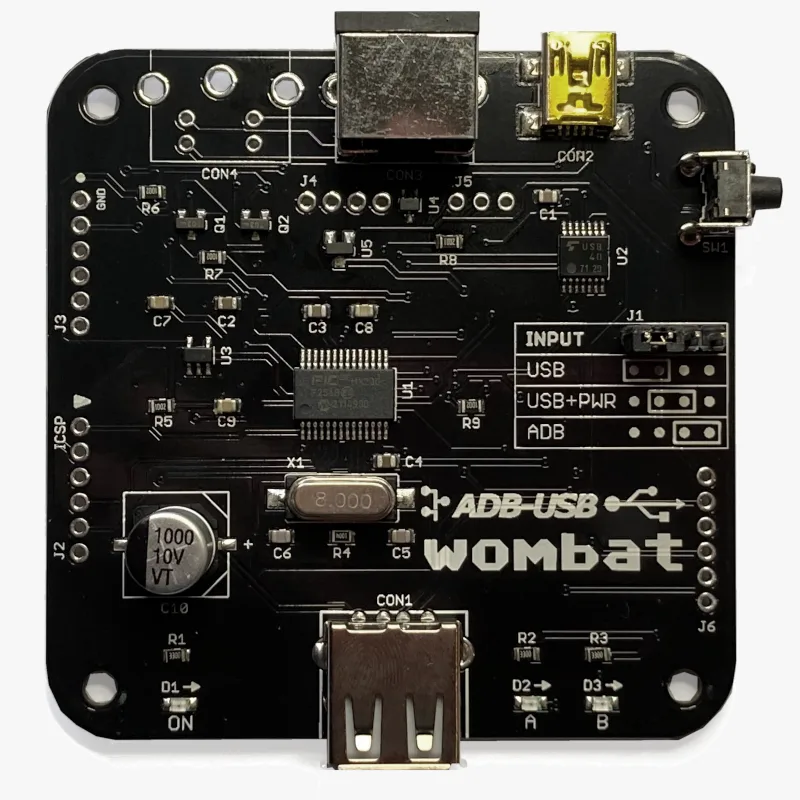
Modern keyboards and mice for your vintage Mac! The Wombat is a bidirectional ADB-to-USB and USB-to-ADB converter for keyboards and mice.
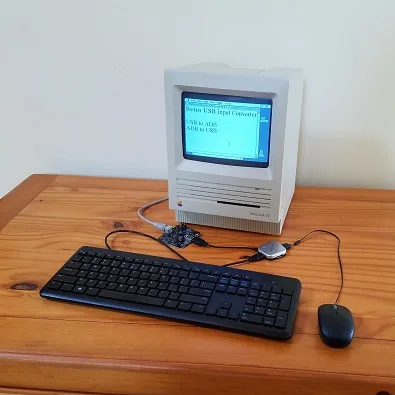
- Connect modern USB keyboards and mice to a classic ADB-based Macintosh, Apple IIgs, or NeXT
- Connect legacy ADB input hardware to a USB-based computer running Windows, macOS, or Linux
No special software or drivers are needed – just plug it in and go.
Now you can finally use a modern optical mouse with your vintage Macintosh, or amuse your coworkers with a retro ADB keyboard on your work machine. ADB-USB Wombat is an indispensable tool for Apple collectors and enthusiasts.
Optional accessories for your Wombat:
Features
BMOW’s ADB-USB Wombat is great for breathing new life into your vintage Apple hardware collection. If you love old Macs, you know ADB keyboards are expensive and hard to find, and ADB mice are sticky and trouble-prone. With the Wombat, you can substitute modern USB input peripherals instead. Or if you swear by your old Apple Extended Keyboard, you can use it with your modern computer. Visitors are sure to smile when they see you running 1980s Apple input peripherals on your current-year machine.
- Bidirectional: converts USB to ADB, or ADB to USB
- Works with your favorite mice and keyboards, including wireless, gaming, and mechanical keyboards
- Use several keyboards and mice at the same time
- On-board power key for remote turn-on
- Custom key mappings
- Supports international keyboards, including ISO, AZERTY, and QWERTZ layouts
- Works with USB switches and KVMs, including IP KVMs like PiKVM
- Startup key combinations work, like Command-Option-P-R to reset PRAM, or Control-Apple-Reset on a IIgs
- Adjustable mouse speed, right-click, and scroll wheel behavior, saved in the Wombat’s memory
- No external power source needed
- Upgradable firmware
The Wombat was developed by Steve Chamberlin, here at Big Mess o’ Wires. See the blog archive for technical details on its software and hardware.

Compatibility
The Wombat works with all Apple computers, keyboards, and mice that have an ADB connector (a 4-pin mini DIN): most early Macintosh models, the Apple IIgs, and some NeXT models. It also works with standard USB keyboards and mice. In ADB-to-USB mode, it works with Windows, macOS, Linux, ChromeOS, or any other operating system that supports standard USB keyboards and mice.
The Wombat has been tested with a very wide range of USB devices, including wireless keyboard and mouse combos, Logitech Bolt receivers, gaming keyboards and mice, mechanical keyboards with QMK or VIA firmware, Apple Magic Keyboards, USB switches, and KVMs. If a USB device doesn’t work as expected, first update to the latest firmware.
Security dongles, graphics tablets, joysticks, and other less common devices aren’t currently supported. The Mac Plus, 512K, and 128K use an older non-ADB connector for keyboards and mice, and aren’t supported.
What are ADB and USB?
 ADB connector
ADB (Apple Desktop Bus) was Apple’s standard for connecting keyboards and mice from 1986 through 1998. It was used by the Apple IIgs and all early Macintosh models except the Mac Plus, 512K, and 128K. The ADB connector is a round 4-pin mini DIN, physically identical to the S-Video connector.
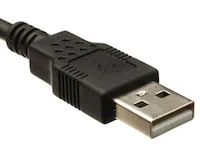 USB-A connector
USB (Universal Serial Bus) replaced ADB, Firewire, PS/2, and other earlier standards, and is used by nearly every computer today. Every Apple computer since 1998 has used USB for its keyboard and mouse.
Converting between the two takes more than a plug adapter. ADB and USB use very different protocols, signal speeds, signal formats, and voltages.
Usage
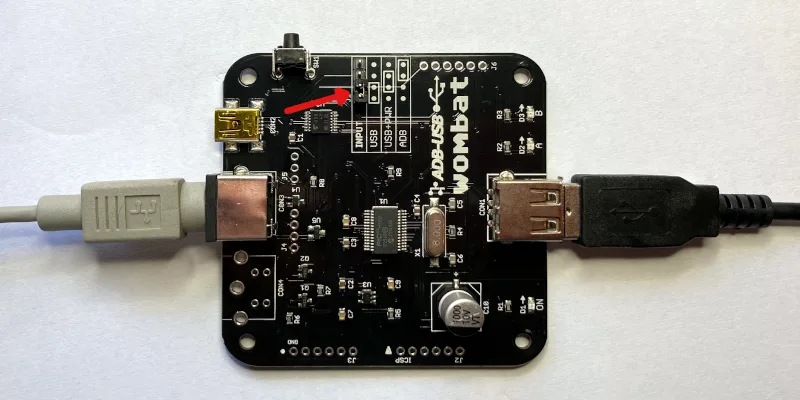
The Wombat converts keyboard and mouse data in one direction at a time, selected by the INPUT jumper on the board. Set the jumper before connecting anything. A wrong jumper setting is the most common cause of problems.
The Wombat board has three connectors:
- CON1: USB-A port, for USB keyboards, mice, and hubs
- CON2: USB Mini-B port, to a USB computer, or to a USB charger for standby power
- CON3: ADB port, to ADB keyboards and mice, or to an ADB computer
USB to ADB: USB keyboards and mice on a vintage computer
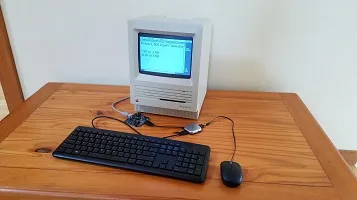
Setup
- Set the jumper to USB, as shown in the diagram.
- Connect CON3 to the computer’s ADB port with an ADB cable. The computer powers the Wombat.
- Connect a USB keyboard or mouse to CON1, or connect a USB hub for several devices.
- Turn on the computer.
Connect the Wombat before turning on the computer, because the computer only looks for ADB devices when it starts up. USB devices can be plugged in and unplugged at any time.
Multiple Devices and Hubs
To connect a keyboard and a mouse at the same time, a simple bus-powered 2-port or 4-port USB hub is recommended. Some hubs with their own external power supply can backfeed power into the Wombat when it’s off, causing problems.
Multiple USB keyboards and mice can be used together, with firmware 3.20 or later. All your devices work at once, combining their input, along with any ADB keyboards and mice connected to the computer.
The Wombat can manage up to 8 total hub ports. Note this is a limit of ports, not connected devices, so using a complex many-port hub is not recommended. Some USB equipment may have invisible ports due to its internal design. A keyboard with two built-in USB ports counts as 3 or 4 ports total, and a 7-port hub counts as 8. Any devices connected to ports beyond the max of 8 are ignored.
Right Button
The Wombat’s preferences determine what the right (secondary) button does on a USB mouse. CTRL LEFT CLICK sends Control + click, which opens contextual menus in Mac OS 8 and later. LEFT CLICK makes it a second left button. RIGHT CLICK sends a true right click, for NeXT computers. Most Macs ignore it.
Scroll Wheel
Scroll wheel movements are turned into virtual presses of the up and down arrow keys. This works well for scrolling documents and file dialogs. This behavior can be turned off in the preferences.
Mouse Speed
If a USB mouse is too slow or too fast, even after adjusting the computer’s mouse control panel, change the Wombat’s mouse speed in the preferences. This applies a scaling factor to the raw motion data.
 Power Key
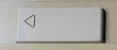
Real ADB keyboards have a power key with a triangle logo, which serves to turn on many Mac models and also acts as a Reset key for the Apple IIgs. The Wombat has a push button that serves the same purpose. For Macs that support keyboard startup, pushing this button will turn on the computer even when the Wombat is off. The PRINT SCREEN and F13 keys on a USB keyboard also function as a power key, but only while the Wombat is already on. They’re handy for restarting with Control-Command-Power, or Control-Power on some models.
ADB Standby Power
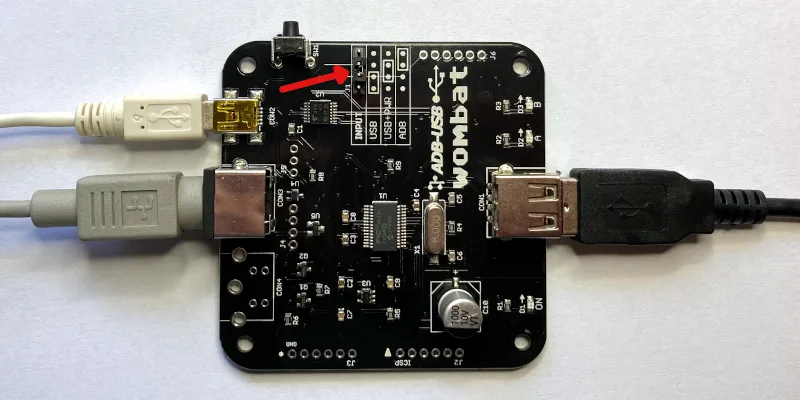
Connections for ADB Standby Power
To turn on a computer from the keyboard’s PRINT SCREEN or F13 key instead of the Wombat button, the Wombat needs power while the computer is off. Set the jumper to USB+PWR, as shown in the diagram, and connect a USB charger to CON2 with a USB Mini-B cable. In USB+PWR mode, the charger must always be connected, regardless of whether the computer is on or off.
ADB to USB: ADB keyboards and mice on a modern computer
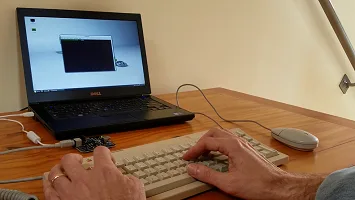
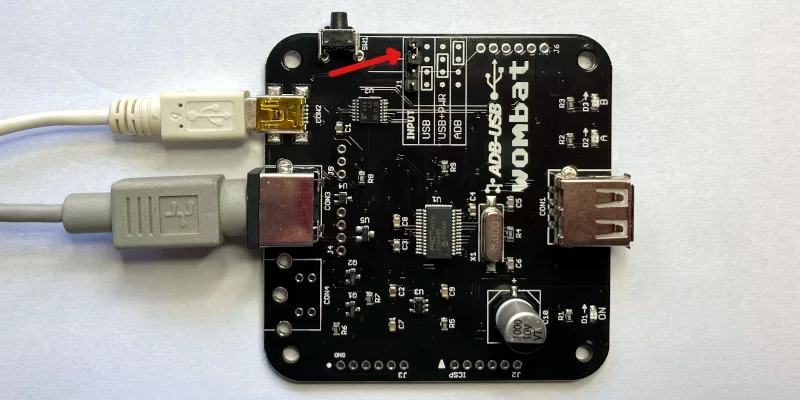
Setup
- Set the jumper to ADB, as shown in the diagram.
- Connect CON2 to the computer’s USB port with a USB-A to Mini-B cable. The computer powers the Wombat.
- Connect an ADB keyboard or mouse to CON3. Daisy-chain more devices through the keyboard’s second port.
- Leave CON1 empty.
The ADB devices appear to the computer as standard USB keyboards and mice, so no drivers are needed. The Wombat supports up to two ADB keyboards and two ADB mice at once, and extra buttons on multi-button mice and trackballs like the Kensington Turbo Mouse. With firmware 3.19 or later, ADB devices can be plugged in and unplugged while the Wombat is running, and are ready to use within a few seconds.
Power Key
The ADB keyboard’s power key is sent to the computer as the USB Power key. You can remap it to another key with the custom key mapping tool.
Status LEDs
During a firmware update or installation of a custom key mapping file, the LEDs show the update status.
During normal operation of the Wombat, the LEDs show the host connection status and input activity.
LED A – On when the Wombat has a working connection to the computer
LED B – Blinks when there’s keyboard or mouse activity
Settings
Preferences
With firmware 3.21 or later, open an empty text document or go to the BASIC prompt and press Control-Shift-Capslock-P. The Wombat types a menu of its current settings:
BMOW Wombat ver 3.21 preferences
1 Keyboard layout is US
2 Mouse speed is 3 of 6
3 Right button is CTRL LEFT CLICK
4 Scroll wheel arrow keys are ON
0 Restore defaults
1234 change, RETURN save, ESC cancel
Press 1 to 4 to change the corresponding setting. Changes take effect immediately, so you can try them out. Press 0 to restore the defaults, RETURN to save, or ESC to cancel and exit the menu without saving. Preferences mode will also auto-cancel after 30 seconds without any key press.
Keyboard layout – US, ISO GENERIC, ISO FR BE, or ISO DE CH. See International Keyboards below.
Mouse speed – 1 (slowest) to 6 (fastest).
Right button – CTRL LEFT CLICK, LEFT CLICK, or RIGHT CLICK. See USB to ADB above.
Scroll wheel arrow keys – ON or OFF, to enable conversion of wheel movements to up/down arrow key presses.
Settings are kept through power-off and firmware updates. Installing a custom key mapping file resets them to the defaults.
Custom Key Mappings
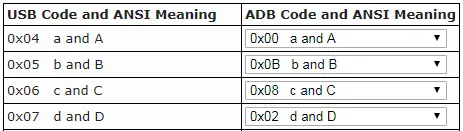
With firmware 0.3.0 or later, you can create customized mapping tables to control the USB/ADB conversion behavior. It’s possible to change which keys act as Command and Option, reassign the function keys, and more. See the Wombat Keymap Tool for details.
Help Commands
Issue help commands to the Wombat using any attached keyboard. Open an empty text document or command prompt first. The Wombat “types” its output there.
Control-Shift-Capslock-P – Enters the preferences menu, to configure the Wombat’s settings. See Preferences above.
Control-Shift-Capslock-V – Shows the firmware version number
Control-Shift-Capslock-I – Shows the USB vendor and product ID or ADB handler ID of each keyboard and mouse
Control-Shift-Capslock-C – Enters keydump mode, which shows the USB key code of each key you press and the ADB key code it’s mapped to (or vice versa). Useful for troubleshooting key mapping problems. Press Control-D to exit.
International Keyboards
The Wombat supports non-US keyboards, including British, Canadian French, Danish, Greek, AZERTY, QWERTZ, and other layouts. Select the matching keyboard layout in your computer’s keyboard control panel, so each key types the correct character.
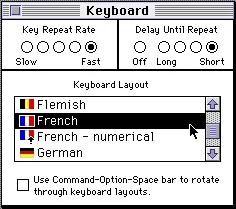
Macintosh System 7 Keyboard Control Panel
Keyboard Layout Setting
The keyboard layout option in the Wombat’s preferences tells it whether your keyboard is US (ANSI) or ISO style, and which keys to use when it generates output for help commands. If the key above TAB acts like the key to the right of LEFT SHIFT, switch the keyboard layout between US and an ISO layout to fix it.
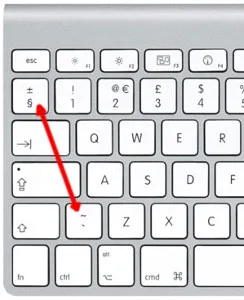
ISO Keyboard Key Swap
Except for the US/ISO selection, the Wombat’s keyboard layout setting doesn’t otherwise affect the characters you type yourself during normal typing – those are determined by your computer’s keyboard settings, not the Wombat settings. Because the Wombat types its menus and messages by pressing keys, however, some letters or symbols in its help command text will come out wrong if its keyboard layout doesn’t match yours. If that happens, use the preferences help command and press 1 to change the layout. The options are:
- US: US, Canadian English, and other ANSI keyboards
- ISO GENERIC: UK, Spanish, Nordic, Dutch, and other ISO QWERTY keyboards
- ISO FR BE: French and Belgian AZERTY keyboards
- ISO DE CH: German, Swiss, Austrian, and other QWERTZ keyboards
USB to ADB with Non-US Keyboards
For best results, use an Apple-brand country-specific USB keyboard. In many countries, PC-style USB keyboards have a different symbol layout than Apple keyboards. They’ll work, but some symbol keys won’t type what’s printed on them.
ADB to USB with Non-US Keyboards
macOS
The first time you connect the Wombat to a modern Mac, the Keyboard Setup Assistant asks you to identify the keyboard. For non-US keyboards, choose an ISO type. If the key above TAB acts like the key to the right of LEFT SHIFT, even with an ISO layout set in the Wombat, make the assistant run again: delete /Library/Preferences/com.apple.keyboardtype.plist, restart the computer, and follow its steps.
Windows
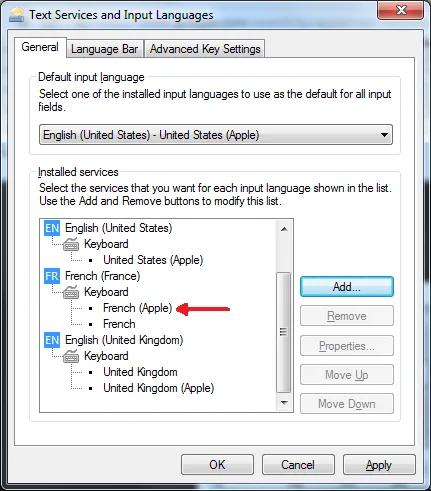
Windows 7 Text Services and Input Languages Control Panel
For country-specific ADB keyboards, choose the Apple version of your keyboard type in Windows’ Text Services and Input Languages control panel, such as United Kingdom (Apple), French (Apple), or German (Apple). If the Apple versions aren’t listed, install the Apple keyboard driver applekeyboardinstaller64.exe.
Firmware
Installing Updates
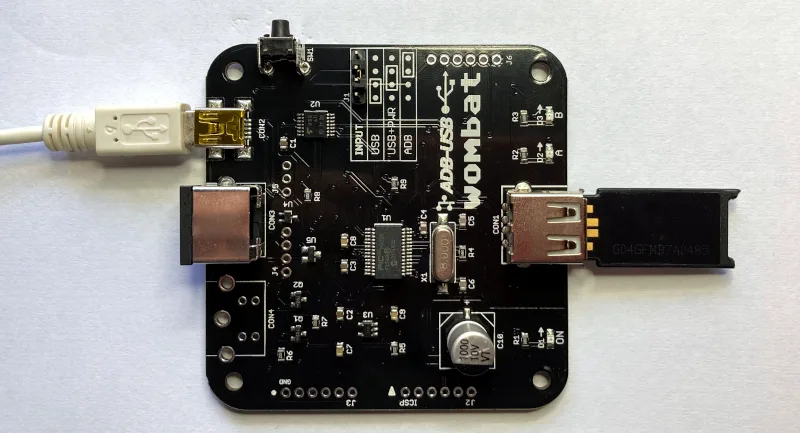
Firmware updates fix bugs and add new features. They don’t change your saved preferences. To update:
- Download the latest firmware from Downloads below, and unzip it.
- Copy firmware.hex to the top level of a FAT32-formatted USB flash drive.
- Disconnect all power from the Wombat, and plug the flash drive into CON1. Don’t use a hub.
- Choose a power source:
- an ADB cable from a running ADB computer to CON3, with the jumper set to USB, or
- a USB Mini-B cable from a USB charger to CON2, with the jumper set to USB+PWR
- Hold down the Wombat’s power key button, and connect the power source.
- Keep holding the button until the A and B LEDs start blinking rapidly, then let go.
- Wait about 10 seconds. When A and B blink slowly together, the update is done.
- Disconnect power, remove the flash drive, and set the jumper back to its normal position.
LED Activity During Updates
During a firmware update or installation of a key mapping file, the A and B LEDs show the progress:
A and B alternate slowly – searching for a firmware or key mapping file
A and B alternate rapidly – installing the firmware or key mapping
A and B blink slowly together – update finished successfully
If B blinks several times while A stays off, there’s an error:
2 blinks – no valid firmware on the chip, Wombat can’t start
3 blinks – no Wombat file found on the USB drive (see the FAQ)
4 blinks – error in the file
5 blinks – error while writing data to the chip
Downloads
ADB-USB Wombat latest firmware version: adb-usb-wombat-3.21 (October 7 2026)
3D-printable enclosure (contributed by James Kelly, Creative Commons license with attribution)
3D-printable enclosure (contributed by James Kelly, Creative Commons license with attribution)
Older firmware versions (try these if the latest version gives you problems)
adb-usb-wombat-3.20 (October 6 2026)
adb-usb-wombat-3.19 (October 5 2026)
adb-usb-wombat-3.18 (October 4 2026)
adb-usb-wombat-3.17 (October 3 2026)
adb-usb-wombat-0.3.16 (October 2 2026)
adb-usb-wombat-0.3.15 (October 2 2026)
adb-usb-wombat-0.3.14 (October 2 2026)
adb-usb-wombat-0.3.13 (October 2 2026)
adb-usb-wombat-0.3.12 (October 2 2026)
adb-usb-wombat-0.3.11 (September 28 2026)
adb-usb-wombat-0.3.10 (September 25 2026)
adb-usb-wombat-0.3.9 (August 9 2023)
adb-usb-wombat-3.19 (October 5 2026)
adb-usb-wombat-3.18 (October 4 2026)
adb-usb-wombat-3.17 (October 3 2026)
adb-usb-wombat-0.3.16 (October 2 2026)
adb-usb-wombat-0.3.15 (October 2 2026)
adb-usb-wombat-0.3.14 (October 2 2026)
adb-usb-wombat-0.3.13 (October 2 2026)
adb-usb-wombat-0.3.12 (October 2 2026)
adb-usb-wombat-0.3.11 (September 28 2026)
adb-usb-wombat-0.3.10 (September 25 2026)
adb-usb-wombat-0.3.9 (August 9 2023)
FAQ
Setup
The Wombat doesn’t work at all. What should I check first?
Check the INPUT jumper. It’s the most common cause of problems. Set it to USB to use USB keyboards and mice with an ADB computer, or ADB to use ADB keyboards and mice with a USB computer. See the diagrams under Usage. When the Wombat has a working connection to the computer, the A LED is on.
In USB-to-ADB mode, my keyboard or mouse works when plugged in directly to the Wombat, but not through a hub.
Try setting the INPUT jumper to USB+PWR and connect a dedicated 5V USB power adapter (like a phone charger) to CON2 with a USB Mini-B cable. The Wombat normally gets its power from the computer’s ADB port, which can only supply a limited amount. USB hubs and USB switches, keyboards with backlights or rechargeable batteries, and some wireless receivers can need more power. Signs of a power problem include devices that work only some of the time, and LEDs and keyboard lights that flicker or dim.
Also try a simple 2-port or 4-port hub. The Wombat can manage up to 8 total hub ports (a limit of ports, not connected devices). Some USB equipment may have invisible ports due to its internal design. A keyboard with two built-in USB ports counts as 3 or 4 ports total, and a 7-port hub counts as 8. Any devices connected to ports beyond the max of 8 are ignored.
In ADB-to-USB mode, my computer doesn’t detect the Wombat.
Some USB cables are charge-only, with no data wires. They power the Wombat, but the computer can’t see it. Try a different USB-A to Mini-B cable, ideally one you’ve used to transfer data with another device.
The A and B LEDs blink back and forth, and the Wombat never starts.
The Wombat is in firmware update mode, which it enters if its power key is held down at power-up. Some S-video cables have pins connected together inside, which looks like a held power key and can also make the Mac turn itself on. Use a real ADB cable or a different S-video cable. The Macintosh Portable causes this too (see Compatibility).
Do I need to connect everything before turning on the computer?
In USB-to-ADB mode, connect the Wombat to the ADB computer before turning it on, because the computer only looks for ADB devices at startup. USB devices can be plugged into the Wombat at any time. In ADB-to-USB mode, ADB devices can be plugged in at any time (firmware 3.19 or later).
Can I use more than one keyboard or mouse?
Yes. In USB-to-ADB mode, connect several USB keyboards and mice through a hub (firmware 3.20 or later), up to the limit of 8 hub ports. In ADB-to-USB mode, daisy-chain up to two ADB keyboards and two ADB mice, such as a keyboard and an Apple Adjustable Keyboard keypad, or a keyboard, trackball, and mouse.
Can I add a second ADB port to the Wombat?
For advanced users only: the board has an empty footprint at CON4 where a second ADB connector (a 4-pin mini DIN) could be soldered, wired in parallel with the main ADB port.
Mouse
My USB mouse moves too slowly (or too fast).
Change the mouse speed in the Wombat’s preferences: press Control-Shift-Capslock-P, then 2. Gaming mice with high polling rates (500 or 1000 Hz) can feel slow and miss some scroll wheel steps. If the mouse’s software can store a polling rate in the mouse, like Razer Synapse or Logitech G Hub, setting it to 125 Hz also helps.
How do I right-click?
By default, the right button of a USB mouse sends Control + click, which opens contextual menus in Mac OS 8 and later. For NeXT computers, set the right button to RIGHT CLICK in the Wombat’s preferences.
Keyboard
Do startup key combinations work, like resetting PRAM or the Apple IIgs Control-Apple-Reset?
Yes, with firmware 0.3.16 or later. On a USB keyboard, the Windows key acts as Command (Apple), Alt acts as Option, and Print Screen, F13, or the power key button on the Wombat board acts as the power key, which is also the Apple IIgs Reset key.
How can I use the help commands?
Make sure an empty text document or BASIC prompt is open, so you can see the Wombat’s text output. Help commands need Control, Shift, Capslock, and a letter key all held down at once, and some inexpensive keyboards can’t recognize that many keys together. Try a different keyboard.
In ADB-to-USB mode, the ADB keyboard doesn’t work after a cold boot, and all its LEDs are lit.
Some Macs, like the iBook G3, switch USB power off and on during startup, which can hang ADB keyboards and mice. Unplug the Wombat and plug it back in.
With an Apple Extended Keyboard, my second ADB device doesn’t respond after a cold boot.
Unplug the second device from the keyboard, and plug it back in.
Compatibility
Can I use the Wombat with a Macintosh Portable?
Yes, with external power. Set the jumper to USB+PWR and connect a USB charger to CON2 with a USB Mini-B cable, confirming that the Wombat is powered before turning on the Portable.
Does the Wombat work with USB switches and KVMs?
Yes. For IP KVMs like PiKVM, NanoKVM, or JetKVM, set the KVM to relative mouse mode. Absolute (tablet-style) pointers aren’t supported.
Does the Wombat work with Logitech Bolt or MX keyboards and mice?
Yes, with firmware 0.3.12 or later. Some older comments on this page say they’re incompatible, but that’s been resolved.
Does the Wombat work with joysticks, gamepads, and graphics tablets?
No, these aren’t currently supported. Coming soon, maybe?
Does the Wombat work with the Mac Plus, Mac 512K, or Mac 128K?
No. These computers use an older non-ADB connector for keyboards and mice, and aren’t compatible with the Wombat.
Firmware
The firmware update can’t find the firmware file (B blinks 3 times).
Make sure firmware.hex is at the top level of the USB drive, not in a folder, and that the drive is formatted as FAT32 with an MBR (Master Boot Record) partition scheme. Most USB drives come formatted this way, but drives formatted on a Mac often use a GUID partition scheme, which won’t work. To reformat a drive on a Mac, use the Disk Utility application. Select the USB drive, choose the option to format the drive as FAT32, and change the partition scheme to MBR before formatting. This erases everything on the drive. If the problem continues, try a different drive. Some large drives don’t work.
How do I check which firmware version I have?
Open an empty text document or go to the BASIC prompt and press Control-Shift-Capslock-V. The Wombat types its firmware version.
Thank you. Next week I am ordering it official. I want it for my Apple //s. I have literally one keyboard and mouse on the table and I do not have space to fit more keyboard mouse. Ones I buy a KVM switcher…third party….and with this device I can then use only one keyboard and mouse for my PC, my Apple //gs, and even for my third device. Next week I am ordering it.
I will be buying this device https://youtu.be/VfA1SgG35Sg?t=64 so I have one keyboard and mouse to control my PC and my Apple //gs at the same time.
I know this was asked in the past with the answer being \”possible\” but there may be technical difficulties. Using the Wombat in ADB mode, I would like to be able to map the \”Power Key\” to something, such as an additional function key, but I don\’t see a way to do this with the mapping tool. Keycode dump simply states \”0x7F7F is not mapped\”.
Any progress on if this is possible?
There haven’t been any changes to the Wombat firmware for a while, but I’m still thinking about the power key and a few other possible items.
Steve
Thank you for the Wombat! It has worked for me flawlessly, for the last two years! I have tried many similar products, and yours works with no problem as soon as I plug it in!
Firmware 0.3.5 is now available. It adds support for remapping the Power Key for ADB-to-USB mode, adds an option to disable ‘mouse wheel arrow keys’ behavior for USB-to-ADB mode, enables separate keycodes for left/right side modifier keys for Apple Extended Keyboard II, and hopefully resolves a user-reported problem with the Appledesign keyboard (unverified).
This firmware update looks good for me. I was able to stop the wheel scrolling the mouse, which helps with inadvertent presses.
One very picky, small detail. I did the Control-Shift-Capslock-V command, while having the IIGS teach app open, to ensure the firmware update took, and it gave me
ADB+uSB ombat firmware 0.3.5
I guess there was a slight miscode with the lowercase u, and the W missing in the response?
I would love one other change, but it may not be possible. I would love to reconfigure the apple eject key as a power key, but it appears to not be recognized by the wombat at all (no response in output mode, on both a wired apple keyboard, and the magic keyboard.) Is the eject key on an apple keyboard so nonstandard that it can’t be read by the wombat?
One more thing to close out a previous post, since putting a logitech universal receiver in the left usb socket of my apple wired keyboard, I have not had any of the weird skipping issues that I had when the same dongle was in the right usb keyboard socket. Very odd, it may be my particular keyboard, or maybe something with this particular model. Hopefully it does not reoccur, but so far so good.
The missing Shift-U and ‘W’ keys you’re seeing in the firmware version string are likely due to slow keyboard polling speed of the IIGS when running GS/OS. It can’t keep up with the super-human typing speed of the phantom typist that writes out that text. Try it in built-in BASIC (not with GS/OS) and you’ll see the response is much faster.
USB key translation is provided for USB HID group 7 (standard keyboard) as shown here: http://www.freebsddiary.org/APC/usb_hid_usages.php The Wombat isn’t designed for USB consumer media controls, game controllers, or other similar input, sorry.
You are correct, I went to the basic prompt (instead of Teach on my unaccelerated IIGS) and it displayed fine.
I didn’t know that the eject key was non-standard for USB devices, I guess I am so use to apple products by now I just assumed it was a standard and not a media control.
I previously configured the f12 key as the reset/power key, so it works well enough for the open apple-control-reset command.
Being the silly person I am; I got so excited to order the Wombat and Floppy Emu that I forgot to order an ADB cable. When I came back to order the ADB cable I notice a Wombat case that is out of stock. Will there be supplies in the near future? I prefer to order the cable and wombat case together if that will be an option. Thanks
I’ll hopefully have more soon, but I don’t know exactly when. The supplier that I use is prioritizing medical orders for Covid-19 equipment and hasn’t processed my order yet.
That is fine by me. That’s a legitimate priority. I will keep an eye on the site and place an order for both when available. Thank you for the response.
Putting my freshly-delivered Wombat to use, I plugged it between the KeyboardIO M01 and my Quadra 650. The M01’s LEDs came on, but – no input on the Mac.
Reading through the keyboardio threads, I came across the distinction between USB’s Boot Protocol and Report Protocol. The story appears to be that a keyboard or mouse will start up talking (full-featured) Report Protocol, and will on demand switch back to the simpler Boot Protocol. The M01 lets you switch modes with “left fn + left shift + esc”, and once I did that, my Quadra read my typing just fine (modulo a few layout differences, which I will probably handle with a custom keyboard map on the Mac).
My question: Does the Wombat firmware attempt to switch USB HID devices to Boot Protocol (which it appears to require)? Could it grow the ability?
Sorry to hear you’re having some trouble. It looks like the KeyboardIO M01 is a DIY keyboard with customizable firmware? There are several discussion threads on the web about problems with that keyboard not working with the BIOS on a variety of computers:
https://community.keyboard.io/t/getting-the-model-01-to-work-correctly-on-a-mac-in-efi-boot-mode/2128
https://github.com/keyboardio/Kaleidoscope/issues/220
https://github.com/keyboardio/KeyboardioHID/issues/59
I think the KeyboardIO handles this somewhat differently from most other keyboards. It appears this issue may have been fixed in a later KeyboardIO firmware version, or you can compile your own firmware that defaults the keyboard to boot protocol. Or use the key combination to manually switch modes, as you’re doing now.
The Wombat’s low-level USB communications are part of the software library provided by Microchip for the PIC32 – I didn’t write them, so it’s difficult to determine exactly what they’re doing and more difficult to change them. It does support the report protocol (it reads report descriptors, rather than assuming a hard-coded report format). But it’s possible that its keyboard report descriptor parsing is buggy or limited in some way related to N-key rollover. That might explain the behavior you’re seeing. A nice overview can be found at https://deskthority.net/wiki/USB#Protocol_problem
In theory this could be addressed with a Wombat firmware change, since it’s all at the software level. But without more knowledge of the Microchip USB code and access to a KeyboardIO M01 for testing, it would be very difficult.
I just received my Wombat case in the mail today. The case is actually smaller than my wombat and the screw holes do not line-up. Has anyone else had this issue? Did the Wombat itself recently get a new smaller design? I have only had mine for a few weeks.
Some wrongly-cut cases got out recently, sorry. Please send me an email to arrange a replacement or refund.
That’s too bad. Has to be pretty annoying to you. I just sent you an email. A replacement would be great. Appreciated.
Hello Steve: A customer had a question for me, I perused through the previous enquiries above and did not see this specifically. Apologies in advance if I missed it and perhaps there is a way to set this in firware…appreciate your time. Best regards Rob Blessin Question below…
Is there a way to keep the caps lock state and keyboard light in sync with the caps lock key?
Apple Extended Keyboard M0115 to Wombat 0.3.5 to iMac 10.15 via USB-B
The light reflects the state but the key position is inverted. Unplugging etc can get it right but it gets out of sync.
Yeah, the Wombat can get confused if your keyboard has a locking caps lock key, and you boot the system with caps lock already on. I don’t have a great solution for that, but as an alternative to unplugging the keyboard you could use one of the help commands like Control-Shift-Capslock-V. This has the side-effect of changing the caps lock state.
Don\’t sweat it…
I have in the meantime udated the M01 to the latest firmware, no difference.
On the other hand, I found that my layout problems were based on a misunderstanding – the 3rd level characters printed on some keys are accessible with Fn, not opt/alt gr. So, after switching to US layout, the mapping works perfectly as-is.
Which leaves manually switching the M01 into boot mode (left Fn – shift – esc) when I start using it with the Wombat, which I can manage. 😉
Amazing little box that bridges thirty years of technological change!
This could be a new FAQ item:
Q: What should I do if the PWR LED lights dimly and the Wombat does not respond when connected to my computer via ADB?
A: Check that jumper block is set to USB. Check the ADB input voltage. Check PSU voltages. Check motherboard power capacitors.
With the input jumper block set to USB, I connected my Wombat to a PowerBook 190 and powered up. The PWR LED lit dimly, A and B LEDs stayed off, and the Mac didn’t recognize the USB mouse I was using. I wish I had checked Vcc at the Wombat then, but I didn’t. I tried setting the jumper to USB+PWR and connecting a USB charger and it worked fine, for a while. Some days later, the PB190 failed to power on. It was then that I realized the SMD electrolytics were leaking barely visible electrolyte fluid onto the board. After a swap to a motherboard without that problem, the Wombat worked perfectly off ADB without the USB charger. I’ve ordered parts to recap both boards. I’m kind of amazed the old one was working at all. While not technically a Wombat problem, with Macs of this vintage, I’m sure I’m not the only one who will have this issue.
The Wombat is amazing! I tried it the other way around with an Apple Extended Keyboard (ADB) on a USB KVM switch. Buggy nightmare on both Windows and Mac prior to the firmware update, but an absolute dream after.
I freed up some space in the PB190 by swapping the hard drive for an SSD, so I plan to remove some connectors from the Wombat (to save space) and install it plus a USB RF transceiver for my wireless optical mouse permanently inside the PB190.
I just bought this and it seems to work well with my PowerBook 5300 on system 7.6.1 and 8.1, except if I try and cycle between programs too quickly (I.e. between Netscape Navigator>Stuffit Expander>Finder] the mouse often slows down to a crawl; only remedied by restarting the 5300. I did check firmware and I’m a few revs behind (0.3.2 or 0.3.3 I think). If I update to 0.3.5 will it fix this issue? I’m also using a USB 3.0 hub, though I’ve tried a 90s USB 1.1 hub and had the same problem. Logitech mouse is M705 v1 and keyboard is a backlit Drevo Calibur. I wonder could the backlight on the KB be problematic? I’ve not yet tried powering the Wombat from the wall, maybe that might help?
Thanks.
Matt, this sounds like a possible hardware problem. Send me a direct mail (see Contact at the page’s upper-right) and I can help you troubleshoot.
I excitedly bought a Wombat in the hope that I could finally make full use of my Apple Adjustable Keyboard (https://en.wikipedia.org/wiki/Apple_Adjustable_Keyboard). I’ve used a Griffin iMate in the past, but was always bummed out that I couldn’t use the special volume keys, and thought it would be fun to be able to make the microphone key to Siri.
Unfortunately, it doesn’t seem like the Wombat sees any of these special keys. Is there something special about them? Anyone else know anything about it? Could it, perhaps, be fixed with a Firmware update? (I’m not 100% sure what firmware I’m running, since the Caps lock key on the Apple Adjustable Keyboard doesn’t seem to be recognized either, but I just bought it my Wombat a week ago).
Thanks!
A bit more information– I did get it to get into key dump mode, and the volume up / volume down / microphone / mute keys are absolutely not picked up at all.
Was this some sort of weird alternate ADB mode that was only ever used for the Apple Adjustable Keyboard?
Hi Greg, you can see the list of Wombat-mappable keys in its Keymap tool here: https://www.bigmessowires.com/wombat-keymap.html Key translation is provided for USB HID group 7 (standard keyboard) as defined here: http://www.freebsddiary.org/APC/usb_hid_usages.php The media keys are a separate category of USB HID input, rather than simply being additional keys on a standard keyboard. The Wombat isn’t designed for USB consumer media controls, game controllers, or other similar input, sorry.
Is it possible there’s a problem with your keyboard’s caps-lock? I’ve heard from other people with the Apple Adjustable Keyboard who did not mention any issue with caps-lock. If there’s a hardware problem, please use the Contact link at upper-right to send me the details, and we’ll sort it out.
Hello, I wanted to first thank you for your product. I’ve been using Wombat with my ADB keyboard (the original, the one that came with the Apple IIgs) with my Macbook for a year or two now and it has been fantastic.
I do want to drop a tip off to everyone here – the Caps Lock is a toggle key but it only activates when you depress it to the on position (it does not send a keycode when it is untoggled. HOWEVER! if capslock is off, and you accidentally lightly brush it with your finger, sometimes it sends the capslock on, meanwhile you haven’t actually clicked it.
So you can turn caps lock off by simply brushing your finger against it a second time. It’s hokey but it works, (until I decide to permanently desolder that pesky critter!) 😀
Now is my question.. This keyboard is phenomenal for me but there is an obvious lack of function keys. I was able to use the Macbook’s function keys when necessary since they happened to be right there, but I am moving this setup to a Windows environment where they use function keys more often. I see in a comment above a request to use the power key as a “Fn” or additional modifier key. I was wondering if there was any movement on that or if it was possible at all.
For example, Power-1 could be F1, Power-2 could be F2, .. up to F12 if you count the – and = keys on the top number row. Power-Numpad-+ and Power-Numpad– and Power-Numpad-* could be volume up/down/mute, and there’s other mappings like brightness, lock, search, printscreen, scrolllock, play/pause/forward/backward, etc etc, all those fun keys, that could be mapped to user specification.. So Option-Power-4 would for example be my Alt-F4 to close the window.
Please let me know if this is possible. Thanks again!
Caps lock is deceptively complicated. Some keyboards have a locking mechanical key – they send a keydown event when pressed and locked, and send a keyup event when pressed a second time and released. Other keyboards have a caps lock that behaves like any other key, sending keydown and keyup events every time it’s pressed, and letting the OS handle the caps toggling behavior. The Wombat tries to gracefully handle both types.
Support for mapping the ADB power key was added in firmware 0.3.5. If you want it to behave like a special modifier key, then you could use key mapping software on your computer to configure the desired behaviors for each key combo.
Hi Steve,
Do you have any indication about the expected input delay in ADB to USB mode? For typing it won’t matter much, but every now and then I like to play rhythm games where input delay does matter.
Could you let me know the expected delay in miliseconds and if this varies and if it is a (somewhat) predictable set amount of time? That way I could calibrate the settings to work with the input delay.
Cheers
I haven’t attempted to measure that, and it’s a complicated question to answer. If I had to guess, I’d say a variable delay somewhere around 1-25 milliseconds. USB keyboards operate on a polling basis – typically the computer polls the keyboard every 8-10 milliseconds, so even without a Wombat converter there won’t be a fixed interval between a USB keypress and when the computer becomes aware of the keypress.
I guess it would depend on what polling rate the Wombat functions at then right?
I think most high-end keyboards use the maximum USB polling rate of 1/1000s, cheaper ones may use 1/125s or maybe 1/250s.
Maybe I’ll just have to witness it myself, I think ADB has some delay as well (I don’t remember if it used polling, I think it does right?) so your estimate of around 1-25ms is likely close to the truth. If I’m really bored I may grab the scope and figure it out haha.
Thanks!
Hi!
When it will be available?
Just posting to subscribe for the next batch notification. This looks like it’d be an awesome addition to my old PowerMac.
Hi, I love my Wombat and how it has been improving these years. I wish there was something similar supporting PS2. Is there anybody aware of a Wombat like adapter for the PS2? I mean an adapter that can accept (non PS2 supporting) USB keyboard entry (therefore the adapter behaving as usb host) and send the PS2 signals to a PC?
@Ruben yes, those devices exist. They’re fairly expensive since they’re designed as you described. One option is the Tripp lite Minicom. I’ve seen a couple of others but can’t vouch for how well any of them work. Another option is a KVM switch that supports both PS/2 and USB. That’s a bigger, more expensive solution, but sometimes they can be obtained cheaply as old data center equipment.
To bring it back to topic, I use a type of USB KVM switcher with multiple Wombats, which allows me to not only control more than one Apple IIgs from the same keyboard, but send them commands via serial to USB HID device to remote control them from a modern PC. The only drawback is that the Wombat doesn’t seem to like the USB mouse output from the switcher, though I haven’t been able to determine why.
@adbj the USB HID report descriptor from your KVM might be in some unexpected format that confuses the Wombat. The report descriptor parser in the Wombat firmware isn’t as robust as what you’ll find in a full-fledged OS like Windows. If you dump the descriptor and send it to me, I can take a look at it. https://web.archive.org/web/20180703143648/https://github.com/tmk/tmk_keyboard/wiki/HID-Report-Descriptor
is there any way to upgrade the firmware to be able to recognize more devices by their hardware PIN. as-well as add support for joysticks & their unique product ID # there are alot of joystick specifically for a mac ADB i would like to use.
I’ve been playing with using a YubiKey with the Wombat. My use case is authenticating against a netatalk-classic server that is configured to use the YubiKey PAM module for network shares.
I noticed that the Wombat will only use key events from the last-plugged-in USB keyboard (which the YubiKey emulates). This isn’t a huge problem — I plug in the YubuKey, press the button for auth, then unplug it after I’m done.
Being forgetful and constantly misplacing the YubiKey on the desk, though, I wonder … is it possible for the Wombat to handle key events for all attached keyboards?
@Chris maybe try a USB hub with built-in on/off switches for each USB port. That should support what you’re doing without needing to constantly unplug and replug devices. I would have to look at the firmware to see about supporting multiple USB keyboards simultaneously by the Wombat hardware. I’m not sure how the presence of multiple keyboards would be handled by classic Apple operating systems like System 7 or the Apple IIGS.
@Anonymous what do you mean by hardware PIN? Please see the “compatibility” section above. Security dongles, joysticks, and other less common devices are not supported, sorry.
Because several people have asked about joysticks, I’ll expand on this. ADB defines standard communication protocols for keyboards and mice, and support for these two ADB devices is built into the ROM of classic Macs and the Apple IIGS (and presumably ADB-equipped NeXT computers too). There’s no standard protocol for joysticks. Back in the 80s and 90s you would have installed some control panel software (essentially a driver) on your Mac for your specific brand and model of ADB joystick. This software would support a custom ADB communication protocol, as well as configuration of the joystick options. I think the Gravis Gamepad control panel also had a menu of popular contemporary games, which you could choose from in order to make the Gamepad compatible with those games. I’m not sure what that did under the hood. As far as I know, the joystick communication protocols were vendor- and model-specific, and undocumented.
In practice, most of the popular ADB joysticks were made by Gravis. They made the Gamepad, Mousestick II, and Blackhawk.
In theory, one could get samples of each of these joysticks, connect them to an old Mac, install the appropriate control panel software (if you can find it), and sniff the ADB bus with a logic analyzer. With work, it might be possible to reverse-engineer the communication protocols used.
But even if you did all that, what then? If you’re wanting to use the Wombat to connect an ADB joystick to a USB computer, where does the equivalent of the control panel software go? How would you configure the Gamepad settings? And can something like a Gamepad with its digital direction pad mimic the behavior of a USB joystick, which is normally an analog device?
Similar challenges exist if you’re wanting to use the Wombat to connect a USB joystick to an ADB computer. The Wombat would need to choose a specific brand and model of ADB joystick to mimic, and you would need to install a control panel on your Mac. The Apple IIGS and NeXT would probably have to be excluded. And then what about the driver or configuration software for the USB joystick? Where would that go? There’s no simple answer.
There may be solutions to all of this, but hopefully I’ve explained why it’s much more complex than basic keyboard and mouse conversion. At best, any joystick conversion would likely still be tied to specific vendor/model assumptions and would lack the normal configuration software. Without the configuration software, it might be awkward or impossible to set up the joystick as needed for any given game.
> \”I’m not sure how the presence of multiple keyboards would be handled by classic Apple operating systems like System 7\”
On my Mac II and SE/30 I could use two keyboards at the same time on ADB, an Apple Keyboard II and an Extended II. Worked perfectly fine. If you think over it, it has to work, as early Powerbooks had ADB, and you could use both the internal and external keyboard simultaneously (same with mice). I’m quite sure that the internal keyboards of early PowerBooks were attached via ADB internally.
Ah, and there even was an official Apple keyboard that was 2 keyboards: the Ergonomic. It consists of a main keyboard, and attached via ADB, a number/cursor pad. So Mac OS should support 2 keyboards in general.
Steve,
Does using the wombat in usb power mode effectively relieve the adb port of whatever power it would normally be providing to the device? I’m thinking of scenarios where i have split the adb port into two, with the wombat plugged into one port, and traditional adb device(s) plugged into the other.
That’s right, in that situation the Wombat will draw power from the external USB supply rather than from the computer.
And how much could the Wombat pass through? Because I have a chain like 68kMac Wombat RaspberryPi4 OTG port. And the Pi consumes up to 7W via its combined OTG and USB-C port.
(Why I do this? PiKVM. KVM in “software”, where I attached an 68k-Mac to have Audio/Keyboard/Mouse over IP)
I don’t have a spec for that. The power and ground traces are 16 mil on 1 ounce copper. 7 watts is 1.4 amps continuous, which is maybe OK for those traces but I wouldn’t want to go any higher. It’s probably better to connect your Pi to a good quality powered USB hub, and plug that into the Wombat.
Any plans for a converter for the 512k? Or does anyone make one?
Firstly – I love my Wombat!! Thank you for such an awesome project!
I\’m using my Wombat with a \”PiKVM\” (https://github.com/pikvm/pikvm) to remotely control my Mac. The Wombat currently reports itself as a \”relative\” device type, which normally what a mouse uses. PiKVM defaults to using an absolute type (like a tablet) since it makes the mouse a lot easier to use through remote control. PiKVM can be reconfigured to work in relative mode, but its pretty laggy and annoying.
What is the feasibility of adding an \”absolute\” mode to Wombat so have it emulate a tablet interface if the USB device uses absolute positioning? Is this something you would consider implementing?
I don’t think so, sorry. Both USB and ADB mice are relative position devices.
FYI The Ultimate Hacking Keyboard (uhk.io) does _not_ seem to be compatible with the Wombat at this time. I’m not sure if this is related. but may be helpful: https://github.com/UltimateHackingKeyboard/firmware/issues/70
The link mentions something about the UHK key rollover behavior, but I don’t think that should matter for the Wombat.
Any idea when the Wombat will be back in stock? Thanks!
Looking at mid to late April for Wombat restock.
This is a great product!
Wombat has been announced as temporarily out of stock, but is it late?
When it arrives, I will purchase it from Japan at the same time as Floppy Emu and Mac ROM-inator II 🙂
Thanks.
It’s been delayed, but I’m hoping to take delivery this week.
Hi There, would it be possible to get an email, when this is back in stock please? Thanks in advance
Sorry for the continued Wombat delay. I’m now expecting to have more stock available next week. I’ll send a notice to those who’ve requested it when they’re restocked.
Hi Steve,
Great Product! It was somewhat magical to see my new Logitech mouse working on a computer that is more than 30 years older than it!
Unfortunately, I have not been able to get my keyboard to work with it. 🙁 I\’ve tried a few different firmware revisions (0.3.5, 0.3.3 & 0.3.0) and both with & without a hub but had no luck so far. Both \”ON\” & \”A\” light up nicely but \”B\” refuses to light up no matter what key I press…
The keyboard in question is Feenix Autore with an ANSI layout. The system that I am trying to control is a Macintosh SE running Mac OS 7.5.3. I\’ve had no problems with it on Mac OS 9 (over USB on iMac G3) or the latest Windows/macOS versions, so I found it a bit odd that it does not respond over ADB at all.
Do you have any tips/tricks that I could try? I am happy to provide any additional information that might help solve the problem! 🙂
– Paul
I’ve heard the same from other VidHD users. It appears to be an incompatibility caused by how VidHD holds the computer in reset for a long time at power-up. A work-around is to press the Emu’s reset button after the computer starts up.
Hi Paul, for customer support problems, please use the Customer Support link to get 1-on-1 help. This sounds like a possible incompatibility with that specific model of keyboard.
Hi Steve, any updates regarding the restock? Thank you!