

Bring new life to your old Apple computer!
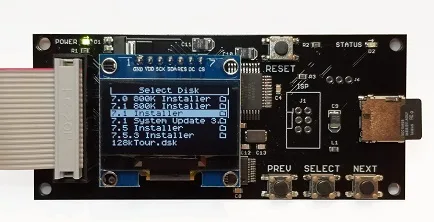
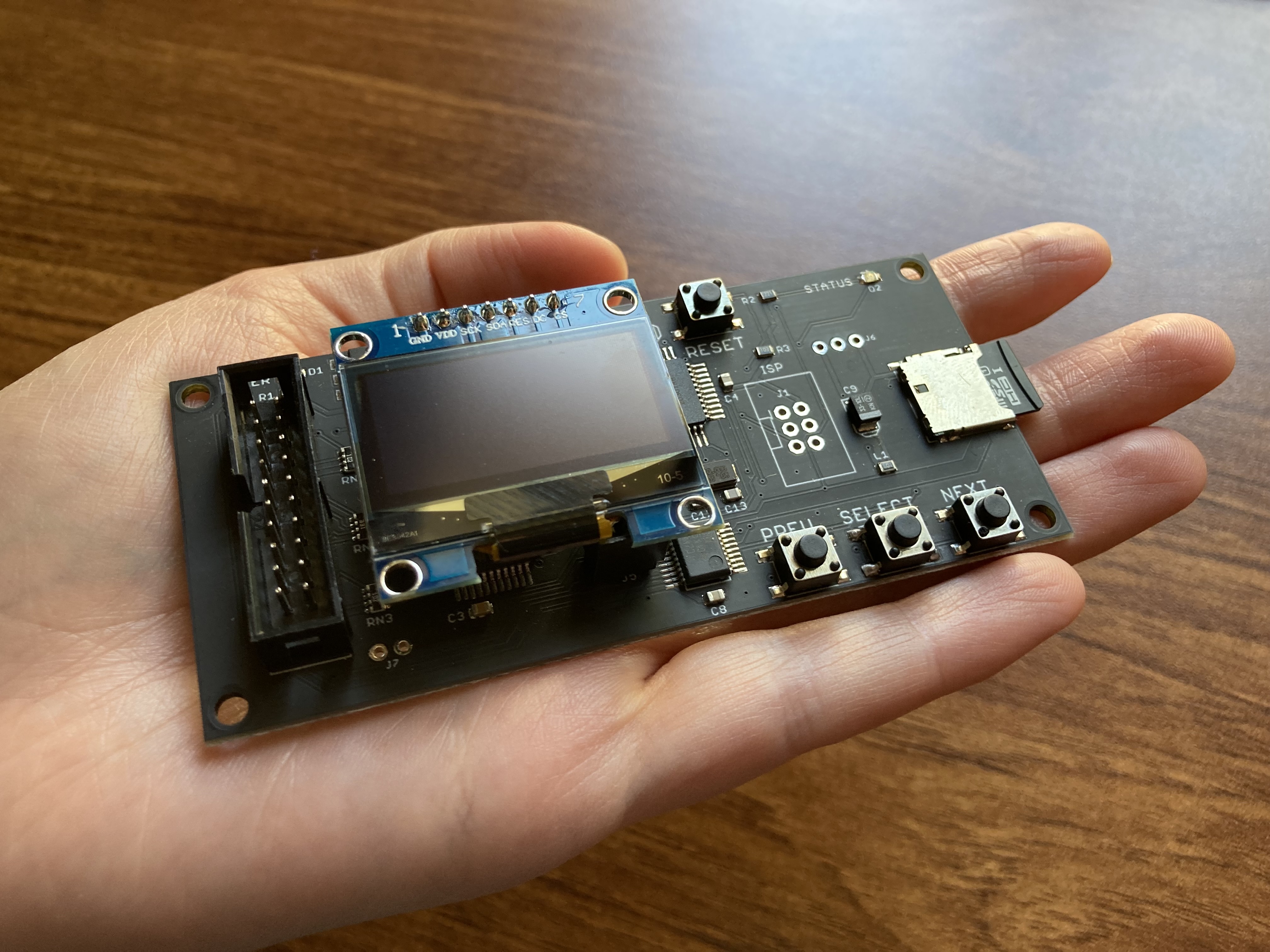
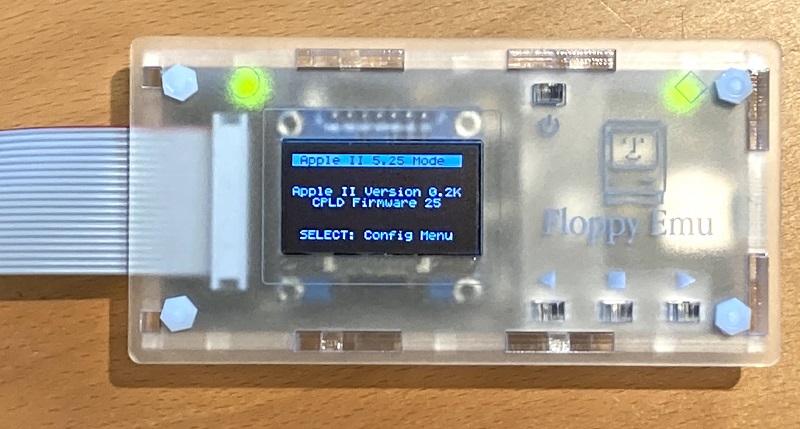
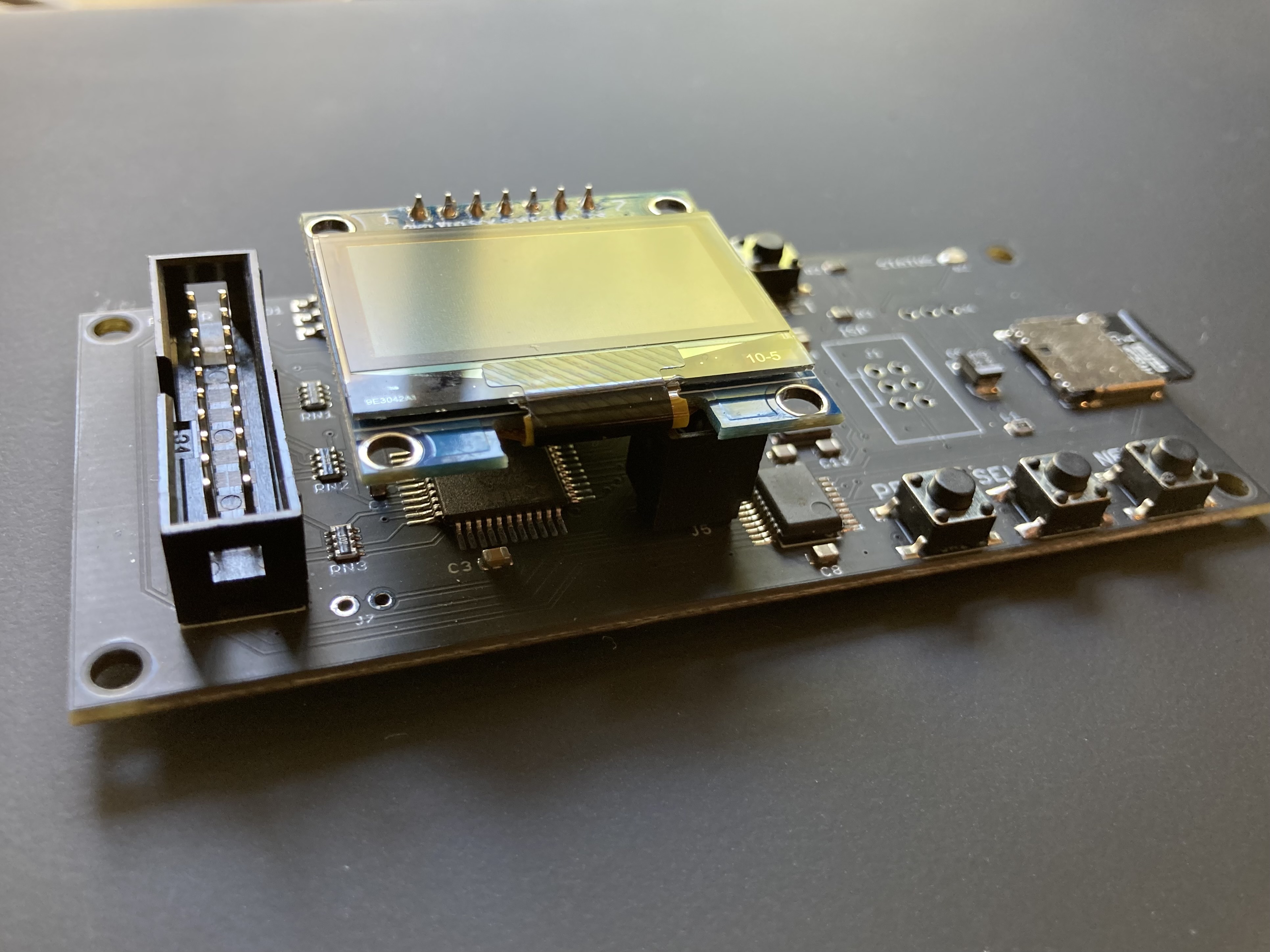
Floppy Emu is a floppy and hard disk emulator for classic Apple II, Macintosh, and Lisa computers. It uses an SD memory card and custom hardware to mimic an Apple floppy disk and drive, or an Apple hard drive. The Emu behaves exactly like a real disk drive, requiring no special software or drivers.
“Highly recommended.”
– Apple2Online
“A great device.”
– Blondihacks
“A boon for classic Mac collectors.”
– RetroMacCast
Bring new life to your old Apple computer! Floppy Emu is a specialized floppy and hard disk emulator for classic Apple computers. It uses a removable SD memory card and custom hardware to mimic an Apple floppy disk and drive, or an Apple hard drive. The Emu behaves exactly like a real disk drive, requiring no special software or drivers.
The BMOW Floppy Emu is perfect for booting your favorite games and software, or transferring files between vintage and modern machines. Just fill your SD card with disk images, plug in the Emu board, and you’ll be up and running in seconds.
Parts Sold Separately
For Apple IIc
Just For Fun
Usage Demonstration Video

Documentation
Instruction Manual and User Guide: PDF
日本語マニュアルはこちらから(2021/2/22更新): PDF
Setup Guide: PDF
Case assembly instructions: instructions
Instruction Manual and User Guide for previous generation Model B: PDF
日本語マニュアルはこちらから(2021/2/22更新): PDF
Setup Guide: PDF
Case assembly instructions: instructions
Instruction Manual and User Guide for previous generation Model B: PDF
Features
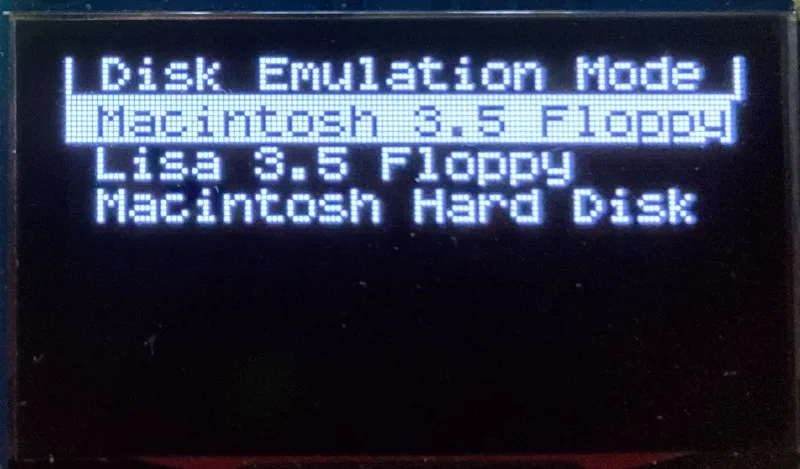
- Displays a menu UI for choosing from the disk images stored on the removable SD memory card
- Reads and writes emulated 140K, 400K, 800K, or 1.4MB floppy disk images, or hard disk images up to 2GB
- Compatible with all Apple II models, the original Macintosh 128K through the Mac II series and Power Mac, and Lisa 2
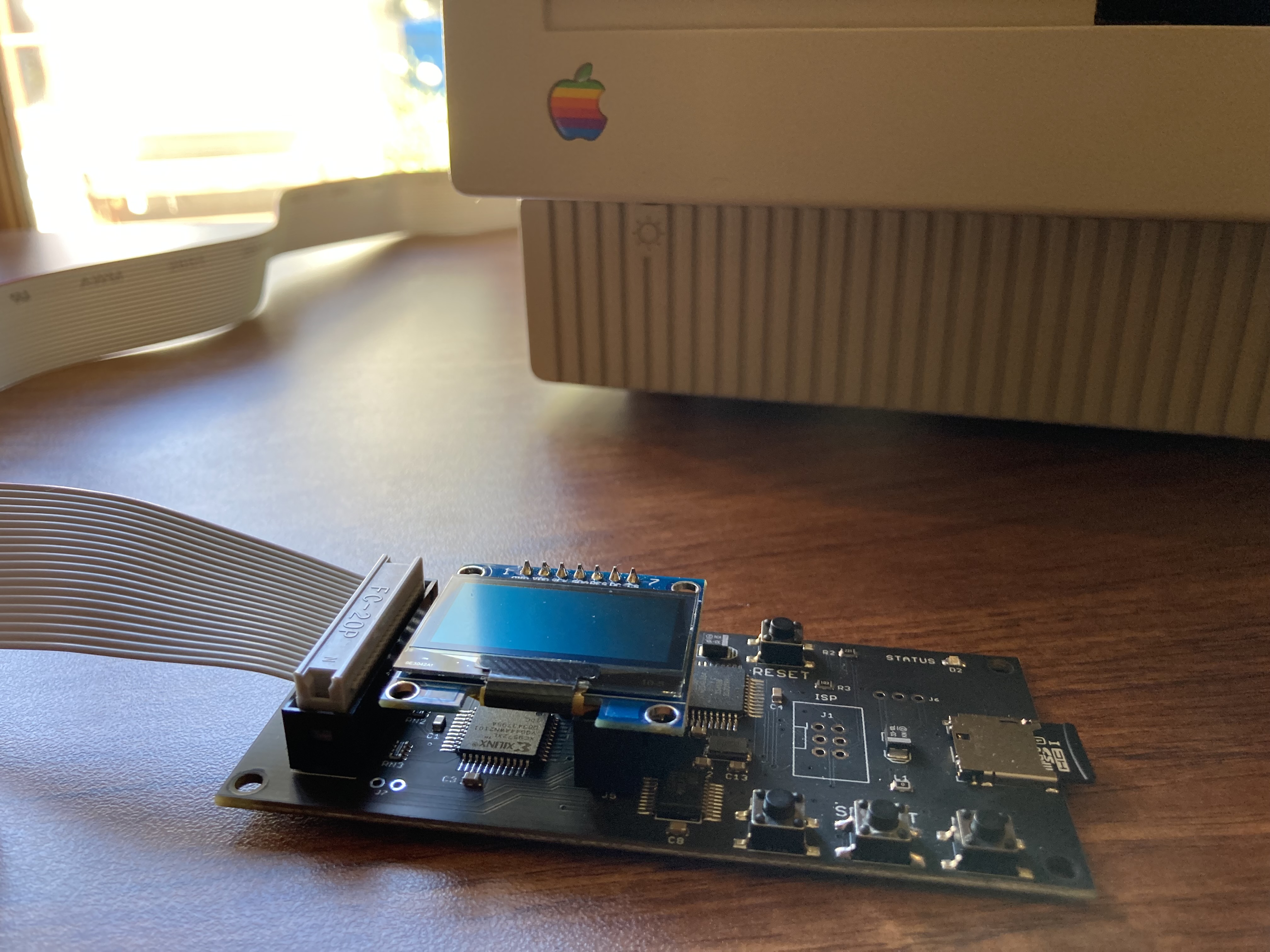
- Connects to external (DB-19 D-SUB) or internal (20 pin ribbon header) floppy drive connector
- Supports all major types of Apple disk images
Apple II Floppy – Emulates 5.25 inch 140K floppy disks on any Apple II series system, as well as 3.5 inch 800K floppies on compatible Apple II models. An optional Dual 5.25 Floppy mode emulates two drives at the same time. Disk image files may be in .DSK, .DO, .PO, .2MG, .NIB (5.25 inch only) or .WOZ (5.25 inch only) formats. Disk images are compatible with common Apple II emulation tools such as AppleWin and Ciderpress.
Apple II Hard Disk – Emulates up to four simultaneous Smartport hard disks, each up to 32 MB (when formatted as ProDOS) or 2 GB (when formatted as HFS). Smartport disks are compatible with the Apple IIgs, Apple IIc (ROM version 0 or newer), Apple IIc+, and Apple II+ or IIe with a Yellowstone or Liron disk controller card.
For Apple II use, Floppy Emu connects to the built-in 19-pin disk connector on the Apple IIgs, IIc, and IIc+, or to a 20-pin or 19-pin connector on a separate disk controller card for other Apple II models. See the instruction manual for details on drive numbering and boot priority.
Macintosh Floppy – Supports 400K, 800K, and 1.4MB floppy disk images, in raw .dsk, Disk Copy 4.2, or MOOF formats. Disk image files are the same format as those used with popular software-based Mac emulators like Mini vMac. Compatible with the original Macintosh 128K through the Mac II series and Power Mac.
Macintosh Hard Disk / CD-ROM – HD20 hard disk / CD-ROM emulation is compatible with the Macintosh 512K, 512Ke, Plus, SE, (SE/30 when used with the Mac ROM-inator II), Classic, Classic II, Portable, IIci, IIsi, or LC I. Supports bootable hard disk / CD-ROM images up to 2GB. CD-ROMs are treated as read-only hard disks. Disk image files are compatible with other popular Mac emulators.
Lisa Floppy – Emulates 400K and 800K floppy disks on the Lisa 2/5 and 2/10. Boot or mount native Lisa Office System disk images in Disk Copy 4.2 format, or use Macintosh disk images within the MacWorks environment.
| COMPUTER | DISK EMULATION MODES |
|---|---|
| Apple II | |
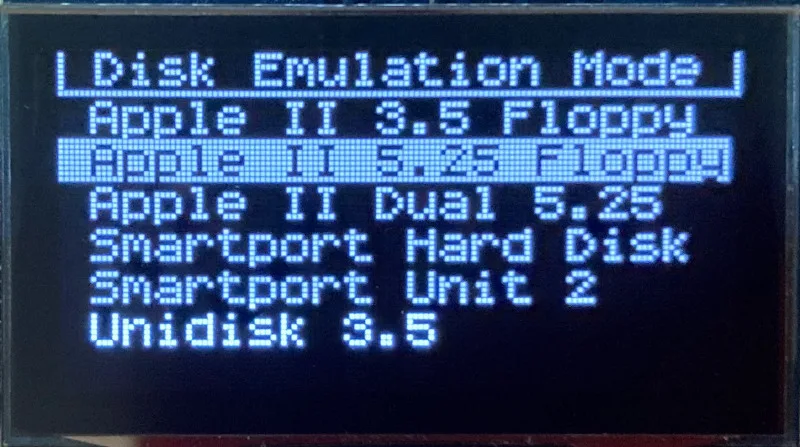
| Apple II, II+, IIe with Yellowstone disk controller |  5.25 inch floppy, Dual 5.25 inch floppy, 3.5 inch floppy, Smartport hard disk, Unidisk 3.5 5.25 inch floppy, Dual 5.25 inch floppy, 3.5 inch floppy, Smartport hard disk, Unidisk 3.5 |
| Apple II, II+, IIe with standard disk controller | 5.25 inch floppy, Dual 5.25 inch floppy[1] |
| Apple II, II+, IIe with Liron disk controller | Smartport hard disk, Unidisk 3.5 |
| Apple IIc | 5.25 inch floppy[2], Dual 5.25 inch floppy[3], Smartport hard disk[4], Unidisk 3.5[4] |
| Apple IIgs, IIc+ | 5.25 inch floppy, Dual 5.25 inch floppy, 3.5 inch floppy, Smartport hard disk, Unidisk 3.5 |
| Macintosh | |
| Macintosh 128K | 3.5 inch 400K floppy |
| Macintosh 512K | 3.5 inch 400K floppy, HD20 hard disk / CD-ROM[5] |
| Macintosh 512Ke, Plus, SE | 3.5 inch 400K/800K floppy, HD20 hard disk / CD-ROM |
| SE FDHD, Classic, Classic II, Portable, IIci, IIsi | 3.5 inch 400K/800K/1.4MB floppy, HD20 hard disk / CD |
| LC [6] | 3.5 inch 400K/800K/1.4MB floppy, HD20 hard disk / CD |
| SE/30, IIcx | 3.5 inch 400K/800K/1.4MB floppy, HD20 hard disk / CD[7] |
| IIx [6] | 3.5 inch 400K/800K/1.4MB floppy, HD20 hard disk / CD[7] |
| IIfx, IIvx, IIvi, LC-II, LC-III, LC 4xx, LC 5xx, Color Classic, Color Classic II, TV, Performa, Quadra, Centris, Power Mac [6] | 3.5 inch 400K/800K/1.4MB floppy |
| Lisa | |
| Lisa 2/5 and 2/10 | 3.5 inch 400K/800K floppy |
[1] Disk II Controller Card with 20-pin connector requires Dual 5.25 Adapter for dual drives
[2] requires internal motherboard connection or Internal/External Switcher for booting 5.25 inch disks, see instructions
[3] requires Internal/External Switcher
[4] requires IIc with ROM revision 0 or newer for Smartport and Unidisk 3.5 modes, see instructions for details
[5] Mac 512K also requires a boot floppy with HD20 Init for HD20 hard disk / CD-ROM mode
[6] uses internal disk connector on the computer’s motherboard
[7] requires Mac ROM-inator II for HD20 hard disk / CD-ROM mode
Technology
Interested in how Floppy Emu works under the hood? Check out the Floppy Emu Technology Design page.
FAQ
Can I boot from an emulated floppy or hard disk?
Yes you can!
Does this require a special driver, ROM, or INIT?
No software is required for standard floppy disk emulation on any system. Apple IIc requires ROM version 0 or later for Smartport hard drives and Unidisk 3.5 drives – ROM version 255 lacks support for these. For Macintosh HD20 / CD-ROM hard disk emulation, most supported Mac models require no software, though the Mac 512K requires Apple’s HD20 Init.
What types of disk image files are supported?
Apple II supports 140K floppy disk images in .DSK, .DO, .PO, .NIB, .WOZ, or .2MG format, 800K floppy disk images in .DSK, .DO, .PO, .2MG, and DiskCopy 4.2 format, or hard disk images up to 2 GB in .PO, .2MG, or .HDV format. The maximum size of a ProDOS volume is 32 MB, so larger hard disk images must be formatted as HFS. Macintosh supports 400K, 800K, or 1.4MB floppy disk images in raw .dsk format, DiskCopy 4.2 .image format, MOOF format, or hard disk images up to 2GB in raw format. Lisa supports 400K or 800K floppy disk images in DiskCopy 4.2 format.
Can I format the emulated disk?
Yes for most drive types and disk image types. However, instead of formatting the emulated disk, it’s normally preferable to use a pre-existing blank disk image. In-system formatting of the emulated disk is supported for all Macintosh disk image types, as well as Apple II Smartport hard disks, Unidisk 3.5, WOZ disk images, and NIB disk images. Formatting performance of floppy disk images may vary depending on your SD card’s write cache behavior. For best performance, use the Blank.WOZ or Blank.MOOF sample disk images that are included with the Floppy Emu firmware.
Can I back-up old floppies using tools like Copy II Plus or Disk Copy 4.2?
Yes, with some conditions. Many disk copy programs perform a simultaneous format-and-write of the destination floppy, which may create problems (see previous answer about formatting). For best results, use a destination disk image type that supports in-system formatting. See the manual for details.
Can the Emu work with copy-protected disks?
Most copy-protected disks in WOZ or MOOF format will work with the Floppy Emu, but there are some rare exceptions. The hardware is primarily designed to work with unprotected disks using standard sector and disk formats.
Can I emulate multiple disk drives at once?
Floppy Emu can store as many disk image files as your SD card will hold. For compatible Apple II models, the hardware supports dual 5.25 inch floppy drive emulation. For Apple II Smartport hard disk emulation, up to four hard disks may be active at the same time. For other computer models and disk types, only one disk can be “inserted” in the emulated drive at any given time.
Can I connect two Floppy Emus to the same computer?
Yes, if they’re attached to separate disk ports, or to separate connectors of a dual-connector disk controller. For compatible Apple II computers, a Floppy Emu board can also be placed in a daisy chain along with other disk drives. The Emu doesn’t have a daisy-chain output port, but the optional Daisy Chainer adds one. Daisy-chaining is not supported by the Lisa or Macintosh.
How can I copy documents from an old Apple II or Mac disk to a modern PC?
Use Floppy Emu to copy the documents from the original disk onto a blank disk image residing on the SD card, then put the SD card in your PC and use a disk image utility program like CiderPress or HFVExplorer to open the disk image and extract the files. See the manual for details.
More questions?
Please see the Floppy Emu user guide for complete details and instructions.
Firmware Downloads
Floppy Emu firmware versions are available with support for Apple II, Macintosh, or Lisa computers.
Install the firmware version for the type of computer you plan to use with your Floppy Emu.
Apple II
- Apple II firmware, for Floppy Emu Model C or B, normal version: 250225A
- Apple II firmware, for Floppy Emu Model C or B, SPDC version: 250225A-SPDC what’s this?
- Apple II firmware, for Floppy Emu Model A: 250225A-ModelA
Macintosh and Lisa
- Macintosh and Lisa firmware, for all Floppy Emu models: 240209M
Older Versions (try these if the latest version gives you problems)
Apple II, Model C or B, normal version: 240208A 231213A 230712A 230218A
Apple II, Model C or B, SPDC version: 240208A-SPDC 231213A-SPDC 230712A-SPDC 230218A-SPDC
Apple II, Model A: 240208A-ModelA 231213A-ModelA 230712A-ModelA 230218A-ModelA
Macintosh/Lisa, all models: 231212M 230309M 230203M 221221M
Apple II, Model C or B, SPDC version: 240208A-SPDC 231213A-SPDC 230712A-SPDC 230218A-SPDC
Apple II, Model A: 240208A-ModelA 231213A-ModelA 230712A-ModelA 230218A-ModelA
Macintosh/Lisa, all models: 231212M 230309M 230203M 221221M

Anonymous, if you give your name and email in the comment form, I can contact you directly to help. Your email isn’t displayed, only I will see it. It sounds like your bootloader isn’t starting when you hold PREV+SELECT and press and release RESET. Did you watch the video demo of the process steps? If it’s easier, you can also start the bootloader by holding PREV+SELECT while you first turn on the computer power, then you won’t have to bother with the RESET button.
Sorry that my message given just above appeared as Anonymous. Normally the concerned fields are filled when I open this emu site, but they disappeared this time when I submitted the previous message. Hope they appear now.
My error in the update was that I didn’t press the RESTART when still holding the PREV+SELECT pressed. Accordingly, I corrected that error and then the second part of the firmware update it worked fine, and to be sure I repeated the two updating parts and both worked fine.
I opened the blank 1440 K blank disk in the Mac folder but Mac said it is not recognized, so I opened the 800 k blank disk and the Mac accepted it.
I changed the name of that disk, and the new name appeared on Mac Finder, and I saved two files to that disk, and the two files appeared inside this disk in the Finder.
I shut down the Mac and get the SD card out from the emu board and inserted it into the Windows laptop.
I used the HFV_Explorer and went to the Mac blank disks. However, I find the 800 K blank disk as it was before doing any file copying to it.
I was all the time believing the blank disk will work as if it is a volume and I’ll find inside it the two copied files.
My ultimate target is to use the emu to get some files from the Mac and copy them into a new Mac via sending the copied files to my son in the USA using my Windows laptop as attached files.
Certainly, there is some gap my understanding of the correct procedure to follow in order to get the files of interest transferred using the emu SD and it blank disks. Am sure you have a solution for that.
Am keen eager to forward a package of deep thanks to Mr. Steve Chamberlin for his “floppy-emu-board” and to thank him much more for the kind help and answers he has delivered to my questions on his bigmesswires.com site about the use of that nice “emu board”. In addition, he was so kind to give several reply messages to my questions via email. It is time to say a great “THANK YOU” to this brilliant engineer who found and shared a great solution for a difficult problem facing the users of vintage Macintosh computers. Finally his kind continuous help and support have resulted in fully transferring two of my old files (20-27 years old) on my Mac SE to my Windows laptop, something which made their conversion to a modern Mac laptop and then to a modern Windows laptop (by my son on a new Mac laptop) possible. These two files now appear perfectly on my Windows laptop with all their original formatting and calculation functions as they were on my old Mac SE. This way, I can continue to make the same work for hundreds of my other old files stored since more than two decades on my Mac SE. For years, I was believing that my old Word and Excel files stored on my old Mac SE are dead and lost for ever as they cannot be recovered in anyway to a modern computer. Now, the solution is out therein. The transfer/conversion process needs patience but it is worth trying. For me, my old files are a real personal treasure as I used my Mac SE for >10 years as it was my unique computer between 1988 and 1998 (after one year of using Apple II-GS that was useless to me since it has never had MS-WORD and MS-Excel software applications). Thank you again Mr. Steve Chamberlin. You are simply great.
the Floppy Emu Deluxe Bundle with Snow White Case is currently out of stock. Will they become available again? I wish to order! 🙂
I’ve temporarily run out the Snow White case, but expect to have more in about a week. The Frosted Ice case is still available.
I’ve run into a bug with FloppyEmu. I am using it with the Apple IIe PDS card. When I try to connect as a 3.5 800K drive, Apple IIe startup locks up. I’ve tried numerous power cycling and other things. The only thing that works is going back to 5.25 floppy mode. Any ideas?
The Macintosh LC Apple IIe PDS card isn’t officially supported, sorry. See the compatibility table above for details on supported computers and emulation modes. However, the Floppy Emu should function the same with the IIe PDS card as with a regular Apple IIe, in 5.25 inch floppy emulation mode. Smartport hard disk mode may also work, though I’ve never tried it myself (see https://www.youtube.com/watch?v=FRbNz5iL6UI). For 3.5 inch disks, the IIe PDS card requires a Unidisk 3.5 drive (A2M2053), but Floppy Emu emulates the Apple 3.5 Drive (A9M0106) commonly used with the Apple IIgs and IIc+.
A fantastic device and a great contribution to retro-Apple freaks. Highly recommend it. While I miss the click and whir (and scary sounds) of the Disk ][, this is a definite upgrade from them. No more degrading floppy disks and no more finding places to store them.
OMG, take my money!
Thanks for this. I was looking on how to do something similar with Arduino and/or run the disk drive from a PC or Arduino. The $139 bundle should let me do what I need…even copy images to the real FDD on the Apple //e. Worth it in time saved.
Hello, I don’t see several disk images in floppy emu. When I drag and drop new .image file to SD card Macintosh folder, it doesn’t appear in the list neither. How can I make my .image file visible and readible by FDDemu?
Regards, Robert
What type of disk images are they? “.image” could mean a lot of different things. If they are DiskCopy 6.3 images, they won’t work – see the explanation in the instruction manual. The Floppy Emu LCD display will only show disk image files of types that it knows how to use.
https://www.facebook.com/photo.php?fbid=1573471862695195&set=gm.1407664759299153&type=3&theater
Steve
You\’ve done a huge service to all of us, thank you!
Suggestion… On the instructions consider putting a little flow chart in there so customers can more quickly understand if Apple // – good to go … Mac or Lisa – must do a little software assembly…
Also.. I have a use case that needs some expert help. On a 1 or drive Mac.. what is the most effective way to transfer the contents of dozens of 400 and 800k disks to the SD card? Is there a utility on the Vintage Apple SD card that will emulate a hard disk? On a SE II the best I can do is create a new boot floppy and use the blank 800k SD card to copy one disk a time.. then copy the contents on another machine. Of course I have to reboot the Mac along the way.
Please, there must be a better way!
Thanks!
Don
And there is – it helps the read BOTH manuals!
the longer manual https://www.bigmessowires.com/femu-instructions.pdf give specifics on setting up the Floppy EMU to be become not a \”floppy\” but a 20Mb HDD.
Thanks Steve!
Hello,
Is it possible to use the floppy emu for both an Apple IIe and a Macintosh SE without changing the firmware all the time ?
Thank you,
Nicolas
No, the on-board CPLD chip needs to be configured differently for Apple II emulation vs Mac/Lisa emulation, so each requires a different firmware.
Feature Request: Allow naming the smartport files with “SMART#” as the prefix rather than the whole filename (not counting extension). Use case: in an emulator like Virtual II you can mount “Games.2mg” and “Utilities.2mg”, but when you copy that to your SD card you need to rename them “smart0.2mg” and “smart1.2mg”… and then try and remember which is which if you later try and sync the images. If the files could be named “smart0 – Games.2mg” and “smart1 – Utilities.2mg” that’d be swell. Regardless, keep up the awesome!
Great Website! So easy to navigate, well laid out. You’re the best, thanks for adding the Liron Support! 😀
Hi
Will it work with this
performa 580cd specs
The Apple Macintosh Performa 580CD features a 33 MHz 68LC040 processor, 5 MB or 8 MB of RAM, either a 250 MB or 500 MB hard drive, and a 2X CD-ROM drive in a relatively compact all-in-one case with a 14″ color display.
regards
john hill
Is the vTech/Laser Universal Disk Controller (UDC) supported? I have read that the UDC supports smart port devices like the Chinook smart port HD (20mb). I have 3 cards (2 with ASIC and one TTL) and I am willing to lend one card for testing. I have only seem smart port support mentioned together with the ASIC based design.
-Jonas
I don’t have a UDC, but I’ve been told it doesn’t work with Floppy Emu’s smartport mode.
There are a couple of different firmware versions floating around for the Laser UDC. The more recent one should support SmartPort devices.
Just curious: Where is the Rev A manual? I cannot find a link, but the current (Rev B) documentation tells me that’s the appropriate one for my unit.
This is something I scanned myself: https://drive.google.com/open?id=0B5SAWSGa49rLb21GYm5zMFIzYUk
I don’t know if it helps, though
Thanks, but that’s a scan of the UDC manual. I’m looking for the FloppyEmu Rev A manual.
Hi
It doesnt seem to work with a
performa 580cd
specs
The Apple Macintosh Performa 580CD features a 33 MHz 68LC040 processor, 5 MB or 8 MB of RAM, either a 250 MB or 500 MB hard drive, and a 2X CD-ROM drive in a relatively compact all-in-one case with a 14″ color display.
regards
john hill
John, please send me an email with the details of what’s happening on your performa. Steveh, is there any specific info you need? I can get a copy of the old manual for you, but I’m traveling now and can’t get it immediately.
Hi, Steve. Nothing specific at the moment, but I realized I do not have the Rev. A manual and would like to get a copy for completeness’ sake. I’d appreciate your making it available when convenient – no hurry.
An older version of the manual with info on both Model A and Model B is at https://www.bigmessowires.com/femu-instructions-old.pdf
Hello Steve,
I am using FloppyEMU with my Apple IIC in smartport mode.
How can I remove the writeprotection of the \”hard drive\” provided ? (it also shows a locker on the lcd screen)
Thank you,
Nicolas
The smart0.po example disk image is not meant to be writeable. It’s stored in a truncated form where the empty regions of the disk are omitted from the disk image, so there’s no place to store additional data. If you use one of the other smartport example files, or create a new one with Ciderpress or one of the other tools described in the manual, then you can read and write to the disk.
Thank you Steve. I got the point.
Do you know where I can get the largest possible blank image for Apple iic (Prodos, not GSOS) ?
Thanks again for the fast response 🙂
ProDOS supports disks up to 32MB, and Cidepress can make a blank disk image. See section 8.3 in the manual for info on working with disk images.
I have a little problem with my floppy emu for the Macintosh. I am not able to access the system folder to start the finder or change the default settings for the mouse speed. That makes it really difficult to play games which require a mouse. Never the less, i am able to access the games folder and start the games. What could be wrong?
https://youtu.be/4tKkQjqaKwU
Another problem is, after starting the HD 20 mode does the Emu display show:
“Next: Set Startup Disk”
What does this mean and how do I set up a startup disk?
> I am not able to access the system folder to start the finder or change the default settings for the mouse speed.
Mouse speed in the classic Macintosh OS is set using the General or Mouse control panel, which you’ll find in the Apple menu.
> “Next: Set Startup Disk” What does this mean and how do I set up a startup disk?
Press the NEXT button on the Emu board, to select a startup disk image from the menu.
> I am not able to access the system folder to start the finder or change the default settings for the mouse speed.
“Mouse speed in the classic Macintosh OS is set using the General or Mouse control panel, which you’ll find in the Apple menu.”
My control panel in the apple menu shows only: Desktop Pattern, Insert Point Blinking, Menu Blinking, Time, Speaker Volume and Ram Cache. There is no Mouse Speed Adjustment. Finder Version 6.1.8, System 6.0.8 I am using the HD Emulation and the software from your sd card.
> “Next: Set Startup Disk” What does this mean and how do I set up a startup disk?
“Press the NEXT button on the Emu board, to select a startup disk image from the menu.”
Why do I need to select a startup disk image, when the Mac has already booted up? Whould that startup disk be used for the next boot up?
If a particular disk image doesn’t have the Mouse control panel in its System folder, then you won’t see it listed. You can copy it from another System 6 disk into your disk image’s System folder. The Vintage Apple Software Collection SD card has a copy of the full System 6.0.8 installer, which includes all the extras and accessories. Details on usage of Classic Mac OS control panels is unfortunately outside the scope of the tech support I can give, but 68kmla.org is a good resource for general Classic Mac OS-related questions.
The NEXT button is used to select a disk image for Mac HD20 (hard disk) mode. The selected image will be used after the next reboot.
Hi Steve,
I have two questions for you.
1) Can this run protected disk files, or is it like other solutions not able to?
2) What is the difference (in essence) between this solution and the CFFA 3000 adapter card? Anything this would bring to the table the other doesn’t or viceversa?
Thanks!!
Floppy Emu isn’t a cracking tool and doesn’t have any special anti-copy-protection features, but you’ll find most common Apple II software is already available in a cracked version. You’ll have to draw your own conclusions about the the CFFA3000, but it’s a different kind of device (internal card vs external disk replacement, etc).
Hi again, thanks for replying!
I didn’t mean as a hacking/copy removal tool, what I meant was some disks came with copy protection, and a “normal” disk drive reads them just fine, so I wanted to know if this also reads those fine (images of disks that are not cracked but have protection) or if it also cannot like seceral other disk drive replacement solutions for different machines.
Also after reading some I guess this also has the pro that you can use it on computers that have external port only for drives and you cannot use a card in a slot
I recently got a floppy emu and its pretty great! For transferring all 5.25 inch disk images for apple ii. The problem is that I can’t seem to use any 3.5 inch images or hard disk images. I already updated the firmware just wondering if there is another solution. I Have a iigs and I kinda need 3.5 files for that. Thanks for any help I can get.
Have you read the Emulation Modes section in the manual? https://www.bigmessowires.com/femu-instructions.pdf You can use the Contact link at the top-right of this page for customer support.
Hi. Just got my Floppy Emu. Love it.
However, after having used it without any glitches on a SE with System 6, I’m stuck in an endless loop when I try to use it on my Plus w/System 7.1.
When I reset the Floppy Emu, It keeps asking me to select a startup disk. Then, it asks me to reboot my Mac.
I don’t want to use an image as a startup disk. The Mac is already booted, I just want to select an image to access its content.
Thank you for your help!
It sounds like you’re using HD20 hard disk mode. You should never need to reset the Emu during normal use, except when changing emulation modes or the hard disk image. Can you take a video of what you’re seeing and send it to me using the Contact link at the top-right of this page?
Thanks SO MUCH for the update. Page bookmarked and I will visit periodically in the next days.
Cheers!
I am looking at using the Floppy Emu to connect to a Mac SE (not the SE/30 model). I don’t have a Windows PC, but have many generations of Macs available. Can I connect the SD card up to a Mac running macOS Sierra to access the SD card to read and write files and then connect back up to the Mac SE? My primary goal is to extract some files stored on the Mac SE, but I’d also like to try and put some new software on the Mac SE, as well. This Mac SE has the 800K floppy drive, so it doesn’t work with the 1.4MB HD disks.
Please see section 8.3 of the manual for info on working with disk images. https://www.bigmessowires.com/femu-instructions.pdf When viewed on a modern Mac or PC system, the SD card will appear to contain disk images, not individual vintage-format files.
Just got the EMU today for my Apple llc with 255 Rom. Dosen’t Boot up, I know I’m probably doin something wrong but I can’t find the Answer.
\o/ Whoa!! Thank you, Steve!! Order just placed, #2277!
Hi Steve, great product. I was using it for a month with Apple //c and Apple //e but now want to move to GS. I have 3,5\” A9M0106 drive – if I understand correctly – FloppyEMU B will work thru daisy chain after floppy drive but not directly? I have both ROM1 and ROM3 Apple IIGS.
For information on Apple II daisy chaining, please see section 6.1. the manual. Floppy Emu can be connected directly to an Apple IIGS or chained after another drive. It does not have a daisy-chain output.
Great little device.
Two features that are screaming out to be implemented:
1. The ability to mount more than one disk image at a time – this might require an extra wire in 5.25″ disk mode while being used in older style Disk II control cards, but not on the DB-19 controllers or smart ports
2. The ability to read / write 800K 3.5″ floppy disk images while in smart-port mode – this could increase the speed immensely.
Otherwise I love this device.
Dual disk emulation would be very nice for some Apple IIs, but isn’t possible with the current design, nor with the Macintosh or Lisa. Unidisk 3.5 mode (in the latest firmware) supports 800K 3.5 inch disk images on the Smartport.
I ordered your deluxe model B kit for my original 512k Mac and I’m struggling to get anything to load from the emu. It just gives an error message when trying to load any 400k program via the external floppy port. So far I have a hundred and fifty dollar paper weight with a cool clear case… Please help!