

Bring new life to your old Apple computer!
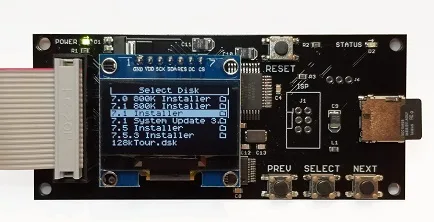
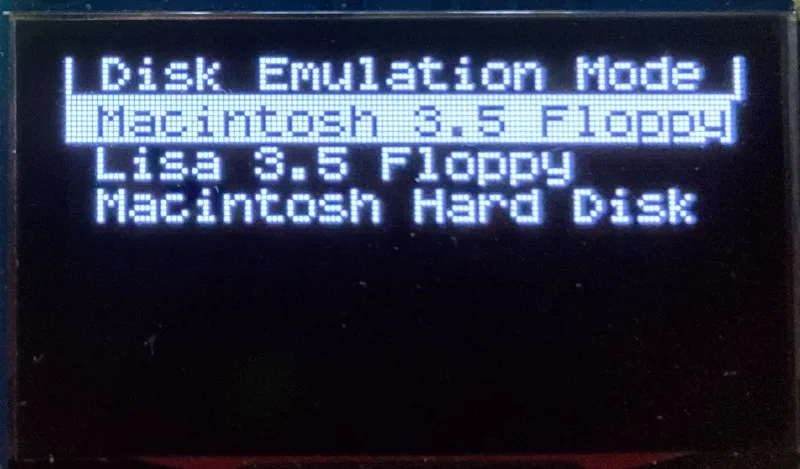
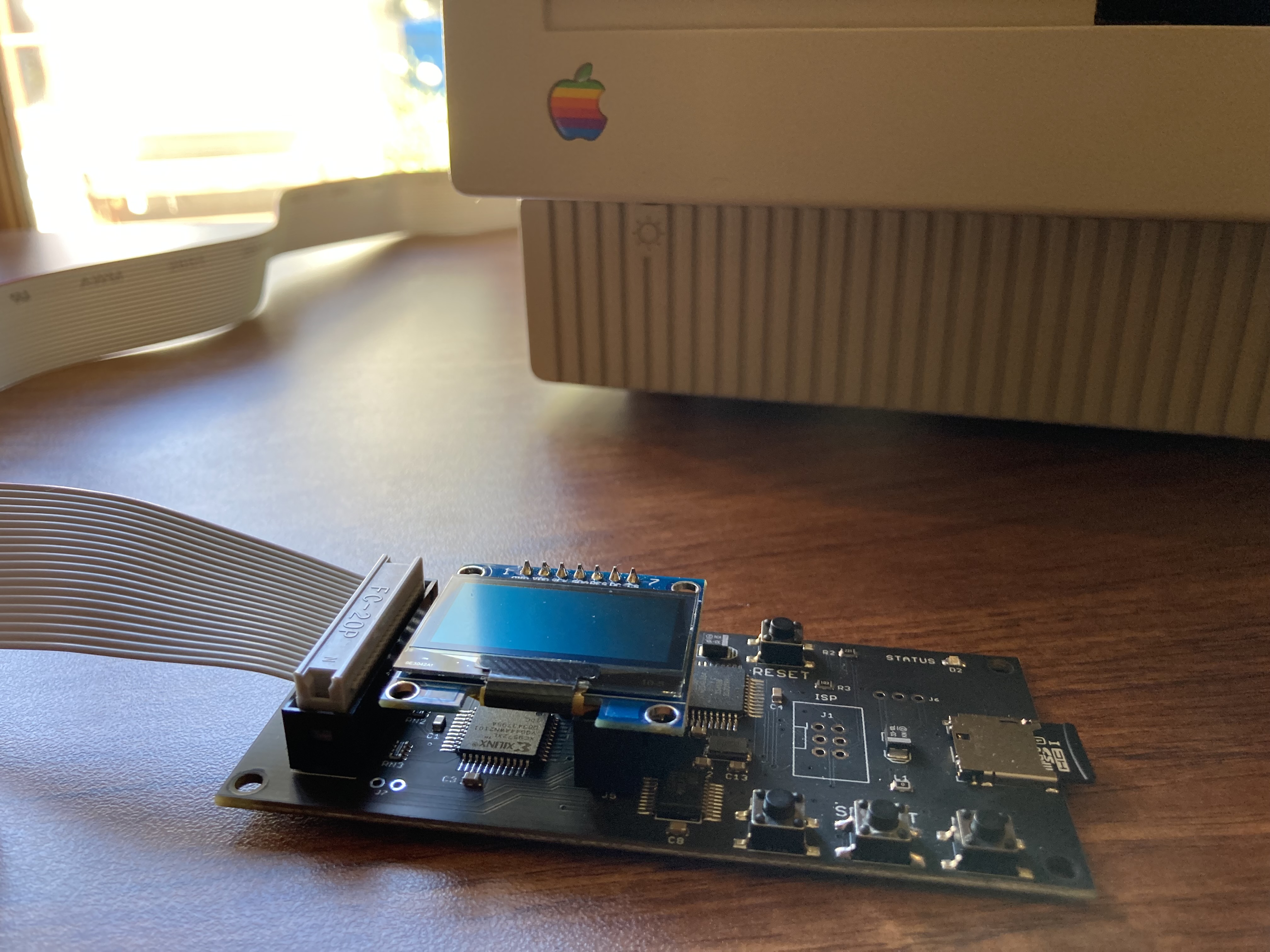
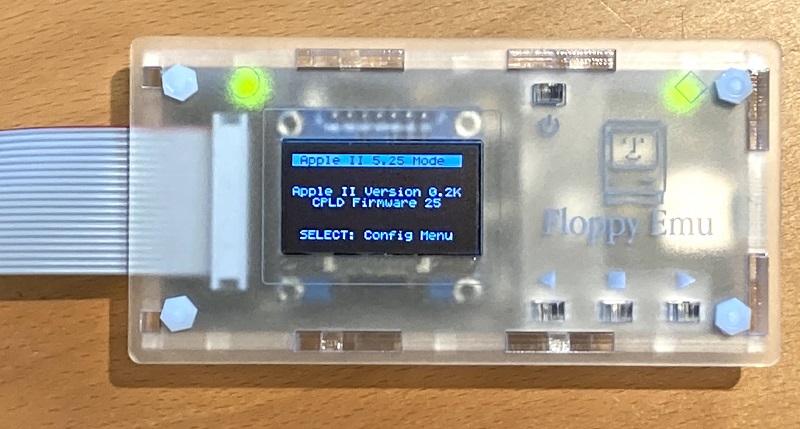
Floppy Emu is a floppy and hard disk emulator for classic Apple II, Macintosh, and Lisa computers. It uses an SD memory card and custom hardware to mimic an Apple floppy disk and drive, or an Apple hard drive. The Emu behaves exactly like a real disk drive, requiring no special software or drivers.
“Highly recommended.”
– Apple2Online
“A great device.”
– Blondihacks
“A boon for classic Mac collectors.”
– RetroMacCast
Bring new life to your old Apple computer! Floppy Emu is a specialized floppy and hard disk emulator for classic Apple computers. It uses a removable SD memory card and custom hardware to mimic an Apple floppy disk and drive, or an Apple hard drive. The Emu behaves exactly like a real disk drive, requiring no special software or drivers.
The BMOW Floppy Emu is perfect for booting your favorite games and software, or transferring files between vintage and modern machines. Just fill your SD card with disk images, plug in the Emu board, and you’ll be up and running in seconds.
Parts Sold Separately
For Apple IIc
Just For Fun
Usage Demonstration Video

Documentation
Instruction Manual and User Guide: PDF
日本語マニュアルはこちらから(2021/2/22更新): PDF
Setup Guide: PDF
Case assembly instructions: instructions
Instruction Manual and User Guide for previous generation Model B: PDF
日本語マニュアルはこちらから(2021/2/22更新): PDF
Setup Guide: PDF
Case assembly instructions: instructions
Instruction Manual and User Guide for previous generation Model B: PDF
Features
- Displays a menu UI for choosing from the disk images stored on the removable SD memory card
- Reads and writes emulated 140K, 400K, 800K, or 1.4MB floppy disk images, or hard disk images up to 2GB
- Compatible with all Apple II models, the original Macintosh 128K through the Mac II series and Power Mac, and Lisa 2
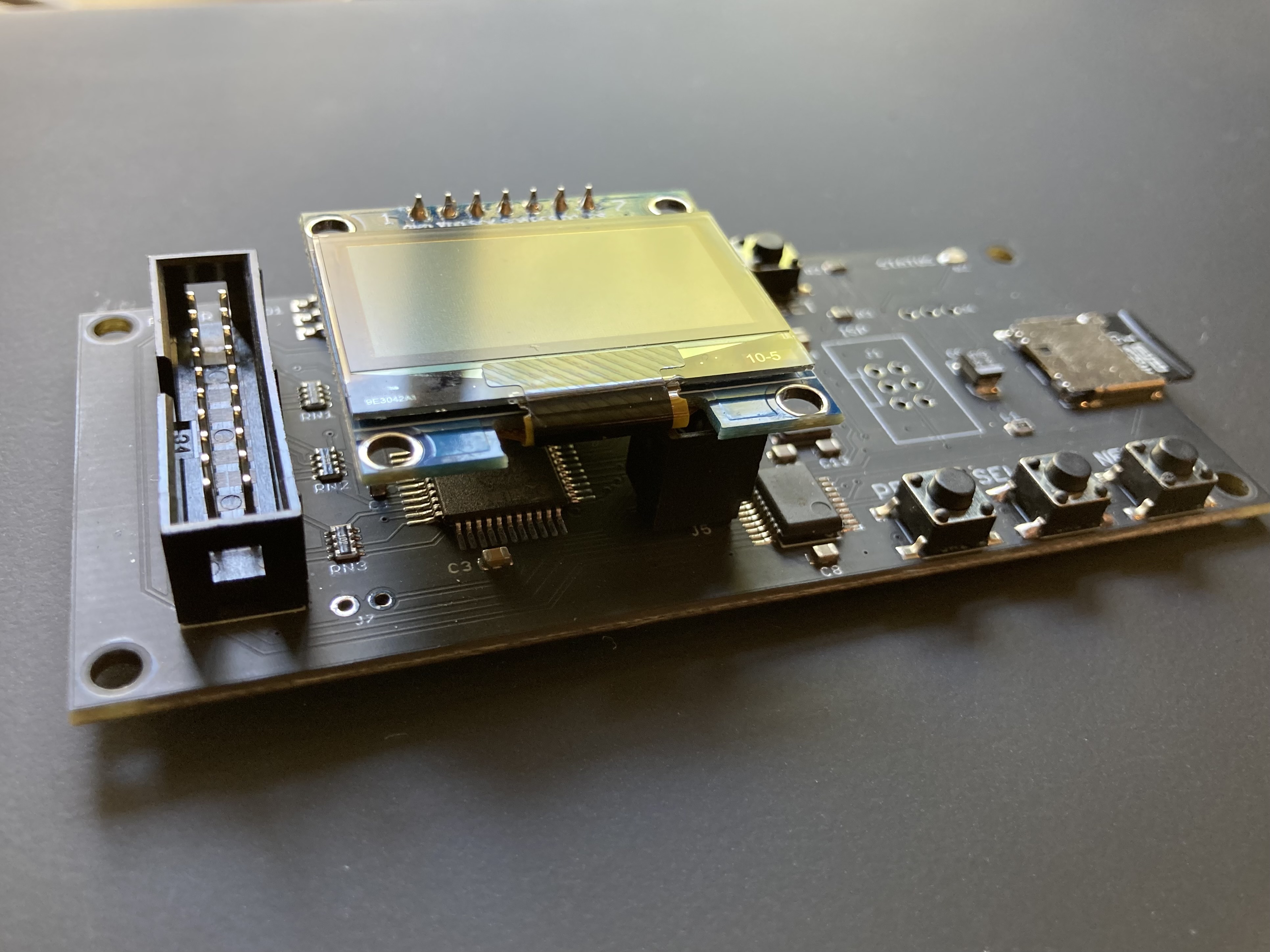
- Connects to external (DB-19 D-SUB) or internal (20 pin ribbon header) floppy drive connector
- Supports all major types of Apple disk images
Apple II Floppy – Emulates 5.25 inch 140K floppy disks on any Apple II series system, as well as 3.5 inch 800K floppies on compatible Apple II models. An optional Dual 5.25 Floppy mode emulates two drives at the same time. Disk image files may be in .DSK, .DO, .PO, .2MG, .NIB (5.25 inch only) or .WOZ (5.25 inch only) formats. Disk images are compatible with common Apple II emulation tools such as AppleWin and Ciderpress.
Apple II Hard Disk – Emulates up to four simultaneous Smartport hard disks, each up to 32 MB (when formatted as ProDOS) or 2 GB (when formatted as HFS). Smartport disks are compatible with the Apple IIgs, Apple IIc (ROM version 0 or newer), Apple IIc+, and Apple II+ or IIe with a Yellowstone or Liron disk controller card.
For Apple II use, Floppy Emu connects to the built-in 19-pin disk connector on the Apple IIgs, IIc, and IIc+, or to a 20-pin or 19-pin connector on a separate disk controller card for other Apple II models. See the instruction manual for details on drive numbering and boot priority.
Macintosh Floppy – Supports 400K, 800K, and 1.4MB floppy disk images, in raw .dsk, Disk Copy 4.2, or MOOF formats. Disk image files are the same format as those used with popular software-based Mac emulators like Mini vMac. Compatible with the original Macintosh 128K through the Mac II series and Power Mac.
Macintosh Hard Disk / CD-ROM – HD20 hard disk / CD-ROM emulation is compatible with the Macintosh 512K, 512Ke, Plus, SE, (SE/30 when used with the Mac ROM-inator II), Classic, Classic II, Portable, IIci, IIsi, or LC I. Supports bootable hard disk / CD-ROM images up to 2GB. CD-ROMs are treated as read-only hard disks. Disk image files are compatible with other popular Mac emulators.
Lisa Floppy – Emulates 400K and 800K floppy disks on the Lisa 2/5 and 2/10. Boot or mount native Lisa Office System disk images in Disk Copy 4.2 format, or use Macintosh disk images within the MacWorks environment.
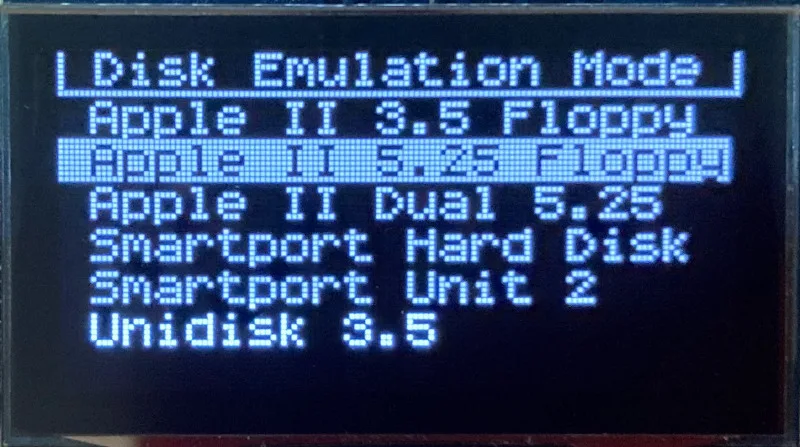
| COMPUTER | DISK EMULATION MODES |
|---|---|
| Apple II | |
| Apple II, II+, IIe with Yellowstone disk controller |  5.25 inch floppy, Dual 5.25 inch floppy, 3.5 inch floppy, Smartport hard disk, Unidisk 3.5 5.25 inch floppy, Dual 5.25 inch floppy, 3.5 inch floppy, Smartport hard disk, Unidisk 3.5 |
| Apple II, II+, IIe with standard disk controller | 5.25 inch floppy, Dual 5.25 inch floppy[1] |
| Apple II, II+, IIe with Liron disk controller | Smartport hard disk, Unidisk 3.5 |
| Apple IIc | 5.25 inch floppy[2], Dual 5.25 inch floppy[3], Smartport hard disk[4], Unidisk 3.5[4] |
| Apple IIgs, IIc+ | 5.25 inch floppy, Dual 5.25 inch floppy, 3.5 inch floppy, Smartport hard disk, Unidisk 3.5 |
| Macintosh | |
| Macintosh 128K | 3.5 inch 400K floppy |
| Macintosh 512K | 3.5 inch 400K floppy, HD20 hard disk / CD-ROM[5] |
| Macintosh 512Ke, Plus, SE | 3.5 inch 400K/800K floppy, HD20 hard disk / CD-ROM |
| SE FDHD, Classic, Classic II, Portable, IIci, IIsi | 3.5 inch 400K/800K/1.4MB floppy, HD20 hard disk / CD |
| LC [6] | 3.5 inch 400K/800K/1.4MB floppy, HD20 hard disk / CD |
| SE/30, IIcx | 3.5 inch 400K/800K/1.4MB floppy, HD20 hard disk / CD[7] |
| IIx [6] | 3.5 inch 400K/800K/1.4MB floppy, HD20 hard disk / CD[7] |
| IIfx, IIvx, IIvi, LC-II, LC-III, LC 4xx, LC 5xx, Color Classic, Color Classic II, TV, Performa, Quadra, Centris, Power Mac [6] | 3.5 inch 400K/800K/1.4MB floppy |
| Lisa | |
| Lisa 2/5 and 2/10 | 3.5 inch 400K/800K floppy |
[1] Disk II Controller Card with 20-pin connector requires Dual 5.25 Adapter for dual drives
[2] requires internal motherboard connection or Internal/External Switcher for booting 5.25 inch disks, see instructions
[3] requires Internal/External Switcher
[4] requires IIc with ROM revision 0 or newer for Smartport and Unidisk 3.5 modes, see instructions for details
[5] Mac 512K also requires a boot floppy with HD20 Init for HD20 hard disk / CD-ROM mode
[6] uses internal disk connector on the computer’s motherboard
[7] requires Mac ROM-inator II for HD20 hard disk / CD-ROM mode
Technology
Interested in how Floppy Emu works under the hood? Check out the Floppy Emu Technology Design page.
FAQ
Can I boot from an emulated floppy or hard disk?
Yes you can!
Does this require a special driver, ROM, or INIT?
No software is required for standard floppy disk emulation on any system. Apple IIc requires ROM version 0 or later for Smartport hard drives and Unidisk 3.5 drives – ROM version 255 lacks support for these. For Macintosh HD20 / CD-ROM hard disk emulation, most supported Mac models require no software, though the Mac 512K requires Apple’s HD20 Init.
What types of disk image files are supported?
Apple II supports 140K floppy disk images in .DSK, .DO, .PO, .NIB, .WOZ, or .2MG format, 800K floppy disk images in .DSK, .DO, .PO, .2MG, and DiskCopy 4.2 format, or hard disk images up to 2 GB in .PO, .2MG, or .HDV format. The maximum size of a ProDOS volume is 32 MB, so larger hard disk images must be formatted as HFS. Macintosh supports 400K, 800K, or 1.4MB floppy disk images in raw .dsk format, DiskCopy 4.2 .image format, MOOF format, or hard disk images up to 2GB in raw format. Lisa supports 400K or 800K floppy disk images in DiskCopy 4.2 format.
Can I format the emulated disk?
Yes for most drive types and disk image types. However, instead of formatting the emulated disk, it’s normally preferable to use a pre-existing blank disk image. In-system formatting of the emulated disk is supported for all Macintosh disk image types, as well as Apple II Smartport hard disks, Unidisk 3.5, WOZ disk images, and NIB disk images. Formatting performance of floppy disk images may vary depending on your SD card’s write cache behavior. For best performance, use the Blank.WOZ or Blank.MOOF sample disk images that are included with the Floppy Emu firmware.
Can I back-up old floppies using tools like Copy II Plus or Disk Copy 4.2?
Yes, with some conditions. Many disk copy programs perform a simultaneous format-and-write of the destination floppy, which may create problems (see previous answer about formatting). For best results, use a destination disk image type that supports in-system formatting. See the manual for details.
Can the Emu work with copy-protected disks?
Most copy-protected disks in WOZ or MOOF format will work with the Floppy Emu, but there are some rare exceptions. The hardware is primarily designed to work with unprotected disks using standard sector and disk formats.
Can I emulate multiple disk drives at once?
Floppy Emu can store as many disk image files as your SD card will hold. For compatible Apple II models, the hardware supports dual 5.25 inch floppy drive emulation. For Apple II Smartport hard disk emulation, up to four hard disks may be active at the same time. For other computer models and disk types, only one disk can be “inserted” in the emulated drive at any given time.
Can I connect two Floppy Emus to the same computer?
Yes, if they’re attached to separate disk ports, or to separate connectors of a dual-connector disk controller. For compatible Apple II computers, a Floppy Emu board can also be placed in a daisy chain along with other disk drives. The Emu doesn’t have a daisy-chain output port, but the optional Daisy Chainer adds one. Daisy-chaining is not supported by the Lisa or Macintosh.
How can I copy documents from an old Apple II or Mac disk to a modern PC?
Use Floppy Emu to copy the documents from the original disk onto a blank disk image residing on the SD card, then put the SD card in your PC and use a disk image utility program like CiderPress or HFVExplorer to open the disk image and extract the files. See the manual for details.
More questions?
Please see the Floppy Emu user guide for complete details and instructions.
Firmware Downloads
Floppy Emu firmware versions are available with support for Apple II, Macintosh, or Lisa computers.
Install the firmware version for the type of computer you plan to use with your Floppy Emu.
Apple II
- Apple II firmware, for Floppy Emu Model C or B, normal version: 250225A
- Apple II firmware, for Floppy Emu Model C or B, SPDC version: 250225A-SPDC what’s this?
- Apple II firmware, for Floppy Emu Model A: 250225A-ModelA
Macintosh and Lisa
- Macintosh and Lisa firmware, for all Floppy Emu models: 240209M
Older Versions (try these if the latest version gives you problems)
Apple II, Model C or B, normal version: 240208A 231213A 230712A 230218A
Apple II, Model C or B, SPDC version: 240208A-SPDC 231213A-SPDC 230712A-SPDC 230218A-SPDC
Apple II, Model A: 240208A-ModelA 231213A-ModelA 230712A-ModelA 230218A-ModelA
Macintosh/Lisa, all models: 231212M 230309M 230203M 221221M
Apple II, Model C or B, SPDC version: 240208A-SPDC 231213A-SPDC 230712A-SPDC 230218A-SPDC
Apple II, Model A: 240208A-ModelA 231213A-ModelA 230712A-ModelA 230218A-ModelA
Macintosh/Lisa, all models: 231212M 230309M 230203M 221221M
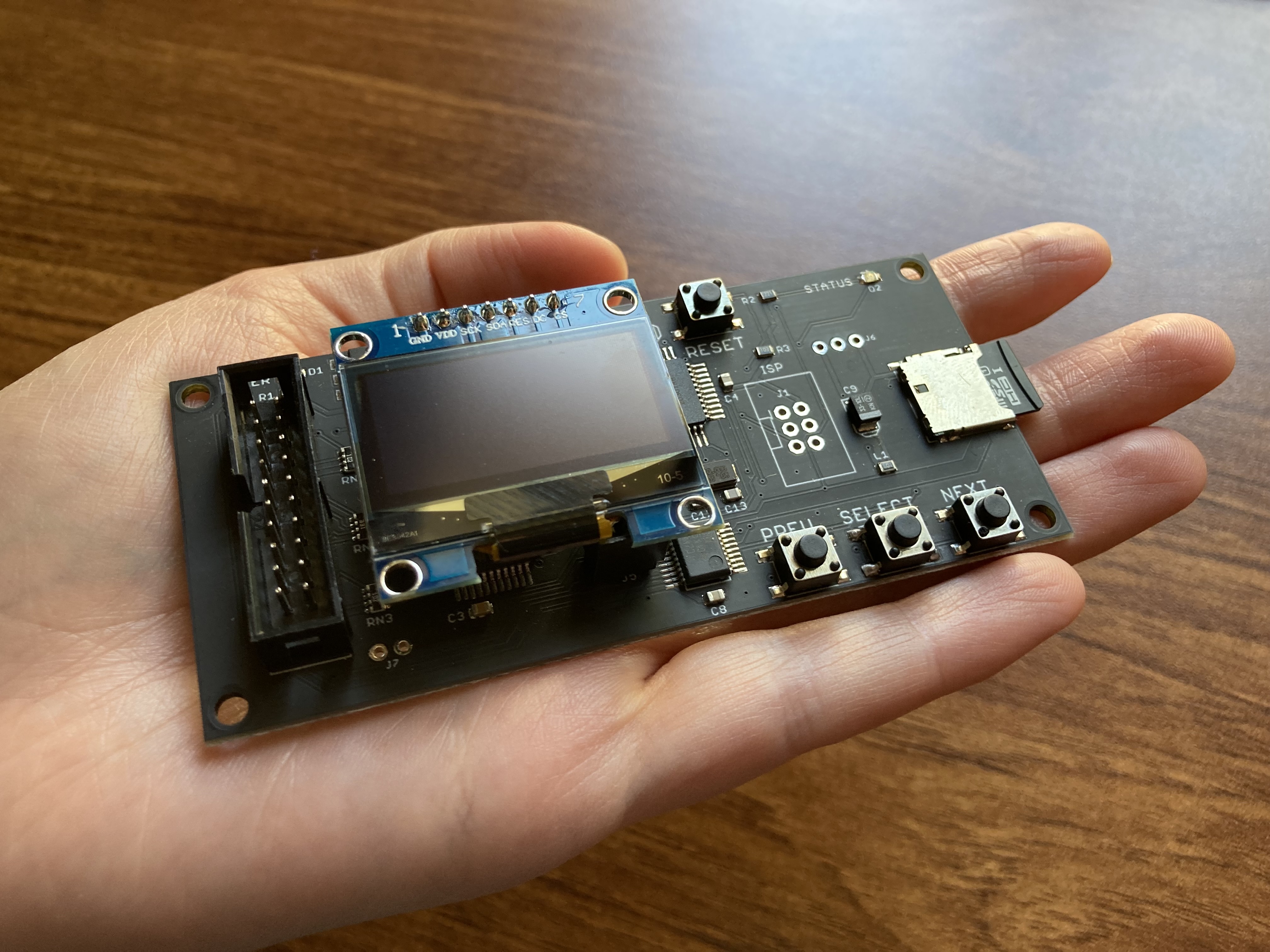

Is there any provision on the Floppy Emu B/C PCB + firmware that allows for support of using a rotary encoder? If not yet, perhaps for a future revision then. Thanks.
Fantastic piece of kit!
Just got a Floppy Emu for a Mac SE and it works like a charm.
Ordering and delivery to Australia was super fast.
Good Work!
What are the dimensions of the current version, please?
The current and prior versions are all the same size: 100 x 45 mm.
I have a Powerbook 520 and it has a 3.5″ floppy drive with a really small 10×2 connector… would it work? The dimensions of the black part of the connector is half an inch by an eighth of an inch. Floppy drive is an Mitsubishi MF355H. Thanks!
I don’t think so. The standard 10×2 floppy connector has 0.1 inch spacing between pins.
FYI for all the Apple II users out there: The Apple2OnlineStore has been selling a 4 GB microSD card configured for the FEMU and its a pretty good seller for us. The card is configured with 2 ProDOS 32 MB volumes and 2 HFS 1.5 GB volumes, and if you boot your system from the FEMU, it boots into GSOS 6.0.1 with HFS drivers installed and thus ready access to those 1.5 GB volumes. Sells for $16.99 + S&H is our store, or for those who just love eBay, $19.99 + S&H.
Dr Ken> only for the IIgs, innit?
Yes, as only the IIGS can run GSOS (ProDOS 6.0.1).
Im just wondering if its possible to replace my model A lcd with a oled. i have two models A’s with one still going strong but the second one had its lcd die recently and ive tried buying some generic nokia replacement ones off ebay however the quality is pretty poor so its hard to get the display to show all the pixels without fiddling constantly with the pressure of the metal frame tabs on the back.
i cant really afford to buy a new floppyemu right now so if its possible to replace the lcd with an oled please let me know, otherwise i do at least have my other one that still works well for now
Sorry, the Model A was only designed to work with the 84×48 LCD display. Aside from playing with those metal tabs, you could try cleaning the pressure-fit connector inside the LCD assembly, as described in the last paragraph of section 3.3 here: https://www.bigmessowires.com/femu-instructions-b.pdf
A new Floppy Emu firmware update was released today: See https://www.bigmessowires.com/2020/05/27/floppy-emu-update-favorites-lisa-fixes-and-more/
Wow! New firmware. That’s great! thank you
I received the Floppy Emu yesterday and it’s working great on the Mac Portable. Now i can finaly get some usefull (and less usefull) stuff working on it.
Thank you for this amazing piece of kit
hi, I’m from Hong Kong, My computer model is Macintosh Color Classic (Performa 250)I found on the back side of computer just only SCSI interface, but I see your product interface is DB-19 D-SUB, How do I connect to SCSI ?
You have to use the internal connector (disconnect the floppy drive and connect the Floppy EMU)
Floppy Emu isn’t a SCSI device and doesn’t connect to SCSI. You can attach the cable to the internal floppy disk connector on the logic board, but the Color Classic doesn’t have a standard floppy connector either. I haven’t tried it myself, but I’ve heard from others that this cable extender may help for internal floppy connections on the Color Classic: https://www.digikey.com/product-detail/en/assmann-wsw-components/H3CKH-2018G/H3CKH-2018G-ND/1043698
I’m finding the version 25 firmware is not working with my Apple /// . I am not sure how many Apple /// users of this device there are. I went back to version 23 and all is well again with my version B. With the v25 firmware it keeps showing track 34 and sits there forever. Sometimes I get an I/O error.
Hmm, my version C, 1.7 is happy with the Apple /// and firmware v25. Maybe it is just my older 1.5 version B?
Hello Steve,
why you remove firmware(apple-II-0.2L-F22) for revision A hardware?
Regards.
Petar, I’ve restored the Model A firmware apple-II-0.2L-F22. It looks like it was accidentally deleted during some server changes last month. Sorry!
Steve Yuhasz, the Apple III isn’t officially supported but it appears to work fine for Apple II disks when used with a 3rd-party cable adapter. The firmware version numbers are two-part hyphenated like 0.2L-F25, so v25 doesn’t describe a specific firmware version. As of today the latest for Models B and C is 0.2L-F25, and the previous versions in order of newness are 0.2K-F25, 0.2J-F25, 0.2I-F25, 0.2H-F25, and 0.2G-F23.
So, all I see is the -F25 that I grabbed onto. I understand, my point was to ask to see if others had the same issue. All I know is, I downloaded the latest you had as of Saturday and now only the Model B has an issue.
hee great project, i would love to try it too.
when will they be back in stock?
First, I have to say that I have enjoyed very much my two Floppy EMU devices (one for My Mac Classic, the other for my IIe). But I have a question. Have any of you used your Floppy EMU with an Apple II 3.5″ Disk Controller Card v1.0 from Ultimate-Micro.com (sold by RetroActiveMicro.com). This card is described as a clone of Liron controller. The one I have works great with an actual 3.5-inch disk drive but not with my Floppy EMU.
Michael, I can’t speak to the ReActiveMicro clone card specifically, but I can confirm the Floppy Emu works with a standard Apple Liron card. If you’re referring to their “Apple II 3.5 Disk Controller Card”, then that’s not a Liron clone, it’s a controller for the Apple 3.5 Drive.
I appreciate your feedback, Steve. This confirms my suspicion that the Ultimate-Micro controller does not function the same as a Liron card. But this controller does work well with my newly-acquired 800k floppy disk drive.
You might be happy to know that I have acquired a solid-state hard-disk drive. It is not as easy as a Floppy EMU for carrying files back an forth between my lap-top’s VMWare Workstation and my IIe but with a little help from Ciderpress and a ReActiveMicro product that uses 512M digital camera flash cards I am able transfer files.
Michael – I am assuming that the “ReActiveMicro product that uses 512M digital camera flash cards” is the MicroDrive. If so, you can consider gettting an extension cable to move the CF slot outside your Apple II case. Apple2OnlineStore sells them as well as ReActiveMicro. The only downside to this extension cable is that it replaces the dual CF card reader with a single CF card reader. If you have a dual CF card reader on your system, and you want to bring one of the CF card slots outside the case, the only option is to get a CF extension cable from ES&S, which when I purchased mine, cost two arms, a leg and my first born male child. But it was worth it since that child was trouble from the get-go… 🙂
I have been using the FEMU cards with my IIGS systems which have MicroDrive/Turbo cards and the ReActiveMicro TransWarpGS clone, and all work fine with no problems. Moving files between systems on microSD and CF cards is much easier than using cable setups.
Since the FEMU is the only real option (IMO) for use on a IIc as well as the rest of the Apple II family, its a great bargain especially for those of us who have multiple machines.
Yes, Ken, I am talking about a a Microdrive and I do have an extension cable which I purchased and installed at the same time as the MicroDrive. And I do have a CF card reader.
The hint you provided prompted me to go look in my pile of leftovers for the other thing-a-ma-bob that came with the MicroDrive. I now know it is called a 40 Pin IDE-To-Dual-CF Adapter. I had been puzzling why the instructions said that I could access four volumes but what I was able to could set up only two.
Do wish I could use the Floppy EMU to move big files but cannot — Liron cards seem to be as rare as goonie birds.
I didn’t see the warnings and connected my Floppy Emu in the wrong pin configuration. Looks like my Apple IIe is bricked. What are the most common failure points? Any experience with what goes wrong when Emu is connected backwards? ~ Bricker
If you connect the cable backwards on an Apple II Disk II controller card, it will send +12V to the Floppy Emu board, likely damaging one or more chips on the Floppy Emu. Please use the Contact link at upper-right of the page to get in touch, and I can help you troubleshoot.
The world is a better place thanks to Floppy Emu.
I am trying to play Wizardry from a .dsk image. The game apparently requires the boot disk to be write protected. On an emulator, that means loading the disk as “read only”. How is this done on the Floppy Emu? I have revision C.
I will assume that you have not yet purchased or used a Floppy EMU and are hoping to evaluate its possible usefulness. I have no copy of Wizardry so cannot do an actual experiment. But I did just now grab the little SD card out of my floppy EMU and stuck it into the receptacle on my Windows 10 computer, right clicked on a .dsk image, and changed its “properties” to read-only. Subsequently carried it back to my Apple ][e’s Floppy EMU, changed one of the files in the read-only .dsk file, and tried to save it. The ][e told me I could not do so I am concluding that you can make a .dsk file read only.
Right, if a disk image’s properties are read-only on the SD card, then the emulated disk will be write-protected. Please see section 8 of the instruction manual.
and I forgot to ask, anybody out there using the Noisy disk? Just curious if it gets annoying after a bit. It is in my cart too but wanted to hear from real users 🙂
oops, something went wrong with my first post. Here it is broken in pieces.
This product is great now that I am starting into the old Apple II and original Mac worlds. I have a couple of products in the cart and would like to order all at once (Shipping to Canada adds costs quickly if ordered separately) but I have some questions. I am a newbie looking at keeping the computers running while improving performance, if possible, without using originality. Looking mainly at enjoying proven games and apps, more so than getting into development myself. So please, if the question is too dumb, take it easy with the answers 🙂
Fist question as I don’t want to buy a product I might never use. What option is better for an Apple IIgs:
A) Floppy Emu AND Daisy chainer, so that I can keep the Daisy chainer plugged in with the external Drives attached, and plug the Floppy Emu only when I want to boot from an image on it; OR
B) just the Floppy Emu AND and internal drive (like the Reactive Micro-Drive or the CFFA3000 – assuming I find one) so that I only plug the Floppy Emu to troubleshoot or use another image stored on it;
I ruled out any SCCI option for the Apple IIgs as I would need to get the SCCI card, then a SSCI2SD drive, so I do not see the point. Maybe just the SSCI2SD would make sense as an internal drive for a Mac SE, again that is assuming I find a SCCI2SD.
Another question is, I have a couple of Macs as well (128, 512e and SE). When would I need an Apple A/B switch? all these Macs have internal floppy drives and a port for an external floppy or HD. So, if I need to boot from the Floppy Emu, I just plug it to the back of the computer, right?
Last question, I might get an SE/30 and was wondering if the Mac ROM-inator II Atom SIMM was coming for sale again in the near future.
Thanks in advance for any answers
Hi Gus – I don’t have a Daisy Chainer so I can not speak to that. I do have ReActiveMicro’s MicroDrive/Turbo units in all of our IIGS systems, a CFFA3K in one of our IIGS systems, and a FEMU which we use mostly on our bench IIc. The pros and cons of the internal devices are:
MicroDrive/Turbo
Pros: (1) fast, (2) supports 2 CF cards, (3) allows you to have your 3.5 and 5.25 floppy drives connected to the IIGS.
Cons (1) if you want to use a CF card to move files between PC and Apple II, you either pop the lid all the time, leave the lid off all the time, purchase a single CF card reader & cable to move the CF slot outside the computer but loose the 2nd CF reader, or purchase an extremely rare & expensive CF extender cable so that you can have the 2 CF reader installed but extend one of them to outside your IIGS case. We have one of these CF Extender cables which work great, allowing us to keep one CF card in the system & have the other CF card outside for moving files back and forth. Most folks would probably find the CF extender cable to be cost-prohibitive.
CFFA3K
Pros: (1) has both single CF reader & USB thumbdrive reader, which can be extended outside the computer case, (2) allows you to have your 3.5 and 5.25 floppy drives connected to the IIGS.
Cons (1) not as fast as the MicroDrive/Turbo, (2) can’t find one for a reasonable cost these days since they are out of production and no more will be produced.
I would stay far, far away from SCSI devices.
So, if you’re looking to compliment your FEMU with an internal drive, for the money the MicroDrive/Turbo is the better buy IMO (your mileage may vary).
Thanks for the answers DrKenb 🙂
So, out of curiosity, if I had the daisy chainer too, in theory I could use the internal drive (with the 2 CF cards in it, plus the FEMU and the external floppies, so if needed, the flexibility of the FEMU will allow me to copy an image or files from the SD to the internal CF cards. Kind of an extra step if you will, but flexible enough. In the end the main advantage of the internal drive (CF based) is speed. And I don’t anticipate doing a lot of copying moving etc, plus I don’t have CF cards, so I might just buy a couple extra as backups of what I have in the IIGS. Everything else will be just SDs for compatibility with the FEMU. It is hard to follow everything as it gets confusing with so many products out there. I don’t want to hijack this page’s comments, so please let me know if it is OK to email you directly (apologies in advance if this is against the rules)
Hi Gus – Yes, best if you use the Contact Us page on http://www.Apple2Online.com to make contact and we can exchange email addresses that way. Ken
Hello and Happy new year !
I m a board game and RPG author and I bought this to be able to use appleworks for my writing (I like to change my tools when I get a bit bored) and then to save the files on the SD card so I can use it on my MacBook. I received the EMU yesterday and tried a few times to save on copies of the blank disks and then to the original blank disks that are on the SD card. I always get a message saying that I can’t write on those disks : “can’t write at disk on disk1”. Then I tried to use the SD card on my MacBook with “Virtual ][.app” and it did the same.
I checked the blank disk files and they were RWXRWXRWX.
Could you please help me to find out why I can t save my text on those blank disks images ?
Beside this, I was very satisfied by your product.
Greg
I forgot to mention I use the EMU with my old Apple IIe.
@Gus, in reply to your questions: There’s some user feedback on the Noisy Disk here and here. The Daisy Chainer is only needed if you want to connect other external disk drives after the Floppy Emu in an Apple II daisy chain. If your Floppy Emu is the last drive in your chain, or the only drive, then you don’t need the Daisy Chainer. The A/B Switch is intended for the Apple Lisa or Macs without an external floppy port. You wouldn’t need it for the other Mac models you mentioned. Availability for the ROM-inator II Atom is listed on that product’s page and is currently estimated mid-January.
I don’t know that I can really answer your questions about the CFFA3000 and the MicroDrive, since it’s largely a question of opinion and you’ll have to reach your own conclusions. But the CFFA3000 has been discontinued, and I would probably forget about it unless you want to hunt for a used card. The major differences of the BMOW Floppy Emu versus the MicroDrive are: 1) as an external device it supports all Apple II models, not just the models with slots 2) it also supports Macintosh and Lisa disk emulation 3) it can emulate several different types of floppy drives in addition to emulating a hard disk.
@Grégory if you are seeing the same behavior with Virtual II, then it may be an issue with Appleworks. Does that software require a specially formatted data disk, perhaps? The easiest way to test the disk writing emulation with Floppy Emu on an Apple II is to boot DOS 3.3 or ProDOS, type in a short BASIC program, and use the SAVE command to write it to the disk.
@Steve, thank you for the answers. I am getting a Floppy Emu regardless of installing also an internal micro-drive in the IIgs. I was trying to figure out what other accessories I might need, to order all at once.
The reason for considering the Daisy chainer is that I though I could not have the Floppy Emu chained after external floppies. So for simplicity I would like to keep the system like this:
Apple IIGs (with MicroDrive) Daisy chainer (no Floppy Emu usually connected) external floppy 3.5 External floppy 5.25
If needed to, I would plug the Floppy emu to the daisy chainer, make the IIgs skip the internal micro drive for booting, and boot from Floppy Emu, but keeping the ability to also see/use the external floppies and micro drive as a regular HD, to copy/move files as needed between them.
If the Floppy Emu could be chained after the floppies, there would not be a need for the daisy chainer.
So, it might be my lack of knowledge and understanding of real life scenarios (I just started playing with the IIgs last week), so maybe what I described above has no practical use and I’ll never need to have all of them running at once. Any comments from the IIgs community would be appreciated 🙂
BTW, about the noisy disk, I really like it and would order it also if I knew there was a chance that it would be ok to keep it always attached to the Floppy EMU and it would make noise for all floppy drives 🙂
I know that the order of drives is very important for normal IIGS smartport use. (Up to 2 3.5″ drives before the 5.25″ drives. See figure 1-10 in the manual (http://www.apple-iigs.info/doc/fichiers/settingiigs.pdf)
I am using the daisy chainer in a probably more unique way than most with my setup however.
My setup is a Booti card in slot 7. For the smartport, I have the daisy chainer, then connected to the floppyemu, and for the second drive I have a wdrive (with a 19 to 20 pin converter) instead of any other external drives.
I have no old school spinning/floppy drives.
Using the daisy chainer, it entire setup works very well, although the wDrive does lose it’s smart port functions. (But 5.25 emulation works fine, and that is what I purchased it for, to read/write woz images.)
Normally, I boot to GSOS from the boot1, you can load up to 8 emulated hard drives files at the same time.
My floppyemu us set up as a 3.5″ drive. (S5D1) (Unlike just using the wDrive, the floppyemu supports eject commands.)
The wDrive is used as a 5.25″ drive (S6D1) (as it will write to woz format, while last i remember floppyemu is read only on that format.)
As a bonus, if I decide near something that will only use two floppy drives, I can set up the floppyemu up as a 5.25″ drive, the floppyemu drive becomes S6D1, and the wdrive automatically reconfigures to become S6D2. This is great for any programs that will use 5.25 floppy drives.
The only downside is that the wdrive will no longer work using it’s smartport mode (3.5/hdd images) but honesty the floppyemu has better (eject) support for 3.5″ images., and the booti takes care of any hdd needs better anyway.
@Greg: I am also having issues with being able to write to the Micro-SD card, mounted on my Mac mini using the included SD adapter. It comes up on my Mac as “Read Only” and yes, I have made sure the “Lock/Unlock” slider on the Adapter is in the “Unlock” position.
I also use Virtual ][ but I never “write” directly to the SD card. I copy the blank floppy to my Mac mini first, use Virtual ][ to write to it and then attempt to copy the newly updated file image (with a new name) back to the SD card.
I have been successful in the opposite direction: Using Floppy EMU on my Apple //c and (since I do not yet have the Internal/External Drive Switcher for the Apple //c), I create a subdirectory on FE, put the floppy files there, use one of the Copy utilities to copy these files to a blank disk file, and bring it to my Mac and Virtual ][ will read it.
I’ll keep you posted as I research why I cannot write to my SD card.
I am the author of the previous comment.
@Steve, thanks again. I am getting the Floppy Emu as the benefits are there, especially if one have macs as well. Order placed and shipment notification received earlier today (Thumbs up to Steve). I included the daisy chainer and ADB-USB board as well. The only thing I wanted but did not include was the Noisy Disk (I know this is silly), but I would love it if it would do the noise for all floppies supported by the Floppy Emu (3.5-5.25 for Mac, Apple and Lisa). So if I hear that it can do it, or that it might be possible to make it do it, I ‘ll get it sometime later this month as I will need a ROMinator when available (I have a Mac se/30 coming my way in 1 week or so 🙂 )
@Richard Moore, thanks for the answer. Wow, lots of info there and I need to play with my IIgs and read more. I keep forgetting that things were different back then and it was common to have disks with the basic bootable OS plus the game or app in that specific floppy. Anyhow, there are things I am not familiar with, like smart port, so will do my homework. From what you said, it seems the Booti is an alternative to the MidroDrive. I will dive into that research to see which one is better as a regular internal SDD option for my IIgs.
Thanks everyone and Happy New year
@Steve: I must say that I have enjoyed using your Floppy EMU on my recently restored Apple //c, mostly in the SmartPort mode as an external hard drive. I did just order your Apple //c accessory for when I need to use it as a floppy drive, not because I need it now, but when I do, I don’t want them to be out of stock.
Now I have just purchased a recapped Mac SE/30 to relive the years of enjoyment I had as this was my first personal Mac (after buying a Mac 512K with an internal Hyperdrive for my parents business about 3 years prior).
Since the seller was only 95 miles south of me here in Los Angeles, I told him I would pick it up and he was very helpful to install, at my expense: a new battery, the ROMinator with 3D printed clips and another 64MB of RAM to add to the existing 4MB.
So now I want to change the firmware in the Floppy EMU to use with the Mac (I assume this to mean I must refresh each time I want to use it between the Apple //c and the Mac SE/30?). But I see two firmwares that I must install and I am wondering if there is an order I must follow:
Updated firmware for the Apple ][ to help with WOZ files and the Mac-Lisa firmware.
My guess is to update for Mac-Lisa first and wait until I want to use it again with my Apple //c before to update the Apple ][ firmware?
Thanks again!
@Greg: So instead of using the built-in SD reader in my Mac mini, I popped the SD Adapter into a USB reader and now I can read and write to the micro-SD.
@Steve: I just went ahead and flashed the Mac firmware in and am really enjoying it with my SE/30. Great job!
Hello, with the acrylic case, is it recommended to just install the Noisy Disk mod even if the FEMU will sometimes be used as a 3.5″ disk drive? I think the Noisy Disk has to be first in the chain, closest to the Floppy EMU itself, correct? I didn’t think about this before assembling the acrylic case so wondering if I should bother taking it apart. 🙂
Noisy Disk should be located before the Floppy Emu, which may or may not be first in your daisy chain. It’s fine to leave it installed all the time. During 3.5 inch disk access it will be mostly silent.