

Archive for the 'Floppy Emu' Category
Apple II Disk Emulation
I’ve begun looking into the possibility of Apple II disk emulation with the existing Floppy Emu hardware. The recent research project into Lisa floppy emulation turned out well, so why not do it again with another vintage Apple computer? A cursory check of connector pinouts suggests it’s at least theoretically possible, though it would require major changes to the emulator firmware. But Rome wasn’t built in a day, so let’s start.
There are a confusing number of different Apple II family models and floppy drives. Some are 5.25 inch drives, and some are 3.5 inch. Some use a 19-pin D-SUB connector, and some use a 20-pin ribbon connector. Because of these differences, “Apple II disk emulation” won’t be a single emulator mode, but several different ones depending on the Apple II model and disk image being used.
This summary of Apple floppy drive models gives a nice overview. For the purposes of Apple II emulation, the drives can be organized into three categories: the venerable Disk II and its cousins (Disk IIc, Unidisk 5.25, Apple 5.25, Duodisk 5.25), the SmartPort-based Unidisk 3.5 (A2M2053), and the Apple 3.5 external drive (A9M0106).
Disk II Emulation
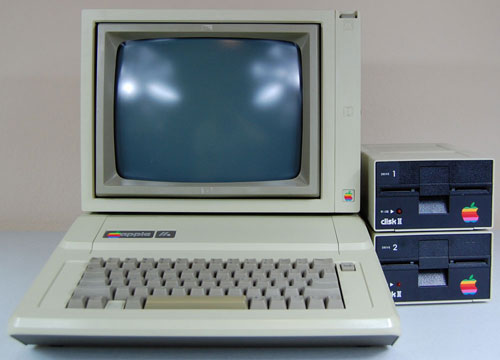
Emulation of low-density 5.25 inch Apple floppies would be useful for the Apple IIe and earlier models. These computers used a Disk II controller card in an internal slot. The controller card has two 20-pin ribbon connectors, each of which can be connected to a Disk II drive. The pinout of this 20-pin connector is almost identical to the pinout of Floppy Emu’s 20-pin connector. So with the right firmware (five words that gloss over a huge amount of work), you could plug a Floppy Emu directly into the controller card and emulate a Disk II floppy drive. Or plug two Floppy Emus into each of the two controller card connectors, and emulate two drives. With a custom multi-ended cable, it might even be possible to emulate two drives with a single Floppy Emu.
| Pin | Floppy Emu | Disk II Controller |
| 1 | GND | GND |
| 2 | PHASE0 | PHASE0 |
| 3 | GND | GND |
| 4 | PHASE1 | PHASE1 |
| 5 | GND | GND |
| 6 | PHASE2 | PHASE2 |
| 7 | GND | GND |
| 8 | PHASE3 | PHASE3 |
| 9 | N.C. | -12V |
| 10 | /WREQ | /WREQ |
| 11 | +5V | +5V |
| 12 | +5V | +5V |
| 13 | N.C. | +12V |
| 14 | /ENABLE | /ENABLE |
| 15 | N.C. | +12V |
| 16 | RD | RD |
| 17 | N.C. | +12V |
| 18 | WR | WR |
| 19 | N.C. | +12V |
| 20 | PWM | WPROT |
The only obvious mismatch is at pin 20. On the Mac, PWM is an output that controls the rotational speed of the 400K floppy drive. But on the Apple II, WPROT is an input that indicates whether the disk is write-protected. So depending on the emulation mode, pin 20 on Floppy Emu would need to behave like either an input or an output, and that’s a problem. The Emu uses a CPLD to interface with the computer, and it’s easy enough to modify the CPLD to change a pin between acting as input or output. But in practice this would be problematic and dangerous.
Let’s say your Floppy Emu board was configured in Apple II mode, and you plugged it into your Mac, with the intention of switching it to Mac floppy mode. But before you could even access the mode select menu, you’d have two outputs fighting each other on pin 20, possibly damaging the Floppy Emu, the Mac, or both. You could work around this problem by connecting the Emu to and Apple II and then switching to Mac floppy mode from there, but it would be an awkward and error-prone process. Some kind of passive adapter could probably solve this problem, with an inline resistor on pin 20, but I’d prefer to find a solution that doesn’t require extra hardware.
To complicate matters a bit more, there are two different standards for Apple 5.25 floppies. DOS 3.2.1 and earlier stored 113.75 KB per disk, 256 bytes per sector, 13 sectors per track, 35 tracks per side. But DOS 3.3 and later used a more efficient GCR encoding to store 140 KB per disk, 256 bytes per sector, 16 sectors per track, 35 tracks per side. As I understand it, this change also required a new version of the Disk II controller card. Was the newer one backwards compatible with the old format? Then there was ProDOS, which I believe used the same low-level format as DOS 3.3, but with a different filesystem. So Disk II emulation might actually involve two or three separate emulation modes, depending on the specific disk image being used.
The later cousins of the Disk II switched to a 19-pin D-SUB connector instead of the 20-pin ribbon connector, but the drive itself remained basically the same. The 19-pin connector pinout matches Floppy Emu’s 19-pin connector just as well as the 20-pin, with no problems except the collision of PWM and WPROT on the same pin. That means it should be possible to connect a Floppy Emu in Disk II mode to an Apple II with a 19-pin controller card, or with a 19-pin external floppy port such as found on the Apple IIc.
SmartPort: Unidisk 3.5
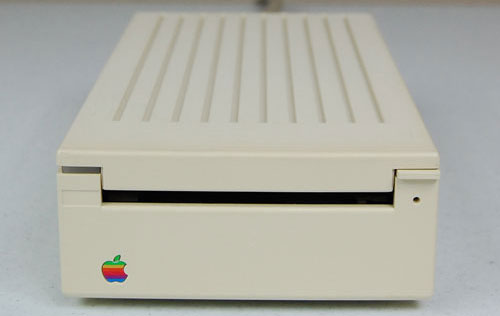
Next we have the Unidisk 3.5, an 800K floppy drive using the SmartPort communication protocol. Unlike the “dumb” Disk II, the Unidisk 3.5 was an intelligent device, communicating with the Apple II using a high-level request/response protocol that abstracted away the details of tracks and sides. From what little I’ve read about SmartPort, it sounds fairly similar to the HD20 protocol that I implemented a few months back for the Mac. It looks like there are already a couple of SmartPort-based disk emulators out there: UNIDISK and an SmartportCFA. That gives me hope that the SmartPort protocol wouldn’t be too difficult to implement.
Here’s where my understanding of things starts to get fuzzy, so if I say anything here that sounds incorrect, please let me know. It looks like the Unidisk 3.5 works on the Apple IIc, but only with certain ROM versions. There’s also a sub-model called the Apple IIc+, but I’m unclear if that’s anything more than a ROM upgrade, or what disk-related features the IIc+ offers over the IIc. The Unidisk 3.5 is also supported on the Apple IIgs, but it’s not recommended, because the performance is worse than can be achieved with non-SmartPort drives.
Did Apple ever sell other SmartPort drives, besides the Unidisk 3.5? I saw one source that mentioned SmartPort could support up to four drives per connection, and up to 32 MB per drive. If that’s true, could a SmartPort implementation on the Floppy Emu provide pseudo hard drive capability to the IIc and IIgs? I’m not sure.
How does the IIc or IIgs detect that a connected drive is a SmartPort drive, as opposed to a dumb 5.25 drive, or a non-SmartPort Apple 3.5 drive? Maybe it just sends a SmartPort request, and checks to see if anything responds. Or maybe there’s a pin that’s used to sense the drive type. The docs refer to a /3.5DISK signal on pin 4 of the 19-pin D-SUB, though I’m unclear how it’s used. More on this later.
Comparing the pinouts of the Floppy Emu 19-pin D-SUB connector with the Apple IIc and Apple IIgs, they mostly match up, but there are some noteworthy differences. There’s some disagreement about the published pinouts too, depending on which source you trust. I believe these are correct, and the Apple IIc+ is the same as the IIgs:
| Pin | Floppy Emu | Disk II | Apple IIc | Apple IIc+/IIgs |
| 1 | GND | GND | GND | GND |
| 2 | GND | GND | GND | GND |
| 3 | GND | GND | GND | GND |
| 4 | GND | GND | GND | /3.5DISK |
| 5 | N.C. | -12V | -12V | -12V |
| 6 | +5V | +5V | +5V | +5V |
| 7 | N.C. | +12V | +12V | +12V |
| 8 | N.C. | +12V | +12V | +12V |
| 9 | N.C. | /ENABLE2 | /EXTINT | /ENABLE2 |
| 10 | PWM | WPROT | WPROT | WPROT |
| 11 | PHASE0 | PHASE0 | PHASE0 | PHASE0 |
| 12 | PHASE1 | PHASE1 | PHASE1 | PHASE1 |
| 13 | PHASE2 | PHASE2 | PHASE2 | PHASE2 |
| 14 | PHASE3 | PHASE3 | PHASE3 | PHASE3 |
| 15 | /WREQ | /WREQ | /WREQ | /WREQ |
| 16 | SELECT | +5V | N.C. | SELECT |
| 17 | /ENABLE | /ENABLE1 | /ENABLE | /ENABLE1 |
| 18 | RD | RD | RD | RD |
| 19 | WR | WR | WR | WR |
There’s the same collision between PWM and WPROT that we saw previously, and I’m still not sure how best to resolve it. Then there’s this /3.5DISK signal on pin 4 of the IIc+ and IIgs, where others have an extra ground pin. What the heck? How is that used? Is it an input, an output, or both? The usage of pin 16 varies, but that shouldn’t cause a problem for the Emu, assuming the firmware is changed appropriately.
The biggest discrepancy is at pin 9, which isn’t physically connected on the Floppy Emu board. This is some kind of external interrupt on the IIc, which I think can be safely ignored. But on the other systems, pin 9 is used to select the second drive in a two-drive configuration. That means the Emu will be limited to emulating only a single drive, which is probably fine since that’s all it does anyway.
Apple 3.5 Drive
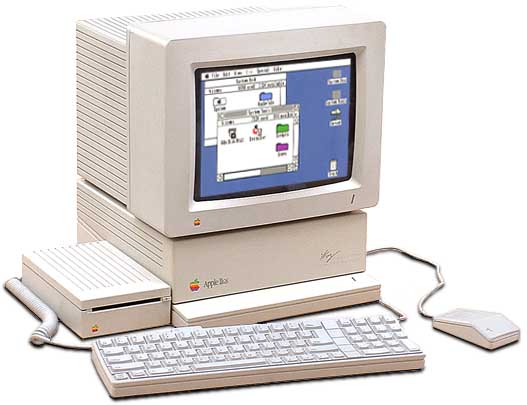
Last of the bunch is the Apple 3.5 Drive. Unlike the others, this drive functions on the Macintosh as well as on Apple II systems. It is not a SmartPort drive. How does that bit of magic work? I wish I understood it. Internally it’s the same Sony 800K mechanism that’s in the Unidisk 3.5 and in standard Macintosh floppy drives like the M0131, so the difference is only in the interface circuitry. I believe the Apple 3.5 Drive is supported on the Apple IIc+ and the IIgs, but it may also be supported on the standard model IIc – source seem to conflict on this point.
How does the computer know that an attached floppy drive is an Apple 3.5 Drive, and not a Unidisk 3.5 or other SmartPort drive, or a dumb 5.25 drive? I’m not sure, and the lack of documentation is frustrating. You can’t just plug a Macintosh floppy drive directly into a IIgs, so obviously there’s some difference in the way it identifies itself to the Apple II, but what is it? If I can find the answer, then I think the existing Floppy Emu firmware should work as-is for Apple 3.5 Drive emulation on the IIgs and IIc+.
Incidentally, if you have an Apple 3.5 Drive, you can remove its drive mechanism and substitute a Floppy Emu in its place. Combined with the 3.5 Drive’s internal daisy-chain board, this combination works today with the current firmware, on the Apple IIgs (and presumably also the IIc+) for 800K disk emulation. See Bryan Villados’ example on the Apple II Enthusiasts group.
/3.5DISK Mystery Signal
The biggest mystery at the moment is how an Apple II system can detect what type of floppy drive is connected, and this /3.5DISK signal on pin 4 seems to be part of the answer. For detecting the difference between a dumb 5.25 drive and a SmartPort Unidisk 3.5, I think /3.5DISK must be irrelevant, because the standard model Apple IIc lacks the /3.5DISK signal but can still use a Unidisk 3.5 drive. Also, SmartportCFA successfully emulates a SmartPort drive, and doesn’t even connect pin 4. My guess is the computer sends some kind of SmartPort “init” command that will fail in a predictable way on a dumb 5.25 drive. Exactly how that works will have to wait for a deeper investigation of the SmartPort protocol.
Most likely, the /3.5DISK signal is used only for detecting the Apple 3.5 Drive. If the Unidisk can be detected by a SmartPort query, then /3.5DISK is probably only for distinguishing between an Apple 3.5 and a dumb 5.25 Disk II drive. That sounds easy enough, but when I start to look at the details, I quickly get lost.
First: is /3.5DISK 0 for 3.5 inch drives and 1 for 5.25 drives, or vice-versa? Most sources refer to it as /3.5DISK or 3.5DISK*, both of which imply it’s an active low signal where 0 means it’s asserted, so 0 should mean to enable the 3.5 drive. This is also consistent with the fact that the Macintosh has pin 4 permanently tied to ground, and in order for the Apple 3.5 drive to function on a Mac, it would need to interpret the 0 volts on pin 4 as the assertion of /3.5DISK. However, this discussion from comp.sys.apple2 says it’s actually the opposite: 0 enables the 5.25 drive and 1 enables the 3.5 drive. Maybe the writer is just mistaken, but I’m not so sure.
Second, and more fundamentally: is /3.5DISK an input, or an output? If the purpose is to detect what type of drive is connected, then it should be an input. None of the documentation I’ve seen actually specifies, but from a few odd comments and schematics, I’ve inferred that it’s actually an output. As best as I can determine, then, /3.5DISK acts more like a secondary enable signal than a drive type detection signal. When /3.5DISK is asserted, then the attached Apple 3.5 drives should respond, and when it’s not asserted the dumb 5.25 drives should respond. Combined with the /ENABLE1 and /ENABLE2 signals, this would provide a way to control two drives of each type, and four drives total (not counting SmartPort). But there’s a problem with this interpretation – the dumb 5.25 drives don’t know anything about /3.5DISK. They think pin 4 is a ground connection, so they’re not going to play along nicely. Obviously I’m missing something, because this just doesn’t add up.
The comp.sys.apple2 discussion that’s linked above further confuses the issue. It refers to /3.5DISK as “an extra enable” line, but also says “The Apple 3.5 drive uses this signal (on its daisy-chain connector) to sense whether a 5.25″ drive (or SmartPort drive?) is connected at the end of the chain.” In this context where it’s used to “sense” a drive’s presence, it sounds like /3.5DISK is an input. Maybe it’s actually some kind of clever circuit that’s both an input and an output, depending on the context.
A final question: what’s the difference between the Apple 3.5 drive and a standard 800K Macintosh floppy drive? The Apple 3.5 drive works on both an Apple IIgs and a Mac – how does it accomplish this? If the answer were only related to the /3.5DISK signal, and that signal was strictly an output from the IIgs, then a Mac 800K drive ought to happily ignore that signal and still respond to the /ENABLE1 signal, and work fine on a IIgs. But that’s not what happens, so there’s a piece of the puzzle I’m missing.
Read 7 comments and join the conversationFloppy Emu “Universal” Firmware Update
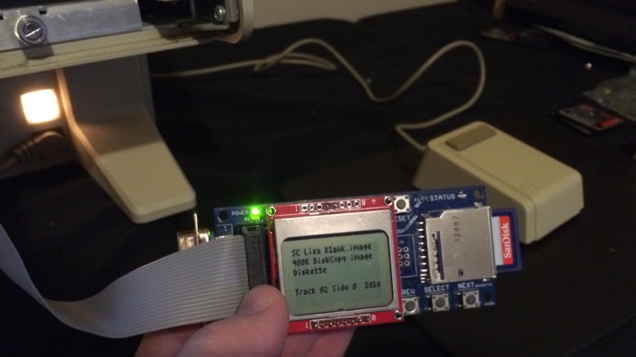
I’ve merged the Lisa floppy emulation functions into the latest Mac version firmware, to create a super universal firmware! it’s a single firmware for Floppy Emu with support for Mac and Lisa, floppy and HD20, raw disk images and Disk Copy 4.2 images. It also brings the benefits of writable DC42 disk images to the Mac. Sorry, it does not make sandwiches or wash your car, but it does nearly everything else. Press the SELECT button while the Emu is displaying version info on the LCD, you’ll enter a config menu where you can choose to operate as a hard disk, Mac floppy drive, or Lisa floppy drive. The new hd20-0.7B-F14.5 universal firmware is available now.
A few other odds and ends:
Checksums
After some discussion, I’ve altered the strategy for updating Disk Copy 4.2 checksums. I still don’t have a good solution for keeping the checksums updated when the disk image is modified, but instead of leaving the old (wrong) checksums in place, this new firmware sets the checksums to zero upon the first write to a DC42 image. Hopefully this will make it clearer for some future archivist who may encounter the modified image file, and he’ll understand the checksum was intentionally zeroed, rather than the image file being corrupted.
dc42cksm – I wrote this simple command line program to view the checksums in a Disk Copy 4.2 disk image file, and optionally to update the checksums if they’re not correct. If you ever have some burning need to copy a modified DC42 file off your SD Card, and import it back into Disk Copy 4.2 on the Mac, this tool can fix up the checksums for you. It’s a Windows command-line executable, but the source code is also included if you want to recompile it for OS X or Linux.
Blank Disks
Todd Meyer pointed out that blank 400K disks created under Lisa Office System 3.0 and 3.1 aren’t usable under Lisa Office System 2.0. The difference seems to be similar to the distinction between MFS and HFS disks on a vintage Macintosh system, except I don’t think the Mac ever used two different filesystems for the same sized disk. Thanks to Todd for providing a working LOS 2.0 blank disk image, which I’ve included with the lisa-emu-1.0S7-F11 firmware (below), and for the femu-on-Lisa photo that appears above.
A Spare Firmware
In case any problems are discovered with the new universal firmware hd20-0.7B, I’m also releasing an updated version of the Lisa-specific firmware, lisa-emu-1.0S7-F11. This is identical to the 1.0S6 Lisa firmware that I released yesterday, except that the checksum in the DC42 image file will be set to zero upon the first write to the disk.
???
The Lisa computer is a strange beast. It was the first mainstream home computer to feature a GUI instead of a text-based interface. It’s been interesting working with the Lisa while I developed the new floppy firmware, and for a time I thought maybe I’d like to get a Lisa system of my own when the time comes to return this borrowed machine. But the Lisa never really grew on me, and I can’t exactly say I’ll miss it when I need to give it back.
Running the Macintosh OS under MacWorks isn’t too bad, except that the machine has twice the bulk and weight of a contemporary Mac system. It’s just… unwieldy. That’s not meant as a dig against the Lisa – pretty much all computers of that era were unwieldy by today’s standards – but it’s impressive how much slimmer Apple was able to make the Mac 128K just a year after the Lisa, using most of the same technology except for the internal hard drive.
From the viewpoint of someone in 2015, the native Lisa OS (Lisa Office System) is truly baffling, ugly, and awkward. I’m not surprised Apple had such trouble selling Lisa systems before MacWorks came along. As the first real GUI computer, it’s no wonder Apple didn’t nail it 100% on the first attempt, so I don’t fault the Lisa or its designers for that. It’s fascinating to see this example of an early GUI, in contrast with the continuing improvements that appeared later in the Mac and other GUI systems.
Read 6 comments and join the conversationLisa Native Floppy Emulation
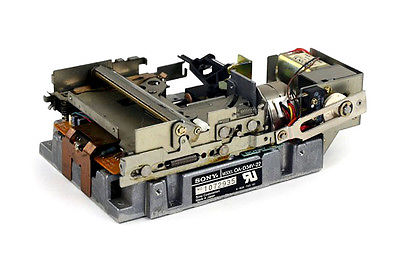
Lisa floppy drive emulation with Floppy Emu is a success! Begone, evil rotational disk drives, with your failure-prone gummed-up mechanisms. The age of SD card Lisa floppy emulation is here!
After a lot of tinkering, it’s now working on both the Lisa 2/5 and 2/10, and for both Lisa-format and Mac-format disks. I’m able to boot the Lisa from the emulated floppy drive, and use it to install Lisa Office System and other apps to the HD, and copy apps and data files from the Lisa HD to the emulated floppy drive. It also works for Mac-format disks, when running the Lisa under Macworks.
The final hurdle was realizing that the custom adapter I’d built to simultaneously connect a 400K floppy drive and a Floppy Emu was causing problems. After getting rid of the adapter and connecting the Emu directly to the Lisa, in place of the normal floppy drive, it’s now working perfectly.
Disk Copy 4.2 Format
From the previous Lisa firmware that I described in an earlier post, the last big piece of the puzzle was adding support for “tags”. On a Lisa floppy disk, a sector consists of 512 bytes of data and 12 bytes of tags. Raw disk image files don’t save the tag info – they’re just a byte-by-byte copy of the 512 data bytes from each sector. So in order to correctly emulate Lisa-native disks, it was necessary to use a disk image format that preserves tags: Disk Copy 4.2 images, the format I love to hate.
Floppy Emu already supported DC42 format image files for use with the Macintosh, but they were treated as read-only disks by the emulator firmware. The problem with tagged DC42 images is that the logical sector data isn’t aligned in the image file, nor in the FAT32 filesystem of the SD Card, and the sector tags are stored separately from the sector data. So to load a single sector of the emulated floppy (512 bytes data plus 12 bytes tags), it’s necessary to load three or sometimes four 512 byte sectors from the SD card, depending how the data and tags for that particular sector are aligned. It’s a pain in the butt.
Writing DC42 images is more complicated still, which is why previous firmware treated DC42 images as read-only. To perform the unaligned writes, the firmware must read a sector from the SD card, modify part of it, then write the modified version back. Again, this can involve three or four SD card sectors in order to write a single emulated floppy sector. SD cards really don’t like this pattern of read-write-read-write for single random-access sectors, so performance suffers a bit. But the new firmware code does its job, and writing to DC42 disk image files is now possible.
Checksums
The last unsolved item is DC42 file checksums. A DC42 image file contains a 32-bit checksum of all the data, and a separate 32-bit checksum of all the tags. If you attempt to load an image file with invalid checksums in Disk Copy 4.2, it will refuse to open it. Floppy Emu doesn’t care about the checksums, but there can be a problem if you copy a modified DC42 image file off your SD card, and try to use it with Disk Copy 4.2 or another utility that does care about checksums.
What’s the best way to make sure the checksums are kept up to date, when the DC42 image file is modified? Now that I know the checksum algorithm, I can recompute the checksum easily enough, but when should I do it?
- It’s impractical to recompute and save a whole-disk checksum, every time any sector is modified.
- I can update the checksum when the disk image is ejected, but that’s dangerous because ejection is very often a prelude to auto power-off a moment later. It takes about 2 seconds to recompute the checksum for a 400K disk, and 4 seconds for an 800K disk. Usually the time between ejection and shutdown is less than that. If the Floppy Emu loses power while it’s writing the new checksum value, the SD card could become corrupted.
- I might recompute the checksum when the disk image is inserted, but that’s unintuitive. Re-insert the disk image, in order to fix its checksums? And for systems like the Mac that write the last mount time whenever a disk is inserted, the checksum would still always be wrong.
- I might add some new Floppy Emu menu option or feature to recompute the checksum on demand. But that’s a strange special case I’d like to avoid, and doesn’t feel like the right solution.
- I could do nothing, and let people fix up the checksums with an offline tool if they ever need to copy them off the SD card and reimport them to Disk Copy 4.2. This is my solution for now.
Try It
If you’ve got a Lisa and a Floppy Emu, you can try the new firmware yourself. I’ve named this firmware version lisa-emu-1.0S6-F11, and it contains all the changes needed to emulate Lisa-format and Macintosh-format floppies on the Lisa computer, and to boot a Lisa from the Floppy Emu board. 1.0S6-F11 contains some changes that aren’t compatible with early Macintosh models, so while you won’t hurt anything by trying it on a Mac system, it may not work. For best results, use the normal Mac firmware for Floppy Emu with Macintosh computers, and use 1.0S6-F11 only when working with a Lisa system.
Read 9 comments and join the conversationLisa Floppy Emu, Looking Good
I’ve been crawling slowly closer to a working floppy emulator for the Apple Lisa, using my existing Floppy Emu hardware. I’ve now got something that’s broadly usable for emulation of Macintosh disks on the Lisa 2/10, when running under the Macworks environment, though it’s still far from perfect. The next step will be emulation of native Lisa floppy disks, so the computer can boot from the Emu and use it from within the Lisa Office System. Things are looking promising!
Setup
So far, most of the effort has gone into getting my borrowed Lisa to the point where I can actually run floppy tests. Initially it seemed no setup would be necessary – just plug the Floppy Emu into the Lisa, and see if it works – but reality has proven different:
- Create a hacked version of Basic Lisa Utility that doesn’t need the M key (my M key is broken)
- Buy/build a Lisa-to-PC serial cable to capture the BLU log data
- Build a custom floppy drive A/B switch, so I can connect a real 400K drive and a Floppy Emu at the same time
- Rewrite my floppy tester utility program in Think C 5.0, to avoid a mysterious crash bug on the Lisa
In order to capture the log data from BLU, I needed a serial connection to the Lisa. I ordered this USB-to-DB9 serial adapter, along with a separate DB9-to-DB25 adapter, and waited impatiently for them to arrive. After receiving the adapter, I connected the Lisa up to my Windows 7 PC, and of course it didn’t work. The link appeared totally dead, and nothing I did on one computer was seen by the other.
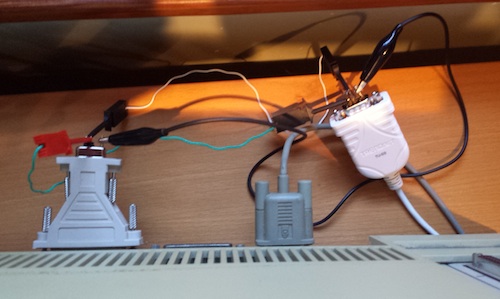
I’d been corresponding by email with a few Lisa experts, and one of them pointed out what I should have realized about the serial connection: I needed a null modem connection, not a straight serial connection. Serial cables have separate TXD and RXD lines for transmit and receive, and in normal usage the computer will transmit on TXD and receive on RXD, while the peripheral will receive on TXD and transmit on RXD. But with my Lisa-to-Windows hookup, both ends thought they were “the computer”, so both were trying to transmit on TXD. Argh!
I looked into buying a null modem adapter, which would also have required getting a gender changer too. But I got impatient, and finally just built my own solution out of some jumper wires to swap TXD and RXD. It works.
Emulation
The best diagnostic tool I’ve found is the floppy tester function of BLU, which generates sector-by-sector debug info. There are some categories of disk problems that BLU doesn’t report, such as drive speed adjustment problems and synchronization problems, but it’s still the most powerful tool for the job.
I’ve been corresponding with two people who own Lisas and Floppy Emus, and the three of us have been testing various Emu firmware versions and comparing the test results. With the latest “Lisa Emu” firmware, the emulation doesn’t work at all on a Lisa 2/5, but does work on a 2/10. These two Lisa models have completely different floppy controller hardware that should be functionally equivalent, but some hidden difference is clearly important here. More on that later.
On the Lisa 2/10, we discovered that the Emu firmware routine that generates the 10-bit bitslip marker wasn’t working. The bitslip marker is used by the floppy controller to find the correct byte-to-byte framing in the floppy data serial bitstream. After fixing that, the emulation started worked on the Lisa, but very slowly. There were clearly still lots of floppy errors happening, slowing down the I/O, even though it eventually succeeded.
Disk Rotation Speed
When testing with BLU, doing a sequential read of all the sectors on the disk, it appeared to freeze for about 15 seconds before reading the first sector on each track. BLU didn’t report any errors, but there was clearly something wrong. After some discussion with my remote Lisa testing partners, we began to suspect this was a problem with the simulated rotation speed of the emulated disk, and we were right.
With an Apple 400K floppy disk drive, the drive spins at different speeds depending on which track is being accessed. The disk is divided into five speed zones, with five different rotational speeds ranging from 394 to 590 RPM. The computer directly controls the drive’s rotational speed by modulating a signal called PWM, and the drive indicates its current speed with a signal called TACH. So the computer sets PWM, then reads TACH and verifies that the desired rotational speed has been reached. If the verification fails, a Macintosh will report error -79: “can’t correctly adjust disk speed”. But what will a Lisa do?
The Floppy Emu doesn’t actually use the PWM signal, but instead it sets the TACH value directly, based upon which track is accessed by the computer. I tried modifying the Emu firmware to generate an obviously wrong TACH, and the behavior on the Lisa was unchanged. It still wasn’t reporting any errors, but the 15 second pause at the start of each track was still there. This told me that the TACH value was probably wrong all along, and that the Lisa was waiting about 15 seconds on each track for the TACH speed to become correct, then giving up and attempting the I/O anyway.
I blindly experimented with different formulas for TACH. Make it faster? Slower? Change the speed by a percentage, or by a constant offset? After lots of trial and error, I found that scaling TACH by 2.5% across the board made all the 15 second pauses disappear. So in effect, the Emu is reporting that the drive’s rotational speed is 2.5% faster than the spec. Why is this necessary? I honestly have no idea. The revised formula is almost certainly still wrong, but it seems to work well enough for now.
Inter-Sector Gap and Interleave
The sectors on a normal Macintosh disk are interleaved 2:1, with a short gap of dead space between sectors. Conceptually it looks something like this timeline view:
0000000000.6666666666.1111111111.7777777777.2222222222.8888888888 etc.
The 2:1 interleave means sector 6 follows sector 0, then come sectors 1, 7, 2, 8, 3, etc. The gap between each sector is about 10% the duration of the sector itself. The purpose of the interleave is to get the fastest possible I/O speeds when doing sequential reads of many contiguous sectors, allowing for some amount of CPU processing time after reading each sector that wouldn’t be possible with a 1:1 interleave.
For a sequential read of many sectors and a correctly tuned interleave, after locating the first sector on a track, the floppy controller should see zero unwanted sectors go by before the next desired sector appears. But I discovered that for BLU’s sequential read test, the floppy controller was almost always seeing 11 unwanted sectors before the desired sector appeared. There are 12 sectors per track on this region of the floppy, so 11 unwanted sectors meant the Lisa was just missing the desired sector, and had to wait for an entire rotation of the simulated disk (11 more sectors) before the desired sector rolled around again. In short, this meant it needed a higher interleave than 2:1. But that couldn’t be right, because real Mac disks are interleaved 2:1, and the Lisa under Macworks can read them without problems.
I wasted a lot of time experimenting with different interleave values, and different gap sizes between the sectors. Eventually I found a combination that led to zero unwanted sectors after the first sector of the track, but it required a huge and unrealistic inter-sector gap size. And while it made the BLU floppy test results look better, it actually performed worse in real-world tests, copying files under Macworks.
Finally I had the idea to repeat the BLU floppy test with a real floppy disk and drive, and observed the same 11 unwanted sectors before the desired sector. Aha! This told me the issue was actually with the BLU test, and not with the Floppy Emu firmware. BLU must be doing a non-trivial amount of CPU computation or other I/O after each sector, more than is normally performed by the OS during a sequential read, so that by the time it’s ready for the next sector, the desired sector has already rotated past. I reverted all of my changes, and put the inter-sector gap size back where it was originally. The BLU results got worse again, but real-world performance under Macworks improved noticeably.
Recalibrations?
One more mystery remains unsolved. In all of my BLU tests, the reported value for recalibrations (Rcl) is always 4C. For one of the other testers, it’s always 02. I’m not sure yet what the third tester is seeing for Rcl. The BLU manual appendix D says Rcl is “recalibrations remaining”, and that an operation normally starts with 1 recalibration remaining and counts down from there – so both 4C and 02 are anomalous. What’s the significance of this? It needs more investigation.
Real-World Tests
Using a Lisa 2/10 system, I booted Macworks XL from the Lisa’s hard drive. By holding down the left option key, I told Macworks to initialize the Macintosh environment, but wait for a floppy disk to actually boot the Mac OS. Using a real 400K floppy drive and disk, I booted System 3.2, measuring the time from disk insertion to ready desktop at 37 seconds. Then I repeated the same experiment with Floppy Emu and a disk image of System 3.2, and measured it also at 37 seconds. So it works! No more mysterious slowdowns: Floppy Emu on the Lisa performs at the same speed as a real floppy.
As a second test, I booted Macworks from the Lisa’s hard drive, then used Floppy Emu to insert a 400K disk image containing MacPaint and MacWrite. The disk image appeared on the desktop within a few seconds of inserting it, and copying MacPaint from the Emu to the Lisa’s HD only took a few seconds more. I was also able to copy files from the HD back to the emulated floppy disk without problems. Given what I’m seeing in these tests, the current firmware should provide a fully usable and full-speed floppy emulation for the Lisa under the Macworks environment.
Try It
If you’ve got a Lisa and a Floppy Emu, you can try the new firmware yourself. I’ve named this firmware version lisa-emu-1.0S3-F11, and it contains all the fixes and adjustments described above in order to make Macintosh disk emulation work on the Lisa in the Macworks environment. Native Lisa floppy emulation still isn’t implemented, but I hope to tackle that soon.
Be the first to comment!Floppy Emu AVRGCC Mystery Behavior
For a while I’ve been struggling with occasional mystery bugs when making changes to the Floppy Emu AVR microcontroller firmware. I’ll make some seemingly innocuous code changes, and completely unrelated things will break. Frequently I’ll change something in a menu or other user-facing code, and suddenly the Emu will lose the ability to read the SD card, and insist there’s no card present. Needless to say, this makes development a real pain in the butt.
Today I found a perfect example of this behavior, where changing the max loop count in some code that’s not even executed would cause the Emu to lose access to the SD card. Buried in the code that simulates reading a floppy disk image is this:
#define INTER_SECTOR_GAP_SIZE 55

// lots of stuff omitted

for (uint16_t i=0; i<INTER_SECTOR_GAP_SIZE; i++)

{

  SendByteAndCheckRestart(0xFF);

}
What I found is that if I changed 55 to 56 or 65 or pretty much any other number, the Emu would suddenly become unable to read the SD card. What’s strange is that this for loop isn’t even executed during Emu startup, where the SD problem occurs. And just changing a single constant from 55 to 56 shouldn’t change the size or location of the compiled code, or anything else that might reveal previously hidden memory-related bugs. But it was extremely reliable: 55 always worked fine, 56 could never read the SD card.
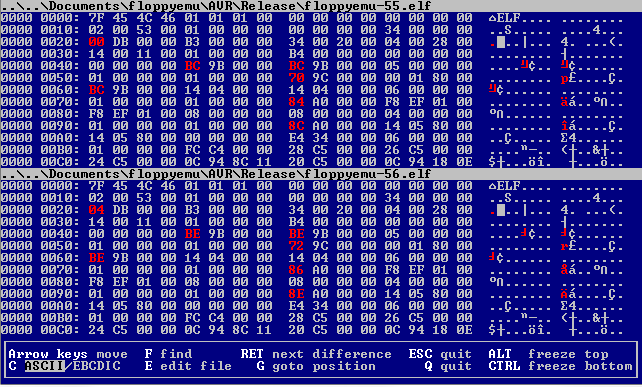
Determined to find an explanation, I grabbed the binary diff tool VBinDiff and used it to compare the two compiled .hex files. I fully expected the files to be identical, save for a single byte that was 0x47 in one version and 0x48 in another version. But I was stunned to find the two files differ in hundreds of places! There are at least a hundred single-byte differences, as well as whole blocks that are different between the two. Thinking maybe I was getting different compile results from one compile to the next, due to a compiled-in timestamp or something weird, I tried compiling the same source code twice and comparing the results. They were identical. But if I changed the loop count, I got a hugely different result. And somehow that result was causing an SD card problem.
At the moment I don’t have any explanation for this, except maybe for some kind of compiler optimization that kicks in after 55 something-or-others. If you’re curious, you can compare the two .hex files yourself: floppyemu-55.hex, floppyemu-56.hex. The hex files show exactly what will be programmed into the ATMEGA1284’s flash memory.
Read 15 comments and join the conversationLisa Emu, Day 3
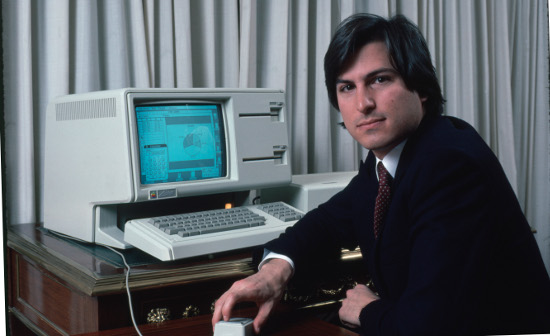
I always operate my computer on a mahogany desk, while wearing a suit and tie. Don’t you?
There’s been no progress on the Lisa disk emulation itself since my last update, but I’ve spent some time getting the Lisa into a state where I can collect better floppy diagnostic information. The BLU Basic Lisa Utility seems to be the best tool available for this.
BLU Setup
BLU isn’t an application, but is a “bare metal” program that loads instead of the operating system. As I mentioned previously, the tricky part with BLU is that it needs to be loaded from a real floppy disk, but I also need to connect the Floppy Emu in order to run tests on it. The Lisa only has one floppy port, and I don’t want to hot-swap the drives.
I finally decided to install BLU to the Lisa’s hard drive. I’d been resisting that solution, since a BLU hard drive install wipes out anything else on the HD, which makes it impossible for me to run further Macworks tests. That’s not great, but because it would enable me to run BLU from the HD while testing a Floppy Emu on the floppy port, I decided it was the best option available. After reading the BLU documentation, I learned that the HD install option is in the “miscellaneous” sub-menu, accessed by pressing M from the main menu. But wait a second – the M key on the Lisa’s keyboard is broken! Argh! No HD install for me.
So instead of installing BLU to the hard drive, I switched to my backup plan and built a two port floppy drive adapter with an external enable switch. This adapter connects power and the computer’s floppy outputs to both drives, with a manual switch to control whether the computer’s enable output is connected to drive 1 or drive 2. The read lines from the floppy drives are connected together, but that should be OK since only one drive will be enabled at a time. That’s similar to how the external and internal floppy drives are connected on a Mac.
Not wanting to risk damaging the Lisa if the adapter was flawed, I tested the adapter on a Mac SE, with one 400K drive and one Floppy Emu. It mostly worked, and I could use the switch, and the computer would only see the drive that was enabled with the switch. But there were some weird problems too, like disks sometimes becoming unreadable or failing to eject. I had almost given up on the adapter, when I realized the problem was that I’d combined a real 400K drive with a Floppy Emu that acted like an 800K drive. So from the computer’s point of view, the type of drive would magically change when I flipped the switch, causing badness. After changing the Floppy Emu firmware to identify itself as a 400K drive, it worked fine.
Now I can use the adapter to connect both a 400K drive and a Floppy Emu to the Lisa, though only one drive can be used at a time. I can boot BLU from a real floppy disk, then switch over to the Floppy Emu to run tests. Great! Unfortunately I can’t actually see the results of BLU’s floppy tests. It sends the test results to the serial port, not the screen. I’ve ordered a DB-25 to USB serial cable, but it’ll be a couple of days before it arrives.
Binary Hacking
Meanwhile, about that broken M key… it turns out that I still need access to BLU’s (M)iscellanous menu in order to turn on verbose output from the floppy tests. And short of getting a new Lisa keyboard, the only solution was to patch BLU to use a different keyboard shortcut to access the menu.
BLU is distributed as a DiskCopy 4.2 image file. I opened the file in a hex editor under Windows, and found where the menu options were stored, and the table of keypress values for each option. I hacked the code to use B for the miscellaneous menu, instead of M, and saved my work. Success! Except now the checksum on the image file was wrong, and DiskCopy 4.2 refused to load it.
Undaunted, I searched the web for some existing tool that could fix DC42 checksums, or ignore the checksums, or at least tell me the values of the stored and computed checksums. I found nothing. I couldn’t even find a good explanation of the checksum algorithm, the only reference being a one-sentence description on the DiskFerret wiki. I finally gave up on finding an existing tool, and wrote my own program to compute DC42 checksums, experimenting with it until the values it computed matched the stored checksums in some known-good DC42 image files. I used my new program to manually fix the stored checksum in my patched version of the BLU image file, and all was well. There must have been an easier way to work around a broken M key!
Floppy Tester Tool
In addition to BLU, the other weapon in my arsenal is a Macintosh program I wrote during Floppy Emu’s original development, and which I described in my previous post. This testing program has a few problems on the Lisa, when running under Macworks. After some experiments, I learned that it doesn’t work on Macs with a 64K ROM (the Mac 128K or Mac 512K), nor on the Lisa with an emulated 64K Mac ROM using Macworks XL. The program opens, then immediately closes again, with no error message reported. More experiments showed that it worked fine with a 128K ROM (Mac Plus). When the Lisa was updated to use Macworks Plus with an emulated 128K ROM, the testing program worked. However, I suspect that the combination of Macworks Plus and 400K IO ROMs in the Lisa I’m using is causing some problems of its own. A much better solution would be to understand why the program doesn’t work with 64K ROMs, and fix it.
So why doesn’t it work? My best guess is that it’s some glue code being automatically inserted by the Metrowerks Codewarrior 6 compiler I used to build the program. I don’t remember exactly when Codewarrior 6 was current, but it’s probably 10-15 years newer than those early Macs with the 64K ROM, and so it’s easy to imagine it would assume the target machine had at least a 128K ROM. In fact I know of one example of this already, where Codewarrior automatically includes calls to the StripAddress() trap, which is supposed to make sure addresses are 32-bit clean. But this trap doesn’t exist on old ROMs and old system versions, so programs built with CW6 will mysteriously crash. StripAddress() isn’t even needed on those systems, because they always run in 24-bit mode. The solution I’ve found is to open the compiled program in ResEdit, open the CODE resource, and replace instances of 0xA055 (StripAddress) with 0x4E71 (NOP instruction).
A better solution would be to rebuild the test program with an older compiler that’s more likely to be 64K ROM friendly. Keith Kaisershot kindly did this using Think C 5.0. I haven’t yet had a chance to try his new version, but I hope to give it a shot after I finish up this progress report.
BLU Testing
I’ve also been mulling over possible explanations for the BLU test results reported by my remote Lisa pen-pal. It looks like the Lisa is finding the start of the sector’s data section OK, but runs into errors at the data checksum or the data end signature, so something is going wrong midway through the sector data. Possible causes I can think of:
1. It picked up a false data start signature in the middle of some other data, while the floppy controller was out of sync. This might happen occasionally, but it should be rare. I doubt this is the problem.
2. The bit rate sent by the Floppy Emu doesn’t match the bit rate expected by the Lisa. The Emu sends at exactly one bit per 2.0 microseconds. On a real Macintosh and floppy drive, it would be 2.04 microseconds, but this discrepancy never caused a problem. I doubt this is the problem on the Lisa, but it might be.
3. The Lisa is getting confused because the Emu doesn’t provide proper 10-bit bitslips. I don’t think this can be the answer, because it wouldn’t explain how the Lisa could so often read the start of a data section OK, but run into problems somewhere before reaching the end. The bitslip is something that happens before a sector, or between the sector’s address and data sections, but not in the middle of the data.
4. Electrical noise, reflections, ringing, or cross-coupling are screwing up the digital signal from the Floppy Emu to the Lisa, causing read errors. I tend to doubt this, since if it were a problem, it should be a problem on the Mac too. But maybe the Mac is more tolerant of noise, has different voltage thresholds or hysteresis on the inputs, so electrical noise simply doesn’t affect it as much. The scope should reveal this.
5. The structure of a single bit is not what the Lisa expects. When simulating a read, a 0 bit is sent by keeping the signal at whatever level it was previously, and a 1 bit is sent by a high-to-low transition. Some time after the high-to-low transition, but before the next bit window, there must be a low-to-high transition to prepare for a possible high-to-low transition on the next bit. The time delay between these two transitions is undefined, as far as I know, as long as it’s less than a bit window. I believe Floppy Emu does it half-way through the bit window, so a sequence of all 1 bits would be transmitted as a 50% duty cycle square wave. Maybe the Lisa hardware expects a different duty cycle? Comparing the Floppy Emu signal to a real drive on the scope might shed some light on this.
6. Something is interrupting the AVR microcontroller during its transmission of a sector, so it hiccups midway through and introduces an error into the data. I think this is the most likely explanation for the problems observed. But if it were a problem, it should be affecting the Mac too. Possible things that could interrupt or stall the AVR and cause a hiccup:
- It thinks the computer just switched to reading the opposite side of the disk.
- It thinks the computer just stepped to a different track.
- It thinks the computer just began a write operation.
- There is a code path where it takes longer to compute and prepare the next byte than the 16 microseconds it takes to send a byte.
That seems like plenty to think about for tonight.
Read 4 comments and join the conversation