

Mac ROM-inator Kit Back in Stock
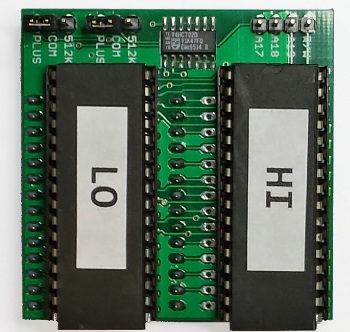
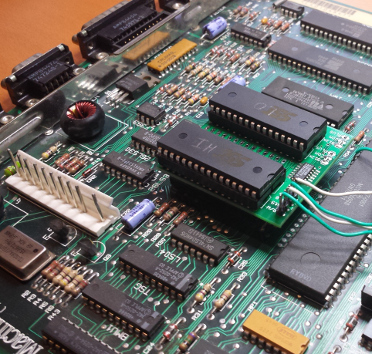
After a long absence, the Mac ROM-inator Kit is back in stock at the BMOW store. The ROM-inator replaces the stock 64K or 128K of ROM in a compact Macintosh with a full 1 MB of flash memory. Once installed, the flash ROM’s contents can be updated from within the running Macintosh, allowing for a bootable ROM disk and crazy customization possibilities. It’s compatible with the Macintosh Plus, 512Ke, 512K, and 128K.
The kit includes preprogrammed flash chips with the following ROM changes as defaults. Any of them can be changed by updating the flash memory with a simple GUI tool.
- Startup beep is replaced by a glass “ping”
- Happy Mac icon is replaced by a Mac wearing sunglasses
- Pirate icon is displayed while waiting to load the ROM disk
- ROM disk image including System 6, utilities, and games
- 128K ROM code turns a Mac 128K or 512K into a 128Ke or 512Ke
Get Them While They Last
This will most likely be the final batch of Mac ROM-inator Kits, so if you’ve been wanting one, get it now! The ROM-inator is nice bit of technology, but when I put on my businessman hat I must admit it hasn’t been a great product. Stuffing the kits and pre-programming the ROMs is very time-intensive, and isn’t something I wish to continue doing. Instead, I’ve documented a “Make Your Own Kit” parts list and instructions for DIY builders. But for those who prefer a pre-packed kit, you can still get it while supplies last.
Read 3 comments and join the conversationYellowstone Bugs
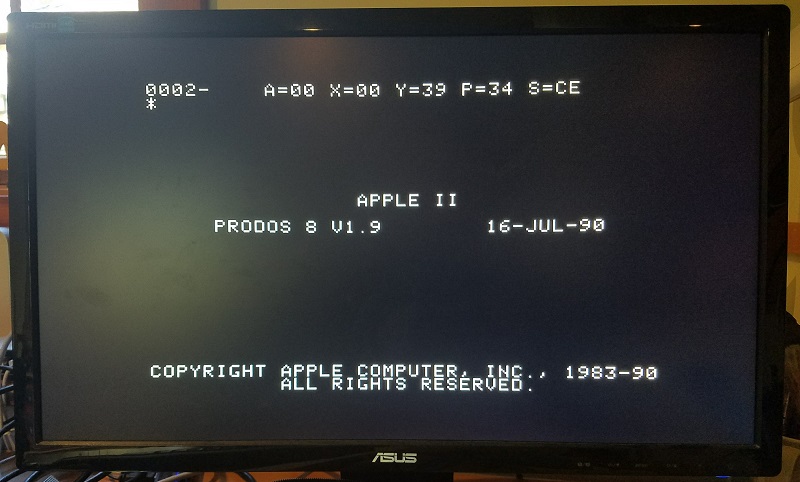
I’ve discovered a troubling problem with the Yellowstone disk controller for Apple II, and I’m unsure how to debug it. When it’s functioning as a Liron clone, Yellowstone isn’t playing nicely with other cards like a stock Disk II controller card. While booting from a Prodos 1.9 disk image using a Disk II controller in slot 6, Prodos crashes midway through booting if the Yellowstone card is present in slot 5. This happens even if there aren’t any drives connected to the Yellowstone card. It’s not 100% reproducible, but happens maybe 90% of the time. Yet everything works fine if I repeat the test with a real Liron controller card instead of the Yellowstone card. That means it’s my problem, and not the Liron designer’s.
I believe what’s happening is this: the Apple II scans the slots beginning with slot 7, and moving towards slot 1, looking for cards with a bootable ROM. It finds the Disk II card in slot 6, and jumps to its ROM code. That code loads sector 0 from the Prodos disk, displaying the splash screen shown in the photo. Then before Prodos has finished fully loading, the Apple II resumes the scan and jumps to the Yellowstone ROM code for slot 5. This code should look for attached Smartport devices, find that there aren’t any, and return. But somewhere during the execution of that ROM code, or during execution of the Prodos code just afterwards, something goes wrong. The Apple II stops and displays a system monitor prompt. Crash.
Where do I begin, with a bug like this? I don’t really know anything about the inner workings of Prodos, or even about the ROM code on the Yellowstone card, since I simply copied it verbatim from the Liron card without really studying it. That means I can’t easily figure out what the computer is trying to do at the moment it crashes.
My first guess is that I’m experiencing data bus contention, and the Yellowstone card is interfering with the Disk II card. The Disk II controller card and the Yellowstone card might both be attempting to put data on the bus at the same time, interfering with each other, and causing wrong values to be read from ROM code. But it’s hard to imagine how Yellowstone could be driving the bus at the wrong time. The output enable logic is pretty simple, and the Apple II already provides each slot with its own fully-decoded enable signals /DEVICE and /IOSELECT. There is a region of the Apple II address space that’s shared by all cards, and that uses a shared /IOSTROBE enable signal, but the Disk II card doesn’t use that address space.
My second guess is the reverse of the first: the presence of the Disk II card is somehow interfering with the Yellowstone card, exposing a flaw in the Yellowstone design that doesn’t appear when Yellowstone is the only card present. Maybe it’s somehow causing Yellowstone to malfunction. But I can’t really imagine what could cause that.
A third possibility is a problem caused by Prodos itself, rather than by the Disk II card. Maybe the first portion of Prodos alters some memory locations or sets some interrupt timers, or changes the system state in other ways that cause the Yellowstone boot ROM to fail. But it’s unclear why such an issue wouldn’t also affect a real Liron controller card in the same way.
A final possibility: maybe there’s a hardware problem with my Apple IIe, and there’s not enough juice to power two cards simultaneously, or the logic board is flakey. In the past on this same computer, I’ve occasionally seen similar crashes to the system monitor while booting Disk II software, long before Yellowstone even existed. Coincidence, or clue?
I’m scratching my head, trying to think what I could do to help troubleshoot this further, but I don’t have any great ideas.
Read 44 comments and join the conversationFloppy Emu Back in Stock
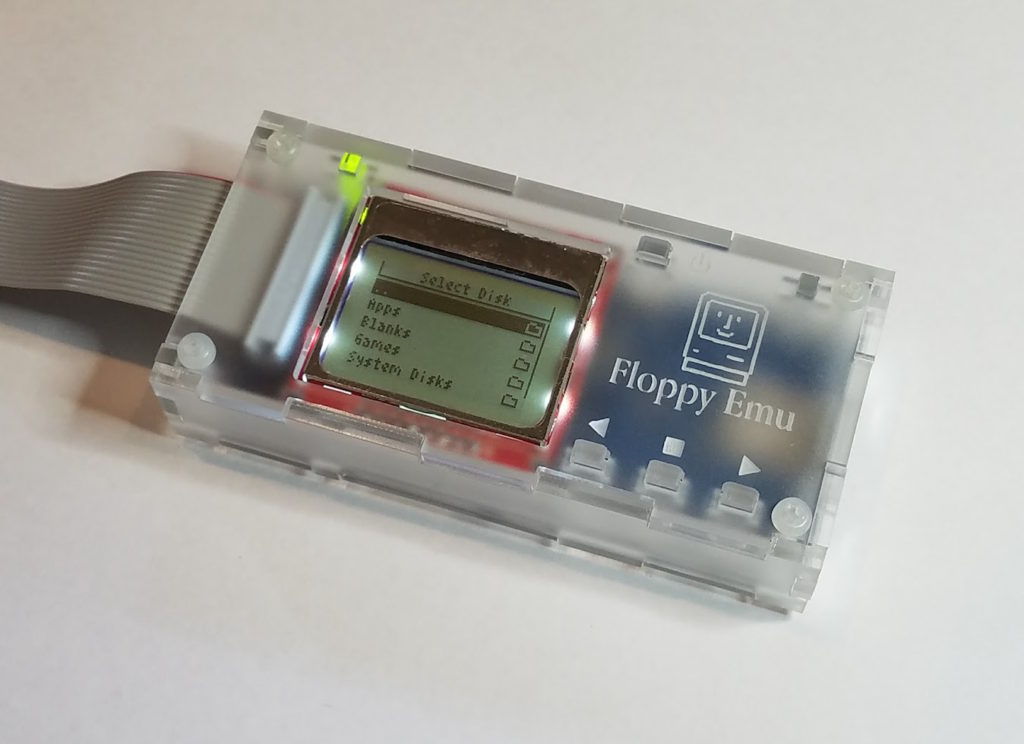
BMOW’s Floppy Emu disk emulator for vintage Apple computers is back in stock. Get yours now at the BMOW store.
Read 9 comments and join the conversationYellowstone: Cloning the Apple II Liron
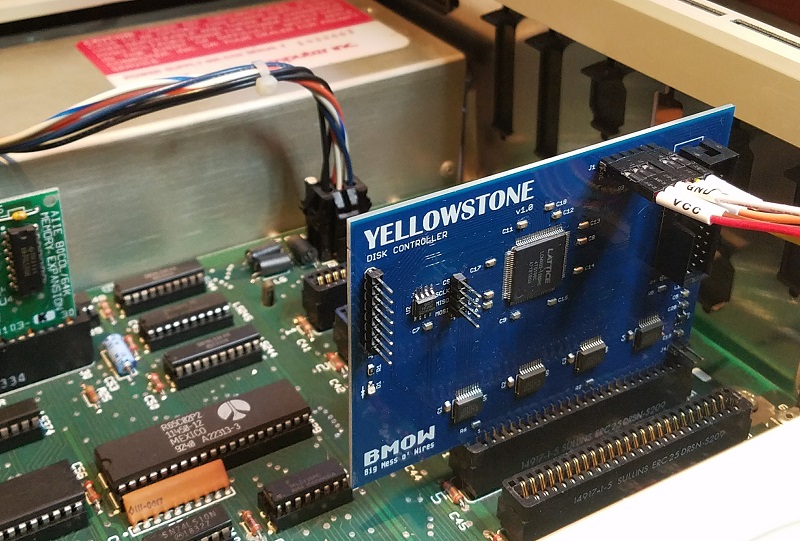
FPGA-based disk control for Apple II is finally working! Six months ago, I began designing a universal disk controller card for the Apple II family. Apple made a bewildering number of different disk controller cards in the 1970s and 80s, and my hope was to replace the IWM chip (Integrated Wozniak Machine) and other assorted ICs typically found on the cards, and substitute a modern FPGA. With a little luck, that would make it possible to clone any vintage disk controller card – some of which are now rare and expensive. It would also enable a single card to function as many different disk controllers, simply by modifying the FPGA configuration. With the successful cloning of a Liron disk controller, the first major step towards those goals has been made.
Six months passed from the initial design until now, but it wasn’t exactly six months of continuous work. After a short spurt of activity last summer, the project sat collecting dust on my desk until I recently picked it up again. Sometimes it’s hard to find motivation!
Hello Liron
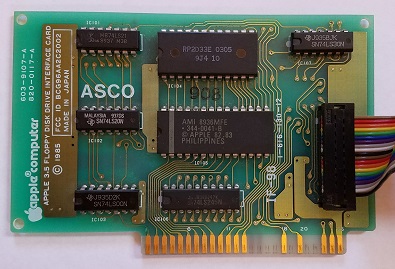
The “Liron” disk controller was introduced by Apple in 1985. More formally known as the Apple II UniDisk 3.5 Controller, it’s designed to work with a new generation of “smart” disk drives more sophisticated than the venerable Disk II 5.25 inch floppy drive. The smart disk port on the Liron is appropriately named the Smartport, and it can communicate with block-based storage devices such as the Unidisk 3.5 (an early 800K drive) and Smartport-based Apple II hard drives.
Why care about the Liron? The Apple IIc and Apple IIgs have integrated disk ports with built-in Smartport functionality, but for the earlier Apple II+ and IIe, the Liron is the only way to get a Smartport. For owners of the BMOW Floppy Emu disk emulator, the Liron card makes it possible to use the Floppy Emu as an external hard drive for the II+ and IIe. Unfortunately finding a Liron is difficult, and although they occasionally turn up on eBay, they’re quite expensive. That made cloning the Liron a logical first goal.
John Holmes was kind enough to lend me his Liron card for examination. Later Roger Shimada made the generous gift of a Liron and a Unidisk 3.5. I’m indebted to both of these kind gentlemen for their help.
The Liron contains an IWM chip, a 4K ROM, and a handful of 7400-series glue logic chips. It took a few hours to trace all the connections on the card and create a schematic. Except for the IWM, the exact functions of the other chips are all well known and relatively easy to implement in a hardware description language for the FPGA. Fortunately there’s a spec sheet for the IWM too, written by Woz himself, available if you search through dusty corners of the Internet. Based on that information, I was able to create an HDL model of the IWM for synthesis in the FPGA. It was a fairly big project, but I’d already done part of it back in 2011 for my Plus Too Mac replica.
Yellowstone Prototype
The first Yellowstone prototype was sketched out during a single hectic week. I’d never made an Apple II card before, but it’s just a standard thickness PCB with a specific shape and pattern of edge connectors. The core of the Yellowstone board is a Lattice MachXO2 FPGA, specifically the LCMXO2-1200HC. This 100-pin chip has 1280 LUTs for implementing logic, and 8 KB of embedded block RAM to serve as the boot ROM or for other functions. It also has some nice features like a built-in PLL oscillator and integrated programmable pull-up and pull-down resistors. Unlike some FPGAs, the MachXO2 family has built-in flash memory to store the FPGA configuration, so it doesn’t need to be reloaded from an external source at power-up. The FPGA can be programmed through a JTAG header on the card.
Because the FPGA’s maximum supported I/O voltage is 3.3V, but the Apple II has a 5V bus, some level conversion is needed. I used four 74LVC245 chips as bus drivers. These chips operate at 3.3V but are fully 5V tolerant, and the Apple II happily accepts their 3.3V output as a valid logic “high”. One of the chips operates bidirectionally on the data bus, and the others handle the unidirectional address bus and control signals.
The prototype card also has a 2 MB serial EEPROM. I’m not exactly sure how this will be used, but I’m hoping to find a way to load disk images from the EEPROM as well as load disks from a real drive. 2 MB is enough to store 14 disk images of 5.25 inch disks, or a single larger disk image. It’s not central to the design, but if it works it would be exciting.
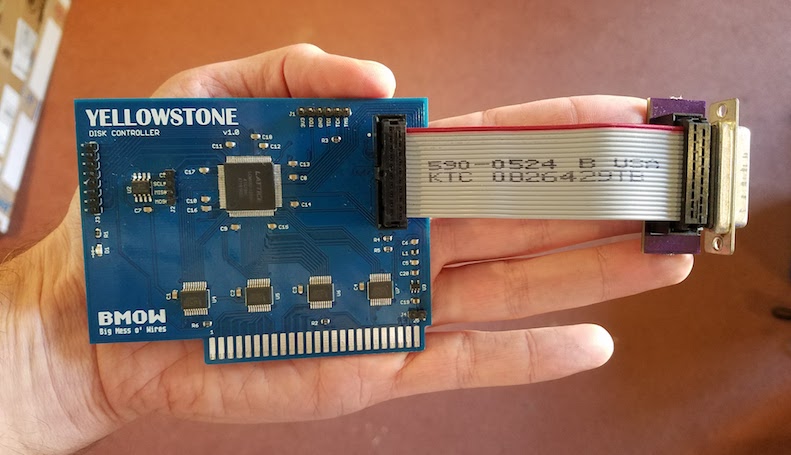
To make the physical connection to an external disk drive, I attached a short cable to another custom PCB with a DB19-F connector. The female version of the DB19 isn’t quite as difficult to find as the male, but it’s not exactly common. If Yellowstone eventually becomes a product and sells in any appreciable volume, obtaining sufficient supplies of the DB19-F will likely be a problem.
Putting it All Together
After months of procrastination, and a long digression into what proved to be a faulty JTAG programmer, I was finally ready to put Yellowstone to the test. After a few quick fixes, it worked right away! I was very surprised, considering that the complex IWM model for the FPGA was developed without any iterative testing or validation. I got lucky this time.
Here’s Yellowstone, booting an Apple IIe from a 6 MB hard disk image using a Floppy Emu Model B in Smartport mode:
And here’s Yellowstone again, booting an 800K ProDOS master disk from an Apple Unidisk 3.5 drive:
What’s Next?
I’ve made it this far – phew! Next, there are lots of little things to fix on the card. Some parts are labeled incorrectly, it’s slightly too wide, some extra resistors and buffers are probably needed for safety, etc. Addressing all those items will keep me busy for a while.
Second, I’d like to investigate cloning other types of Apple II disk controllers. The Disk II controller card should be fairly easy to clone – or the Disk 5.25 controller, which is essentially the same card with a different physical connector. I’m about 90% sure I can make that work. I would love to clone the Apple II 3.5 Disk Controller too (aka the Superdrive controller), but that would be a much larger effort and I’m not certain it’s possible. I believe the real Superdrive controller contains an independent 6502 CPU and is quite complex.
In theory the Yellowstone card could also implement other non-disk functions, although it might require a different physical connector to make use of them. A serial card maybe? Some kind of networking? A coprocessor?
The elephant in the room is the question of Yellowstone’s ultimate goal. Is it a hobby project, or a product? If a product, how much demand really exists for something like this? How would the demand change, depending on what kinds of other disk controllers I’m ultimately able to clone? And how would Yellowstone buyers update the FPGA with new firmware for new clones and bug fixes? I probably can’t assume that every customer owns a JTAG programmer and has the tools and skills to use it. But I’m reluctant to add a USB interface or microcontroller that’s used solely for JTAG/firmware updates and is dead weight otherwise. I’m still waiting for a great solution to hit me.
I’m happy the Apple II bus interface is so easy to understand and implement. Thanks to Woz for that. With just a ROM and a bit of glue logic (or their equivalents in FPGA), you can do all sorts of creative things. With today’s computers being such closed systems, I’m glad we still have antiques like the Apple II to provide an outlet for my electronics tinkering.
Read 62 comments and join the conversationNo Device Connected
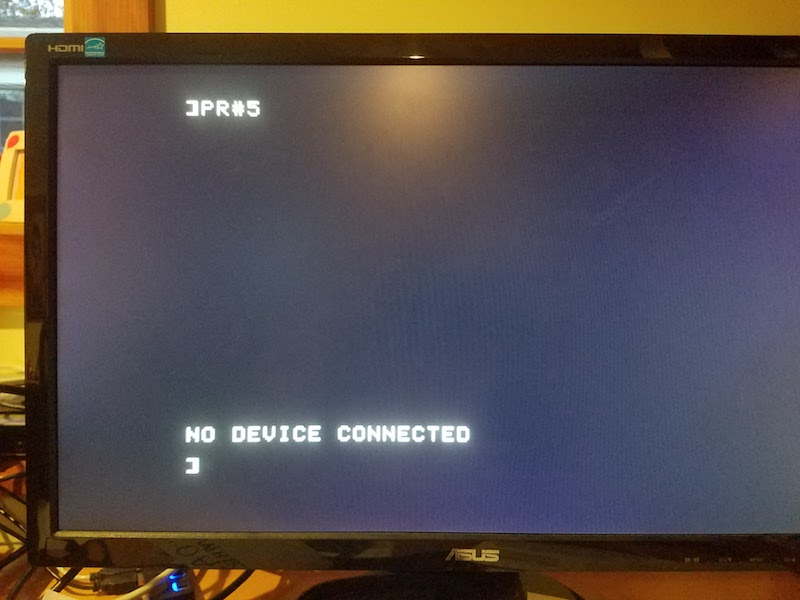
Finally, the first real progress on the Yellowstone disk controller since last summer! Sometimes an error is a good thing. It doesn’t look like much yet, but this error demonstrates that the Yellowstone card is correctly decoding address references to its slot, and is serving up data from a simulated ROM inside the FPGA. In this case the ROM data is the firmware from a stock Liron card. The Apple II’s 6502 CPU runs the firmware, which tries to use the FPGA’s soft-IWM to find a Smartport-capable disk drive. It finds none, and prints an error message. Hot stuff.
An error message is much better than having PR#5 crash the computer. That’s what happened on the many previous iterations of this test.
The next step is to stick a logic analyzer on the card’s disk interface, and see if the I/O lines are moving as expected. If that works, I’ll connect a disk drive and cross my fingers.
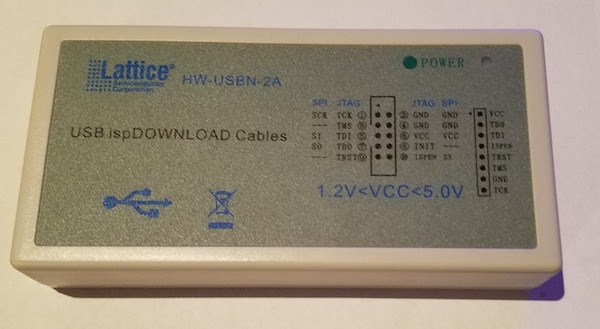
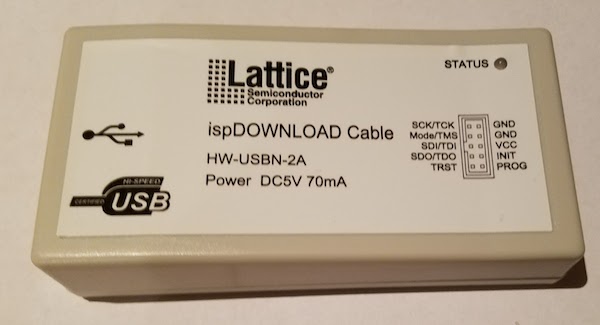
I also received another Lattice clone JTAG programmer in the mail today. This one worked on the first try, and the power/status LED works too! After a week of fiddling with my first Lattice clone, and reworking its PCB to replace the 74LS244 with a 74HC244, I finally got that one working as well. Fixing the first JTAG programmer was an interesting digression, but not really how I’d hoped to spend my time. If you’re shopping for a Lattice clone JTAG programmer, choose the one that looks like this:
not this:
Time for a celebratory beer.
Read 3 comments and join the conversationQuest For a Simple JTAG SVF Player
Where are all the cheap and simple third-party JTAG programmers? My work on the Yellowstone disk controller was sidetracked by issues with the Lattice-clone JTAG programmer, and discussion about ways that future Yellowstone customers might do JTAG programming. Eventually I realized that any generic JTAG hardware can program Yellowstone’s Lattice FPGA using a standard SVF file generated by the Lattice software. But what JTAG programming hardware to use, and what software to control it?
The device I’m imagining needs to play SVF files on a JTAG interface and verify the result. That’s all. It doesn’t need to handle JTAG debugging, ISP programming, SPI, or anything else. It should have easy cross-platform software to control the device: a basic GUI where the user can select an SVF file and click a button, then see progress info and a final good/bad result. Since JTAG is a fairly simple serial interface, this shouldn’t be much more difficult than building something like a USB-to-serial adapter, along with software to control it, which could leverage something like lib(X)SVF for SVF parsing. I confidently assumed there would be many such devices available for sale.
I was wrong. My search found nothing that really fit the requirement of cheap and easy, though a few options came close. Here’s a summary of what I found. If I’ve overlooked something obvious, please leave me a note in the comments.
Bus Blaster – A $35 open source JTAG tool based on the FT2232H. The hardware fits the bill, but the software does not. The Bus Blaster seems mainly intended to be used with UrJTAG or OpenOCD software, which are both unfortunately the opposite of user-friendly. From what I can tell, neither one has an official binary distribution and must be compiled from source code. From there it’s a somewhat daunting sequence of command line work to get things done. Surely there’s a simpler option if all that’s needed is an SVF player?
Flash Cat – A $30 commercial JTAG device that also does SPI, I2C, and serial. It’s not clear what IC it uses. This might almost work, and the software looks promising, but it’s Windows-only.
TinyFPGA Programmer – A $9 open source programmer for the TinyFPGA product line, and based on a PIC microcontroller. This is the best solution I’ve found so far, and the software is simple and cross-platform. But the hardware is specifically designed for the TinyFPGA boards, and so it makes assumptions about voltage levels and JTAG pinouts, and may have other limitations that prevent it from being a general-purpose programmer. The software is a python module and the GUI is Tk. Beggars can’t be choosers, especially for only $9, but a native control program for Mac and Windows would be preferred.
Those were the only decent commercial options I could find. Everything else was either a platform-specific tool, or a more complex and expensive JTAG debugger like the Segger J-Link, or somebody’s one-off hobby project.
Am I blind, and overlooking an obvious solution? If not, why doesn’t something like this already exist? Is it more complicated than I imagine? Or is there simply no demand for it? It sure looks like you could build a device like this using any simple microcontroller or USB-to-serial converter. Then spend a little time creating native apps for Mac and Windows, and get everything lined up regarding necessary drivers and software signatures, and you’d have a very desirable product. I have half a mind to drop everything and go do this myself.
Read 9 comments and join the conversation