

Macintosh DiskCopy 4.2 Floppy Image Converter
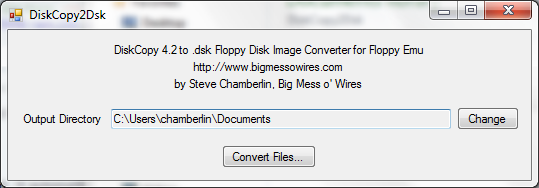
Here’s a quick-and-dirty utility I whipped up called DiskCopy2Dsk. A few people asked how to create raw .dsk floppy images to use with Floppy Emu. The hardware supports both DiskCopy 4.2 and raw .dsk image files, but DiskCopy 4.2 images are treated as read-only, so .dsk images are preferred. However, many emulation sites have their entire collection in DiskCopy 4.2 format.
On a vintage Mac, DiskDup+ will create .dsk images, or convert between DiskCopy 4.2 and .dsk images.
For 21st century computers, this DiskCopy2Dsk utility will bulk-convert DiskCopy 4.2 image files into .dsk format. It received at least 45 seconds of testing, so I’m sure it’s good. Source code is included for the curious.
DiskCopy2DSK for Windows
DiskCopy2DSK for Mac OSX (Intel Macs only)
Cameron Kaiser contributed this command-line version of dc2dsk, which works on PPC or Intel Macs. The source code has been rewritten for any generic Unix system, so that Linux and NetBSD users can play too.
Read 11 comments and join the conversationFloppy Emu Back in Stock
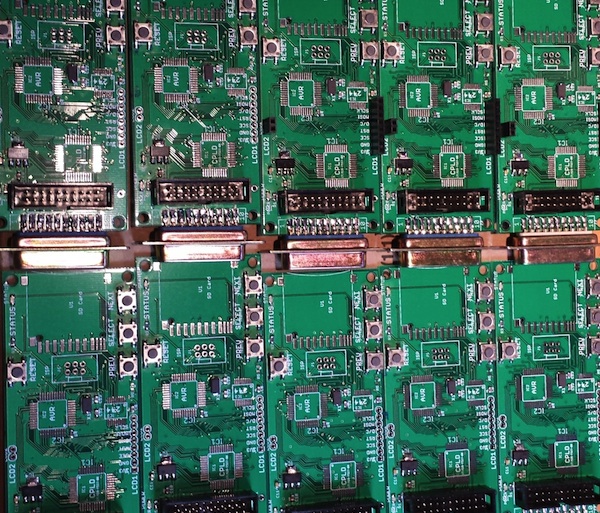
Macintosh Floppy Emu is back in stock. The elves have been working overtime to build more of these. Get yours today before they sell out again!
Floppy Emu is a prototype floppy disk drive emulator for vintage Macs. It uses an SD memory card and custom hardware to mimic a 400K, 800K, or 1.4MB 3.5 inch disk drive and floppy disk. It plugs into the Mac’s external or internal floppy connector, and behaves exactly like a real floppy drive, requiring no special software on the Mac. Floppy Emu is available now for $89.
Read 1 comment and join the conversation
No-Connector AVR Programming
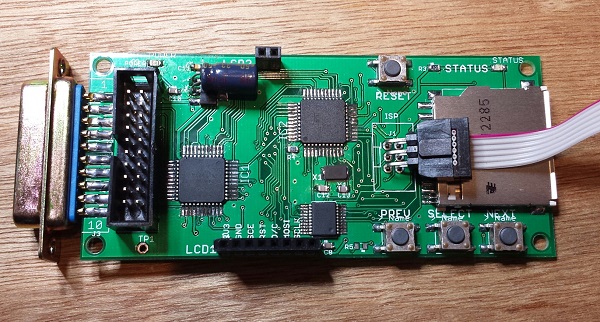
Here’s a handy trick I developed while searching for ways to reduce the cost and assembly time of Floppy Emu boards. The board has space for a 3 x 2 shrouded IDC header, where the AVR ISP cable should connect. But that connection is only needed once, the first time the AVR is programmed – all future software updates are loaded from the SD card using the bootloader. So why waste 75 cents and 30 seconds of soldering on a part that’s only ever going to be used once? It’s a small saving, I admit, but those savings add up.
OK, the programmer cable has a 3 x 2 female connector, and the board has an unpopulated footprint of 3 x 2 holes. Now what? My first attempt at a “no connector” solution was a straight 3 x 2 male header plugged into the cable connector, with the other end placed loosely inside the board footprint’s holes without soldering. By itself the fit was too loose, and the pins didn’t make reliable contact with the insides of the holes. If I pushed and twisted the connector with my finger, though, I could usually get all six pins to make contact long enough to successfully program the AVR. But as this only gave me one free hand, and didn’t work 100% reliably anyway, I gave up on that technique.
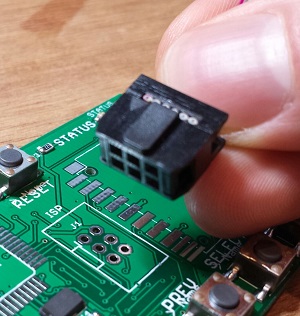
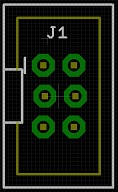
With board revision 1.1 I tried something new. Using Eagle, I created a staggered 3 x 2 header footprint, offsetting every other pin 5 thousandths of an inch from the centerline. I hoped this would help lock the pins tightly in place, keeping them pressed against the insides of the holes without solder and without my hand to brace it. But when the new boards came in, I was disappointed to find that while the staggered footprint was somewhat better than the original, it still didn’t work reliably. Sigh.
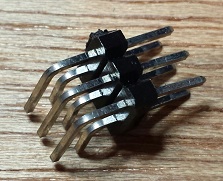
But every failure is just another step on the road to success! After more experiments, I finally hit upon a winning solution using a 3 x 2 right-angle header, with a small piece of scrap wedged under it for leverage. And I later found that the SD card holder is exactly the right size and in the right location to provide the necessary leverage, making for a quick and easy connection that’s 100% reliable with no soldering. I just plug one end of the 3 x 2 right-angle header into the programmer cable, and the other end into the holes in the board, with the connector and cable pressed against the top of the SD card holder. Once AVR programming is complete, I pull everything out and can re-use the parts for the next board. Hooray!
Read 20 comments and join the conversationFloppy Emu – Ready For Sale
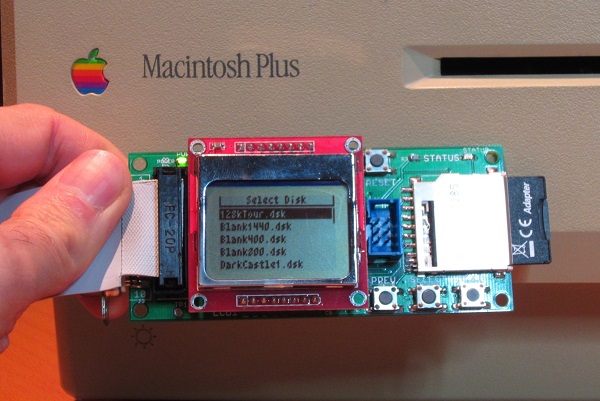
The Floppy Emu Macintosh Disk Emulator is finally available for sale! Get one now for $89. Each one is hand-assembled, programmed, and tested by me. After more than two years in development, and two months of preparation for “production”, I’m very excited to share this with you today. The initial inventory is quite small, but should grow over the next few weeks as more boards get built.
Floppy Emu is a prototype floppy disk drive emulator for vintage Macs, compatible with everything from the original Mac 128K through the Mac II and Power Mac series. It uses an SD memory card and custom hardware to mimic a 400K, 800K, or 1.4MB 3.5 inch disk drive and floppy disk. It plugs into the Mac’s external or internal floppy connector, and behaves exactly like a real disk drive, requiring no special software on the Mac. Floppy Emu is perfect for setup or troubleshooting of a Mac without a hard drive or a working OS. Just plug in the Floppy Emu, and you’re booting up in seconds. Keep it as a permanent solution, or use System 6/7 installer disk images to do a new hard drive installation. The hardware is also great for moving files between vintage Macs.
As always, you can also build your own if you’re comfortable with SMD soldering and have the necessary programming tools.
Thanks to everyone who offered feedback, advice, and encouragement over the long course of development. It’s great to be part of such a positive community!
Be the first to comment!International Shipping Hurts!
I’ve been looking at options for shipping to locations outside the United States. Wow, the choices are terrible! For comparison purposes, I’m assuming an 8 x 4 x 3 package that weighs 4.5 ounces (about 125 grams). I calculated hypothetical shipping charges to Canada, the UK, Norway, and Australia using the US Post Office, UPS, or Fed Ex. The results were not encouraging.
UPS and Fed Ex provide detailed tracking info for packages, but the costs are through the roof. The cheapest option through UPS is $104, and with Fed Ex it’s $84. These are both for 5 business day delivery – they don’t seem to offer anything slower. Hello? $100 for a four ounce package the size of my hand? Forget it.
US Postal Service Priority Mail Express International (I love these names) looks a little better, but it’s still bad. It provides package tracking information, with a cost of $33 for Canada and $48 for the other countries. Delivery is promised to be 3-5 business days. That’s a lot better than UPS and Fed Ex, but it still seems like too much money to ship a little lightweight box.
US Postal Service Priority Mail International (non-express version) is cheaper still, with a cost of $20 for Canada and $24 for the other countries if you use their small-sized flat rate box. It promises delivery in 6-10 business days. But for reasons unknown, the small-sized box is ineligible for package tracking. You have to step up to the medium-sized flat rate box for that, which then costs more than Priority Mail Express International. Thanks, but no thanks.
That finally brings us to lowly First Class Mail. This is just plain old mail, with no fancy features, and no promise of delivery speed – though anecdotally the speed is essentially identical to Priority Mail International (6-10 business days). It’s just $8.55 for Canada and $12.75 for the other countries, but there’s no package tracking or insurance. If your package disappears into a black hole in some foreign mail sorting facility, too bad.
I’m thinking that the best option may be to self-insure, charging something like $20 flat rate for international delivery and shipping via US Postal Service First Class Mail. Then I could make good on any lost deliveries out of my own pocket. Of course there’s the risk that some unscrupulous person could order 20 units delivered to Burkina Faso, then claim they never arrived, and I’d be out a lot of money.
Or I think it’s possible to get delivery confirmation with Priority Mail International, but only for some countries. And delivery confirmation isn’t the same as package tracking – if the package gets lost, it’s still lost. But at least it would protect against the guy in Burkina Faso claiming he never received his delivery.
This stuff is hard. Now I understand why real businesses use shipping logistics services!
Read 16 comments and join the conversationRigol DS1074Z Oscilloscope Review
Here’s my long-overdue review of the Rigol DS1074Z four-channel oscilloscope, which I purchased a couple of months ago. At around $550, the DS1074Z occupies a unique place in today’s oscilloscope market between the $300 entry-level scopes, and the $850+ higher end scopes like Rigol’s new DS2000 series. It’s also one of the only scopes in this range to offer four channels.
I felt a little unprepared to do a review, since during the time that I’ve had the scope, I’ve really only scratched the surface of its features. If there’s something not covered in the video or something else you’d like me to test, leave me a note in the comments. A quick summary of what’s covered in the video:
Likes – display, menus, measurement features, memory size, SPI decoding
Dislikes – fan noise
If you’re shopping for a new oscilloscope and can stretch your budget beyond the entry-level choices, the DS1074Z is definitely worth a look.
Read 13 comments and join the conversation