

Archive for the 'Floppy Emu' Category
Emu Firmware 0.6: Formatting the HD20
Firmware 0.6A-F14 now supports formatting the emulated HD20 disk from the Finder. This is handy for creating new hard disk images without the aid of programs like Mini vMac or Basilisk II. Just grab any random file of 100 MB or so (or create a new one using DD under Linux), name it HD20.dsk, and put it on the SD card. If you boot the Mac from another disk, it will see the HD20 disk image, but won’t recognize it as a valid Macintosh disk. The Finder will ask if you want to initialize the disk – answer yes. Be aware that formatting large disk images can take several minutes, during which there’s no on-screen feedback that anything is happening.
While working on this firmware, I encountered more mysterious errors and spontaneous reboots of the sort I described with firmware 0.5A-F14 on my original purple prototype board. But this time it was happening on another board. I rearranged some code, and the problems mysteriously went away, and even the balky purple prototype board started working fine again. I can’t explain what was causing those errors originally though, so maybe I fixed them, or maybe I just papered over them and there’s still a problem lurking somewhere. Please let me know if you experience any of these issues with this firmware 0.6A-F14:
- Emu consistently says there’s no SD card, when there is. Even after reboot, reset, reinsert card.
- Emu in floppy emulation mode says “no image files found”, even though there are disk images on the SD card
- Emu resets to the smiley face screen in the middle of disk I/O, as if you had pressed the reset button
Combo Firmware 0.6A-F14
Once again, if you try this firmware, I would appreciate feedback on what systems you tried it with and what the results were. Thanks!
Read 14 comments and join the conversationEmu Firmware 0.5: Floppy and HD20 Combined!
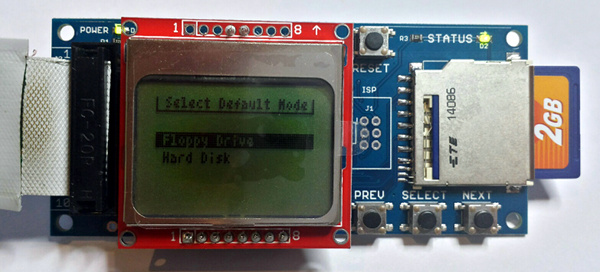
Ta dah! I thought it couldn’t be done, but I used my hammer and tongs to smash HD20 emulation and floppy emulation into a single firmware version. No more re-flashing the board when you want to switch between emulation types; now you can make your choice from a config menu during start-up. Your default choice is saved in EEPROM, so you only need to access the config menu if you want to choose a different emulation mode than you did last time. Unfortunately this combo firmware was born on the grave of the self-testing logic, which is now gone. That means I can’t use this to replace the regular production firmware. Maybe I’ll look into using JTAG boundary scan for a future firmware update, and re-implement the self-test using that method instead of with CPLD logic.
This firmware is a major change from version 0.4. The code for both floppy and HD20 emulation underwent significant changes, and the CPLD logic was altered substantially too. That means there’s an excellent chance I broke stuff. If you see any strange behavior during floppy or HD20 emulation that wasn’t present with the previous firmware, please let me know.
The scariest and most perplexing issue with this new firmware is that it doesn’t work on my original purple Floppy Emu board, the very first one I ever built back in April 2012. With this firmware, the purple board experiences constant SD card errors, or even spontaneously reboots during disk I/O! The behavior is similar to what I found on the first production boards, before I discovered that they needed more capacitance on the output of their voltage regulators. The purple board lacks that capacitor, and also has a few other small differences from the production boards. So I’d be prepared to believe the problems are all due to the purple board’s hardware, except that it worked fine with every previous firmware version, including Sunday’s version 0.4A-F66. So… yeah. There’s that.
I’ve tested this new firmware in both floppy and HD20 modes, on a Mac 512K, Plus, and IIsi, with one of the current batch of production boards as well as the first (hand-soldered) production board with serial #0001. No problems anywhere.
- Merged the firmware, with a menu-selectable HD20 or floppy mode. Default choice is stored in EEPROM.
- Changed the default HD20 disk icon to a standard Apple hard drive icon.
- LED now blinks during HD20 disk activity.
- Fixed a bunch of little bugs.
- Disabled self-tests. 🙁
Combo Firmware 0.5A-F14
Notes on which Macintosh models you’ve confirmed to work with the latest firmware are always welcome.
Read 15 comments and join the conversationHD20 Firmware 0.4: Write Support!
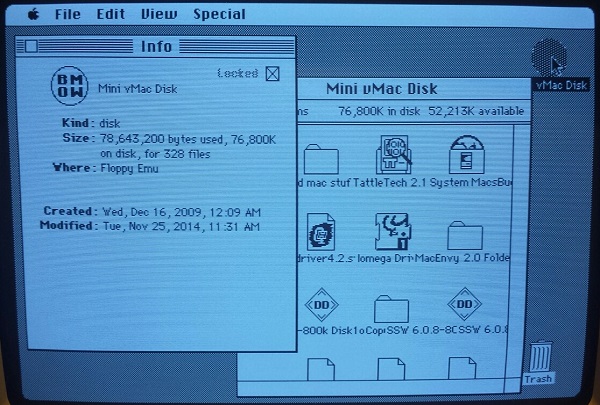
Firmware 0.4 adds support for writing to the emulated HD20 disk drive. No more read-only disks! I’ve tested it with a Mac Plus and a Mac IIsi, copying lots of files about and moving the mouse in crazy circles to exercise the holdoff logic, and it all seems solid.
- Implemented writing to the emulated HD20 disk
HD20 Firmware 0.4A-F66
This marks the completion of the HD20 emulation work, and the latest firmware version is fully usable as a general purpose boot disk or secondary disk. I still need to do some code cleanup and performance optimization, and see how much of the floppy and HD20 emulation code can be merged, but that’s all bonus stuff. Assuming no major problems surface with this HD20 firmware 0.4 in the next couple of days, I’ll promote it to 1.0 status and call it done. Woohoo!
Thank you, Apple, for creating such an oddball hard drive that hijacked the floppy port. HD20 lives!
Read 31 comments and join the conversationHD20 Firmware 0.3: Fixes for 020 and 030 Macs
I’ve fixed an HD20 emulation bug that caused occasional errors on faster 68020- and 68030-based Macs. The symptom was a “NEG COMMAND SIZE” error message on the LCD screen, and I/O failure. This version also fixes the “BAD FUSES” error that a few people with older boards encountered when running this firmware.
Another note: the firmware requires that the HD20.dsk file on your SD card occupy a contiguous range of sectors. If it doesn’t, you’ll see an “image not contiguous” error on the LCD. The easiest way to ensure all your SD card files are contiguous is to copy them all to your PC, delete everything on the SD card, then copy the files from your PC back to the SD card. You can also use a defragmentation tool on the SD card if you want to get fancy.
- Fixed NEG COMMAND SIZE error that sometimes appeared on faster Macs
- Fixed BAD FUSES error that appeared on older Floppy Emu boards
HD20 Firmware 0.3A-F65
Read 6 comments and join the conversationFloppy Emu, $10 Off This Week
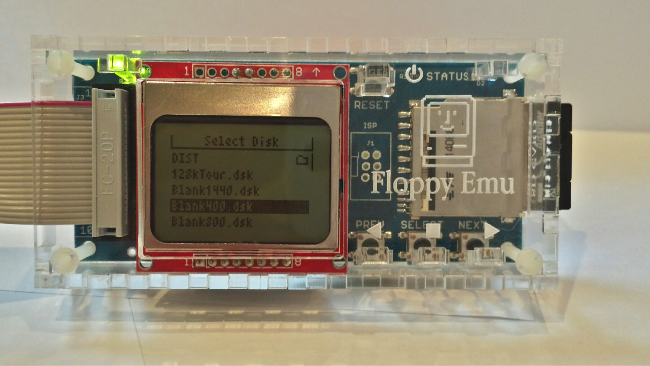
Both models of Floppy Emu boards are on sale this week, $10 off until December 5. If you’ve been holding off on getting one, now’s your chance! With the new HD20 firmware hopefully finished soon, the Floppy Emu board will be like two devices in one: a floppy disk drive emulator and a hard disk emulator. HD20 mode will require a Macintosh model with support in ROM (512Ke, Plus, SE, Classic, Classic II, Portable, IIci, IIsi, LC-I) or booted from another disk that has Apple’s HD20 Init.
Floppy Emu is a prototype floppy disk drive emulator for vintage Macs. It uses an SD memory card and custom hardware to mimic a 400K, 800K, or 1.4MB 3.5 inch disk drive and floppy disk. It plugs into the Mac’s external or internal floppy connector, and behaves exactly like a real disk drive, requiring no special software on the Mac. Floppy Emu is perfect for setup or troubleshooting of a Mac without a hard drive or a working OS. Just plug in the Floppy Emu, and you’re booting up in seconds. Keep it as a permanent solution, or use System 7 installer disk images to do a new hard drive installation. The hardware is also great for moving files between vintage Macs.
- Compatible with everything from the original Mac 128K through the Mac II and Power Mac series
- Reads and writes emulated 400K, 800K, or 1.4MB disk images
- Supports all major Macintosh disk image types
- External or internal connection to your Mac
- Can be used simultaneously with another floppy drive
HD20 Firmware 0.2: Fewer Bugs, More Emus
I’ve fixed most of the outstanding bugs in the HD20 emulation firmware. If you’ve been holding out for a way to attach huge SD card storage to your vintage Mac, this new firmware version is actually worth using. It’s still a read-only disk, and the data transfer rate can be improved further, but otherwise it’s totally usable as giant boot disk or a tool for transferring files between your vintage Mac and other machines. There doesn’t appear to be any limit on maximum disk size except the OS limit of 2 GB. If you already have a Floppy Emu board, you can use this with only a firmware update! And if you don’t have one, get one now!
- Fixed handling of the holdoff drive state. Now you can go crazy with the mouse during disk I/O without causing any problems.
- The disk’s Get Info window now says “Floppy Emu” for the disk location.
- Disk icon is a soothing round shape.
HD20 Firmware 0.2A-F65
See my previous post for notes about which Mac models are compatible, and how to apply the firmware update.
Read 5 comments and join the conversation