

Archive for the 'Floppy Emu' Category
LCD Contrast Adjustment in Firmware
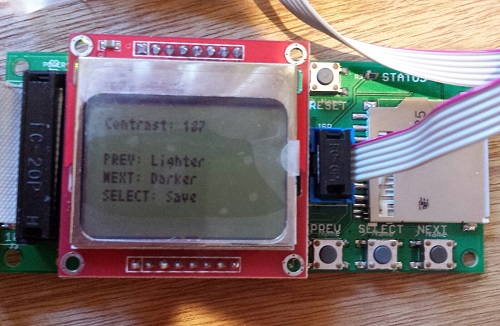
Floppy Emu uses a generic LCD that’s a clone of the display in the Nokia 5110 phone. It’s a nice little bitmapped display with a good range of configuration options, including the ability to set the display’s contrast level through software instead of with an external resistor. Unfortunately there’s a huge variability in contrast response from one LCD to the next, and even the same LCD can exhibit contrast changes from day to day. I’m not sure if it’s due to temperature, fluctuating voltages, bad solder joints, or something else, but it makes it virtually impossible to choose one contrast level in the Floppy Emu firmware that will work well for all LCDs. Until now, I’ve been making a custom firmware build for each Floppy Emu that I assemble, with a hand-tweaked contrast level, but that’s a huge pain in the butt. No more!
Firmware 1.0L F11 introduces the ability to adjust the contrast level and save it to EEPROM. Now you can tune the contrast exactly how you like it. To adjust the contrast, hold down the SELECT and NEXT buttons while Floppy Emu is initializing (after pressing the reset button, or when first powering it on). After a few seconds, the contrast adjustment screen will appear. Press PREV and NEXT to tune the contrast level, and SELECT to save the contrast setting to EEPROM. Easy peasy lemon squeezy.
To apply this firmware update to your Floppy Emu hardware, download the firmware files, and copy the file femu.bin to your SD card. Then hold down PREV and SELECT while the Floppy Emu is initializing. This update only changes the AVR software (from 1.0K to 1.0L), the CPLD is unchanged (it’s still F11).
Happy contrasting!
Read 3 comments and join the conversationSelling the Floppy Emu
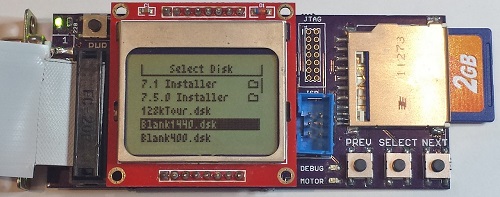
It’s been about a month since I began selling my Floppy Emu disk emulator for vintage Macs, and it’s time for a progress report. It’s been a real learning experience with the hardware, as well as on the “business” side of things. If you’ve ever considered turning a hobby project into a source of extra income, you may be especially interested in this side of the story.
The Biz
First, the business report: To date I’ve hand-built 44 of these little guys. 39 passed all my tests and received the seal of approval, for a yield of about 89%. Of the working boards, I sold 33, gave two as gifts, kept two for myself, and have two currently available for sale.
About half the Floppy Emus I’ve sold have gone to people outside the USA. Initially this surprised me – I’m in the USA, and I assumed most of the readers of my blog were too. Then there are large chunks of the world where the Mac was never popular, which are effectively ruled out as potential customers. And because the blog is in English, potential customers are further limited to those who are comfortable enough with the language to follow along. Yet despite all this, there are a surprising number of die-hards in Slovenia, Brazil, and other unexpected places who are buying Floppy Emus. Hello! So if you’re in the United States and considering selling some kind of DIY product, don’t make the mistake of ignoring the international market.
For a while I was operating a waiting list, but it was a bigger hassle than it was worth. Only about half the people on the waiting list actually followed through to make a purchase once I told them their board was ready. It was also awkward to reserve units for people on the waiting list, who may or may not eventually buy them, when it meant there weren’t enough units for the people who came later and were ready to buy.
Assembly and Test
All the Floppy Emus are built by hand, by me, with a regular soldering iron. It’s a fairly labor-intensive process, and with orders averaging about one per day, it’s monopolized most of my free time for the past month. I’ve been building boards in small batches of three to five at a time, updating the stock on the web page as new boards become available. This has created a pattern where Floppy Emu is constantly going in and out of stock, and I haven’t yet been able to get far enough ahead to keep a steady stock available. I guess that’s a good thing as it means there’s demand, but it would be nice if I weren’t always on the edge of running out.
The 89% success rate is pretty bad. Or maybe it’s reasonable for a hand-assembled electronics item, but throwing 11% of the hardware in the trash is a frustrating and expensive way to do manufacturing. Not only do I lose all the money that went into those failed boards, I also lose the hours it took to assemble and test them. This is an area where I really need to improve. The defective boards failed in various ways that I couldn’t diagnose or repair. Some of them almost work, but exhibit occasional failures when reading or writing. Others are nothing but scrap.
I’ve looked into having an assembly shop build a batch of Floppy Emus, but I probably need to purchase 50 or 100 units at a time for it to be cost-effective. With a new manufacturer, there’s also a risk of some misunderstanding or error that would lead to delivery of 100 non-functional Floppy Emus, and I can’t afford that risk. There are also some elements that an assembly shop likely couldn’t accommodate with their standard process, like the edge-mounted DB-19 connector, and the LCD mounted on a separate module. So for the time being, Floppy Emus will continue to be hand-assembled.
Assembly is slow, and it’s not just the time spent soldering. Setting the AVR fuses, programming the chip, and adjusting the LCD contrast for each board takes a surprising amount of time. Just digging the next part out of the box eats a substantial amount of time too. With a dedicated work area I could leave all the parts laid out for easy access, but I have to get by with a small desk that’s also used for other purposes.
Each Floppy Emu is tested three times on three different computers: a 400K disk test on a Mac 512K, an 800K test on a Mac Plus, and a 1.4MB test on a IIsi. These aren’t just quick boot-up tests either: they’re read and write tests that fill an entire disk image, multiple times, using each of the two floppy connectors on the board. Each Floppy Emu goes through about 20 minutes of testing, but when testing multiple boards at once I can do one every 10 minutes with pipelining. That’s a lot of manual testing work, and it bloats the time per board beyond the actual assembly time. And of course if there’s a problem found during testing, more time is needed to troubleshoot and fix it.
Shipping and Handling
I used to think “handling” was just a bogus term used to rip-off buyers, but now I understand why the cost to ship something is not necessarily the same as the cost of postage.
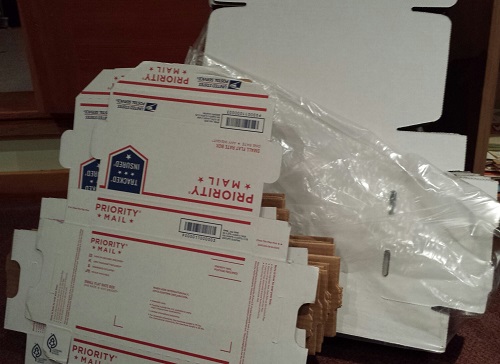
For USA shipments, it takes me about 10 minutes to prepare one Floppy Emu to be mailed. How can it take 10 minutes just to put something in a box? I didn’t believe it myself at first, but I’ve timed myself doing it often enough to accept it. The buyer’s contact info needs to saved, so I can contact him/her later if necessary. Then the Floppy Emu has to go in an anti-static bag, and the bag gets sealed. I have to assemble a box, fill it with foam peanuts, wrap the anti-static bag in bubble wrap, and cradle it in the peanuts. Then I need to print a packing slip and an instruction sheet, stuff those in the box, close it up, and seal it all with packing tape. Then I need to feed a sheet of label paper into the printer, log into the PayPal web site, purchase and print the postage, and stick it on the box. I have newfound sympathy for mail room employees.
For shipments going outside the USA, it takes about 15 minutes to prepare one Floppy Emu for mailing. For unknown reasons, PayPal will not sell postage for International First Class mail. I need to log into a separate account at the US Post Office Click-n-Ship site, and copy the pieces of the address one at a time from the PayPal data to the Click-n-Ship page. Instead of a single blank field for the address, Click-n-Ship forces me to break it up into separate form fields for first name, last name, street address, city, postal code, etc. Often these don’t match well with the way addresses in other countries are formatted.
If any letters have accents, the form validation fails, and I have to reformat it manually. Méndez Núñez must become Mendez Nunez. Sorry. This reminds me of some traffic signs in the area of California where I live. Many local place names are Spanish, and some signs for Cañada College have it as Canada College. When I first moved to the area, I couldn’t understand why the nation of Canada was sponsoring a local school.
I discovered that shipping materials cost real money! For USA shipments I can use the free Priority Mail boxes, but for international mailing I need to buy appropriate boxes, which must be purchased 50 or 100 at a time. Anti-static baggies, bubble wrap, packing tape, and shipping labels all cost money too. I hadn’t really considered this when I did my original cost estimates.
Once everything’s packed and ready to go, I have to bring it to the post office for mailing, which is about a 20 minute errand round-trip. Sometimes I can combine it with another errand, but I often find myself spending 20 minutes in the car just so I can mail a single Floppy Emu package. Post-9/11 paranoia means we’re no longer allowed to put packages in neighborhood mailboxes, but must take them to the post office and put them in the mail drop there. For international packages, you’re not even allowed to use the mail drop, but must wait in line to hand the package to a retail employee in person, even if the postage was already purchased online. Fortunately my local post office workers don’t insist on this rule, and told me that putting international packages in the mail drop is fine.
Between testing, packing, and visiting the post office, I’m averaging at least 30 minutes of labor per Floppy Emu above and beyond the time it takes to actually build it. Combined with the costs of shipping materials, that’s a significant amount of overhead I hadn’t planned for.
Parts Sourcing
Getting the parts needed to build each Floppy Emu has proven to be more challenging than I’d expected. I’m buying most of the parts from DigiKey, but the prices are constantly fluctuating, and sometimes it’s cheaper to buy certain parts from another vendor. It’s a bit of a puzzle, every time I refill my supplies. For most parts, the unit price is substantially cheaper when buying many of them vs buying a single one. I’ve been buying the majority of parts 10 at a time, but vendors other than DigiKey typically have higher minimum orders or steeper discount curves that force you into buying large quantities. I had to buy 73 of those DB-19 connectors!
Two other parts costs I neglected to account for are shipping and sales tax. These two combined add about 20% to my total cost of parts. In theory I could avoid paying sales tax by showing the suppliers a sales tax exemption certificate, but that would involve a layer of government red tape I haven’t wanted to mess with yet. It would also mean collecting sales tax when a California resident buys a Floppy Emu, which is something I really should be doing anyway, but would be a pain in the butt.
I discovered another hidden cost of parts sourcing too, and it’s one that wasn’t obvious at first. Say I’m building widgets, and each one needs a sprocket and a lever. If I buy 50 sprockets for $4 each and 50 levers for $3 each, then my total cost of parts is $7 per widget, right? Well, not exactly. It costs $350 to buy 50 sprockets and 50 levers, and I won’t recoup that cost until I’ve sold 50 widgets. If I do this repeatedly, on average at any given time I’ll have the parts for 25 unsold widgets sitting on my shelf. That’s a cost of $175 that I’ll never get back unless I quit the business after selling some exact multiple of 50 widgets. It’s like a security deposit, or worse.
The Sincerest Form of Flattery
The last of the business surprises was the theft of the Floppy Emu name. Another person (or company?) in Europe has started selling disk emulators using the Floppy Emu name for their product. I won’t link to it and lend it extra page rank points, but you can find it if you try. As far as I can tell, it’s a PC floppy emulator and not compatible with vintage Macintosh computers, so it’s not going to accomplish much except for confusing people.
Biz Summary
If you’re getting the picture that there are a lot of unforeseen costs and unexpected time sinks involved, you’re right. Don’t feel too sorry for me, though: even after all of this, I still make money from selling Floppy Emus. But with all the labor involved, it’s basically like I’ve invented a new part-time job for myself. It pays more than minimum wage, but not by much. 🙂
Hardware
Enough of all this business stuff – let’s talk about what’s happening with the hardware! The good news is that Floppy Emu is working well in the wild, and I haven’t had any reports of major problems or incompatibility. The worst problem seems to be one I encountered myself: on my Mac 512K, maybe one in ten times the computer will fail to boot, and will show a Sad Mac error. I suspect this is because the drive speed emulation for the Mac 512K (and Mac 128K) is imperfect, and so the Mac sometimes freaks out when it thinks the floppy drive is rotating at the wrong speed. Newer Macs don’t use the drive speed signal and so don’t run into this problem. On the other hand, maybe it’s just something flakey about my 512K.
LCD
The LCD has been a source of headaches. About 10% of the LCD modules I’ve purchased have been defective in some way: damaged screens or dead pixels. That’s annoying, but the bigger headache has been varying contrast between LCD modules. Using the same software contrast setting, some modules show nice crisp text, some are washed out, and some are nearly solid black. I think it has something to do with how the LCD glass is mounted on the module, as I can usually change the contrast by pushing on the glass with my finger.
For the LCDs that don’t look good with the default contrast setting, I’ve been making custom firmware versions with a different contrast value, so every Floppy Emu that ships should have a nice display image. This isn’t a good long-term solution, though. It’s time consuming, and the customized firmware will be lost if the user ever applies a firmware update. People can make their own custom firmware, but it’s a hassle. What I probably need to do is add a manual contrast adjustment feature to the firmware, with the selected contrast value stored in EEPROM. Then everybody can tune the contrast exactly how they want it.
The revision 1.1 board that’s shipping now was designed to backlight the LCD, and the LCD modules have backlight LEDs built-in. After doing a few samples, though, I decided it looked better without backlighting. The backlight highlighted imperfections in the display glass, and gave it a washed-out look. All the Floppy Emus that are now shipping have the backlight disabled, but for people who really really want backlighting, they can add a 220 Ohm resistor at location R5 to enable it. A future board revision will have a through-hole footprint for R5 instead of a surface-mount footprint, to make it a little easier for modders.
Future Development
Time permitting, I hope to continue development of the Floppy Emu firmware. Some early adopters discovered that Floppy Emu works with the Apple IIgs, but it’s not as simple of a setup as I’d like. It works when the Floppy Emu is connected to the pass-through board of a real 3.5 inch Apple external drive, but not when Floppy Emu is connected directly to the IIgs. I’m pretty clueless when it comes to all things IIgs-related, so I’m not sure what’s going on, but I hope to find out.
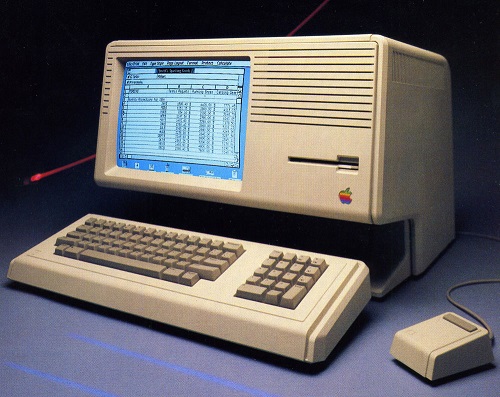
According to what I’ve read, it should also be possible to make Floppy Emu work on a Lisa – the precursor to the Macintosh. This would require a firmware change, since Lisa disks have essential data in the “tags” section of each sector, but the Macintosh doesn’t use tags and Floppy Emu ignores them. This may never happen, though, since the Lisa community is such a small audience of potentially interested people. I’m not ready to plunk down thousands of dollars for a Lisa just to test it out.
The most exciting thing on the horizon is HD20 support. The HD20 was a very early Apple hard drive from before the introduction of SCSI, and it connected to the external floppy port. In the past, several people have suggested HD20 emulation as a possible new feature, and I’ve always said it was impossible. But some new documentation that’s recently come to light suggests it may be possible after all – so Floppy Emu could emulate a 20 MB hard disk instead of an 800K floppy. In fact, it might even be possible to emulate hard disks larger than 20 MB. Unfortunately only a few early Macs have HD20 support in ROM, so it wouldn’t be a universal solution, but it would be great for those Macs that support it. It looks like HD20 emulation would involve a near total re-write of the Floppy Emu firmware, though, so don’t expect to see it next week!
Read 4 comments and join the conversation
Macintosh DiskCopy 4.2 Floppy Image Converter
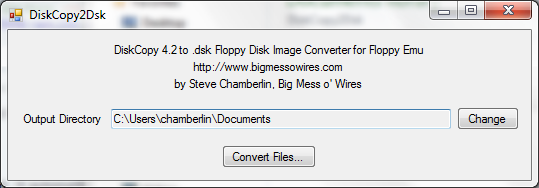
Here’s a quick-and-dirty utility I whipped up called DiskCopy2Dsk. A few people asked how to create raw .dsk floppy images to use with Floppy Emu. The hardware supports both DiskCopy 4.2 and raw .dsk image files, but DiskCopy 4.2 images are treated as read-only, so .dsk images are preferred. However, many emulation sites have their entire collection in DiskCopy 4.2 format.
On a vintage Mac, DiskDup+ will create .dsk images, or convert between DiskCopy 4.2 and .dsk images.
For 21st century computers, this DiskCopy2Dsk utility will bulk-convert DiskCopy 4.2 image files into .dsk format. It received at least 45 seconds of testing, so I’m sure it’s good. Source code is included for the curious.
DiskCopy2DSK for Windows
DiskCopy2DSK for Mac OSX (Intel Macs only)
Cameron Kaiser contributed this command-line version of dc2dsk, which works on PPC or Intel Macs. The source code has been rewritten for any generic Unix system, so that Linux and NetBSD users can play too.
Read 11 comments and join the conversationFloppy Emu Back in Stock
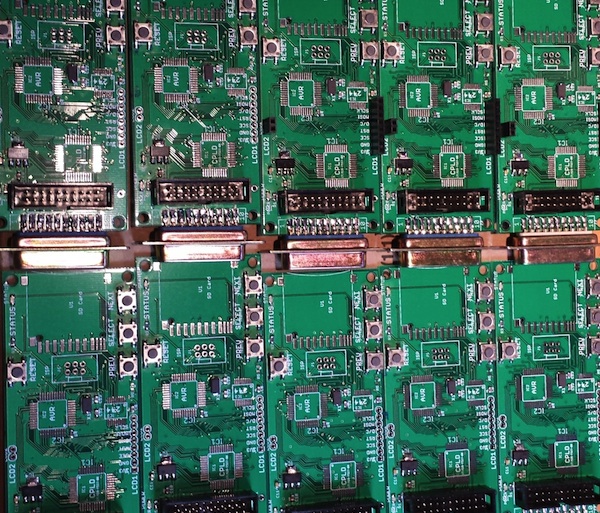
Macintosh Floppy Emu is back in stock. The elves have been working overtime to build more of these. Get yours today before they sell out again!
Floppy Emu is a prototype floppy disk drive emulator for vintage Macs. It uses an SD memory card and custom hardware to mimic a 400K, 800K, or 1.4MB 3.5 inch disk drive and floppy disk. It plugs into the Mac’s external or internal floppy connector, and behaves exactly like a real floppy drive, requiring no special software on the Mac. Floppy Emu is available now for $89.
Read 1 comment and join the conversation
Floppy Emu – Ready For Sale
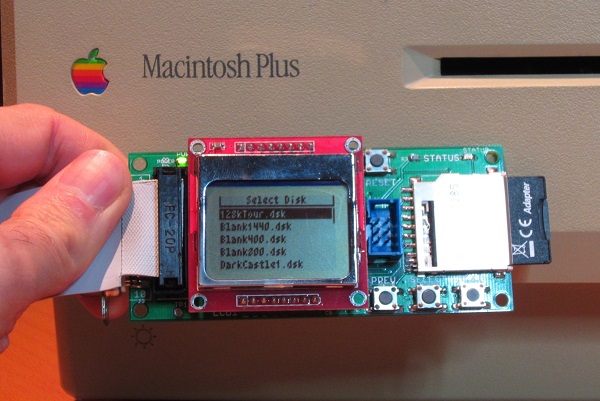
The Floppy Emu Macintosh Disk Emulator is finally available for sale! Get one now for $89. Each one is hand-assembled, programmed, and tested by me. After more than two years in development, and two months of preparation for “production”, I’m very excited to share this with you today. The initial inventory is quite small, but should grow over the next few weeks as more boards get built.
Floppy Emu is a prototype floppy disk drive emulator for vintage Macs, compatible with everything from the original Mac 128K through the Mac II and Power Mac series. It uses an SD memory card and custom hardware to mimic a 400K, 800K, or 1.4MB 3.5 inch disk drive and floppy disk. It plugs into the Mac’s external or internal floppy connector, and behaves exactly like a real disk drive, requiring no special software on the Mac. Floppy Emu is perfect for setup or troubleshooting of a Mac without a hard drive or a working OS. Just plug in the Floppy Emu, and you’re booting up in seconds. Keep it as a permanent solution, or use System 6/7 installer disk images to do a new hard drive installation. The hardware is also great for moving files between vintage Macs.
As always, you can also build your own if you’re comfortable with SMD soldering and have the necessary programming tools.
Thanks to everyone who offered feedback, advice, and encouragement over the long course of development. It’s great to be part of such a positive community!
Be the first to comment!Manufacturing is Hard
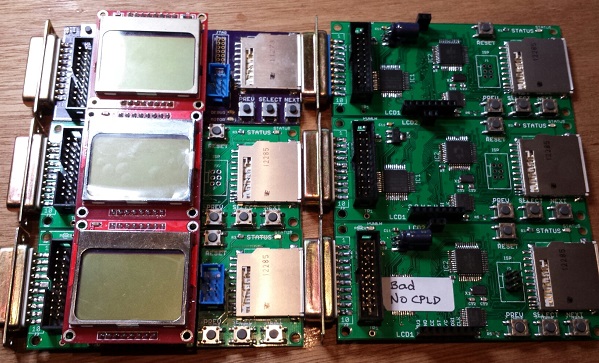
There’s a big difference between building one of something, and making a repeatable process to build 10 of them, or 100. Unfortunately I’m learning that the hard way while I try to get some more Floppy Emu boards ready to sell. If I had any hair, I’d be pulling it out! I never thought this would be so hard.
If you haven’t been following the earlier posts, Floppy Emu is a floppy disk drive emulator for vintage Macintosh computers. I built the first Floppy Emu for my personal use about a year ago, and while the soldering was a little challenging, everything worked once it was done. I posted the design on the BMOW web site, and since then I’d estimate about 10 other people have built their own Floppy Emu boards. Then in October I built two more boards from my remaining parts stock, and sold them on eBay. I tested those thoroughly before I sold them, so I’m confident those boards were working well.
The eBay sale generated lots of interest and requests for more boards, so in late October I created board revision 1.1 in preparation for a small hand-made “production run”. The board layout changed slightly to make room for mounting holes, and some board traces were moved or added. I switched to a different PCB supplier, changed to a different brand of 3.3V LDO regulator, and substituted the Atmega1284 for the Atmega1284P to save a few pennies.
I built four of the rev 1.1 boards, and initially none of them worked. As described in my previous post, the new brand of 3.3V regulator proved to be unstable when combined with the output capacitor I’d been using. The oscillations on the 3.3V and 5V supply lines caused all kinds of crazy behavior and malfunctions that drove me crazy. I’ve since found that replacing the 10 uF ceramic output capacitor with a 33 uF tantalum solves that particular problem. Yet even with the capacitor fix, one of the boards exhibited occasional random write errors, and I somehow toasted another one during assembly.
Later I discovered a flaw in my CPLD firmware that was shorting the Mac’s PWM drive speed control input to GND. Floppy Emu doesn’t actually use that input, but shorting it to ground is not very nice, and may have damaged the CPLD, the Mac, or both. This only affected the rev 1.1 boards. That firmware flaw is now fixed, hopefully without any permanent damage.
I’ve since built two more of the rev 1.1 boards. One worked fine, but the other showed the same pattern of occasional random write errors. Of the six rev 1.1 boards I’ve built, that means I only have three working boards. Arghh! 50% yield is not good. The random write error is maddening. It doesn’t happen very often, so it’s necessary to do a LOT of testing before I can be confident a particular board does or doesn’t have this problem. I spent a long time with a lens, an oscilloscope, and a debugger trying to explain what’s going wrong, but failed. My best theories are:
Software Bug – Perhaps there’s a problem with the Floppy Emu software, like a timing bug or uninitialized variable, and tiny variations in boards or components cause the bug to appear or disappear. This was my first guess, but if true I would expect a continuous distribution of bugginess across boards, rather than two groups of “working” and “not working” boards. I tested the working boards heavily, and they really do work 100%. I also made many experimental software changes that I thought might cause the problem to appear or disappear, but there was no change in behavior. And to my knowledge none of the rev 1.0 boards have this problem, even though they use the same software.
Soldering Mistake – I may have created a bad solder joint somewhere, leading to flaky behavior. That’s possible, but it seems pretty unlikely I’d make the exact same soldering mistake twice in six boards. And I’ve visually inspected the problem boards carefully with a 10x magnifier, and touched up all the likely problem points with an iron, without any success.
CPLD Damage – Some of the CPLDs might have been damaged by the firmware bug that shorted PWM to GND, resulting in buggy behavior even after the firmware was fixed. That’s certainly possible, but then why weren’t all the CPLDs damaged? Why just two of them? If this is the true explanation, then future rev 1.1 boards should all work OK now that the firmware bug is fixed.
Atmega1284 vs Atmega1284P Variation – Maybe some minor difference between the two types of the AVR microcontroller is causing unexpected problems. As far as I know, the only difference is that the “P” version uses Atmel’s Pico-Power system to enable very low power sleep modes. Since I’m not using those sleep modes, that difference shouldn’t matter.
Board Design Flaw – The rev 1.1 board could contain a design mistake not present in the original board, like substantial coupling between neighboring traces, signal reflections, or other noise that leads to intermittent problems. While the layout changes between rev 1.0 and 1.1 were minor, I can’t rule this possibility out.
Manufacturing Flaw – The rev 1.1 boards from Smart Prototyping might not be built to the same tolerances as the original boards from Dorkbot PDX. In terms of published specs like minimum trace width and spacing, the Smart Prototyping process should be fine, and I used their design rules file to verify my board in Eagle. I know other people have been successful with rev 1.0 boards not made by Dorkbot PDX, though I don’t think any have used Smart Prototyping specifically.
Unfortunately I’m at one of those points where I really don’t know where to go next. I could build a few more boards to test the CPLD damage theory. Or get some more Atmega1284P’s and build a few boards with those, or experiment with going back to the original PCB manufacturer or the rev 1.0 board design. But each of those experiments would require more time and money to test the theory. I’d need to see at least five good boards and zero bad ones before I had any confidence that I’d solved the problem. Spread across all the possible problem causes, I could end up building several dozen test boards, and still come up empty-handed if the true cause is a software bug or something else I haven’t considered.
Read 11 comments and join the conversation