Apple IIc Drive Switcher Version 2
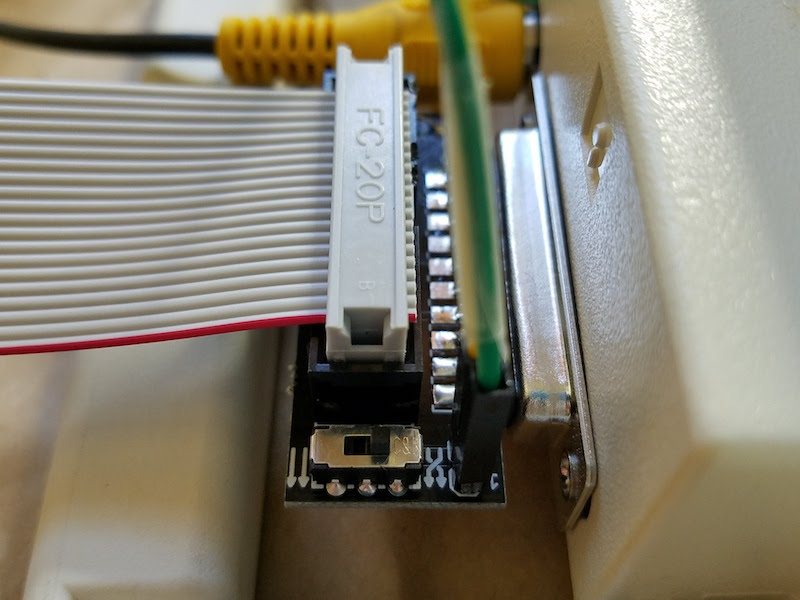
Version 2 of the Apple IIc Internal/External Drive Switcher is here, and is working nicely. It’s mostly the same as version 1, except for a few tweaks to the piece that goes inside the IIc case. Although the inside fit is still very tight, with this new version it’s a little more forgiving. I also updated the switch labels on the external portion of the drive switcher, with an icon showing parallel arrows for normal mode, and crossed arrows for drive swap mode.
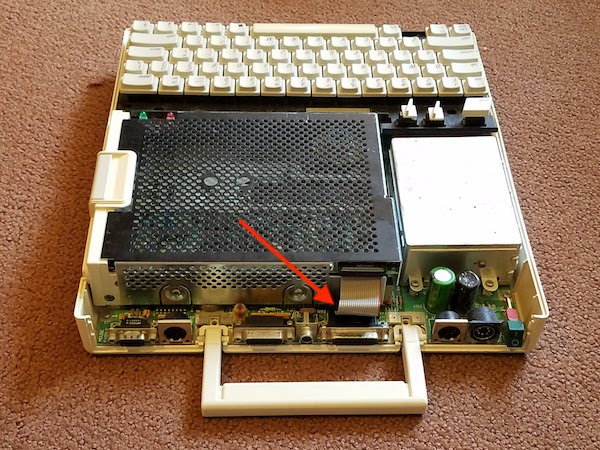
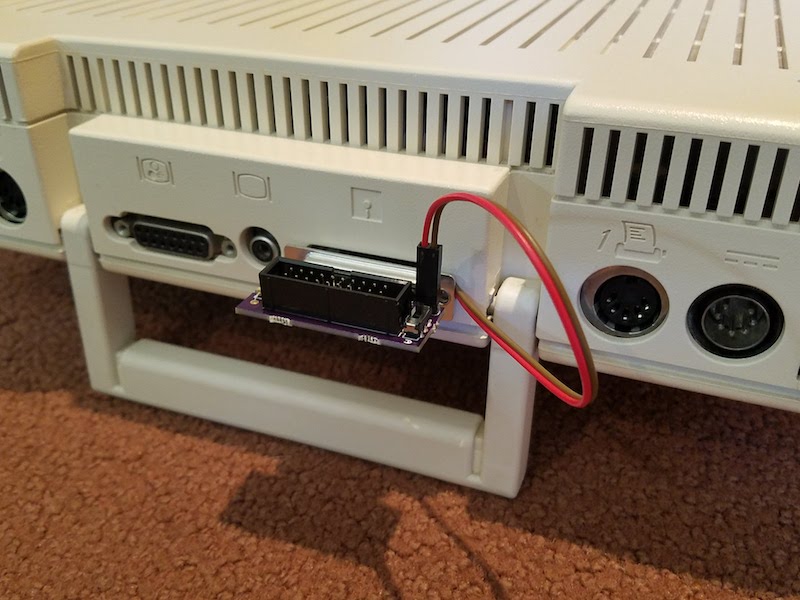
In my previous trials with the drive switcher, I threaded two wires through a gap in the Apple IIc case around the 19-pin disk port. That works, but I’ve concluded it’s easier to thread the wires through the gap around the composite video connector instead, as shown in the photo below. There’s a little bit more wiggle room, and it avoids blocking the faceplate of the male DB-19 connector when the external portion of the drive switcher is plugged in. Threading the wires around the video connector doesn’t cause any blockage problems, and I had no difficulty plugging in the video cable. You could also thread the wires around the DB-15 monitor port, which most people aren’t using anyway.
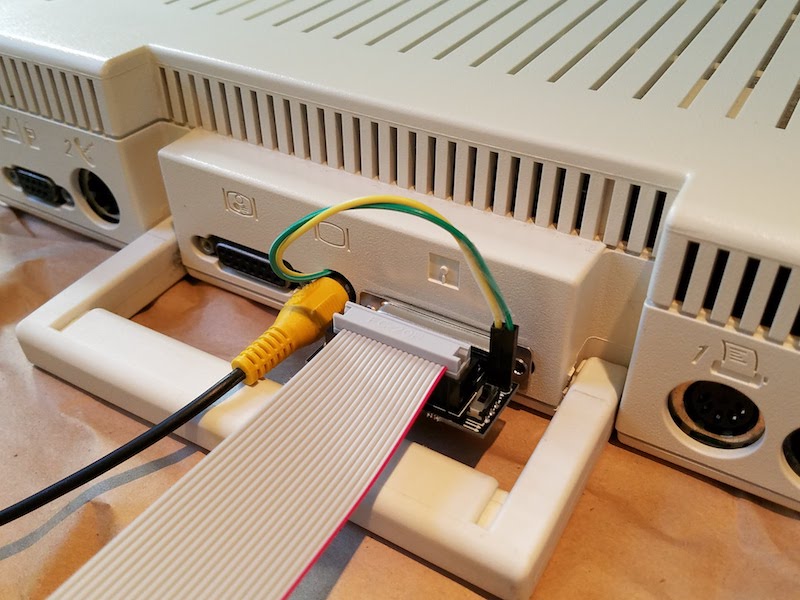
I think it’s ready! Now I just need to assemble a few of these and get them ready for sale. If you’re interested in helping to beta test the first few units, please let me know.
Read 14 comments and join the conversationCrazy Fast PCB Manufacturing
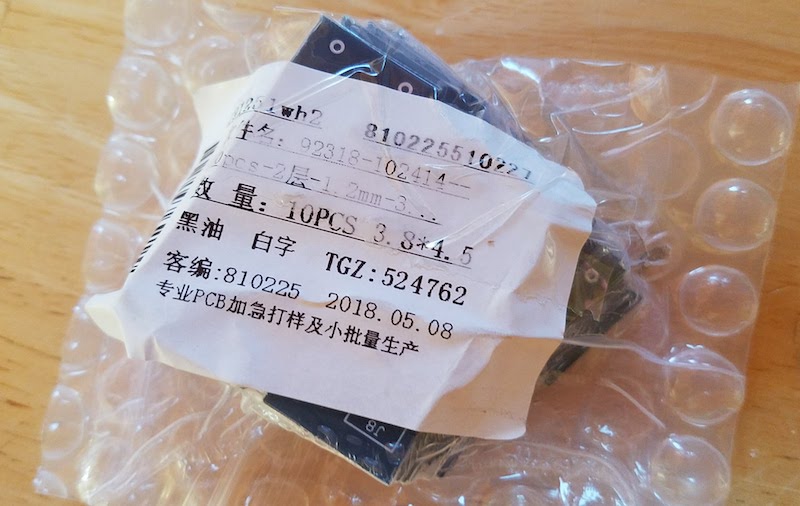
I finished the redesign for my Apple IIc Drive Switcher PCB on Monday morning, and submitted the Gerber files to Elecrow on Monday at 11:25 am. Friday at 5:20 pm I held the finished PCBs in my hands. Only 4 days for manufacturing and delivery. From China. According to the tracking info, my package took just 17 hours to travel from Elecrow’s Shenzhen facility to my doorstep in California. Total cost for everything was a mere $29.96.
We live in a crazy world, where a completely custom and intricate item can be manufactured on the other side of the planet and delivered to my door in 4 days, for the cost of a pizza and beer. Thank you Elecrow!
Read 1 comment and join the conversation10000 More DB-19 Connectors

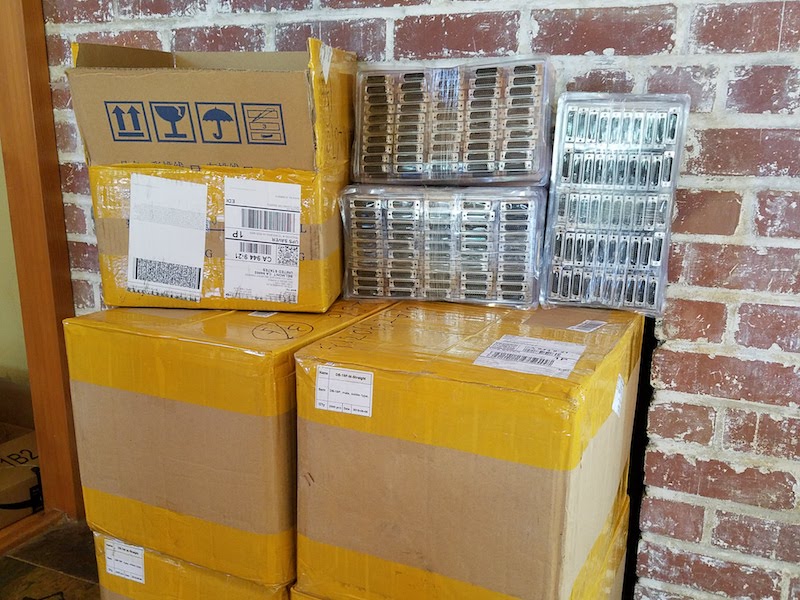
Oops, I did it again: another 10000 DB-19 connectors fresh from the factory! After helping to resurrect this rare retro-connector from the dead in 2016, and organizing a group of people to share the cost of creating new molds for manufacturing, I had some of the 21st century’s first newly-made DB-19s. The mating connector is found on vintage Apple, Atari, and NeXT computers from the 1980s and 1990s, so having a new source of DB-19s was great news for computer collectors.
But that was two years ago. After manufacturing, the lot of connectors was divided among the members of the group buy, leaving me with “only” a few thousand. Since then I’d used up more than half of my share in assembly of the Floppy Emu disk emulator, and I began to get nervous about the looming need for a re-order. It was such a big challenge the first time finding a Chinese manufacturer for the DB-19s, and the all-email company relationship was tenuous. What if they lost the molds? What if my contact there left the company? What if the company went out of business? Even though I didn’t absolutely need more DB-19 connectors until 2019 or 2020, I decided to lock in my future supply and order more now.
I needn’t have worried, and the transaction went smoothly. With no mold costs to pay this time, the only challenge was meeting the 10000 piece minimum order quantity. I was even able to pay via PayPal, instead of enduring the hassles and weird scrutiny of an international bank wire transfer like I did in 2016.
So now I have a near lifetime supply of DB-19 connectors. Call me strange, but it actually gives me a warm fuzzy feeling. Now to find someplace to store all these boxes…
Apple IIc Internal/External Drive Switcher
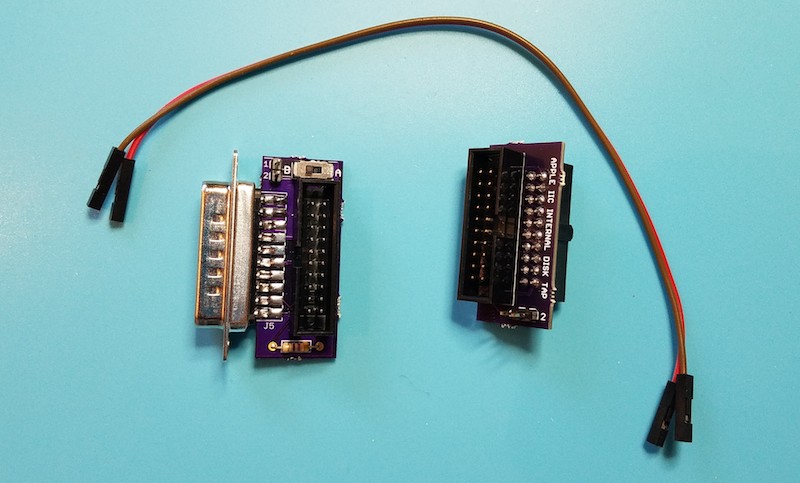
If you’re using a Floppy Emu disk emulator with an Apple IIc, you’ll want to see this: a switched adapter that can reassign the external 5.25 inch drive as internal, and the internal 5.25 inch drive as external. This little gizmo helps to work around the Apple IIc’s inability to boot from an externally-connected 5.25 inch drive. That shortcoming is a headache for 5.25 inch disk emulators like Floppy Emu. With this internal/external drive switcher, the limitation is now gone!
Background
The IIc has an internal built-in 5.25 inch floppy drive. The internal drive appears to the computer as slot 6, drive 1. If you connect an external 5.25 inch floppy drive, it will appear to the computer as slot 6, drive 2. Unfortunately the whole Apple II family is designed to check for a bootable disk in drive 1 only. The computer can boot from drive 1, and then use drive 2 as a secondary disk, but it can’t boot from drive 2. So for the IIc with its built-in drive 1, this means it can never boot from an external 5.25 inch drive.
An important detail: this limitation only applies to the Apple IIc with an external 5.25 inch drive. An external Smartport drive (like Floppy Emu when configured for Smartport hard disk emulation mode) appears to the computer as slot 5, drive 1, and is bootable.
Apple IIc owners who want to boot from an emulated 5.25 inch disk image are in a difficult spot. Until now, their best option has been to remove the top panel from the IIc, disconnect the internal floppy drive, and connect the Floppy Emu to the internal drive connector on the motherboard. This works fine for the Floppy Emu, but it means IIc owners forfeit their ability to use the internal drive.
How the Drive Switcher Works
There’s almost no difference between the internal drive connector on the motherboard and the external drive connector at the rear of the Apple IIc. Although they’re different shapes and even have different numbers of pins, they feature the exact same disk IO signals except one: the drive enable signal. To perform this drive switcheroo, the adapter needs to tap into the signals from the motherboard, divert the enable signal externally, and route the external enable signal back inside to the internal drive. This is easily accomplished with some headers and wires and a slide switch, but the tricky part is making it all small enough to fit inside the Apple IIc case.
A slide switch makes the drive remapping optional. At one switch position, the external drive will appear as drive 1 and the internal as drive 2. At the other switch position, the internal drive will appear as drive 1 and the external as drive 2. Now Apple IIc owners can have the best of both options.
The Hardware
This is a two-part device: a signal tap that should be installed inside the Apple IIc, and a modified DB19 adapter with a slide switch for the external connection. Two female-female jumper wires are passed through a gap in the case to make the connection between the two parts.
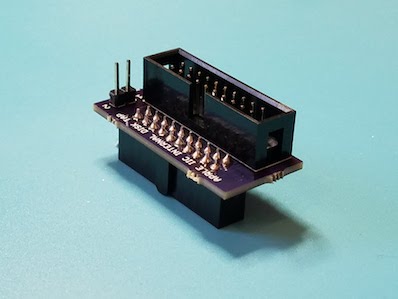
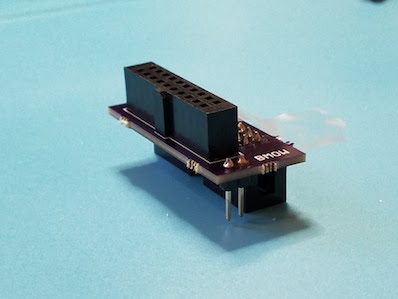
The signal tap portion of the drive switcher looks a little peculiar, and it’s a minor challenge to solder closely-spaced through-hole components to the top and bottom of a PCB like this, but it works. The top is just a standard 20-pin male shrouded header, with a polarizing key like the one used on Apple drive cables. The bottom is a PCB-mounted female version of the same connector – not a very common part, but fortunately Digikey has it. The only other component here is a 2-pin male header for attaching the jumper wires.
Step 1 is to remove the top panel from the Apple IIc (follow the instructions here), and locate the ribbon cable that connects the internal floppy drive to the motherboard.
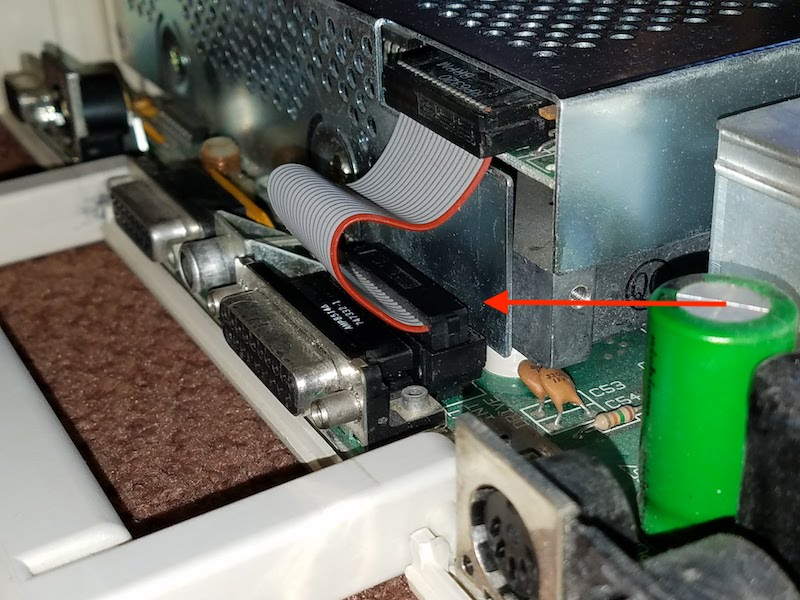
Disconnect the ribbon cable from the motherboard, and plug the signal tap into the motherboard in its place.
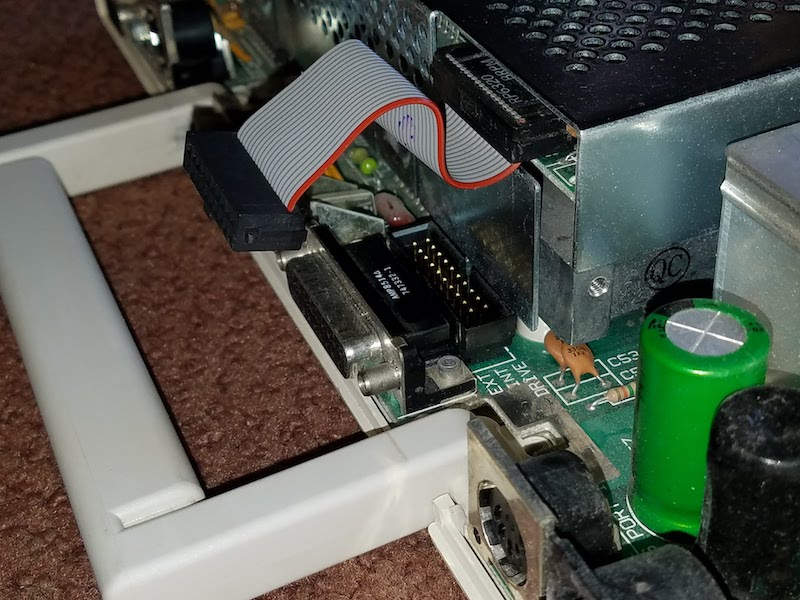
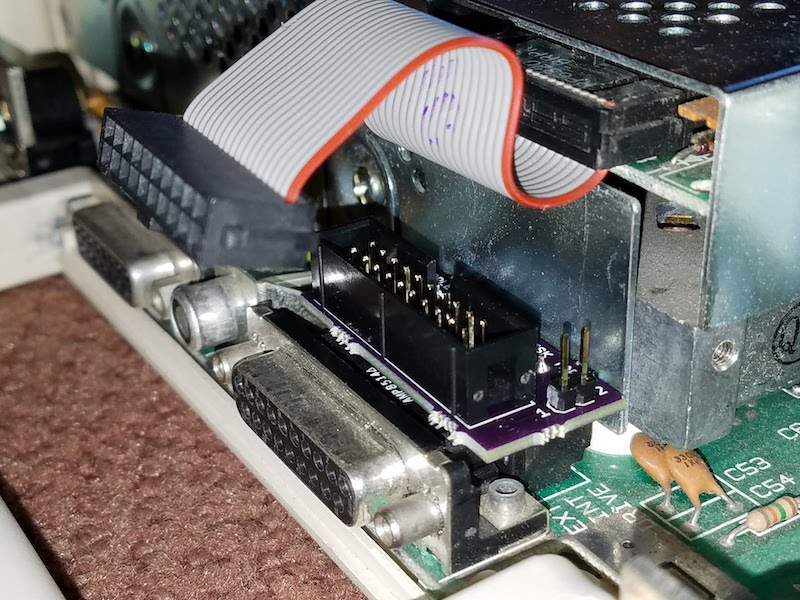
Then plug the ribbon cable into the signal tap. Also connect one end of each jumper wire to one of the signal tap’s male header pins. Here I chose to connect the brown wire to pin 1, and the red wire to pin 2. I’ll need to make the same choice later for the external jumper wire connections.
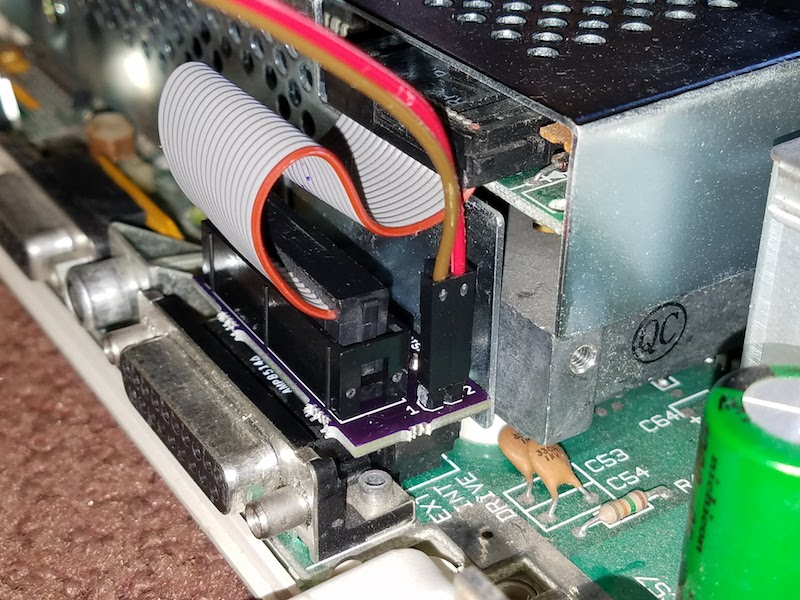
Before closing the case, it’s important to squish the ribbon cable down into the gap between the signal tap and internal floppy drive bracket. Push it down as far as it will go. This will make it easier to fit the top cover back on later. Notice the difference between the ribbon cable position in this photo as compared to the previous one:
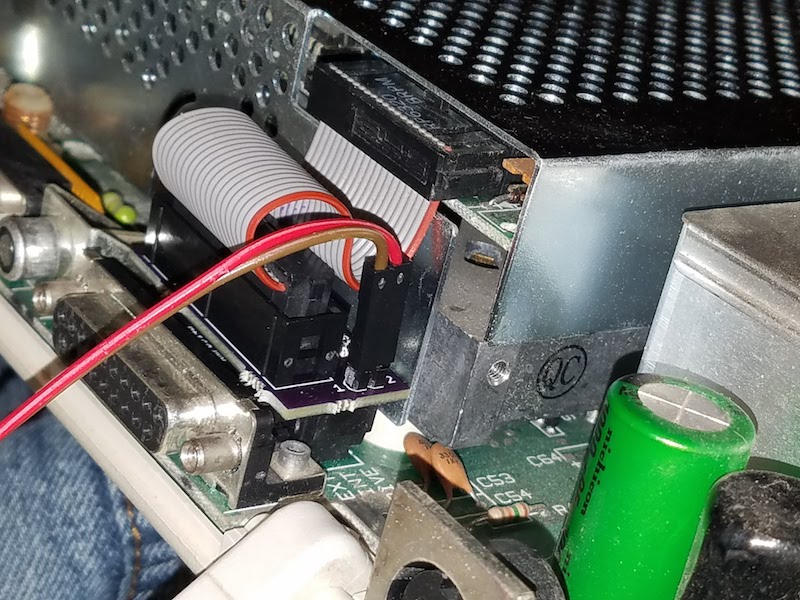
Now it’s time to close the case. First, set the top panel loosely on the IIc, and thread the jumper wires through the opening for the disk connector in the rear of the case.
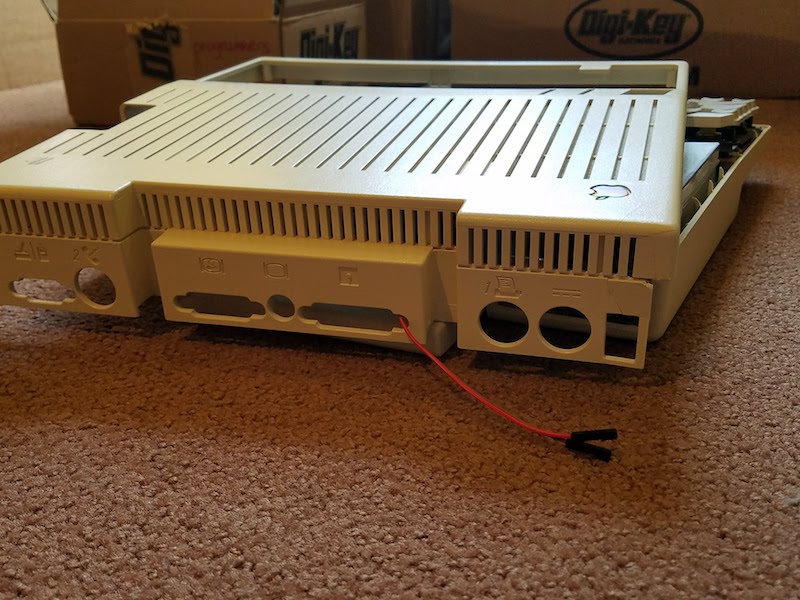
Then reinstall the top panel. It’s a snug fit, but there’s a large enough gap between the top panel and the rear connectors for the jumper wires to squeeze through. As an alternative, the jumper wires can also be threaded through the opening for the printer port or the video connector. After the top panel is reinstalled, it should look like this:
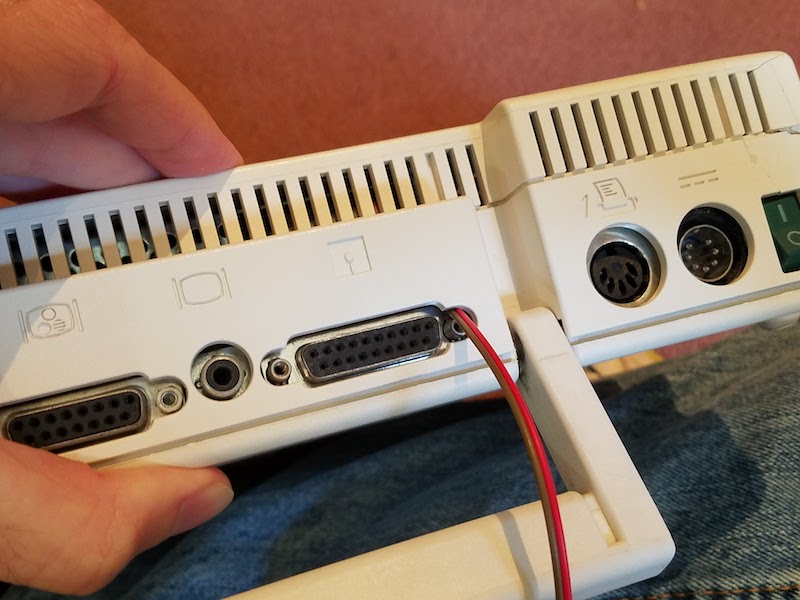
Connect the jumper wires to the 2-pin male header on the switched DB19 adapter, remembering to use the same color-to-pin mapping as before. Then plug the DB19 adapter into the Apple IIc’s external disk port. It will replace the standard DB19 adapter that’s included with the Floppy Emu.
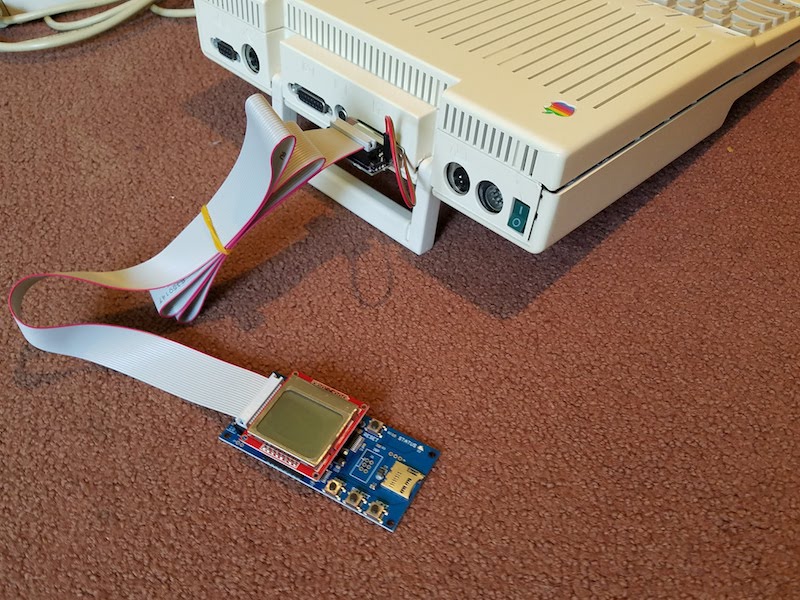
Finally, connect the Floppy Emu’s 20-pin ribbon cable to the switched DB19 adapter. All done! This Apple IIc can now boot Choplifter and other 5.25 inch disk image favorites from the Floppy Emu, while retaining the internal 5.25 inch floppy drive for secondary needs like disk copying. Or at the flick of a switch, the IIc can be restored to normal operating, with the internal floppy drive configured as the boot drive.
Coming Soon
I hope to have the IIc Internal/External Switcher ready for the BMOW store in a month or two. There are still a few wrinkles to iron out before it’s ready. Because it’s such a tight fit inside, I need to get feedback from some other IIc owners to verify the switcher fits their computers too. I also want to revise the PCB a bit, to make the switcher easier to assemble. And I’d like to provide more meaningful labels for the switch positions than simply “A” and “B”. If there were enough space, I’d label the switch positions something like “normal” and “swapped”, but the adapter is so small that there’s only room for 1 or 2 letters at most. Any great suggestions?
Read 14 comments and join the conversationInternational Shipping Struggles
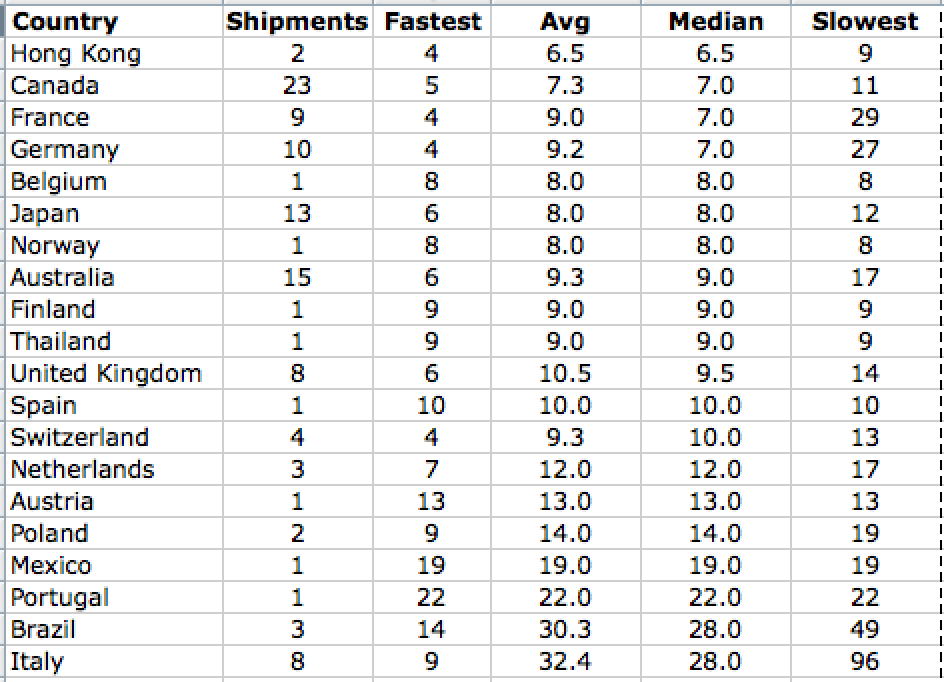
I’ve assembled some data on international shipping delivery times, for a sample of real BMOW customers over the past few months. The table shows destination countries, sorted by median delivery time. The listed time includes the shipping itself, customs inspection, and any hold time at the local destination post office waiting for the buyer to claim the package. It’s the total door-to-door delivery time. All packages are shipped via US Postal Service First Class Package International service, which is the only reasonably-priced international shipping option available to me.
As you can see, the typical delivery time varies enormously. The good news is that most countries are faster than my two-weeks generic estimate for international delivery. For the countries where BMOW has the greatest number of sales, the median delivery time is about 8 days. Poland, Mexico, and Portugal have longer delivery times, but they’re still tolerable, and I don’t have many sales in those countries anyway.
Then there’s shipping for Brazil and Italy. Ugh. Let me draw your attention to that 49-day worst case time for Brazil, and the whopping 96 DAY worst case for Italy. When a package disappears into the bowels of the postal system for 2-3 months, customers don’t blame the post office. They blame me. It’s a difficult and awkward position, and I often need to spend large amounts of time communicating with the buyer and attempting to track the package. Sometimes I have to send replacement packages or provide refunds, even though I have no control over the postal delays.
I’ve considered various ideas for the “Italy Problem”, from an express shipper option (much more expensive, and inconvenient for me), to a surcharge on orders to Italy, Brazil, and a few others (would compensate for the greater number of problem deliveries, but would be unpopular), to halting shipments to those countries completely (forcing those customers to use a 3rd-party freight forwarding service from the US).
Misrouted Packages
While collecting the data for this table, I discovered several instances where a package was sent to the wrong country, even the wrong continent! Eventually it was re-routed to the correct country, but the extra side-trip added several weeks to the delivery time. Check out these tracking histories. Follow the links and click the “Tracking History” tab:
Canadian package sent to Brazil
German package sent to Canada
French package sent to Mexico
In every case, the address on the package was correct. What appears to have happened is that the package was sent to the same country as another one of my international shipments made on the same day. I’m not sure how that could happen – surely the sorting process is automated?
Unclaimed/Refused Packages
Many countries impose an import tax or fees on merchandise purchased from another country. In such cases, typically the package will be held at the customer’s local post office, and they’ll be sent a letter informing them that the package is ready for pick-up. Then the customer will visit the local post office, pay the taxes, and claim the package.
Most local post offices will hold a package for 1 or 2 weeks. If the customer doesn’t claim the package within that time window, it will usually be returned to me. Unclaimed packages happen for a variety of reasons: the customer was away on holiday when the package arrived, or they never received the notification letter, or they forgot about it, or they declined to claim the package because they were unhappy about the taxes. Whatever the reason, unclaimed packages are always a giant pain in the ass. They usually take several months to be returned to me, if they’re returned at all. Sometimes they just disappear.
Worldwide Sales
Despite these hassles, I’ll keep selling to people everywhere, and looking for more ways to improve the international shipping experience. I’ll keep working on packaging changes to reduce shipping weight and costs, and improved labeling to speed customs inspection time. To the customers in the 42 countries where I’ve done business, thank you.
Read 6 comments and join the conversationStar Ring Version 2
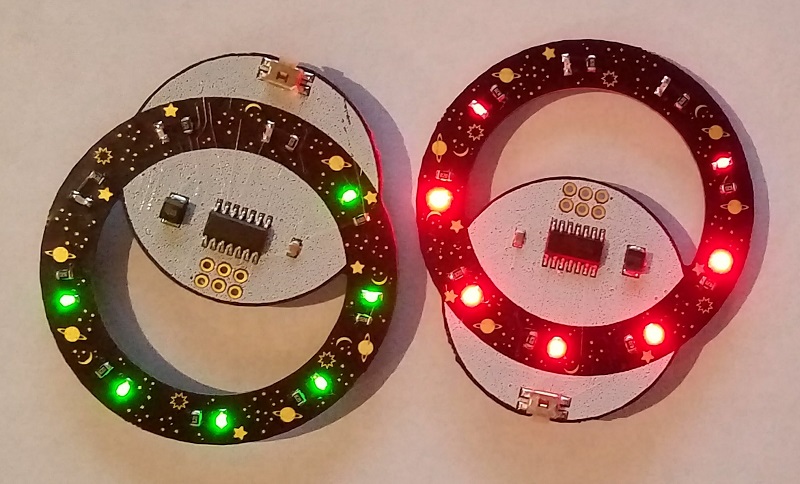
Version 2 of my PCB-abusing LED blinky is here! It’s the same odd shape as Star Ring version 1, with the same abuse of the metal layer to make shiny stars and planets, and the same low power usage and long battery life, but it adds several small improvements to function and appearance. Sure, it’s just an LED blinky, but it’s got some interesting tricks.
Version 2 replaces the amber yellow LEDs with either red or green. I’d imagined green would somehow be more exciting, but the red is a clear winner due to its much higher brightness. It’s not entirely obvious from the photo, but the red Star Ring has excellent brightness for something that’s driven from a puny 3V coin cell battery. The red LEDs have a 250 mcd brightness rating, as compared to 162 mcd for the amber LEDs and only 60 mcd for the green. From browsing the LED catalog, it’s clear that LED colors with longer wavelengths (closer to red) are able to achieve higher millicandela ratings at the same current and voltage. This is probably because of bandgaps and electron orbitals, or something… where’s a physicist when you need one?
Both the red and the green LEDs are 0603 sized SMD components, and they were my first-ever experience at assembling 0603 parts. Initially they seemed nearly microscopic compared to the 0805 size I use normally, and you could easily inhale one accidentally if you yawned at the wrong time, but I’m happy to report I didn’t have much difficulty with them. Each one is just 1.6 x 0.8 mm.
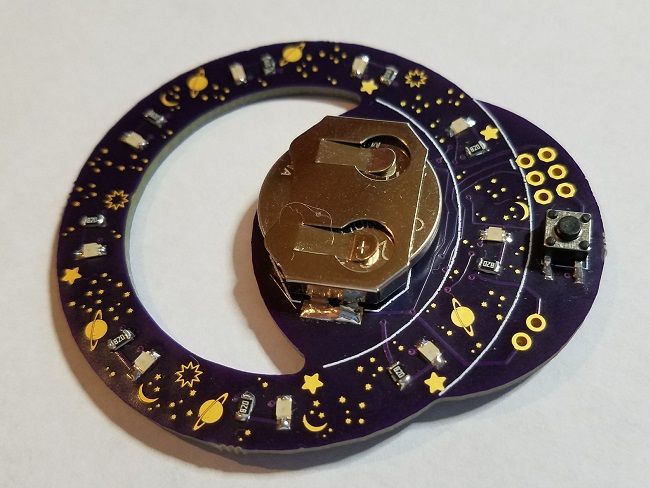
Star Ring version 1 located the battery on the front side, which was a little ugly. Version 2 moves the battery to the back, and brings the microcontroller and two capacitors to the front. It also fills the entire circular “moon” behind the star ring with white silkscreen, which really helps it to stand out visually. I think it looks great.
The tactile pushbutton was changed from a standard button to a right-angle button that’s mounted on the edge. Since it’s natural to hold the Star Ring by its edges, this makes it easy to hold the ring and push the edge-mounted button with a single hand. The version 1 Star Ring demanded two-hand operation due to its more awkward button orientation and placement.
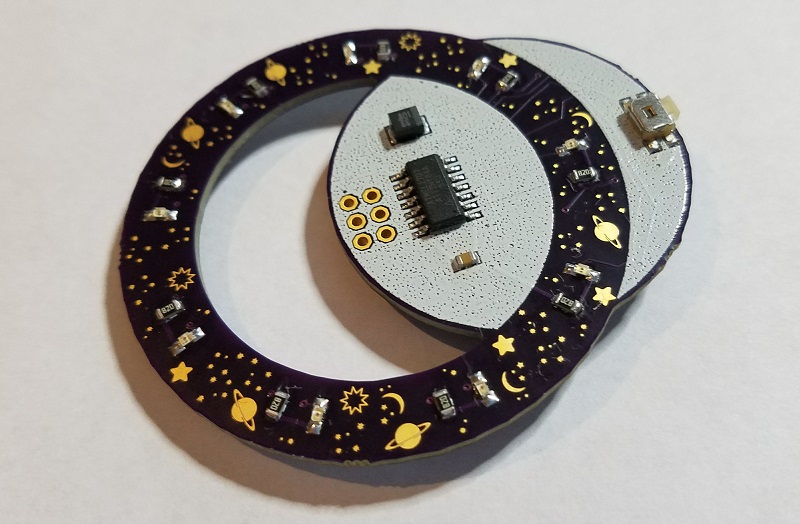
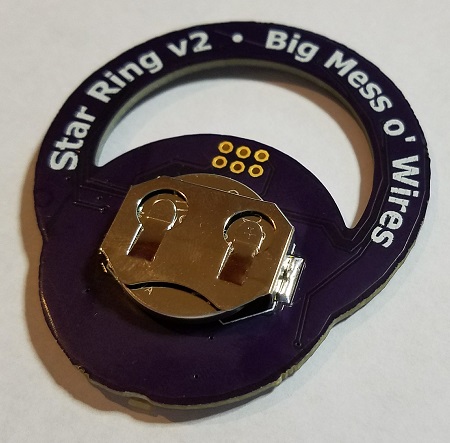
Version 1, for comparison:
Version 3?
It would be a tight fit, but there’s probably enough room to move the microcontroller and the button to the back, along with the battery. Then the front would only have a blank white moon and the star ring itself. That might look more attractive, but it would make soldering inconvenient, so I’m not sure it would be an improvement. Keeping all the parts (except the battery) on the front makes it easy to assemble the PCB using hot plate SMD reflow.
What about multi-colored LEDs? Full-color RGB is out of the question with this hardware, but what if each LED had a choice of two colors instead of being monochromatic? It’s possible to buy dual-color LEDs that are really two separate LEDs with a common cathode in a single package. A dual-color LED with red and green elements can appear red, green, or yellow depending on which of the two elements are illuminated. But dual-color LEDs would require controlling 18 LED elements instead of 9 – would I need a larger microcontroller with more IO pins? Fortunately no.
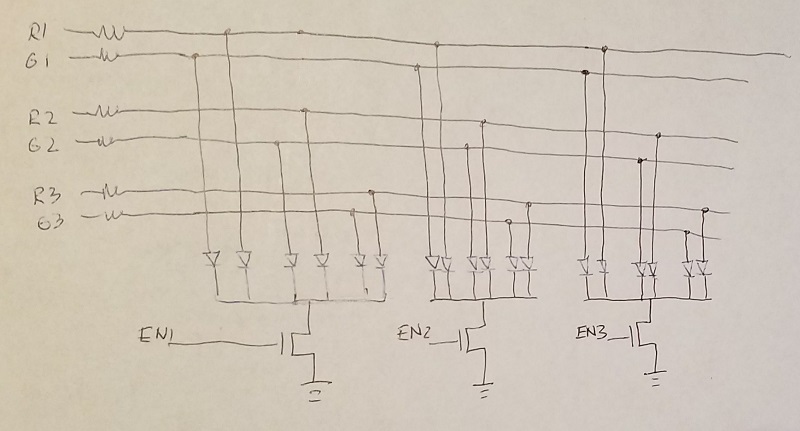
The current Star Ring hardware has 9 individually-addressable LEDs, with 9 current limiting resistors, connected to 9 IO pins of the microcontroller. The software never turns on more than three LEDs at once to avoid overwhelming the small battery, but it cycles through the LEDs so quickly that it looks as if they’re all on. Since it’s not necessary to power all the LEDs simultaneously, I worked out an alternative method where the same 9 IO pins could control 9 dual-color LEDs, organized into three groups of three dual-color LEDs each (six individual LED elements per group). Three IO pins are used to enable one of the three groups, and the other six IO pins control the six LED elements in that group. Only six current limiting resistors are required instead of nine, so even with the addition of three transistors for enabling the groups, the total component count is the same as the current design. Here’s my schematic for nine red-green dual-color LEDs: