

Introducing Floppy Emu Model B
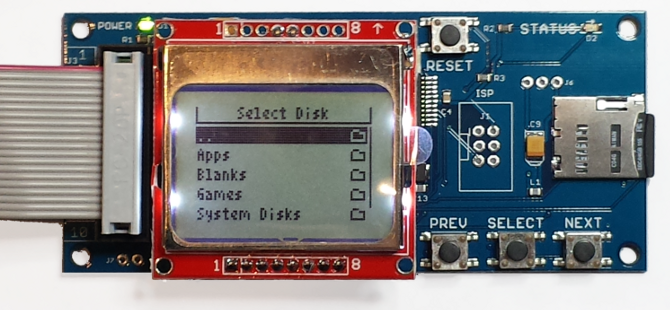
Today I’m excited to introduce the first significant update to the Floppy Emu disk emulator for Apple II and classic Macintosh computers: Floppy Emu Model B. The new Model B has the same disk emulation functions as the Model A and Universal Adapter, but with several new convenience features:
- Built-in Apple II Compatibility – Model B is directly compatible with the entire Apple II line, emulating a 5 1/4 inch disk, 3 1/2 inch disk, or Smartport hard disk. While Model A required a separate Universal Adapter for the best Apple II compatibility, Model B has the equivalent functionality built-in. Classic Macintosh and Lisa disk emulation is still supported too.
- microSD Card Support – The SD card slot is now a push-push microSD type, identical to what’s used in most mobile phones. This will make it easier to find suitable SD card media, since the older full-size SD cards are becoming rare.
- SD Card Hot-Swap – The SD card can be removed and re-inserted while the Floppy Emu is powered on.
- Improved Protection Circuitry – Model B features improved protection circuitry on the disk drive interface connector. This circuitry will help protect the Floppy Emu from electrical damage caused by voltage spikes and surges. It also eliminates the risk of potential damage if an Emu board running the Apple II firmware is inadvertently connected to a Mac or Lisa computer.
- Same Great Emulation Features – All of the time-tested Macintosh, Apple II, and Lisa disk emulation features from Model A are still present. Model B reads and writes emulated 140K, 400K, 800K, or 1.4MB floppy disk images, or hard disk images up to 2GB, if supported by your Apple computer. For full details, see the instruction manual.
If you’re new to Floppy Emu, it’s an external hardware device for vintage Macintosh, Apple II, or Lisa computers. It uses a removable SD memory card to mimic an Apple floppy disk and drive, or an Apple hard drive. The Emu behaves exactly like a real disk drive, requiring no special software or drivers. Floppy Emu is perfect for booting your favorite games, moving files between modern and vintage machines, and troubleshooting a computer without a working OS. Just plug in the Emu board, and you’ll be up and running in seconds.
Floppy Emu Model B is available for sale now. While supplies last, I’m also selling the remaining inventory of Floppy Emu Model A units for a reduced price. It’s disk emulation madness!
Read 35 comments and join the conversationThe Story of Tetris Max
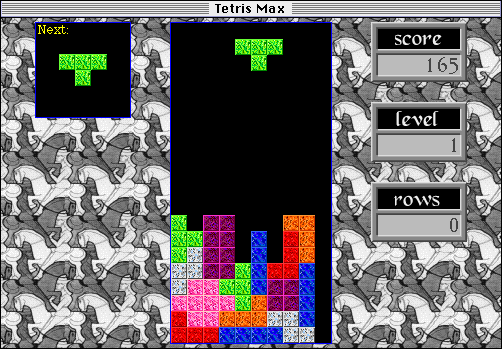
It was the summer of 1992. Nirvana smelled like teen spirit, Ross Perot was running for president, and I was a senior at the Massachusetts Institute of Technology who wanted to play tetris. Looking at the options then available for my Macintosh LC computer, none of them were inspiring. My friends were all addicted to a beautifully crafted Mac falling blocks game called Jewelbox, and I wondered if I could make a Macintosh tetris with the same level of polish. And so began the story of Tetris Max, a game that was to play a major role in my life for the next decade.
I had only a shaky understanding of the C language, and a weak grasp of Mac programming fundamentals. This was before the days when any programming question could be answered in seconds at stackoverflow.com, so knowledge had to be gained the hard way, reading through the five thick printed volumes of Inside Macintosh. Somehow I cobbled together a working game.
Before long, I had dozens of friends camped out in my room day and night, competing for high scores and offering feedback on dropping speed, rotation rules, key repeat behavior, and other fine points that made the difference between a so-so game and a great one. We polished the hell out of that thing, arguing over arcane details until the gameplay was dialed perfectly. Then I agonized over all the little graphics elements and sound effects, for events like dropping a piece, advancing to the next level, or getting a high score. Somehow a mooing cow found its way in there too. I became obsessed with perfecting every aspect of the game until it was buttery smooth.
For music, I chose the instrumental portion of Jesus Jones’ song Blissed. It had that ethereal quality appropriate for trance-like extended play at level 10. Over lunch one day, a few friends and I argued over what meaningless suffix would be best for the game title. Tetris Gold? Tetris Pro? Tetris Plus? How about Tetris Max? Yes, that’s it!
At the time there were dozens of tetris versions available, including the popular xtetris, and Asshole Tetris, which cheated against the player. I was aware that the game concept originated with a Russian man, but it seemed a generic idea like chess or tennis, and it didn’t occur to me that I shouldn’t call it “tetris”. This came back to haunt me later.
Launch
In August 1992, I uploaded the first version of Tetris Max to the Info-Mac archive and America Online, which was about as advanced as Mac software distribution got at the time. I prayed that somebody would notice my submission, and… surprise! Somebody did. A lot of somebodies! I started receiving an extraordinary number of emails from all over the world, from people telling me how much they enjoyed playing Tetris Max. It was beyond the best I’d hoped for. The game was a hit!
Everyone wanted to know about their high score. How did it compare to others? What was the highest score ever achieved? People shared their stories of deep states of meditation achieved on level 10, the final level where human reflexes were just barely fast enough to keep up, where marathon length tetris sessions were possible, but where a single mistake was fatal. Others claimed the game helped them get to sleep each night, or reduced their stress levels, like a form of therapy. As for myself, I played the game so much that I began to see falling shapes in my mind whenever I closed my eyes, and would mentally rotate and drop them without any conscious thought.
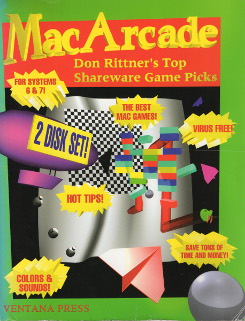
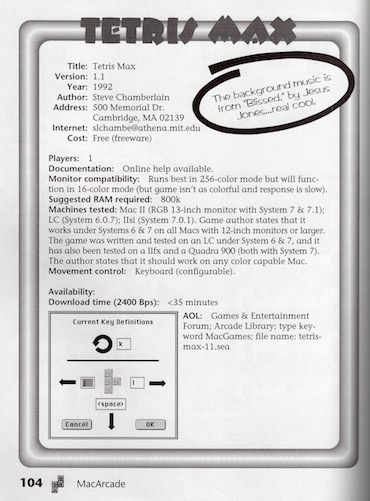
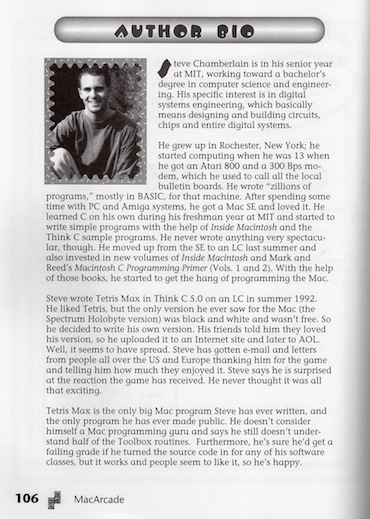
By that winter Tetris Max had become a major force in the world of Macintosh games, and the excitement level continued to grow. I was invited to appear in a book about Macintosh shareware called Mac Arcade: Don Rittner’s Top Shareware Game Picks. The book included several pages about Tetris Max, including a rather silly biography of me. When I later saw it on sale at a local bookstore, it was one of the most exciting things to yet happen in my young life. And it helped ratchet up the level of Tetris Max mania even further.
After the game had been out for a few months, I was contacted by Peter Wagner, an amateur musician and tetris fan from New Jersey. He loved Tetris Max, and offered to compose some original music for it. The song he sent me was perfect for tetris: beautiful, memorable, and almost meditative without becoming annoying when it was looped 1000 times. When I released an update to Tetris Max, I substituted in Peter’s music, and it became the iconic Tetris Max music that anyone who’s ever played the game probably still remembers today. A funny bit of trivia: Peter sent me his song on a cassette tape, which I digitized using a tape deck whose motor was too slow. So the music in the game is transposed down about a whole step from Peter’s original composition.
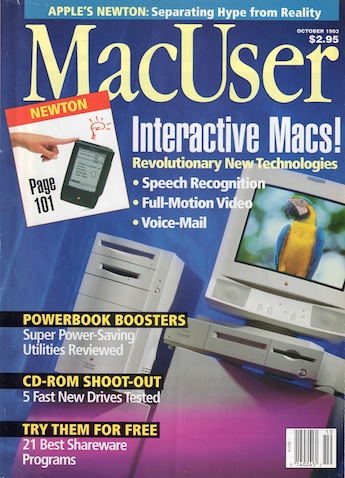
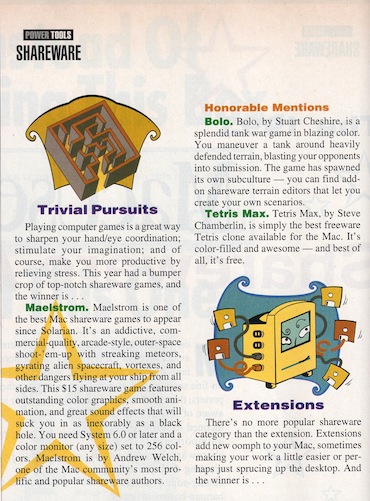
Through 1993, the Tetris Max train continued gathering steam. The October 1993 issue of MacUser magazine (feature article: the new Apple Newton) gave it an honorable mention in their annual shareware awards. My name was in print again, and unlike the Mac Arcade book, it was spelled right! Exciting times for a young Macintosh fan.
Making It Pay
By mid 1993 I had graduated from M.I.T. and was living in Cambridge, Massachusetts. This whole time Tetris Max had been a free game, and the only thing I asked people for was a note saying hi. Most other Macintosh games at the time were distributed as shareware, a try-before-you-buy system in which people were asked to send money to the author if they liked the program. With the popularity of Tetris Max, I heard loud arguments from my friends that I was an idiot for not using the shareware idea myself, so I decided to give it a try. In September 1993 I released a new version of the game as a $10 shareware product.
The response was weak at first. Players were under the honor system to send the shareware fee, but there was nothing really motivating them except perhaps a guilty conscience. Later I implemented a nag screen, and an A.I. player feature that was unlocked only for registered customers, both of which helped boost the number of registrations somewhat. But the total remained low.
What really made a difference was the introduction of the “Bonus Disk Set” in 1994. Recognizing that most people needed some incentive to register shareware, I gave them one in the form of a collection of alternate tetris piece graphics, sounds, and music to use with the game. Because only registered users were eligible to purchase the bonus disk set, it spurred lots of new registrations.
In those days there was no PayPal or other easy way to send small amounts of money to a stranger, so the registration system was incredibly low-tech. I rented a box at the Cambridge post office in Central Square, a few blocks from where I lived. Customers wrote paper checks and mailed them to my P.O. box. I used a cheesy XOR algorithm to generate a registration code from their name, then mailed them back a letter with the code. It was tremendously labor-intensive, and I spent hours manually typing people’s names into a database and stuffing envelopes. But low-tech or not, the system worked, and for a while I earned a very nice side income from shareware registration fees. Steve Wozniak even registered the game on behalf of his kids charity. His check was signed just “Woz”.
Receiving payments from people outside the United States was a big problem. My bank would generally not accept checks drawn on non-US banks, or if they did, the service fee was greater than the amount of the check. Other solutions like international money orders didn’t work well either. Eventually I settled on a simple solution: cash. Plain old pound notes, francs, deutschmarks, and reals, plucked from a wallet and stuffed in an envelope. I could convert these to US cash for a small fee at any bank or money changer, but in practice I kept many of them as souvenirs. Sending cash through the mail sounds like it might be a risky idea due to possible mail theft, but I never had even a single cash registration go missing.
Over time, several alternate versions of Tetris Max were developed. In 1994 my friend Yev ported the game to Windows 3.1 and released it as Bricklayer. We split the shareware income between us, but it was never very much, as Bricklayer for Windows never enjoyed anywhere near the popularity of Tetris Max for Macintosh. I also reused much of the same code to develop Columns Max in 1995, and Dr. Max in 1997. Neither game was very successful, and to be honest Columns Max was pretty bad, but I’m proud of Dr. Max. It has a great feel and cute little animations, and is lots of fun to play.
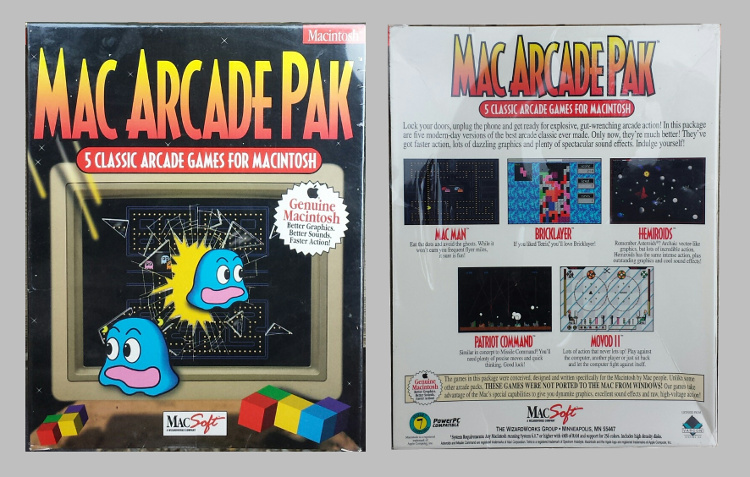
The most important alternate version appeared in the Mac Arcade Pak, published by MacSoft. Beginning in 1994, the game appeared (as Bricklayer) in this collection of five Macintosh games sold across the country at stores like Comp USA and Micro Center. It was low-cost budget software, and I only earned a 25 cent royalty for each one, but MacSoft sold a tremendous number of that Arcade Pak. My relationship with MacSoft’s partner Varcon Systems grew in importance as the Mac Arcade Pak took off. Once when I was buying a new monitor at Comp USA, the woman ahead of me in the checkout line was buying the Mac Arcade Pak. But when I casually mentioned that I’d written one of the games, she didn’t seem impressed. 🙂
By 1996 things were going well, and my Cambridge P.O. box was stuffed with envelopes whenever I visited. But I had a problem: I was moving to California. I could release a new version with a new address for registrations, but so many copies of the old version remained in circulation that the Cambridge box was sure to keep receiving letters for a long time to come. My solution was to hire my grad student friend Tom to check the Cambridge box for me, and forward the letters to my new address in California. Problem solved… for a while at least.
Even as the Macintosh platform lost market share, the popularity of the game was undiminished. I continued to get emails and letters from enthusiastic players around the world, and everyone still wanted to know about their high score. I finally got fed up with manual registration processing in 1997. Opening envelopes, database entry, post office runs, bounced checks… it was all too much, so I contracted with Kagi Shareware to process the registrations for me. Letters went directly to Kagi, who handled all the money, registration codes, and customer correspondence. They took a big chunk of the income in exchange for their service, but it was worth it for all the headache that it saved me.
The End of Things
In 1998 I received a letter from New York law firm LeBoeuf, Lamb, Greene & MacRae LLP on behalf of The Tetris Company, an organization with the sole purpose of licensing the tetris brand. The letter claimed that both Tetris Max and Columns Max infringed on the trademark, copyright, and other rights of The Tetris Company, and demanded that I immediately stop all distribution and sales of the games. Though I didn’t know it at the time, this was part of a broad effort by TTC in the late 90’s to remove all freeware and shareware versions of tetris from the market.
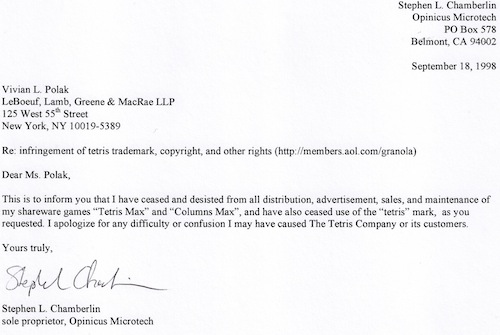
Some aspects of these claims seemed dubious to me, as it’s subjective to what extent the “look and feel” of a software program is protected by copyright, and Columns Max was not a tetris game at all. But the “tetris” trademark infringement was more clear, and it seemed I was straight-up wrong in using that as part of the game’s name. After briefly consulting with a lawyer, who wasn’t much help, I decided I didn’t have the resources or the desire to fight. I removed Tetris Max from the internet wherever I could, instructed Kagi to stop accepting shareware registrations, and formally terminated my contract with Varcon.
But stopping Tetris Max proved easier said than done. Because there were so many copies of the game still in circulation, registrations continued to arrive at Kagi and at my old P.O. box. I had to send letters back to all those would-be-registrants, returning their checks. Kagi complained that they were spending hours doing the same thing for the registrations that reached them, yet not getting paid for their efforts, but there was nothing I could do about it. It took about two years for the tide of incoming registrations to finally taper off.
As an interesting post-script, in 2000 I became involved in another legal dispute over Tetris Max, after the game had already been discontinued for more than 18 months. Varcon received a summons to Massachusetts civil court, for a suit related to Tetris Max and the Mac Arcade Pak. It was part of a complex dispute involving derivatives of
Tetris, Missile Command, Pac Man, Dig Dug, and Asteroids. In all there were 4 or 5 companies suing, including Elorg and Hasbro, and 10 different companies being sued. There was no question of trademark infringement this time, and the entire case rested on claims of look and feel copyright violations.
Two months later, I saw a press release saying that Varcon had settled their part of the case, although it mentioned Pac Man and not Tetris. I never heard anything further about the case.
The two companies, GT Interactive and Varcon Systems, agreed to stop selling look-alike games of titles owned or licensed by Hasbro. GT Interactive and Varcon, for example, sold games like “Mac-Man” and “Munch Man,” which Hasbro said infringed on its copyright of “Pac-Man.”
Hasbro said it would continue to pursue its suit against eGames. and smaller companies Webfoot, MVP Software and Xtreme Games.
Some people may read this story and conclude I’m a bad person for unfairly using somebody else’s idea, and to a large extent I would agree. In hindsight it would certainly have been better if I’d developed a new game concept instead of recycling an existing one. Like many projects gone awry, it seemed like a good idea at the time.
It’s now 2015, and the Macintosh operating system looks radically different than it did in the 90’s. Tetris Max can’t even run on today’s Macs, outside of an emulator for vintage software. Yet two decades later, I still get occasional emails from fans, and they STILL want to know about their high scores. Some things never change!
Read 17 comments and join the conversationBackups: Head in the Sand

For two decades, I’ve head my head in the sand when it comes to the topic of backups. My strategy has been:
- Put lots of essential, irreplaceable work-related design files on PC
- Every 2-3 years, copy some files to an external hard disk, if I feel like it
- Put the external disk away in a closet, then forget where it is
Somehow I’ve escaped any major disasters due to accidental file deletion, disk failures, theft, or fire. It took some recent news stories about the CryptoWall 4.0 ransomware to finally motivate me to action. If you’re not familiar with CryptoWall, this thing is nasty. It encrypts everything on your PC, including external drives and mapped networked drives, such as those you might use to store backups. The only recourse is to restore from offsite backups that CryptoWall didn’t hit, or pay the ransom to unlock your data. While the current version of CryptoWall only affects Windows systems, the same techniques could appear on Macs and Linux desktop or server systems.
Like most of you, my household contains piles of computing devices of various types. There’s a Windows PC, two Mac laptops, a Mac Mini (used for media streaming), a Chromebook, and several assorted tablets and smartphones. Then there’s the BMOW web site to consider, as well as another web site I also administer. Below I describe the backup solution I chose for each device, the cost, and possible alternatives.
Chromebook, Media Streaming Computer, Tablets, Phones
Backup Solution: None
Cost: 0
Some devices store little or no data locally, and don’t really need to be backed up. I might lose some photos if the hardware were destroyed, but that’s about all. I’m comfortable with none of this being backed up.
Mac Laptops
Backup Solution: Time Machine
Cost: 0*
I elected to use Apple’s built-in backup software, Time Machine. It’s blissfully simple to set up and use, and it runs automatically once it’s configured. It maintains as many older versions of your files as it can fit on your backup disk, removing older versions once the backup disk becomes full.
My cost for the Time Machine setup was zero, because I already had the necessary hardware on hand. My router has a USB port where a disk can be attached, turning it into a network-accessable drive. And I just happened to have a moderate-sized USB disk sitting unused, which fit the requirements perfectly. Otherwise I might have paid $50 to $200 for a suitable disk and something to attach it to.
The main drawback of this Time Machine setup is that it relies on networked attached storage, located at the same premises as the computers themselves. While there’s currently no Mac version of CryptoWall or anything similar, someday there might be, and it’s likely it would hit the Time Machine backups too on the networked disk. And if my house burns down, the backups will be lost along with the Macs. Both of those worries could be addressed by backing up the backups to cloud storage, but I’m not going there just yet for these machines.
Windows PC
Backup Solution: External Disk and CrashPlan Cloud Backup
Cost: $61 + $60/year
The Windows PC contains the data I’d be most upset to lose. That includes all of my electronics and software projects, including the design files and firmware for Floppy Emu and the BMOW 1 Computer. That PC also holds thousands of personal photos and videos going back 15 years, and plenty of other irreplaceable data.
To safeguard this data, I’ve chosen a hybrid setup that includes both a local disk and cloud backup. The hardware’s been purchased, but nothing is yet configured – that’s on my to-do list for this week. The local disk is there because it’s fast and cheap: $61 for a 1.5 terabyte USB 3.0 drive. If I ever need to do a complete restore, it should only take hours, compared to the days or weeks it might require to restore hundreds of gigabytes of data from a cloud service. CrashPlan‘s cloud backup is there as a second line of defense, in case something like CryptoWall also hits the backup drive, or theft or fire destroy everything local. Maybe I’m overly paranoid, but I’m more comfortable with that extra level of protection on the Windows PC.
CrashPlan costs $60/year for one computer, with unlimited backup space. I specifically chose it over other options because it’s one of the few cloud backup services that will also do local backups through the same interface that’s used to manage cloud backups. Configuring two separate backup systems for local and cloud backups would be a pain.
To be honest, I don’t love this solution. All of the cloud backup services have a sort of seedy used car salesman feel about them. If you believe the reviews, customer service is often horrible, and you’re constantly confronted by upsell efforts to a more expensive service tier.
Since I’m not about to physically rotate backup disks to a bank vault somewhere, the main alternative is other cloud storage services that aren’t specifically marketed as backup solutions. For small backups, something like Dropbox or Google Drive might be enough. For more typically sized backups, especially for ones storing many past file versions instead of only a single snapshot, something like Amazon S3 storage makes more sense. But what tools would I use to transfer the backups to S3 in a completely automated way, and how much would it cost?
S3’s “infrequent access” storage is just 1.25 cents per gigabyte per month, (plus 1 cent per gigabyte when retrieving data, something that should rarely or never happen for backups). That makes it cheaper than CrashPlan for up to 400 GB of backup storage, and more expensive beyond 400 GB. My Windows PC backups, including all past versions of files, will probably be a few hundred GB, so from a price standpoint it’s a toss-up. But considering the ease of using CrashPlan’s service vs backing up to S3, CrashPlan is the clear winner. If I had multiple PCs needing backup to the cloud, or other special requirements, then S3 backup storage might make more sense.
BMOW and Other Web Sites
Backup Solution: UpdraftPlus Backup/Restore and Dreamhost DreamObjects
Cost: $70 + $4/year
I expected backing up my web sites to be easy: shouldn’t the hosting provider already take care of this? As it turns out, mine does, but not in a way that’s really acceptable. There are three automated backup snapshots, with imprecise times of 1-2 hours, 1-2 days, and 1-2 weeks. The site’s files and database are also backed up independently, with no guarantee that the separate file and data backups will be from the same moment in time. While this backup system might be enough to recover from a disaster, it could easily be insufficient, especially if a restore is needed that’s older than two weeks.
I was a little surprised to learn that there aren’t any simple backup solutions for web servers, similar to the options available for workstation PCs and Macs. The closest thing is a backup plugin for WordPress, one of the most popular web publishing packages, and the one I use for my sites. I chose the feature-rich UpdraftPlus Backup/Restore, which is the most popular of the WordPress backup plugins. It seems to work well enough, but something about a backup solution that’s implemented as a WordPress plugin just feels wrong:
- Not every server hosts a web site
- Not every web site runs WordPress
- A WordPress backup plugin makes special assumptions about the files and data it’s backing up
- Most WordPress backup plugins only backup the WP files and data, and ignore other files/data
It was that last bullet point that bit me. On both of the web sites that I maintain, there are large numbers of important files located outside the WordPress directory, in the site’s main root directory. One of the sites also has a second database that’s completely independent of the WordPress database. The free versions of the more popular WordPress backup plugins can’t handle these, which would leave me with an incomplete backup. I ended up paying $70 for the premium version of UpdraftPlus, solely for its ability to also backup non-WordPress files and databases. While I don’t mind paying money for good software, this didn’t seem like the cost matched the complexity of the feature I needed, and only confirmed my feeling that a WordPress plugin isn’t a great framework for a backup tool.
Just as with backing up a desktop machine, the server backup files need to be stored somewhere else. While in theory I could store the backups on the server itself, that wouldn’t protect against a disaster that nuked the whole server, and it’s also a violation of my web host’s “unlimited” hosting policy. I chose to store the web site backups to DreamObjects, a cloud storage service that directly competes with Amazon’s S3 and uses the same API. I chose DreamObjects because it’s provided by the same company that does my hosting, so there was nothing extra to sign up for. UpdraftPlus has built-in support for storing backups with DreamObjects, and the integration was easy. As it turned out, DreamObjects will be slightly more expensive than S3 for my level of data storage. But since the total cost will be about $4/year, I’m not going to lose sleep over a few pennies.
The main alternative to a WordPress plugin backup system is a shell script, executed regularly as a cron job on the server. I probably should have investigated that further, but I invented my own cloud of FUD to convince myself it wasn’t worth it. It might not be too difficult to run tar and mysqldump, and transfer the resulting backups to DreamObjects, but building a more robust backup system would take time. A good system would also need to prune old backups, handle errors gracefully, chunk large uploads, generate reports, and address encryption needs. Maybe I’ve overestimated the level of work it would require, but it sounds like just the sort of dull but important stuff that I would neglect.
Your Backup Story
What’s been your experience with backup systems? Has your head been in the sand, like mine? Instead of finishing with a backup horror story, I’ll leave this success story from Slashdot here instead:
I support a medium business. Cryptowall 2.0 found its way onto a key system and spread through mapped drives to the fileserver. The panic was epic. Boss near tears.
I nuked the compromised systems and restored from backups. No big deal. The unenlightened around me had pretty much given up hope and I was hailed as a hero the next day.
Got a fat bonus and some OT.
10/10 would restore from backups again.
Four Little Updates
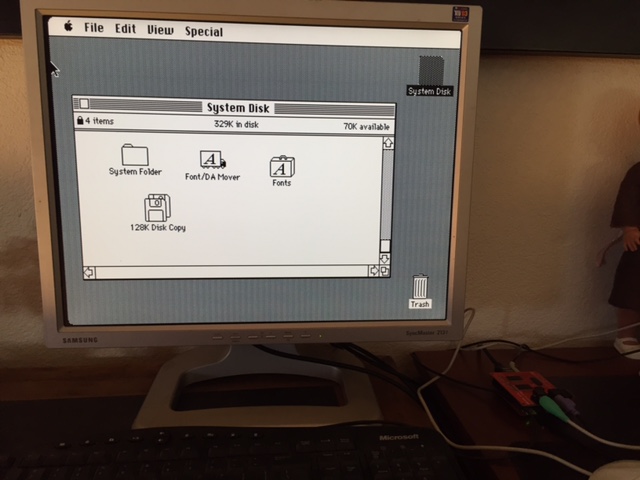
Some brief updates on Floppy Emu, Plus Too, and the DiskCopy2Dsk tool:
Two Apple IIc Plus testers reported this week that the Floppy Emu disk emulator is incompatible in 3.5 inch emulation mode with that machine. If you’re not familiar with the IIc+, it’s an uncommon member of the Apple II family, and is a souped-up version of the more common IIc with an internal 3.5 inch floppy drive. While 5.25 inch disk emulation and Smartport hard disk emulation work fine with the IIc+, 3.5 inch emulation does not, for unknown reasons. Apparently the disk interface on the IIc+ differs from that on the IIgs and on the external Apple 3.5 Drive, which were the basis for Floppy Emu’s 3.5 inch Apple II emulation mode. Unfortunately IIc+ systems are fairly rare, and I don’t have one to test. If anyone has technical info on the IIc+ disk interface that they could share, please contact me.
A minor update of the Floppy Emu firmware for Lisa and Mac HD20 is available: hd20-0.7C-F14.5. This resolves an issue where a “fatal error: 0x96 sync” sometimes occurred during file copies in HD20 mode. Thanks to Joe Strosnider for reporting this issue and helping to text the fix. You can download the new firmware from the Floppy Emu page.
For anyone working with Macintosh DiskCopy 4.2 disk images, a bug was fixed in the command-line version of the dc2dsk tool. The tool converts DiskCopy 4.2 disk images into raw .dsk images with no header. Now that Floppy Emu directly supports DC42 image files, the tool isn’t necessary anymore, but if anyone’s used it for other purposes this will fix a bug in the image size calculation. For the curious, more info about why this tool was needed can be found here.
Magnus Karlsson has ported the Plus Too design to the Pipistrello FPGA board. Plus Too is a working hardware replica of the Macintosh Plus computer, originally developed by me in 2011. Recently Till Harbaum revived the project, ported it to the MiST FPGA board, and made major fixes and improvements. Magnus picked up the MiST code and adapted it to the Pipistrello board, where it’s still a work in progress but successfully boots to the Mac desktop. More info on this project is in the Saanmila discussion forum.
Be the first to comment!Oops! Laser Cut Material Thickness
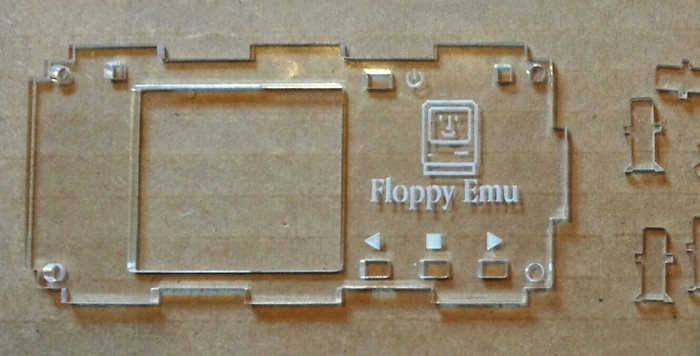
Manufacturing is hard. The thickness of my supplier’s clear acrylic material has magically increased 15%, meaning that the latest batch of Floppy Emu acrylic cases are impossible to assemble. The buttons and light pipes don’t fit in the cut-outs made for them, so this entire batch of product will have to be thrown out. I’m hoping the supplier will agree to re-run my order or provide a refund, but I’m not optimistic since 15% is just within their stated tolerance. An expensive mistake in manufacturing for me!
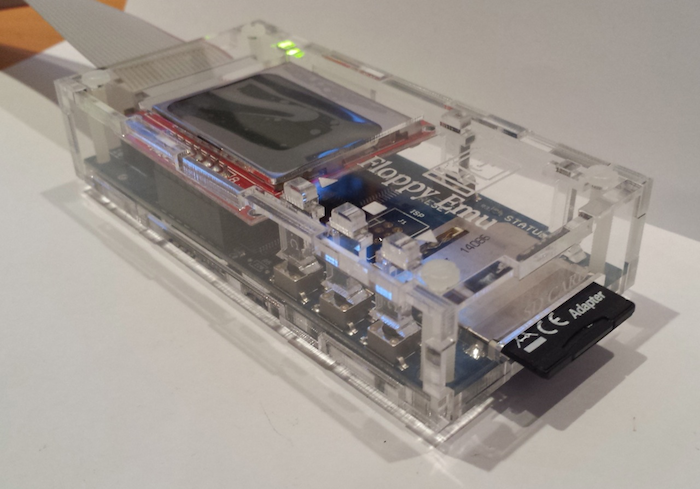
For the past year, I’ve been offering laser-cut case enclosures as a Floppy Emu accessory, and I’ve sold hundreds of the cases to happy customers. They’re made from 3.0 mm (nominal) clear acrylic. With all of my past orders from the laser cutter, the parts I received had an actual thickness between 2.73 mm and 2.83 mm, and my design accounts for that. A case assembled from the old ~2.75 mm thick material looks like this:
I just received a new delivery of parts yesterday, and the material thickness changed to 3.15 mm! Imagine if you were building a house with 8 foot ceilings, but some of the framing lumber was over 9 feet – it would never work. That’s the same magnitude of change I’m facing now. The buttons and light pipes are cut from the same material as the case body, so now they’re 3.15 mm thick. But the cut-outs in the top of the case are only about 3.05 mm, and the parts won’t fit through. It’s still possible to assemble the six sides of the case, but without the buttons and light pipes it’s useless.
The supplier’s material thickness is rated at +/- 15%, so this is really my fault and not theirs. But +/- 15% is a huge margin. How am I supposed to make that work? If I make cut-outs big enough to accept 3.45 mm (+15%) thick buttons, but the actual material thickness in a future delivery is 2.55 mm (-15%), it’ll be so loose that buttons will just fall out. There’s no way I can see to accommodate a thickness tolerance that large.
Some of you may be thinking that I should never have made a design that relied on the material thickness as a critical parameter, and you’re right. But again, I’m not sure how I could have avoided it – any design where two parts meet at right angles with a tab-and-slot system will suffer from the same problem. For now, I’m faced with either re-cutting all the buttons and light pipes using thinner material if I can find some, or re-cutting all the case tops using bigger cut-outs.
Read 15 comments and join the conversationPlus Too Mac Replica, New Progress!
After a long hiatus, there’s new progress for the Plus Too FPGA-based Macintosh replica. Till Harbaum has ported my original, unfinished design to the MiST board, and has begun making fixes and improvements. The video shows Plus Too booting on the MiST board, and selecting a boot floppy disk image from the MiST’s overlay menu.
Plus Too is a reimplementation of a Macintosh Plus, synthesized in an FPGA. All of the original Mac’s chips are modeled in a hardware description language and implemented in the FPGA’s logic cells: the 68000 CPU, VIA, SCC, IWM, memory controller, video circuitry, etc. I did the original work four years ago using an Altera DE1 evaluation board, which pairs an FPGA with some SRAM, flash memory, and other components. It worked well enough to boot Mac System 6.0.8 from a replica floppy disk, but it suffered from stability problems, and had no support for keyboard, sound, SCSI, serial ports, or real-time clock.
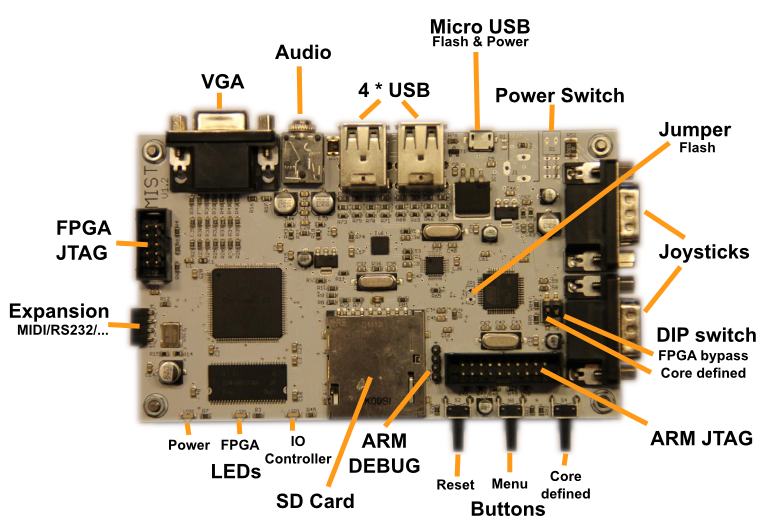
Till Harbaum designed the MiST board to implement classic 16-bit computers like the Amiga and Atari ST as a System-on-a-Chip using modern hardware, and it’s better suited to the task of replication than a generic board like the DE1. It combines a powerful Altera FPGA with a separate ARM-based CPU. The ARM CPU isn’t used directly in the replicated system, but performs helper functions like loading the selected FPGA core from the SD card, managing configuration overlay menus, and mimicking external peripherals like disks. MiST already has working cores for the Amiga and Atari ST, as well as a large number of 8-bit computers and game consoles. The classic Mac is the only computer from that era that’s still missing.
Till’s progress with Plus Too on MiST so far:
- ported the original design to the MiST
- adapted the memory controller to use SDRAM instead of SRAM
- updated the 68000 CPU model
- replaced the 6522 VIA implementation with one from the BBC Micro
- implemented keyboard support
- added an on-screen menu to select floppy disk images
- fixed assorted timing bugs
Somewhere along the way, the stability problems I observed with the DE1 version also disappeared. This might be a hardware difference, or something related to the timing problems that were fixed.
Till is currently working on implementing on-the-fly GCR encoding of standard Macintosh disk images, similar to the way Floppy Emu works. The original Plus Too required disk images to be GCR encoded ahead of time, using a separate utility program.
His roadmap after that includes:
- get both floppies to work nicely with .dsk images (read only)
- make the video timing closer to a real Mac
- add sound
Additional info on the MiST board is at http://code.google.com/p/mist-board/
Source code for Mac-MiST is at https://github.com/mist-devel/mist-board/tree/master/cores/plus_too
Binaries are at https://github.com/mist-devel/mist-binaries/tree/master/cores/plus_too
Some discussion about the Mac core for MiST is at http://atari-forum.com/viewtopic.php?f=101&t=28648
Additional German-language discussion is at http://mist-fpga.net/viewtopic.php?f=24&t=102