

Archive for September, 2026
ADB-USB Wombat firmware fix for unrecognized USB keyboards and mice
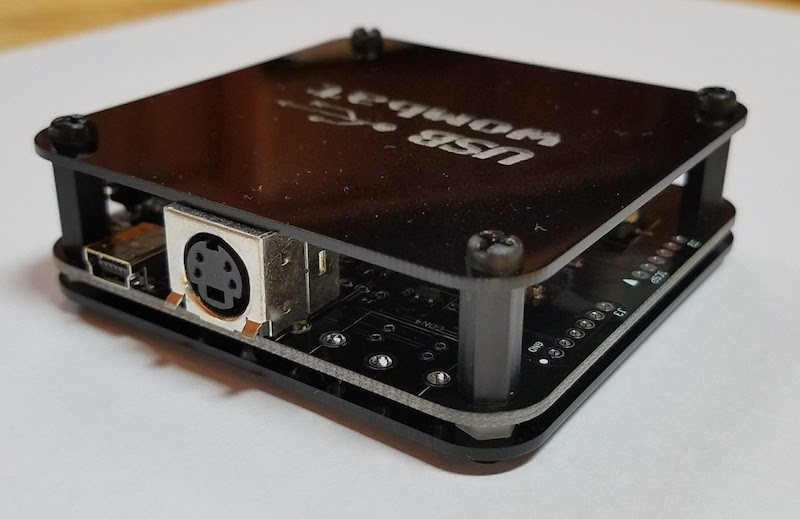
Mea culpa time here. Since the beginnings of the Wombat there have been reports that certain USB keyboards and mice weren’t recognized by the device. Nothing happened when typing or moving the mouse, and the Wombat’s activity LED didn’t blink. The affected devices were usually fancier keyboards and mice with lots of buttons and features, as opposed to plain vanilla $8 two-button mice and generic 101-key keyboards. I had always chalked this up to some unknown issue in the Microchip USB stack code for handling of peripherals with multiple USB interfaces or a single interface with multiple types of data. It was something in the bowels of that code, which I didn’t write and didn’t understand too well, so I treated it as a regrettable known incompatibility.
Recently a few Wombat customers reported more problems like these related to the Logitech Bolt USB receiver, and I decided to take another look. One helpful customer sent me a dump of the Bolt’s USB HID report descriptor as reported by Linux. I dug through the code with the help of AI, attempting to analyze how the USB stack would handle this report descriptor. It looked hopeless, until…
After wading through thousands of lines of mind-numbing USB goo, I found the smoking gun. Upon completing a USB transfer, the code was storing the number of bytes transferred in an 8-bit local variable and then comparing it to the 16-bit expected transfer size. The result was that any transfer larger than 255 bytes would always fail! Please queue the laugh track and sad trombone sound effects.
What does this have to do with composite USB devices? Nothing, except that composite USB devices have more interfaces with more data to report, resulting in larger report descriptors that are more likely to exceed 255 bytes.
Firmware 0.3.11 was released yesterday to fix this bug. It’s not just something relevant to the Logitech Bolt. If you’ve been using the Wombat in USB-to-ADB mode and encountered certain keyboards or mice that just mysteriously didn’t work with the Wombat, please try the new firmware. There’s a good chance that this will fix it.
Read 2 comments and join the conversationFloppy Emu Hardware Failure Analysis Results
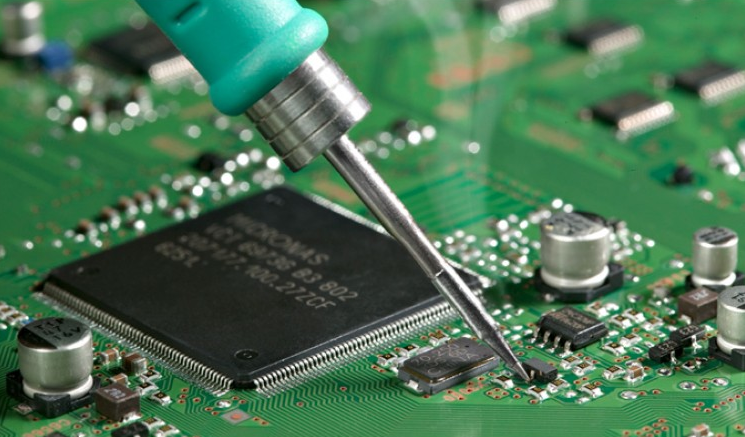
Nobody enjoys troubleshooting non-working hardware, and I’m no exception. Every time I ask a contract manufacturer to assemble a batch of more Floppy Emus, there are always a few that don’t pass QA testing. What happens with those? For several years the accumulating QA failures have been sitting in a pile in the corner of my office, along with a few customer returns, all waiting for the day when I would dedicate time to their investigation. It was a long time coming, but “Failure Analysis Day” finally arrived, or more like Failure Analysis Month, and the results were pretty interesting.
Here’s a breakdown of the unique causes of failure that I identified, and the number of boards affected by each cause.
| Hardware Issue Diagnosis | Count |
| clock crystal / no clock | 26 |
| clock crystal / bad clock | 16 |
| bad CPLD chip | 6 |
| microcontroller not programmed | 5 |
| soldering problems | 5 |
| bad microcontroller chip | 4 |
| broken display header | 1 |
| missing component | 1 |
| cracked PCB | 1 |
| no issue, good board | 1 |
| unknown, couldn’t resolve | 2 |
Clock Crystal
This was a strange failure that required a lot of time to track down initially, but once I learned to recognize the symptoms, I realized that most of my QA failures were due to this problem. I wrote about the clock crystal mysteries in more detail in a separate post last month. The short story is that during my most recent manufacturing batch, my normal supplier of clock crystals was out of stock. The contract manufacturer, with my approval, substituted a different crystal with the same specs. It shouldn’t have affected anything. But somehow it did.
26 of the QA failures appeared to have no functioning clock at all. The board utterly failed to do anything when the microcontroller clock source was changed to the external crystal. A further 16 displayed some level of function, but with erratic behavior or failures at higher clock speeds. Initially I wasn’t sure whether this was due to the newer crystals exposing some defect or fragility in the Floppy Emu design, or whether it was simply caused by defective or damaged crystals. Eventually I came to the opinion that the crystals were damaged by rough handling or overheating during assembly. Replacing the crystals and reprogramming the boards resolved all the issues.
CPLD Chip
The Xilinx CPLD chip on the Floppy Emu is a delicate flower that has long been a source of challenges. Prior to this year’s crystal-gate debacle, the CPLD was the single biggest source of failures that I’d observed. As the chip that’s directly connected to the Floppy Emu’s external interface, it bares the brunt of any static discharge or electrical stress. It’s a 5V-tolerant 3.3V part, but its 5V tolerance has sometimes seemed a bit questionable, at least in the way it’s used here.
Symptoms of a failed or bad CPLD can include disk emulation failures, overheating, or erratic behavior. Usually the device will still be functional and text appears on its display, but the disk features no longer work. In extreme cases the failed CPLD acts as a hard short-circuit from power to ground, and then nothing works. Replacing and reprogramming the CPLD resolved all of the problems with these boards.
Microcontroller not programmed
Amusingly, or depressingly depending on your perspective, the third leading cause of QA failures was that the microcontroller simply wasn’t programmed. Somebody fell asleep at the switch at the contract manufacturer, lost track of what they were doing, put a PCB in the wrong pile, or whatever. A board with an unprogrammed microcontroller will appear completely dead at first glance, but it still responds in the debugger and it only takes a few seconds to flash the chip and get everything working.
Soldering problems
Every component must be electrically bonded to the PCB with solder. Soldering problems can be tough to spot with the naked eye, but usually jump out under magnification, so one of my first troubleshooting steps is usually to look at a problematic board at 10x. I really should get a cool desktop microscope, but for the moment I’m using a cheap 10x jeweler’s loupe which works well enough.
A couple of boards had too much solder in places, resulting in a solder bridge that unintentionally connected two adjacent IC pins. But it was more common to find joints with insufficient solder or poor solder joints, where an IC pin was sort of resting on the PCB pad without actually bonding to it. Fortunately both problems were easy to fix with a soldering iron and a bit of flux.
Bad microcontroller chip
The onboard microcontroller trip is another potential source of failure. In my experience, these microcontrollers are pretty robust, and the only failures I have seen are caused in the field when customers accidentally connect the Floppy Emu cable backwards to their Apple II Disk II controller. This is distressingly easy to do, since the Disk II controller has bare pin connectors instead of a shrouded and keyed header. A backwards connection results in +12 and -12 volts applied to the mcu’s pins, killing it.
Unfortunately the symptoms of a bad microcontroller are nearly identical to the symptoms of a bad clock crystal: a completely unresponsive board, with no debugger activity. I had to review each non-responsive board’s history in order to guess which issue was at fault. In some cases I guessed wrong, and I ended up replacing the microcontroller, and then when that didn’t help, also replacing the clock crystal.
Other
The remaining issues were all one-offs. One board’s display header was physically broken and missing a pin, resulting in a blank display. Another board failed QA because the LED didn’t illuminate, except there was no LED! There was only a blank pad on the PCB. I also encountered a failure due to a PCB that was physically cracked, a long line running down the breadth of the PCB that could only be seen clearly under light from a specific angle. Two more boards defied my efforts to pinpoint the cause of their failures, and after spending too much time on them, I threw them into the scrap bin.
The very last board that I examined turned out to have no problems at all. I tested it extensively and it worked perfectly. This might have failed QA due to something external like a bad power supply or cable, or maybe it was simply miscategorized.
Final results
Of 68 Floppy Emus in the failure analysis heap, I managed to resuscitate 65 of them. That’s a pretty solid percentage! I learned to recognize the symptoms of certain failure causes, so I can address them faster if I see them again. More importantly, the failure analysis learnings (especially about clock crystals) will also help guide me in making design and assembly process changes, so I can reduce the number of future QA failures. Knowledge is power, as they say, and now I have lots of power.
Be the first to comment!Mactoberfest 2026: Exhibits, Activities & More

Planning for the 2026 edition of Mactoberfest Meetup is well underway. This year’s event will take place on Saturday November 7, 2026 in Belmont California. We’re planning a glorious celebration of all things related to the classic Macintosh, with other connected vintage technology too. Don’t miss it!
The previous Mactoberfest Meetup was a hit, and this year promises to be bigger and better. We’ve got a few new things in store for attendees, including sponsors who’ve donated some cool hardware and tools, a Discord channel for pre- and post-meetup conversations between attendees, and more. Look for further announcements about these very soon.
With two months to go until the big day, there are currently 23 exhibitors registered, with more coming. We expect to welcome between 30-40 total exhibitors and several hundred attendees to this year’s Meetup. The next exhibitor to register could be you! If you have an old Mac, Apple II, or related gear, please do sign up as an exhibitor and share your collection. Your participation is highly encouraged, and Mactoberfest is intended to be a collaborative shared experience created by everyone who’s there.
Here are some highlights of what you can expect to find at Mactoberfest Meetup 2026 (with more still to come):
- A vintage Mac DIY repair station stocked with soldering tools, test equipment, and expert help.
- Exhibit of classic Apple and Macintosh networking equipment, highlighting connectivity across Apple II, 68K Macintosh, PowerPC, and early G3 systems.
- Collection tracing the history of Macintosh input devices, including mice and trackballs.
- Exhibit focused on magnetic storage for Macintosh computers, including internal and external hard disk and floppy disk drives.
- Collection of Clarus the Dogcow memorabilia and collectibles.
- After Dark screen saver exhibit featuring an original iMac running screen saver modules alongside a modern macOS emulator developed specifically for After Dark.
- Collection of unusual Macintosh systems, including a Mystic Color Classic with Apple IIe Card, a Power Mac 4400 prototype, and an Assistive Technology Freestyle.
- Mac-compatible handhelds, peripherals, and a hands-on setup for making lo-fi photo name badges.
- “The Satanicube”: an extensively modified and highly unusual Power Mac G4 Cube previously exhibited at VCF West and VCF SoCal.
- Intel Developer Transition Kit, a prototype computer designed to assist with the transition from PowerPC to Intel processors.
- Collection of Apple Newton handheld personal digital assistants.
- Collection of compact Macintosh systems, including 100-series PowerBooks, PowerBook Duos with docks, iBooks, and a PowerPC Mac Mini.
- Power Macintosh 7600 running non-Mac OS systems including Rhapsody, BeOS, and MkLinux, plus Macintosh IIsi running System 7.6, NetBSD, and Debian.
- Complete Power Computing system with original operating system and period promotional materials.
- Macintosh SE with custom MacEffects green case, Macintosh IIcx with Wombat USB accessories and games, Macintosh IIgs with Floppy Emu, and Power Mac G4 Cube with games.
- Macintosh IIfx with NuCF solid-state storage by zigzagjoe and Macintosh Portrait Display, plus a heavily modified Macintosh SE/30.
- Collection of compact Macintosh systems, including Macintosh 512K, Plus, SE, and/or SE/30.
- Macintosh Plus with custom display and miniature displays featuring After Dark screen saver modules.
- Macintosh SE with Voice Navigator, demonstrating early voice control of the Macintosh graphical interface.
- Macintosh IIci with a Caere OmniScan handheld scanner.
- Quadra 650 with PC DOS Card, PowerBook 2400c, graphite iBook, Macworld magazines, and 1990s Apple advertising.
- Macintosh SE running MacWrite and a connected ImageWriter II printer loaded with paper.
- Macintosh LC system in a custom neon orange case.
- Disassembled Macintosh 128K with exposed logic board, and all chips and ports labelled.
- NeXT computer hardware and software, the precursor to Mac OSX.
- Collection of 1980s and 1990s computer magazines including MacUser, MacWorld, and COMPUTE!
- Original Atari Pong home console from 1975.
For more details and to register for Mactoberfest Meetup, visit mactoberfestmeetup.org. You can also support Mactoberfest by contributing a few dollars to help cover our event costs. The meetup is free to attend, and we’re relying on your generous donations to help us pay for this thing. Thank you!
Be the first to comment!